

 AdguardTeam
Sophos Home Antivirus Incompatibility issues with AdGuard For Windows. It blocks downloads in browsers.
There are some incompatibility issues with Sophos Home software alongside AdGuard Windows. AdGuard Windows will block users from downloading some files like .zip in the web browsers it will say Failed - Network error when AdGuard for windows is on. Works fine when AdGuard is off. No differents if Sophos Home > Protection > Web Protection is on or off.
I did a full cleen reinstallation of Windows 11 and reinstalled only AdGuard Windows and Sophos Home software. The same problem is happening so it's not a bug from another software.
When both applications are on, the filtering of websites is missing or incomplete.
Steps to reproduce
1 - Download and install Sophos Home protection from the official website https://home.sophos.com/en-us 2 - Restart the PC 3 - Enable AdGuard protection, Sophos software will be activated automatically after the restart
Expected behavior
It should not block downloading files in web browsers.
Actual behavior
It blocks files from downloading in web browsers giving an error: Failed - Network error
Customer ID
Ticket number is 640663
Your environment
-
Environment name and version: Google Chrome Version 105.0.5195.127 (Official Build) (64-bit)
-
Operating system and version: Windows 11 Pro Version 22H2, OS build: 22621.521, Experience: Windows Feature Experience Pack 1000.22634.1000.0
-
AdGuard Windows v7.10.2

@raykai as you wrote before it doesn't matter if Sophos is on/off. Or does it have an effect? https://github.com/AdguardTeam/AdguardForWindows/issues/4176#issuecomment-1251549395

@Aydinv13 No only AdGuard for Windows, see screenshots:
This was tested in Edge and Google Chrome browsers. Also tested with Incognito mode and also tested without any extension other than the AdGuard assistant. I don't have any unofficial filters in AdGuard.
AdGuard for Windows ON

AdGuard for Windows OFF

Cannot be reproduced on my side, please download the latest nightly build and check if issue persists. In case it's reproducible with nightly build we need to get your logs:
- Collect the debug log as it's explained here.
- Remember the exact time when the issue was reproduced. We will need it to find the corresponding records in the log file.
- Send the archive to
[email protected]and mention this issue number in the subject.
I got the logs. I send it to [email protected] with this Issue number #4430.
I did a clean install of windows 11 and clean install of the Adguard Nightly and Sophos Home, the bug is still happening.
I can reproduce this bug on 2 desktop. I also tested on a laptop on an other network. When both Sophos Home and AdGuard Windows is on it will randomly block/stop downloading files. It blocked adguard nightly from completing the downloads and also blocked/stopped downloading Win 11 official ISO file. But then it did download 2 times the adguard nightly ok afterwards.
This time around it did let Debian ISO to download correctly but in my testing it will also block that randomly. What is so frustrating is its so random.
The download will work ok if I disable AdGuard Windows then it will 100% always download everything alright. If I uninstall Sophos Home and keep AdGuard Windows On, then it will also download any files ok.
So there is a bug when both software are on.
I'm replying to AdGuard Support that I got by email.
Hello! Thank you for reaching out to AdGuard Support! Sophos seems to be a malware detection software. So, you’ll need to include the AdGuard app into the exclusions of the program you mentioned and vice versa, add it into the exclusions list of the AdGuard app. After that’s done, you’ll be able to use all the apps without any interruptions since they won’t process each other’s data. If you have any questions left - just let us know! Best wishes, AdGuard Support
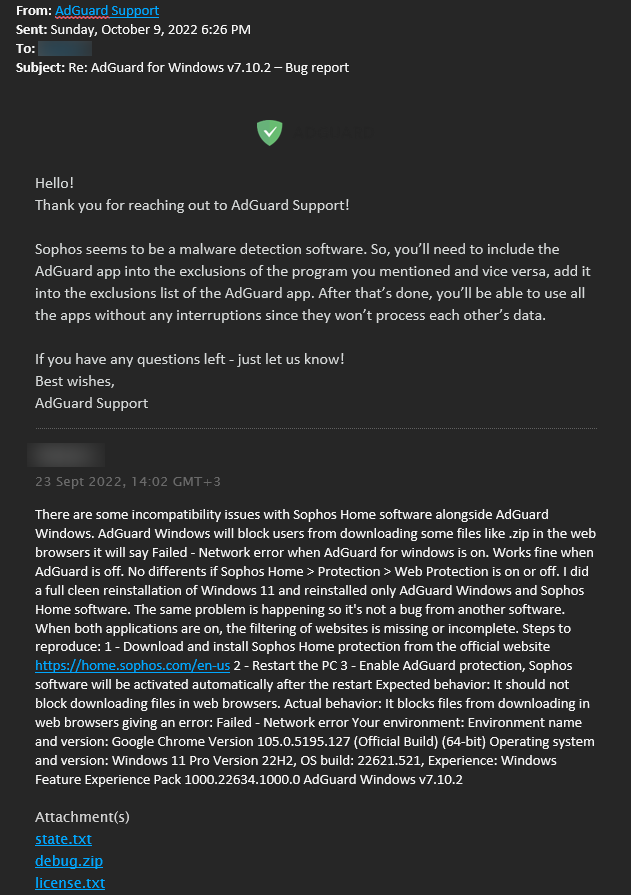
Don't know if any testing has been done by the support team. The thing is I already have AdGuard added to the exclusions list of Sophos See screenshot.
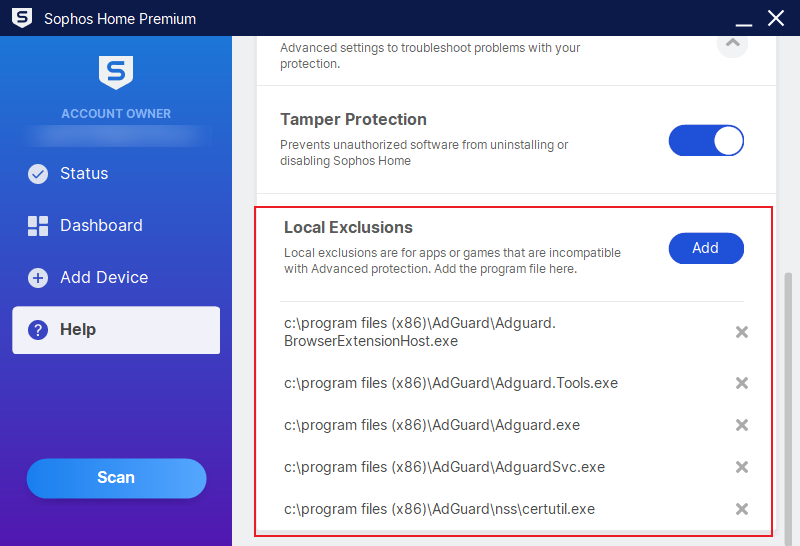
I have a ticket open with Sophos #94286 Feel free to work this bug out. As a user, I can only do so much. As for Sophos, I have sent them the link to this Github.
I did a clean install of windows 11 and a clean install of the Adguard Nightly and Sophos Home, the bug is still happening. I can reproduce this bug on 2 desktops. I also tested on a laptop on another network and the same thing happened. When both Sophos Home and AdGuard Windows are on it will randomly block/stop downloading files.
This bug is preventing me from using Adguard for windows.
@raykai , could you please update to the latest nightly and try to repro the issue

@adbuker
could you please update to the latest nightly and try to repro the issue
Yeah, I can update the latest nightly build and see if the problem still happens. We are talking about v 7.12 nightly 3 right?
@raykai , yes, I meant 7.12n3. Could you please
- try to switch to TDI driver (i.e. disable WFP driver)
- try to add all the sophos executables to the list of filtering exclusions
- try all the 4 combinations with these options (i.e. "disabled, disabled", "disabled, enabled", "enabled, disabled", "enabled, enabled")
- repro the issue and grab the trace logs, as explained here
Moreover, today I'll prepare for a special build could you please try the list of suggestions above also with it
@raykai , as I mentioned yesterday, I've prepared the special build for you - here it is. Please follow the steps above with this build (of course, after processing similar steps with the regular nightly build)
@raykai , as I mentioned yesterday, I've prepared the special build for you - here it is. Please follow the steps above with this build (of course, after processing similar steps with the regular nightly build)
I will be testing it today, thanks.
@raykai , as I mentioned yesterday, I've prepared the special build for you - here it is. Please follow the steps above with this build (of course, after processing similar steps with the regular nightly build)
@adbuker When tested with the special build https://uploads.adguard.org/AdGuard-bug_AG-16635.exe I get the same problem. But when I switch to TDI driver (i.e. disable WFP driver) It seems to work. No download problems.
I also tested with the latest AdGuard 7.12 nightly 4. Same thing if I turn off the WFP driver option. I have no problems downloading.
I also tested by restoring all settings to default (removing all Sophos exe files from exclusion in AdGuard) restarted PC/VM and then deselected the WFP driver option. Restarted PC/VM. No problems downloading files so far.
I do not know if you need me to test:
- try to add all the sophos executables to the list of filtering exclusions
- try all the 4 combinations with these options (i.e. "disabled, disabled", "disabled, enabled", "enabled, disabled", "enabled, enabled")
- repro the issue and grab the trace logs, as explained here
Seeing as the WFP driver seems to be the compatibility problem when running with Sophos.
Got an email from Sophos saying they have been testing in their environment and found a machine that replicates the same issue I'm having.
Any way to add compatibility with WFP with Sophos?
After running with the WFP driver off and running with the TDI driver for some days now. I notice slow (really slow) loading of webpages and some programs like steam not leading its pages in the steam program. If I turn off Adguard all loads up instantly. But having WFP driver off it lets me download files like ISO without any problems.
@raykai , of course switching to the TDI driver is not a solution, and only attempt to find out the clue. As for the rest of suggested list (pp 2-4), could you please follow the instructions above nevertheless