

 AdguardTeam
Incorrect `Network Extension` permission path in macOS Sequoia
Please answer the following questions for yourself before submitting an issue
- [X] Filters were updated before reproducing an issue
- [X] I checked the knowledge base and found no answer
- [X] I checked to make sure that this issue has not already been filed
AdGuard version
Version 2.14.1.1603 beta
Browser version
No response
OS version
Mac OS Sequoia 15.0 beta
Ad Blocking
No response
Privacy
No response
Social
No response
Annoyances
No response
Security
No response
Other
No response
Language-specific
No response
Which DNS server do you use?
DNS protection disabled
DNS protocol
None
Custom DNS
No response
What Stealth Mode options do you have enabled?
No response
Support ticket ID
No response
Issue Details
Steps to reproduce:
- install adguard
- first run and setup works ok
- when you try to turn on adguard filtering it shows a screen to allow Adguard system extension in macOS setting menu
- with new MacOS the "allow" part in system privacy submenu is not showing up so the extension can't be probably installed
- I tried to enable all apps with "sudo spctl --master-disable" and set in allow apps from anywhere but it still is not helping
- It is probably a new way macOS is handling things
- For now can't make Adguard run properly
Expected Behavior
it should push macOS setting menu to allow Adguard install extension
Actual Behavior
no way to "allow" installing extension
Screenshots
Screenshot 1
Additional Information
No response

I have the same problem and it seems that everyone who installs the beta will have this problem. I would expect a quick update.

there is a problem (new way of handling extension) with new macOS. You can probably make it work when just upgrading your macOS with Adguard already being installed (with the extension) but if you try to install the extension on a fresh instance of a macOS it will not let you install the extension (there is no reaction from the macOS system and no way to allow the installation) automatic proxy works without any problems so the app is fully functional just the extension is the problem ps. looking at macrumors forums, all apps using extensions (little snitch etc.) have similar problem with newest macOS.
@Lukaszpl666 @aschiletus Hi there,
due to the peculiarities of the new operating system you need to scroll to the end of the Login items&Extensions page and click on "i" icon next to AdGuard after that turn the switch on.
Screenshot
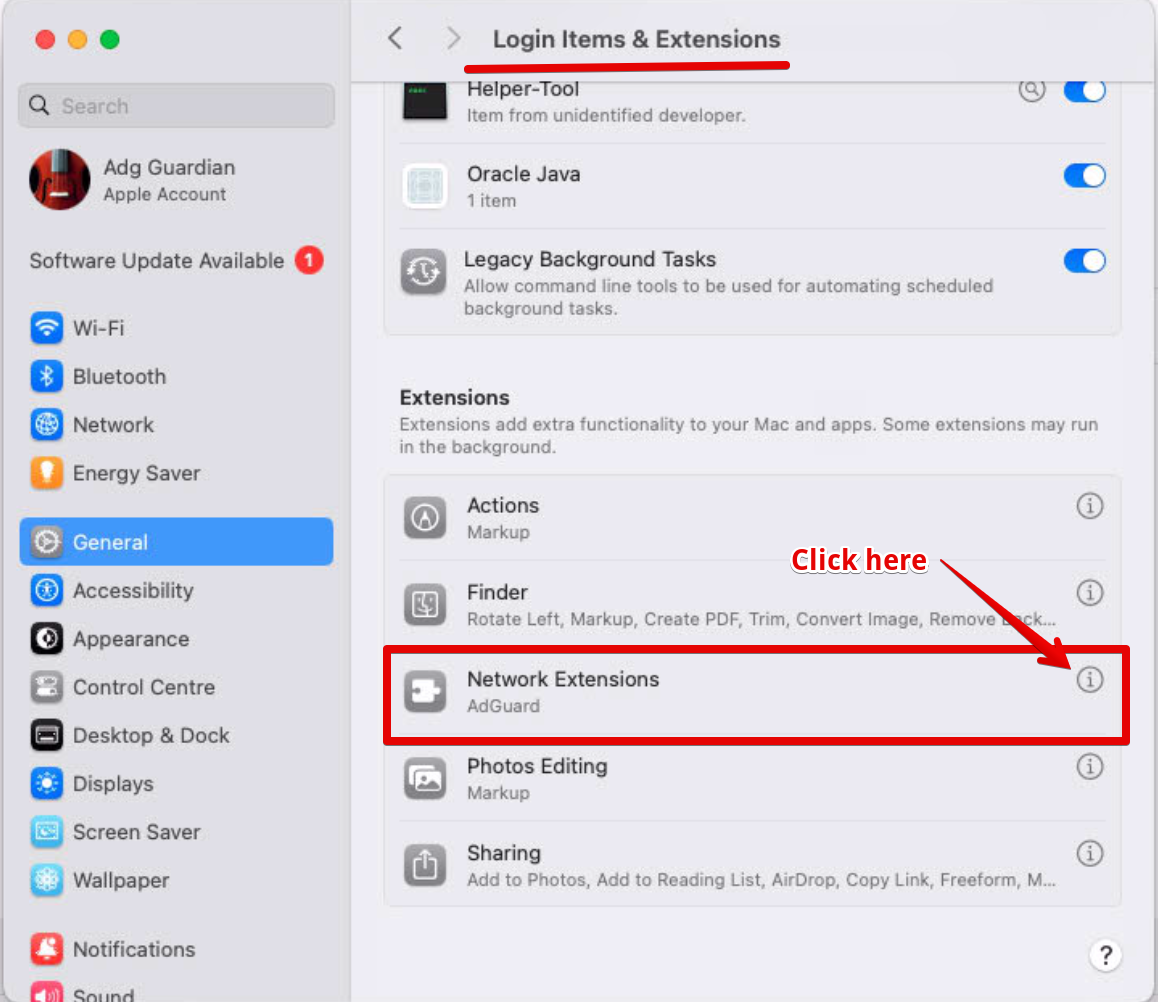

@Lukaszpl666 @aschiletus Hi there,
due to the peculiarities of the new operating system you need to scroll to the end of the Login items&Extensions page and click on "i" icon next to AdGuard after that turn the switch on.
Screenshot
Yeah, that worked. Thank you.


Hi, is there any news regarding this? It's pretty annoying my personal DNS doesn't work with the MacOS beta.


@Lukaszpl666 @aschiletus Hi there, due to the peculiarities of the new operating system you need to scroll to the end of the Login items&Extensions page and click on "i" icon next to AdGuard after that turn the switch on. Screenshot
Yeah, that worked. Thank you.
Tks a lot @aschiletus 🚀
