
AdguardForAndroid
 AdguardForAndroid copied to clipboard
 AdguardTeam
com.google.android.apps.photos - backup issue
@adguard-bot commented on Sat Jun 22 2019
Issue URL (Incorrect Blocking)
https://play.google.com/store/apps/details?id=com.google.android.apps.photos
Comment
Adguard is causing some sort of problem with the Google Photos backup process. I need to turn off Adguard for Google Photos to be able to upload pictures to the cloud.
Screenshots
Screenshot 1

Screenshot 2

System configuration
| Information | value |
|---|---|
| Platform: | And 9 |
| AdGuard version: | v3.1.0 (1.3.347cl) |
| Stealth mode options: | Hide your search queries, Send Do-Not-Track header, Remove X-Client-Data header from HTTP requests, Strip URLs from tracking parameters, Block third-party Authorization header, Self-destructing third-party cookies (180), Disable cache for third-party requests |
| AdGuard mode: | VPN |
| Filtering quality: | High-quality |
| HTTPS filtering: | enabled |
| DNS requests blocking: | enabled |
| Filters: | AdGuard Mobile Ads, AdGuard Annoyances, AdGuard Base, AdGuard Tracking Protection, AdGuard Social Media, AdGuard Spanish/Portuguese |


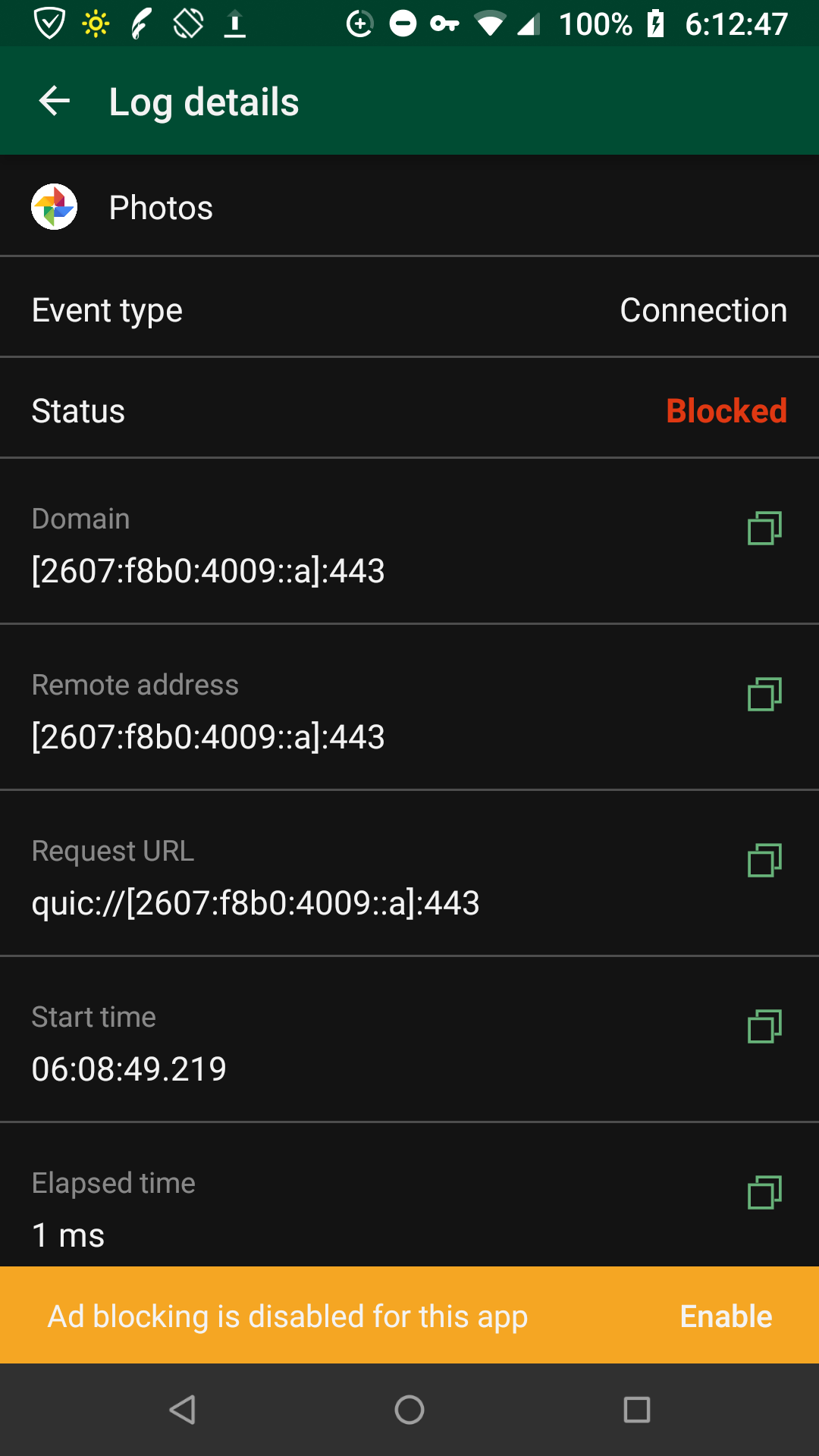

@TPS At this time, it is blocked unconditionally. This will be changed when we implement HTTP/3 filtering.

Also, is it too much to hope that optional passthrough in such circumstances could be sooner available?
@artemiv4nov Given the Waiting for data label you've just added, is there anything else I can provide? Also, given this breaks functionality, I'm unsure that Enhancement is quite right.…
We cannot reproduce this issue on our side, and tbh, I really doubt it has anything to do with QUIC.
@sfionov do $network rules take precedence? We could try test it by adding smth like this:
@@[2607$network,app=com.google.android.apps.photos
Give me a set of instructions of how to test a potential workaround (since I am affected), & I'll report back. E.g., ifF that $network rule could work, lemme know. 🙇🏾♂️
We cannot reproduce this issue on our side, and tbh, I really doubt it has anything to do with QUIC
@ameshkov Do y'all test the Google apps against their "testing" (beta) versions, or only current releases? I signup for every testing version I can, & all the last few weeks' updates have used significantly more QUIC (as noted blocked via live AG log) than before, & I'm noticing a correlation to more GApps breakage (YT, Drive, Play Services, Store, &c, @ least intermittently) so I suspect Google's about to flip a big switch on protocols for their services.
Try adding this rule exactly to the usser filter:
@@[2607$network,app=com.google.android.apps.photos
Do y'all test the Google apps against their "testing" (beta) versions, or only current releases?
Tbh, we tested only releases
so I suspect Google's about to flip a big switch on protocols for their services.
They can't make it QUIC-only. UDP is unreliable and blocked in many networks so they must have a fallback.
It's Google.… They virtually forced HTTP/2 onto the 'Net. D'y'all really think they'll have much trouble w/ HTTP/3?
I'll try that rule a little while & report back.
Huh, it's still blocking QUIC for Photos.… Does adblocking need to re-enabled on the app for the rule to be applied?
It's Google.… They virtually forced HTTP/2 onto the 'Net. D'y'all really think they'll have much trouble w/ HTTP/3?
Well, HTTP/2 still falls back to HTTP/1 if unavailable. The same is true for HTTP/3.
Well, HTTP/2 still falls back to HTTP/1 if unavailable. The same is true for HTTP/3.
All I can currently report (watching the AG filtering log live) is that now most of my GApps aren't failing over from QUIC|HTTP/3 (blocked, per log) back to something older.… They're just failing outright: no further request attempted, other than a successful check to https://connectivitycheck.gstatic.com most of the time after such QUIC failures.
Disabling AG solves it immediately. All GApps that were previously failing thereafter Just Work.
@TPS quick question -- what if you clear the app data for AdGuard (e.g. reset it to default settings). Does it change anything?
@ameshkov 🤯 Yes, it does. It works precisely as you describe — quic connection fails, then pulls DNS & falls back to normal HTTPS — which I'd never seen before.
I'll investigate further. Meanwhile, which offline channel should I submit my backed-up settings? (My β-testing license is still in there, else I'd post here.)
which offline channel
offline? Not sure USPS would accept your backup :)
Try [email protected], but please mention this Github issue in the text.
I have a similar issue but instead photos it's with Google One system backup & Samsung Cloud backup

A similar problem with other Google apps has been resolved in the 4.0 version, please try it.
