

 AdguardTeam
bild.de
Information
Deutsch
Sehr geehrte Benutzerin, sehr geehrter Benutzer, aufgrund von Gesetzen (z. B. die Gerichtsentscheidung in Karlsruhe, Deutschland im Jahre 2018) ist es leider nicht möglich diese Paywall (Adblock-Erkennung) zu umgehen. Vielen Dank für Ihr Verständnis.
English
Dear user, due to a court decision (eg the court ruling in Karlsruhe, Germany in 2018 ) it is unfortunately not possible to bypass this paywall (adblock detection). Thank you for your understanding.


Issue URL (Anti Adblock Script)
Screenshots
Screenshot 1

System configuration
| Information | Value |
|---|---|
| AdGuard product: | AdGuard for iOS v4.5.3(1016) |
| License type: | paid |
| Advanced protection: | enabled |
| DNS filtering: | disabled |
| Filters: | Ad Blocking: AdGuard Base |
Issue URL (Incorrect Blocking)
Comment
if you launch the website, after 3sec the information popups up, that i have to deactivate my blocker
Screenshots
Screenshot 1
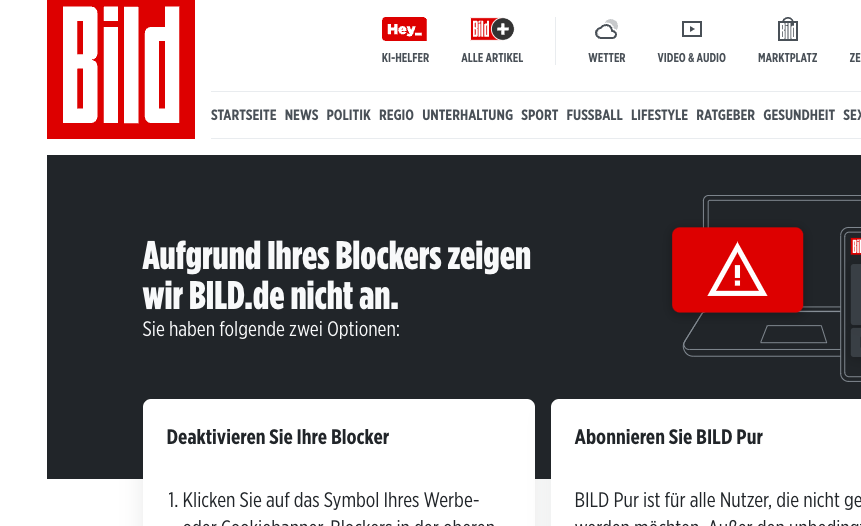
Screenshot 1 with AdGuard disabled

System configuration
| Information | Value |
|---|---|
| AdGuard product: | AdGuard for Mac v2.13.01558 |
| System version: | macos 14.4.1 |
| Browser: | Chrome |
| License type: | paid |
| Stealth mode: | disabled |
| DNS filtering: | disabled |
| Filters: | Ad Blocking: AdGuard Base Privacy: EasyPrivacy |
| Userscripts: | disabled |
This is AdBlock detection paywall which we do not fix.
Also you should enable German filter if you visit German websites.

this not what i mean. i do not want to see the payed sites on that website. i just have the prblem to launch the site itself

This is what you mean. AdBlock is detected, site offers you to pay to have it available with AdBlock -> Paywall.
We do not fix this kind of paywall due to legal reasons.
is there a way to whitelist the website, so i do not have to disable the adblocker?
When will you finally fix this??? This article literally says that Adblockers are legal in Germany too. What the heck are you doing, I'm paying you to fight this kind of censorship. Stop giving in to random trash companies, or I'll cancel my subscriptions!! This is bullshit

Add this rule to user filter:
@@||bild.de^$document,important
it doesnt work. if open the website and do nothing, after seconds the adblocker page appears

@ADettlaff @preuni2k3 @andris86 https://raw.githubusercontent.com/AdCrunchSoftware/AdblockingFilters/main/foradguard.txt

@ADettlaff @preuni2k3 @andris86 https://raw.githubusercontent.com/AdCrunchSoftware/AdblockingFilters/main/foradguard.txt
Link is dead. Can you please renew it?

This works for me:
bild.de##+js(remove-node-text, script, adBlockWall)
What do I do with that? Do I have to put it in the firewall rules?
This works for me:
bild.de##+js(remove-node-text, script, adBlockWall)What do I do with that? Do I have to put it in the firewall rules?
No, in Adguard user rules. User rules can be found in Adguard settings.
This works for me:
bild.de##+js(remove-node-text, script, adBlockWall)What do I do with that? Do I have to put it in the firewall rules?
No, in Adguard user rules. User rules can be found in Adguard settings.
So I just have to put this in custom filtering rules, right?
Just find user rules in Adguard settings and put this rule there. Do that and anti-adblock wall will be gone from this website.
Just find user rules in Adguard settings and put this rule there. Do that and anti-adblock wall will be gone from this website.
Hi, I put it in, but it doesn't work!
I don't have any experience with Adguard Home but I do have with Adguard for Android. So cannot tell why it isn't working for you. But in Adguard for Android, after making sure https filtering is on, if you go to Protection tab -> Ad blocking -> User rules -> three dots -> open rule editor and put the rule there then it should work.
I don't have any experience with Adguard Home but I do have with Adguard for Android. So cannot tell why it isn't working for you. But in Adguard for Android, after making sure https filtering is on, if you go to Protection tab -> Ad blocking -> User rules -> three dots -> open rule editor and put the rule there then it should work.
I removed all of my custom filtering rules, put it in again and rebooted my device. After that it does work.
Thanks for your help!
Hi, my problem isn't solved completely.
I put in the rule from above in custom filtering rules on my Adguard Home device and discovered the following: When using Opera on Android it works, when using Chrome or Brave on Android it doesn't work.
Any clues?
I don't know why its happening. Contact Adguard support. They will be able to help you.
Hi. Please try
bild.de#%#//scriptlet('json-prune', 'CLIENT_STORE_INITIAL_STATE.pageAggregation.advertisement.adBlockWallEnabled')
or
bild.de#%#//scriptlet('remove-node-text', 'script', 'adBlockWall')

@Geier97332 AdGuard Home can apply only DNS filtering rules (HOSTS or AdBlock style domain blocking rules).
Hi. Please try
bild.de#%#//scriptlet('json-prune', 'CLIENT_STORE_INITIAL_STATE.pageAggregation.advertisement.adBlockWallEnabled')or
bild.de#%#//scriptlet('remove-node-text', 'script', 'adBlockWall')
Hi, thanks for your help, but both don't work. I get the same results as before.
@Geier97332 Where do you add the rules?
You need an ad blocker (AdGuard/uBO extension or AdGaurd app)
@Geier97332 Where do you add the rules?
You need an ad blocker (AdGuard/uBO extension or AdGaurd app)
In custom filtering rules