

 AdguardTeam
adguard doesn't forward request to local dns
Prerequisites
-
[X] I have checked the Wiki and Discussions and found no answer
-
[X] I have searched other issues and found no duplicates
-
[X] I want to report a bug and not ask a question
Operating system type
Linux, Other (please mention the version in the description)
CPU architecture
AMD64
Installation
GitHub releases or script from README
Setup
On one machine
AdGuard Home version
0.107.18
Description
What did you do?
Expected result
searched for a local machine on the .home domain
which id added the hub dns 192.168.1.254 to Private reverse DNS servers
Actual result
NXDOMAIN
Screenshots (if applicable)
Additional information
didn't even forward the dns lookup to the private domain so presuming its a bug as the help advice states that it will do that and the version should be at top right corner of screen, not tucked away at the bottom.

Hi @bobsdavenport . I think I have the same issue, but I can't be sure because I think you are not using the correct terms to describe the problem.
Let me explain mine and, if it the same as yours, please update your Issue details to increase the chance of been picked up.
- Architecture: arm7 (rpi4)
- Platform: HASS.io OS
- AdGuard version: v0.107.17 installed from HASS complements store
Summary
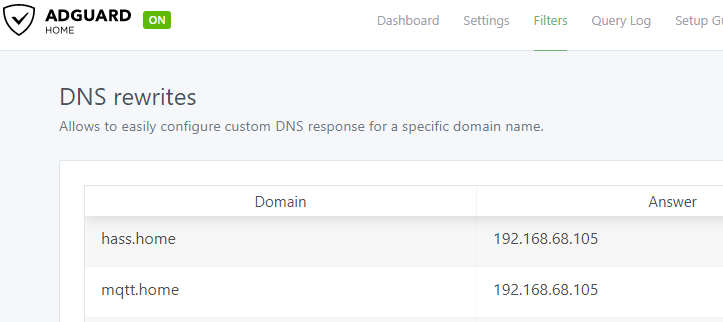
It seems DNS's rewrites stop working yesterday without any change in Adguard configuration or version update.
Additional details
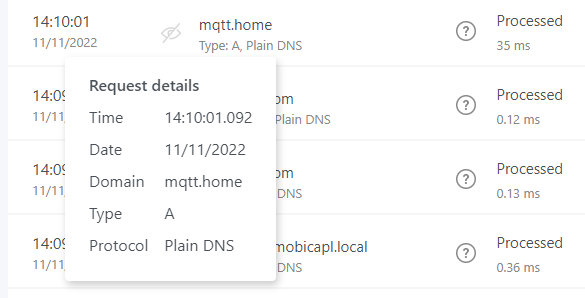
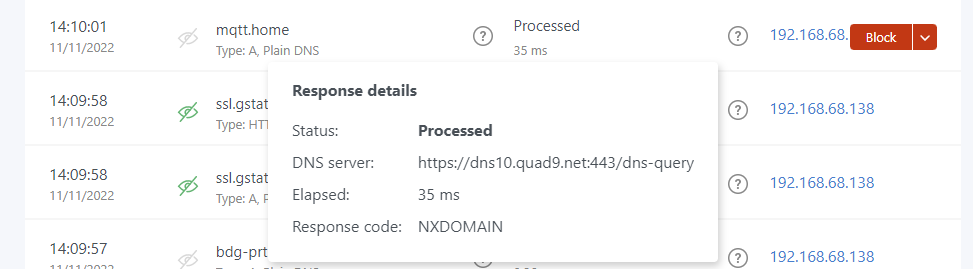
The last rewrite I found in the logs is from yesterday 8:16am CET. Since then, the queries for local domains (like mqtt.home) appear as "Processed" by Adguard and resolved on NXDOMAIN response codes. (the "NX" means Non-existent).
No update of Adguard nor restart of the server nor update of Adguard parameters has been done in several days. This malfunction appears to have been started from nowhere.
Diagnostics
host -t A mqtt.home 192.168.68.105
Using domain server:
Name: 192.168.68.105
Address: 192.168.68.105#53
Aliases:

Host mqtt.home not found: 3(NXDOMAIN)
nslookup mqtt.home 192.168.68.105
Server:         192.168.68.105
Address:        192.168.68.105#53

** server can't find mqtt.home: NXDOMAIN
Accions tried (unsuccessfully) to solve the issue
- Restart Adguard
- Disable the query cache
- Delete the rewrite of mqtt.home and register it again
- Test with other rewrites like abc.anotherhost (I got the same NXDOMAIN response)

I solved my problem!
I did, in fact, disabled the option below (from Home Assistant switches) and forgot to enable it again.

Once I enabled it the DNS Redirection started to work.
host -t A mqtt.home 192.168.68.105
Using domain server:
Name: 192.168.68.105
Address: 192.168.68.105#53
Aliases:

mqtt.home has address 192.168.68.105
But honestly, I don't know why "Block domains using filters and hosts files" has to be enabled for DNS Rewrites to work.
Hi Daniel, Thanks for the feedback I’ll check i haven't done the same and confirm
Sent from my iPhone
On 11 Nov 2022, at 14:19, Daniel Zegarra @.***> wrote:
I solved my problem!
I did, in fact, disabled the option below (from Home Assistant switches) and forgot to enable it again.
Once I enabled it the DNS Redirection started to work.
host -t A mqtt.home 192.168.68.105 Using domain server: Name: 192.168.68.105 Address: 192.168.68.105#53 Aliases:
mqtt.home has address 192.168.68.105 — Reply to this email directly, view it on GitHub, or unsubscribe. You are receiving this because you were mentioned.
I tried it but it didn’t fix my issue,
I think disabling it also stops Adblock from using its filter of sites to block on the #filters page
Im going to have a look in the code and try fond out what happens in the 'Private reverse DNS servers’ filtering.
My guess is all that needs to be done is check whether the local router default dns returns a local IP address, If so use it, otherwise use ad guard filtering Im thinking I’ll have to fix it myself Might take a while.
On 11 Nov 2022, at 14:19, Daniel Zegarra @.***> wrote:
I solved my problem!
I did, in fact, disabled the option below (from Home Assistant switches) and forgot to enable it again.
https://user-images.githubusercontent.com/651286/201358673-349a1c9d-c787-4697-be94-876e2afa3189.png Once I enabled it the DNS Redirection started to work.
host -t A mqtt.home 192.168.68.105 Using domain server: Name: 192.168.68.105 Address: 192.168.68.105#53 Aliases:
mqtt.home has address 192.168.68.105 — Reply to this email directly, view it on GitHub https://github.com/AdguardTeam/AdGuardHome/issues/5127#issuecomment-1311752804, or unsubscribe https://github.com/notifications/unsubscribe-auth/AC777EGNC2IOGVWIIIOZDFTWHZIXRANCNFSM6AAAAAAR4OVF6I. You are receiving this because you were mentioned.
Only way I can make it work is adding manually every machine two the dns rewrites.
Basically I become a manual human dns and have to check my local network continuously:)
Kind of defeats the object, I think AdGuard may need to try harder with their solution Its clearly not working:)
On 11 Nov 2022, at 14:19, Daniel Zegarra @.***> wrote:
I solved my problem!
I did, in fact, disabled the option below (from Home Assistant switches) and forgot to enable it again.
https://user-images.githubusercontent.com/651286/201358673-349a1c9d-c787-4697-be94-876e2afa3189.png Once I enabled it the DNS Redirection started to work.
host -t A mqtt.home 192.168.68.105 Using domain server: Name: 192.168.68.105 Address: 192.168.68.105#53 Aliases:
mqtt.home has address 192.168.68.105 — Reply to this email directly, view it on GitHub https://github.com/AdguardTeam/AdGuardHome/issues/5127#issuecomment-1311752804, or unsubscribe https://github.com/notifications/unsubscribe-auth/AC777EGNC2IOGVWIIIOZDFTWHZIXRANCNFSM6AAAAAAR4OVF6I. You are receiving this because you were mentioned.

thanks [ mad no difference anyway] meanwhile ive downloaded the code to se if i can build locally
seems the checkPrivateUpstreamExc or similar in http.go
is wher the app should process a request.
in my view the logic should be to test if a dns lookup can be resolved to a local ip via the local private dns.
if so use it. else pass it to the ad blocking filtering.
like it simply needs a setting to handle certain suffixes [.home,.local] or otherwise locally
but interseting if i get a local build working.
ill put in soem log statements to see whre the logic is going wrong.
local dns works because if i put the 192.168.1.254 or whatever it is in the 'Upstream DNS servers' ithe get resolved, but with all the add s too.
its for whatever reason completely ignoring the 'Private reverse DNS servers' even though when i test the setting [and deliberatley add the wrong port to see its really testing] then goes on to not use it nothing in its tail -f /var/log/AdGuardHome.err
no change after restarting the service either
so, looks like if i cant work it out ill be uninstalling and using something else.
too many build errors ERR_PACKAGE_PATH_NOT_EXPORTED whereas other apps i build are fine
a./package.json' is not defined by "exports" and some oter error:0308010c:digital envelope routines::unsupported whihc i fixed meh,
nice is user interface but implementation is lacking
so im abandoning it & uninstalling
its not worth the time pursuing wheter i eventually fix it or the ticket does.
I assumed you have some devices with static IPs in your network (or with static DNS leases), so they will always have the same IP. That way, you can register the list of names to map to IPs (DNS Rewrites).