

 AdguardTeam
DNS rewrites not responding with appropriate address in web browsers
Issue Details
-
Version of AdGuard Home server: Version: v0.107.0
-
How did you install AdGuard Home: Installed via Home Assistant integrations
-
How did you setup DNS configuration: Adguard Home DNS configured for use on (Windows 10) device
-
If it's a router or IoT, please write device model: Raspberry Pi 3 Model B+
-
CPU architecture: Cortex-A53 64-bit
-
Operating system and version: HomeAssistantOS6.2 (https://www.home-assistant.io/blog/2021/06/11/home-assistant-os-release-6/)
Expected Behavior
DNS Rewrites are meant to redirect the user to the inputted address, instead of the original address. For example google.com can be rewritten to facebook.com with the appropriate rewritten response.
Actual Behavior
The DNS rewrite log is correctly displayed, however, the actual rewriting only occurs when using tools such as nslookup, but does not occur in any web browser.
Screenshots
Screenshot: Log

Screenshot: Nslookup

Screenshot: DNS rewrite entry


Hello and thank you for the report! A few questions to help us reproduce the issue:
-
What browser are you using? Google Chrome and similar browsers, including Microsoft Edge, are known to ignore the system-wide DNS server.
-
Does this also occur with the newer
$dnsrewriterules? Like:||youtube.com^$dnsrewrite=facebook.com(Put this into the input on the “Filtering → Custom Filtering Rules” page.)

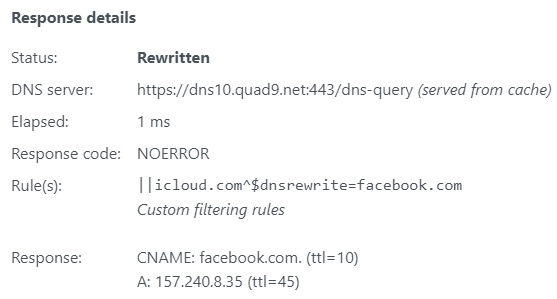
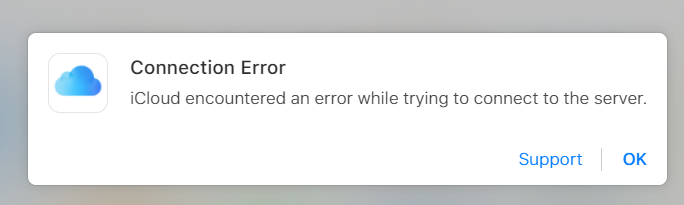
Thanks for the prompt response @ainar-g! I've followed the hyperlink you mentioned and have turned off secure DNS in Chrome settings. This seemed to have changed the original behaviour I described. After this change, websites do not load all their assets, however they do not redirect either (even though the log shows that its been rewritten). For example, I used the custom DNS rewrite rule you mentioned with iCloud.com:
Screenshot: Query log
Screenshot: iCloud page (not all assets loaded)
@MannyJ1, we've pushed a new version to the edge channel that restores some of the behaviour of rewrites to the one from v0.106.3. Could you please check if that version improves DNS rewrites for you?
What you are trying to achieve is URL redirection, which is not something that a DNS server can do.
Resolving google.com to facebook.com on a DNS server only gives you certificate errors and HTTP server errors because you are only sending a request for google.com to Facebook's server, which does not provide Google services and does not have Google's TLS certificate.

What you are trying to achieve is URL redirection, which is not something that a DNS server can do.
There should be a primer somewhere for what DNS can and can't do, since this seems to come up pretty frequently.

I'm having the same issue and also the edge version does not fix it. I'm running Adguard via Docker with the official docker hub image.
This is not a browser related problem. I tested with DIG against the adguard host and the reply simply ignored all DNS rewrites. This is really a problem since I'm running a lot of home internal services which should be resolved with their internal IPs instead of my external one. A downgrade to 0.106.3 did not work either because of "schema" changes ?!
Would be great if this feature could be fixed as soon as possible

@zybster can your provide details about what is it you're trying to do and what you've done so far?
@agneevX Sure.
So as described I'm running AdGuard Home with the official image from Docker Hub.
Today I stopped/updated and started AdGuard again.
I'm not quite sure which exact version I was running until today since I used the latest tag.
I was updated however to v0.107.3
Then I recognized that my DNS overrides which translate several hostnames to an internal IP instead of my external(Internet reachable) IP.
So basically I had a long list of DNS rewrites maintained in the web frontend all pointing to the internal Firewall IP instead of to the external one.
I need this workaround to be able to reach my services from inside as well as outside my home network.
Then I found this issue and tried to upgrade to :edge tag. This seemed to upgrade my AdGuardHome.yaml config file to schema version 13.
Since edge also did not work I tried to downgrade to 0.106.3 which also did not work as I found out later due to the upgraded schema version in the yaml.
I restored my old config file from a backup and saw it had schema version 10 and this was compatible with 0.106.3.
I changed the docker image tag to 0.106.3 and restarted the container. Everything worked fine again.
Long story short:
DNS rewrites maintained via web interface do not like to be upgraded to 0.107.x or 0.108.x
Hope that helps.