

 AdamNowotny
AjaxError - connection failed when trying to connect to jenkins
I am trying to configure new Jenkins dashbaord but get an error: AjaxError - connection failed when trying to connect to jenkins. I think this is related to the issue here: https://github.com/AdamNowotny/BuildReactor/issues/43
Might be related to firewall or other settings. Any idea how to overcome that?

Would need more information from the background page console and network tab. If it's authentication related then logging in in the browser first might help.

Below is what I see in console, doesn't looks like auth problem. maybe the /jenkins in the url? or maybe I have to setup an ssh tunnel? ping to the server works.
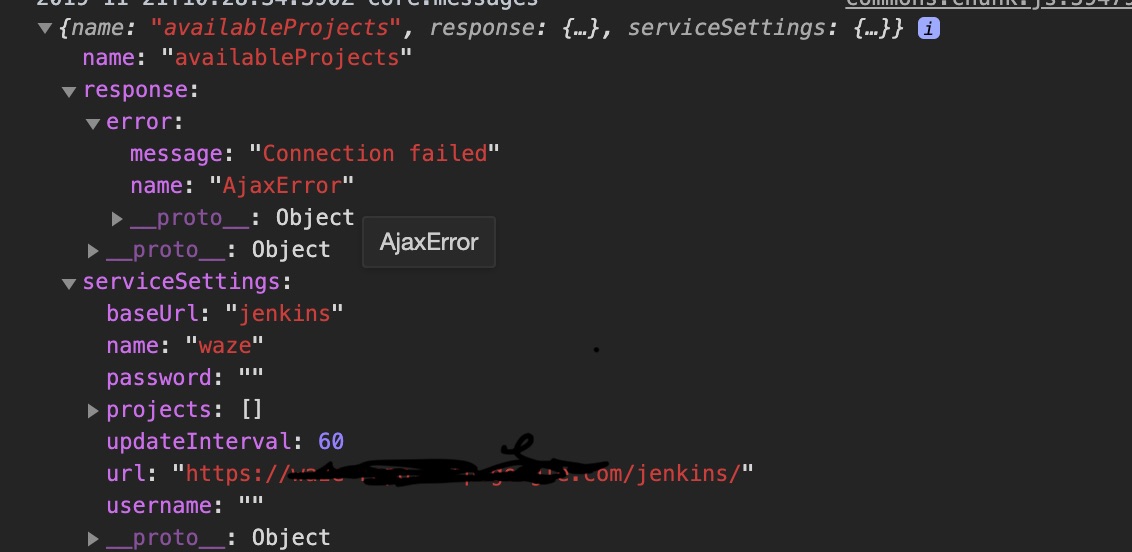
I have the same problem which reporting AjaxError.
2019-12-18T02:45:23.802Z core.messages
Object
name: "availableProjects"
response:
error:
message: "cannot GET http://xxx.xxxxxx.cn:8080/api/json?tree=jobs[_class,name,url,buildable,fullName,jobs[_class,name,url,buildable,fullName,jobs[_class,name,url,buildable,fullName]]] (400)"
name: "AjaxError"
__proto__: Object
__proto__: Object
serviceSettings: {baseUrl: "jenkins", name: "xxx_jenkins", projects: Array(0), url: "http://jenkins.xxxxxx.cn:8080", username: "xxxxxxx", …}
