
MarkdownEverywhere
 MarkdownEverywhere copied to clipboard
 ActivePeter
A web project to auto sync notes in git repositories, then present them by vue. 一个自动同步git仓库笔记并且通过vue呈现出来的web项目(作为我的博客
English
MarkdownEverywhere
https://github.com/ActivePeter/MarkdownEverywhere
A web project to auto sync notes in git repositories, then present them by vue. I'm going to substitute this project for my blog.
由于自己有在本地记笔记的习惯,同时又有两个笔记本,需要进行md文件同步,并且希望通过自己的服务器网站查阅到我的笔记,我准备开始做这个程序。
大概原理是,通过git仓库,我们可以同步.md文件。然后服务端通过git操作库来操作git,同步数据,如果有变更,就自动更新数据到服务端,然后我再通过vue前端去访问后端,后端读取目录文件,
Preview
-------> 传送门 https://hanbaoaaa.xyz

Fetures & TODO
- [x] auto sync through git hook(通过git服务的hook调用接口来自动同步
- [x] ssr(服务端渲染
- [x] 评论
- [x] commit变更记录
- [ ] 全文搜索
- [ ] easy for deploying(易于部署
部署方式
前端部分
将前端部分部署到服务器的node管理下
后端部分
后端部分就是一个go的二进制文件,
将config文件和二进制执行文件传到服务器上,配置后台运行即可

config.json

仓库,存储位置,首页文件路径,服务器ip和端口,评论数据的数据库配置
当前已经具有的功能
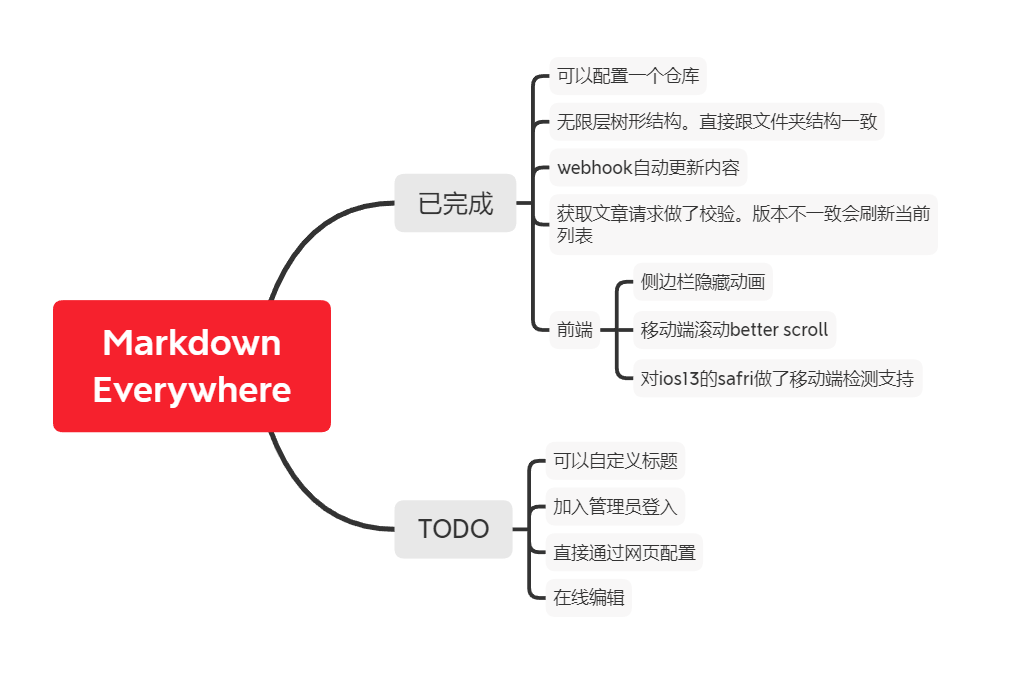
Current Progress
2022/1/4
加入了变更记录功能
2021/5
从vue换成了nuxt,ssr服务端渲染,
后端换成了golang,并加入评论功能
before
(v0.1已经完成)

Project setup(front)
问题描述: Unexpected end of JSON input while parsing near '…"
解决办法: (1)npm install --registry=https://registry.npm.taobao.org --loglevel=silly (2) npm cache clean --force (3) npm install
npm installCompiles and hot-reloads for development
npm run serveCompiles and minifies for production
npm run buildCustomize configuration
Operational process(back)
初始化运行,会调用ServletContextLTest ,然后会加载notemanager 单例,
单例加载过程中先读取配置文件。如果没有配置文件,则不工作,
配置文件 需要配置gitee仓库的地址,
然后在前端设置仓库地址,或者已有配置文件,那么就开始clone仓库,
由于hook等会引起一个线程的数据更新,更新过程中重新构建对象,对象构建完成后。
Metadata
Owner
 ActivePeter
Metadata
A web project to auto sync notes in git repositories, then present them by vue. 一个自动同步git仓库笔记并且通过vue呈现出来的web项目(作为我的博客