

 AcK77
AcK77
Not all NFC215 tags get recognized by Amiibomb
I have bought a few new NTAG215 tags, same as the previous ones but not the same store Amiibomb doesn't recognize the tags, so i tested them on my Android phone that has Tagmo installed (Samsung phone) Tagmo recognizes the NFC NTag215 and writes the amiibo bin perfectly, my N3DS does recognize the tag, so the NTAG215 cards do work perfectly fine.
I checked the info with NFC taginfo from NXP and there identical as the first batch of cards, same info, same stuff, the first batch, Amiibomb could write perfectly fine and it recognized a written card and was able to dump it fine, but this second batch of 10 Amiibomb does not recognize a NFC card while trying to write a bin to it


Huuum, so if I understand well AmiiBomb say "Waiting for NTAG..." and nothing change? (That's what you said on GBATemp ^^). Did you use the version of AmiiBombuino inside v0.2 or v0.3? Your NTAG are cards or stickers? It's really strange ^^! But let we see how we can fix that!

ERROR: Your Tag it's probably not a NTAG215! AmiiBombuino = v0.3 NTAG = cards (https://fr.aliexpress.com/item/Free-Shipping-100pcs-Lot-NTAG215-NFC-Cards-NFC-Forum-Type-2-Tag-ISO-IEC-14443-A/32804767997.html?spm=2114.13010608.0.0.fDqE1v)
Can you try to flash the AmiiBombuino inside the v0.2 and tell me if you have anything different?
When I use v0.2, I have this exception:
Consultez la fin de ce message pour plus de détails sur l'appel du débogage
juste-à-temps (JIT) à la place de cette boîte de dialogue.

************** Texte de l'exception **************
System.FormatException: Impossible de trouver des chiffres reconnaissables.
   à System.ParseNumbers.StringToInt(String s, Int32 radix, Int32 flags, Int32* currPos)
   à System.Convert.ToInt32(String value, Int32 fromBase)
   à AmiiBomb.Amiibo_Class.Calculate_Long_UID(String Short_UID)
   à AmiiBomb.Flash_Form.<button2_Click>d__9.MoveNext()
--- Fin de la trace de la pile à partir de l'emplacement précédent au niveau duquel l'exception a été levée ---
   à System.Runtime.CompilerServices.AsyncMethodBuilderCore.<>c.<ThrowAsync>b__6_0(Object state)


************** Assemblys chargés **************
mscorlib
    Version de l'assembly : 4.0.0.0
    Version Win32 : 4.6.1637.0 built by: NETFXREL3STAGE
    CodeBase : file:///C:/Windows/Microsoft.NET/Framework/v4.0.30319/mscorlib.dll
----------------------------------------
AmiiBomb
    Version de l'assembly : 1.0.0.0
    Version Win32 : 1.0.0.0
    CodeBase : file:///C:/Users/thierrycorbin/Downloads/AmiiBomb_v0.2/AmiiBomb.exe
----------------------------------------
System.Windows.Forms
    Version de l'assembly : 4.0.0.0
    Version Win32 : 4.6.1586.0 built by: NETFXREL2
    CodeBase : file:///C:/Windows/Microsoft.Net/assembly/GAC_MSIL/System.Windows.Forms/v4.0_4.0.0.0__b77a5c561934e089/System.Windows.Forms.dll
----------------------------------------
System
    Version de l'assembly : 4.0.0.0
    Version Win32 : 4.6.1637.0 built by: NETFXREL3STAGE
    CodeBase : file:///C:/Windows/Microsoft.Net/assembly/GAC_MSIL/System/v4.0_4.0.0.0__b77a5c561934e089/System.dll
----------------------------------------
System.Drawing
    Version de l'assembly : 4.0.0.0
    Version Win32 : 4.6.1586.0 built by: NETFXREL2
    CodeBase : file:///C:/Windows/Microsoft.Net/assembly/GAC_MSIL/System.Drawing/v4.0_4.0.0.0__b03f5f7f11d50a3a/System.Drawing.dll
----------------------------------------
Accessibility
    Version de l'assembly : 4.0.0.0
    Version Win32 : 4.6.1586.0 built by: NETFXREL2
    CodeBase : file:///C:/Windows/Microsoft.Net/assembly/GAC_MSIL/Accessibility/v4.0_4.0.0.0__b03f5f7f11d50a3a/Accessibility.dll
----------------------------------------
System.Configuration
    Version de l'assembly : 4.0.0.0
    Version Win32 : 4.6.1586.0 built by: NETFXREL2
    CodeBase : file:///C:/Windows/Microsoft.Net/assembly/GAC_MSIL/System.Configuration/v4.0_4.0.0.0__b03f5f7f11d50a3a/System.Configuration.dll
----------------------------------------
System.Core
    Version de l'assembly : 4.0.0.0
    Version Win32 : 4.6.1638.0 built by: NETFXREL3STAGE
    CodeBase : file:///C:/Windows/Microsoft.Net/assembly/GAC_MSIL/System.Core/v4.0_4.0.0.0__b77a5c561934e089/System.Core.dll
----------------------------------------
System.Xml
    Version de l'assembly : 4.0.0.0
    Version Win32 : 4.6.1586.0 built by: NETFXREL2
    CodeBase : file:///C:/Windows/Microsoft.Net/assembly/GAC_MSIL/System.Xml/v4.0_4.0.0.0__b77a5c561934e089/System.Xml.dll
----------------------------------------
Newtonsoft.Json
    Version de l'assembly : 10.0.0.0
    Version Win32 : 1.0.0.0
    CodeBase : file:///C:/Users/thierrycorbin/Downloads/AmiiBomb_v0.2/AmiiBomb.exe
----------------------------------------
System.Numerics
    Version de l'assembly : 4.0.0.0
    Version Win32 : 4.6.1586.0 built by: NETFXREL2
    CodeBase : file:///C:/Windows/Microsoft.Net/assembly/GAC_MSIL/System.Numerics/v4.0_4.0.0.0__b77a5c561934e089/System.Numerics.dll
----------------------------------------
System.Runtime.Serialization
    Version de l'assembly : 4.0.0.0
    Version Win32 : 4.6.1637.0 built by: NETFXREL3STAGE
    CodeBase : file:///C:/Windows/Microsoft.Net/assembly/GAC_MSIL/System.Runtime.Serialization/v4.0_4.0.0.0__b77a5c561934e089/System.Runtime.Serialization.dll
----------------------------------------
System.Data
    Version de l'assembly : 4.0.0.0
    Version Win32 : 4.6.1636.0 built by: NETFXREL3STAGE
    CodeBase : file:///C:/Windows/Microsoft.Net/assembly/GAC_32/System.Data/v4.0_4.0.0.0__b77a5c561934e089/System.Data.dll
----------------------------------------
BouncyCastle.Crypto
    Version de l'assembly : 1.8.1.0
    Version Win32 : 1.0.0.0
    CodeBase : file:///C:/Users/thierrycorbin/Downloads/AmiiBomb_v0.2/AmiiBomb.exe
----------------------------------------
AngleSharp
    Version de l'assembly : 0.9.9.0
    Version Win32 : 1.0.0.0
    CodeBase : file:///C:/Users/thierrycorbin/Downloads/AmiiBomb_v0.2/AmiiBomb.exe
----------------------------------------
mscorlib.resources
    Version de l'assembly : 4.0.0.0
    Version Win32 : 4.6.1586.0 built by: NETFXREL2
    CodeBase : file:///C:/Windows/Microsoft.Net/assembly/GAC_MSIL/mscorlib.resources/v4.0_4.0.0.0_fr_b77a5c561934e089/mscorlib.resources.dll
----------------------------------------
System.Management
    Version de l'assembly : 4.0.0.0
    Version Win32 : 4.6.1646.0 built by: NETFXREL3STAGE
    CodeBase : file:///C:/Windows/Microsoft.Net/assembly/GAC_MSIL/System.Management/v4.0_4.0.0.0__b03f5f7f11d50a3a/System.Management.dll
----------------------------------------
System.Windows.Forms.resources
    Version de l'assembly : 4.0.0.0
    Version Win32 : 4.6.1586.0 built by: NETFXREL2
    CodeBase : file:///C:/Windows/Microsoft.Net/assembly/GAC_MSIL/System.Windows.Forms.resources/v4.0_4.0.0.0_fr_b77a5c561934e089/System.Windows.Forms.resources.dll
----------------------------------------

************** Débogage JIT **************
Pour activer le débogage juste-à-temps (JIT), le fichier de configuration pour cette
application ou cet ordinateur (machine.config) doit avoir la valeur
jitDebugging définie dans la section system.windows.forms.
L'application doit également être compilée avec le débogage
activé.

Par exemple :

<configuration>
    <system.windows.forms jitDebugging="true" />
</configuration>

Lorsque le débogage juste-à-temps est activé, les exceptions non gérées
seront envoyées au débogueur JIT inscrit sur l'ordinateur
plutôt que d'être gérées par cette boîte de dialogue.
Ok so, the problem is when I calculate Long UID based on the short UID readed from the tag... If someone can send me the UID of NTAG who's give this error (or nothing) it will be great! You can use NXP TagInfo App for Android or you can use DumpInfo (https://github.com/miguelbalboa/rfid/blob/master/examples/DumpInfo/DumpInfo.ino) with the Arduino :)! Thanks
I do not have android phone. I tested dumpinfo but I do not see where I can find the UID on OUTPUT
avrdude: Version 6.3, compiled on Jan 17 2017 at 12:01:35
         Copyright (c) 2000-2005 Brian Dean, http://www.bdmicro.com/
         Copyright (c) 2007-2014 Joerg Wunsch

         System wide configuration file is "/Applications/Arduino.app/Contents/Java/hardware/tools/avr/etc/avrdude.conf"
         User configuration file is "/Users/thierrycorbin/.avrduderc"
         User configuration file does not exist or is not a regular file, skipping

         Using Port                    : /dev/cu.usbmodem14111
         Using Programmer              : arduino
         Overriding Baud Rate          : 115200
         AVR Part                      : ATmega328P
         Chip Erase delay              : 9000 us
         PAGEL                         : PD7
         BS2                           : PC2
         RESET disposition             : dedicated
         RETRY pulse                   : SCK
         serial program mode           : yes
         parallel program mode         : yes
         Timeout                       : 200
         StabDelay                     : 100
         CmdexeDelay                   : 25
         SyncLoops                     : 32
         ByteDelay                     : 0
         PollIndex                     : 3
         PollValue                     : 0x53
         Memory Detail                 :

                                  Block Poll               Page                       Polled
           Memory Type Mode Delay Size  Indx Paged  Size   Size #Pages MinW  MaxW   ReadBack
           ----------- ---- ----- ----- ---- ------ ------ ---- ------ ----- ----- ---------
           eeprom        65    20     4    0 no       1024    4      0  3600  3600 0xff 0xff
           flash         65     6   128    0 yes     32768  128    256  4500  4500 0xff 0xff
           lfuse          0     0     0    0 no          1    0      0  4500  4500 0x00 0x00
           hfuse          0     0     0    0 no          1    0      0  4500  4500 0x00 0x00
           efuse          0     0     0    0 no          1    0      0  4500  4500 0x00 0x00
           lock           0     0     0    0 no          1    0      0  4500  4500 0x00 0x00
           calibration    0     0     0    0 no          1    0      0     0     0 0x00 0x00
           signature      0     0     0    0 no          3    0      0     0     0 0x00 0x00

         Programmer Type : Arduino
         Description     : Arduino
         Hardware Version: 3
         Firmware Version: 4.4
         Vtarget         : 0.3 V
         Varef           : 0.3 V
         Oscillator      : 28.800 kHz
         SCK period      : 3.3 us

avrdude: AVR device initialized and ready to accept instructions

Reading | ################################################## | 100% 0.00s

avrdude: Device signature = 0x1e950f (probably m328p)
avrdude: reading input file "/var/folders/r3/rrjjsmsj0f3bttm1fdgpjsjr0000gn/T/arduino_build_777969/DumpInfo.ino.hex"
avrdude: writing flash (8208 bytes):

Writing | ################################################## | 100% 1.38s

avrdude: 8208 bytes of flash written
avrdude: verifying flash memory against /var/folders/r3/rrjjsmsj0f3bttm1fdgpjsjr0000gn/T/arduino_build_777969/DumpInfo.ino.hex:
avrdude: load data flash data from input file /var/folders/r3/rrjjsmsj0f3bttm1fdgpjsjr0000gn/T/arduino_build_777969/DumpInfo.ino.hex:
avrdude: input file /var/folders/r3/rrjjsmsj0f3bttm1fdgpjsjr0000gn/T/arduino_build_777969/DumpInfo.ino.hex contains 8208 bytes
avrdude: reading on-chip flash data:

Reading | ################################################## | 100% 1.06s

avrdude: verifying ...
avrdude: 8208 bytes of flash verified

avrdude done.  Thank you.
Do you want DumpInfo.ino.hex dump ?
Thanks
You have to run the Serial Windows inside Arduino IDE, and setting it at 9600 baud to get the informations, after that, you have to scan a NTAG and the informations appear ;)! What's you copy/paste here it's just the Arduino IDE logs, nothing useful here ^^! It's not too difficult to found how you have to do on google to compile an INO file and use the Serial windows ;)!
Output:
FirmFirmware Version: 0x92 = v2.0
Scan PICC to see UID, SAK, type, and data blocks...
Card UID: 04 42 C2 62 AE 4F 81
Card SAK: 00
PICC type: MIFARE Ultralight or Ultralight C
Page  0  1  2  3
  0   04 42 C2 0C
  1   62 AE 4F 81
  2   02 48 00 00
  3   E1 10 3E 00
  4   03 00 FE 00
  5   00 00 00 00
  6   00 00 00 00
  7   00 00 00 00
  8   00 00 00 00
  9   00 00 00 00
 10   00 00 00 00
 11   00 00 00 00
 12   00 00 00 00
 13   00 00 00 00
 14   00 00 00 00
 15   00 00 00 00
That looks like most of the ntag215's I've seen. Can you post the same dumpinfo output for one of the working Ntag215's to compare the results of the UID short to long conversion for a working UID vs a non-working UID?

Sorry but I do not have functional NTAG. I have no android for flash a NTAG215.
Maybe @PeggerWed can post us a functional NTAG ?
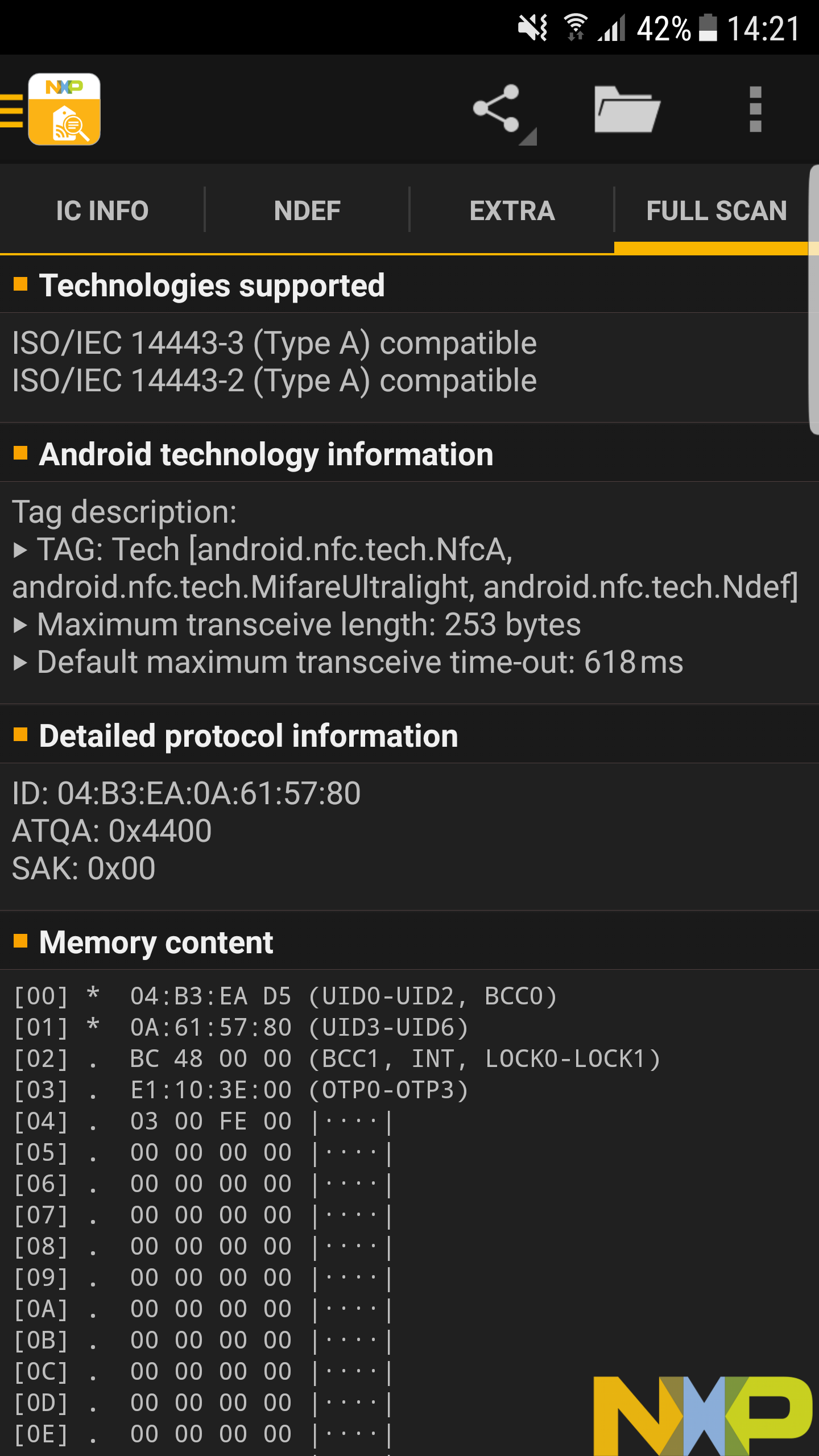
My non working Empty NFC card on AmiiBomb info (there working fine on Tagmo Android) All information according to "NFC Taginfo by NXP" on Android phone
NFC Taginfo (empty card that Amiibomb does not recognize) IC manufacturer: NXP Semiconductors
IC Type: NTAG215
Memory Data: 504 bytes user memory 126 pages with 4 bytes per page
IC detailed information: Full product name: NT2H1511G0DUx Capacitance: 50pF
Version information: Vendor ID: NXP Type: NTAG Subtype: 50pF Major version: 1 Minor version: V0 Storage size: 504 bytes Protocol: ISO/IEC 14443-3
Configuration information: ASCII mirror disabled NGC counter disabled No limit on wrong password attempts Strong load modulation enable
Originality check: Signature verified with NXP public key
Technologies supported: ISO/IEC 1444-3 (Type A) compatible ISO/IEC 1444-2 (Type A) compatible
Android technology information Tag description: TAG: Tech [android.nfc.tech.NfcA, android.nfc.tech.MifareUltralight, android.nfc.tech.NdefFormatable] Maximum transceive lenght: 253 bytes Default maximum transceive time-out: 618ms
Detailed protocol information: ID: 04:50:B5:52:AF:4F:81 ATQA: 0x4400 SAK: 0x00
Memory content: [00] * 04:50:B5 69 (UID0-UID2, BCC0) [01] * 52:AF:4F:81 (UID3-UID6) [02] 33 48 00 00 (BCC1, INT, LOCK0-LOCK1) [03] E1:10:3E:00 (0TP0-OTP3) [04] 03 00 FE 00 |....| [05] 00 00 00 00 |....| ... [82] 00 00 00 BD (LOCK2-LOCK4, CHK) [83] 04 00 00 FF (CFG, MIRROR, AUTH0) [84] 00 05 -- -- (ACCESS) [85] +P FF FF FF FF (PWD0-PWD3) [86] +P 00 00 -- -- (PACK0-PACK1
The old ntags that did work on Amiibomb have he same config, (except there already witten to) If you wish i can ship 2 of those non working on Amiibomb/working on Android Tagmo NFC cards to you.
Ok, i found an old NTAG 512 from my first batch that worked on Amiibomb that was still empty:
Amiibomb info:
Wachten op NTAG... Gevonden!
Short UID is: 04037EAA064F81 Long UID is: 04037EF1AA064F8162
"D:\AmiboDumps\Smash 4[SSB4] Donkey Kong.bin" is gepatched. "D:\AmiboDumps\Smash 4[SSB4] Donkey Kong.bin" is verzonden naar AmiiBombuino.
Amiibo is klaar! Veel plezier!
NXP Taginfo: (after the card was written) IC manufacturer: NXP Semiconductors
IC Type: NTAG215
Memory Size: 504 bytes user memory 126 pages with 4 bytes per page
IC detailed information: Full product name: NT2H1511G0DUx Capacitance: 50pF
Version information: Vendor ID: NXP Type: NTAG Subtype: 50pF Major version: 1 Minor version: V0 Storage size: 504 bytes Protocol: ISO/IEC 14443-3
Configuration information: ASCII mirror disabled NGC counter protected (cause it's already written) Wrong password attempts allowed: 7 (cause it's already written) Strong load modulation disabled (cause it's already written) Configuration locked (cause it's already written)
Originality check: Signature verified with NXP public key
FULL SCAN: Technologies supported: ISO/IEC 1444-3 (Type A) compatible ISO/IEC 1444-2 (Type A) compatible
Android technology information Tag description: TAG: Tech [android.nfc.tech.NfcA, android.nfc.tech.MifareUltralight, android.nfc.tech.NdefFormatable] Maximum transceive lenght: 253 bytes Default maximum transceive time-out: 618ms
Detailed protocol information: ID: 04:03:7E:AA:06:4F:81 ATQA: 0x4400 SAK: 0x00
Memory content: [00] * 04:03:7E F1 (UID0-UID2, BCC0) [01] * AA:06:4F:81 (UID3-UID6) [02] 62 48 0F E0 (BCC1, INT, LOCK0-LOCK1) [03] F1:10:FF:EE (0TP0-OTP3) [04] +r A5 00 00 00 |....| [05] +r 44 0C 37 48 |D.7H] ... [82] *r 01 00 0F BD (LOCK2-LOCK4, CHK) [83] *r 00 00 00 04 (CFG, MIRROR, AUTH0) [84] *r 5F 00 -- -- (ACCESS) [85] +P XX XX XX XX (PWD0-PWD3) [86] +P XX XX -- -- (PACK0-PACK1
The problem is when I calculate the Long UID, with certains of them (who can't be write on the NTAG - Read only). I have to see to fix it, but I just don't have time, I just need many UID of NTAG who's not working with AmiiBomb, to test if the calculation will be good! Please be patient. Thanks
Hi, Waiting for more UID, would it be possible to have an option to disable NTAG verification ? Thanks
AcK77,
Like told, i'm willing to ship a few not working NTAG cards to you, i live in Belgium and shipping to France isn't a problem
Or i can at least read 20+ Long UID's from my batch and post in here.
If i'm not wrong i take the following numbers/letters to get the Long UID: (Example from my previous post)
Memory content: [00] * 04:03:7E F1 (UID0-UID2, BCC0) [01] * AA:06:4F:81 (UID3-UID6) [02] 62 48 0F E0 (BCC1, INT, LOCK0-LOCK1)
Seems the Long UID = 04037EF1AA064F8162
Memory content: [00] * 04:03:7E F1 (UID0-UID2, BCC0) [01] * AA:06:4F:81 (UID3-UID6)
and short UID is 04037EAA064F81
LongUID (Empty cards) (for short UID just remove the bold stuff) 0441945952AF4F8032 0443CC0352AF4F8133 045E7BA952AF4F8133 04B6B08A52AF4F8032 04ADA38252AF4F8032
LongUID (Written Cards) 0457E13A52AF4F8032 04A67D5752AF4F8032 04A992B752AF4F8032 0450B56952AF4F8132
So i noticed, all cards that don't work on Amiibomb have 52AF4F8032 or 52AF4F8132 or 52AF4F8132 at the end
Those cards that did work on Amiibomb have AA064F8162 or AA064F8063
I know those numbers different for alot of cards, but It's a tip maybe :)
Here's how tagmo is overcoming the problem.. scan the entire "raw" or "long" uid, then trim out the checksum bytes from "slot 3" to derive the "actual" or "short" uid.
Or the checksum could be calculated (somehow) to go the other direction and generate the long uid from the short uid.
Notice how it skips "pages0_1[3]" to generate the correct "short" uid from the first two pages. the long uid then is just the raw first two pages read it looks like.. not sure how to fix this in code, but the problem appears easy to overcome.
TagUtil.java
/**
 * Returns the UID of a tag from first two pages of data (TagFormat)
 */
public static byte[] uidFromPages(byte[] pages0_1) {
    //removes the checksum bytes from the first two pages of a tag to get the actual uid
    if (pages0_1.length < 8) return null;

    byte[] key = new byte[7];
    key[0] = pages0_1[0];
    key[1] = pages0_1[1];
    key[2] = pages0_1[2];
    key[3] = pages0_1[4];
    key[4] = pages0_1[5];
    key[5] = pages0_1[6];
    key[6] = pages0_1[7];
    return key;
}
Card UID: 04 51 3D BA E8 4C 81 Card SAK: 00 PICC type: MIFARE Ultralight or Ultralight C Page 0 1 2 3 0 04 51 3D E0 1 BA E8 4C 81 2 9F 48 0F E0 3 ...trimmed...
Well, let's hope AcK77 can do something with all this info :)
Im willing to test a new Alpha release to see if the cards get working.
Would like to know also.
Any news on progress about this problem would be great :)
Hey, project isn't dead, I'm using it successfully still. The code issue with long to short uid is documented in this thread. Take a stab at forking the code, modify your fork based on the notes here, then compile using visual studio 2017 community edition. Not super hard and you'll learn the fundamentals of software development and simultaneously be giving back to the community!
@peacepinguin: It's exactly what I think :)!
For all others who can't wait until I update AmiiBomb, Right now I don't have time to work on it! So be patient. Your NTAG works, it's just an error inside the UID calculation, I make AmiiBomb open source for get other people fix possible error or add functionality, but all I have it's people who claim there is a mistake "here" or "here"! So if you can't wait the fix, do it yourself :)!
Nothing mad here, anyone can understand I'm just busy.
@AcK77 Thanks for the news update :)
I'm not mad or anything, i was just wondering :) As always, real life stuff is more important then anything else, so take your time. I hope i wasn't one of the people who claimed about mistakes here or there (except for this issue i started) but i think i provided helpfull info for it also.
@peacepenguin Well, i can't program, i don't have the power to get it inside my brains :D, i've tried but it just doesn't work, it's just, programming isn't compatible with my brains.
Maybe i do hope you could share your working version, so i can try out my ntags with it and can get started to have some fun with them.
With Kind Regards, Peg Wed
@peacepenguin can you give me a direction where to look to adjust the code? Trying to find it tough i can't seem to get trough all the files lol. @AcK77 at first want to thank you for this project you made, realy love it and hope soon somebody will be able to help me out to fix it (At least where to look for this part to adjust) or hoping you have some day time to adjust the code (Do note; no rush, meanwhile i will search, and use a android phone. Tough rather do it trough this awesome program i just found out!)

You know I'm not really sure where to find the code that handles the long uid and short uid conversions. I found the code in tagmo that seems related to this problem, and how they are stripping particular positions of the long uid to get to the short uid. For me the bigger question is this: what is actually failing when using these problematic NTAG215's. I couldn't interpret the error log posted to see exactly what the problem was. AcK77 mentioned that he thinks the problem exists in the short-long conversion, I'm just not sure where or when that conversion is necessary. But, finding the long- to short uid code in tagmo seems related to what AcK77 was saying is where the problem sits.
I'll take a look around the Amiibomb code to help, perhaps someone experiencing the error could post an english error dump log as well?
Might have found a clue that may help, ack77 said: "Ok so, the problem is when I calculate Long UID based on the short UID readed from the tag..."
Where-as in Tagmo it seems they are reading the long uid from the card, then converting that to small uid.
Same as the dump-info pastes, the long uid is already there, so converting to short uid is easy, just use the tagmo technique of dropping the checksum bits from the long uid. Instead of the apparent technique used by amiibomb that is attempting to calculate the checksum bits based on the short uid. We should be able to store the initially read long uid for use later, instead of converting short to long when needed.
Does the checksum change after its written? Is there a reason the long uid needs to be calculated by the application, instead of read and stored by amiibomb on initial scan of the empty card?
Hmm good questions, hopefully tomorrow (its 9:18 pm here atm) or the day after tomorrow i will have my nfc reader for the arduino so i can do some more tests then i can do now... Then i can read out stuff and adjust codes to give me more information then i can get out of it now at the moment. Will take a look at certain things and hope can make a solution for it :)

Ok found the area of code that will need reviewed to fix these problematic Ntag215's: AmiiBomb-uino/AmiiBomb/Flash_Form.cs. line 84 A variable is created with an external call, not sure where to find this external code that does the actual "GET". string NTAG_Short_UID = Arduino.SendCommand("/GET_NTAG_UID");
Then on line 92, the long uid is calculated and stored in a variable using an external library: string NTAG_Long_UID = BitConverter.ToString(Amiibo_Class.Calculate_Long_UID(NTAG_Short_UID)).Replace("-", "");
I would suggest implementing a new way to gather the long uid, then generate the short uid with the technique used by tagmo that i posted above. Note that tagmo is java, amiibomb is c#, so comparable code will need to be written.
Hope that helps push some smart developer in the right direction! I will also try to implement these fixes, and will post here if i have any success!
Yes this will help me to the correct direction :) Tough need to test some things first cause i modified the arduino program.... So hopefully i can get more information like i said above as soon as i have my nfc reader.... Then its a lot easier to debug certain stuff ! Thanks for the help so far :)
edit: this part; string NTAG_Short_UID = Arduino.SendCommand("/GET_NTAG_UID");
That sends a "command" to the arduino software to get the ntag.... Already rewritten that part, but like i said above... need my nfc reader to confirm it works as it should do :/
Ok got my nfc reader, now need to test stuff to get the correct information that I need... So far no luck but will try other stuff to get it to work :)
Hi, when i've tested amiibomb 10 days ago I had the same "Waiting for NTAG..." problem with my Tags. Was totally new to arduino and elegy rc522, running on a windows VM so I'd suspected that it would be too much for it run as excepted and i forgave. I've recode a flask python web ui that wraps amiitool, amiibo_tool bash and communicate with a modified write_amiibo to get bytes from serial...all of it to run on a raspberry pi with 3,5 inch lcd on top. I've succeeded in writing some dump, well recognized on my switch but randomly depending of the tags i use the process often fail with an "MIFARE PICC responded with NAK error".
My issue seems nearly similar as this #8 one, regarding to the random reproduction and the fact my NAK error is related to password auth process on the mirage side.
I just realize my lib MFRC522 was so out to date(v1.1.6 Jan 2016). miguelbalboa have been very active within the last year and the lib is now at v1.3.6(Mar 2017) and it has a fix for an auth problem with long UIDs since Jan 2017. https://github.com/miguelbalboa/rfid/blob/master/changes.txt
I can't see the versioning of the MFRC522 you're using in amibombuino. I need to find some time to give it a try on my code this week-end and see if can help to solve my issue. I'll let you know

I've first test my proposed solution on amiibomb it seems i can now read the content of an amiibo on amiibombuino Dump with the updated MFRC522 lib. Now it can see my previously not detected Tags.
But i'm still stuck in the Create Tag action with the same "Waiting for NTAG..."
For a same Tag with the old lib my ID was: 04C7C388 2AAF4F80 and with the last updated one it is: 0493C3DC 2AAF4F80
If you want to test by yourself and give more feedback: Just rename and replace MFRC522.cpp and MFRC522.h with the fresh ones in the amibombuino folder and flash it again to your arduino.
ok it definitely works for me in amiibomb in Writing tags. I removed the MFRC522 lib from amibombuino folder, update MFRC522 in the library manger of the official arduino studio and i flashed amiibombuino with my arduino with the arduino studio.
All my tag creation with amiibomb works like a charm now !!!
I'll also fix my raspberry app as i like the very convenient and portable way of creating amiibos.
Hmm maybe updating it can indeed fix the problems. Maybe a idea for other people to try it who had the problems?
Wel, it would be nice if somebody would provide a compiled versio we can download and just reflash the uno r3 with it. This is for all people who are not skilled in doing such stuff (like me)

Hi,
You need the "with bootloader" file ;)! To get the hex files for the others boards, you have to select the board you want inside the Arduino IDE and compile to hex again. Nothing more :)!
Recompiled the firmware for the arduino's Place it in the amiibomb folder and reupload it trough amiibomb. Not sure if i did correct, but according to what i read what AcK77 said it should work 👍 http://www.mediafire.com/file/5q3emofm16qms3f/lib.zip Enjoy !
@Daisayah (Just tagging for a new link for you with the updated firmware for the arduino 😄 )
Thanks a lot for your work. I flashed my arduino a few minutes before i go to work and everything works fine now. Reading and writing tags works correct now, later i check if i can use them with my 3DS XL and Switch.
Thanks André
Uploaded the uno.hex, still doesn't work with my ntags, so back to Tagmo on a borrowed nfc android phone. Thanks for the effort you all guys made to try to fix it for most of us.
Also i 1st tried to upload it through XLoader, but that gives a fail (previous ack77 hex works perfect to flash with xloader) so i used the internal writer, but i'm not sure if it does write the new hex, it says it did, buti think it doesn't
Screenshot in difference internal flashing
Internal: https://s28.postimg.org/ifntosj0t/amiibombhex.png
XLoader: https://s28.postimg.org/3lv5uyq3h/amiibombhex1.png
Has a pull request with the fixes been made? I can't connect to mediafire where I'm at. I can grab the zipped source from here though...

Mine Ntag 215 isn't reconiced bij RC522 and arduino r3 with tagmo works great. Amiibomb : waiting for NTAG

@PeggerWed Try to download the arduino programming software (i use 1.8.3 is the latest i believe) Then download this: http://www.mediafire.com/file/v2q8389se80v77i/AmiiBombuino.zip Compile it inside the arduino software and try to upload it trough the arduino software. See if it will upload then, i just dont understand what i did wrong... Got nothing changed besides the updated files that where required (And added the new ones into the compilation....)
@urherenow the zip i uploaded should been a updated hex for the arduino, but seems there are little problems with it. Trying to figure out why that is happening...
@rlvbrussel I have the same problem at the moment with a new batch of ntag 215 cards i ordered from aliexpress.... I compared them (At least in 2 different ntag scanning on android) and all the information is the same. Tough 1 is readable with the arduino and 1 is not. Still no clue why.... 👎
@kokkie20 I have tried rfid-master and rfid 1.3.6. and when i load "I thought" rfid-master with arduino software then i get the message "not a ntag512" with amiibomb... so it can read the tag but didn't recognized the card.
Hmm ill take a look at it this weekend, going to try some stuff to figure out what can be the problem. Not sure if i can find but its worth a shot
It was fun wiring up an arduino+RFC522 for the first time, and I know it is correct because I can do things manually with other tools (get tag ID from arduino, enter tag ID, key file, and .bin file on web page, copy resulting hex into arduino sketch, and upload). But this software hasn't worked for me at all and it's a moot point, since Thenaya works perfectly right on an N3DS! I'll still like to try when this is sorted out, so please do a pull request when it is. Or use mega.nz for the zip...
@kokkie20 I have tried PN532 schield with this guide and the tags work. https://games.kel.mn/en/create-amiibo-clones-with-arduino-and-pn532-nfc-module/
@rlvbrussel ill take a look at that 👍 Maybe its possible to adjust the code to work with amiibomb to.... *gotta find me first the pn532 within reasonable price, found the adafruit but to expensive for me atm to buy and test.... 😢
Should be something with MFRC522 library since the problem tags are recognized fine with Adafruit PN532 library.

@kokkie20 I hope so that amiibomb wil work with PN532. It's a great software.
@konstantin-kelemen Mabey someone can look at it.
@kokkie20 Did everything you said, all compiled fine and uploaded fine, still nothing.
Anyway, for the time being i'm using TagMo to do all the stuff, but it would be so easier to use the adruino.
Still, thanks for all the hard work you already did on it trying to fix it for us.
Regards
Small update from my side... Found a affordable pn532 module for arduino. Now waiting for delivery and then i can try to get it working with amiibomb. Well or at least to write the tags correctly and then try to implement it into amiibomb :) Will take some time to arrive but at least i can try stuff then :)
For those people having problems, and think it may be the MFC522 library, I've updated it here and done a pull request. You may wish to try the updated library.

Nice, now if somebody can put up a compiled version of amiibomb with this updated lib :) Thanks in advance
why are you all still here? Thenaya works fine directly on the 3DS. Nothing is easier than that. https://github.com/HiddenRamblings/Thenaya

@urherenow Why are you still doing stuff on the 3DS? Nothing is easier than Windows. (Sarcasm, in case you didn't notice). And also, you need a hacked 3DS. Which not everyone has.
@PedroBinGonzales So turns out I've found a selection of cards that don't work on the RC522. I believe it's a hardware incompatibility, as I can't even get these cards to be RECOGNISED. It's not like it partly sees it and then errors, the board doesn't even notice they're there.
I've been playing around with the development toolkit, and it's just not working. So if you have a card that isn't being recognised AT ALL, you're probably having the same issue I am. (And they work fine on my phone)
I get soon a new batch of cards and a new rfid scanner. As soon as i got those i can work and test some stuff for thr amiibo and amiibomb.
@urherenow Also not everyone owns a 3ds...
Works fine on my phone to those cards that are not recognized but windows is easier for me then doing it on the phone
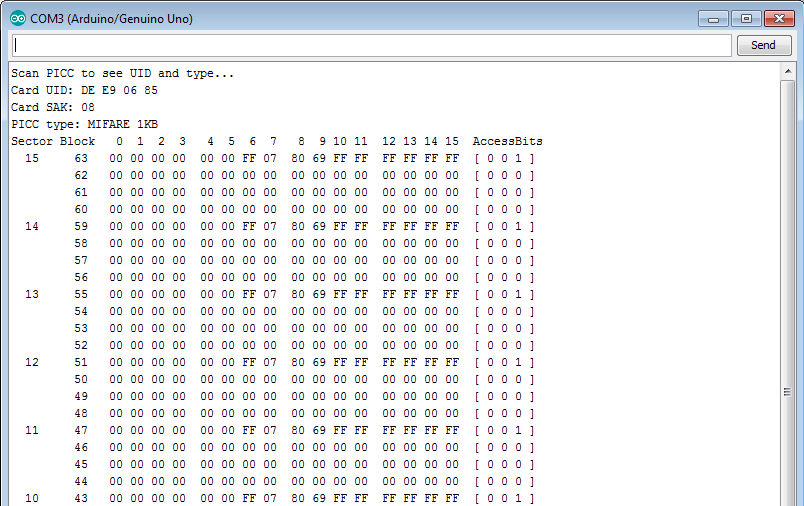
@PedroBinGonzales Wrong cards you use man :/ mifare 1kb have only 4 bytes as a uid, while you need 7 bytes as a uid for amiibo's. Amiibo's wont work on that card you use
@urherenow I know you can, still i bought the hardware and like to use it, it's easier and more convinient to use then open 3ds, get sd out put amiibo bins on them write stuff, whenever a new bin come sout you have to repeat (i don't like the ftp stuff 3ds/windows pc)
Also same goes for phone, but it's easier, i can at least download them on my phone without having to get the sd out
That's why i bought the hardware, cheap and no messing around, i bought a few new round flexible tags, those work fine, but i really like to use the rest (60+) of the 100 cards i bought (i used the other +/-40 on my phone and tagmo, a few on the 3ds with the hombrew app)
Hmmm i got a new batch of ntag 215 cards in from china. They all are recognized by the program, a other batch i had don't.... Now waiting till the new rfid scanner comes in (Should be tomorrow) so i can do some testing to see if it recognizes the wrong batch or not.... *To be continued...
Anyone having any luck compiling the Amiibomb Solution in Visual Studio 2017 Community?
"Build" -> "Rebuild Solution" results in errors related to serialportstream..
then, updating package 'serialportstream' allows it to compile... "Project" -> "Manage NuGet Packages" -> Then select 'serialportstream' and check the box next to it and click "update"
Then "Build" -> "Rebuild Solution" compiles successfully with no errors or warnings.
Finding the app in the BIN folder of the source code repo, launching Amiibomb.exe immediatly results in: "Unhandled exception...." error message, details show it's related to: "'Newtonsoft.Json, Version=10.0.0.0..." investigating further.
I'll keep going and try to get all these instructions into the Wiki once I get it all working..
Edit: doesn't look like the rfid library update helps this issue.. try if you're feeling lucky...
Anyone want to try the new build with the new MFRC522 library fixes applied that "should" fix this problem? https://github.com/peacepenguin/Amiibomb-UnofficialReleases or direct download the updated zip file that is almost identical to the 0.3 alpha release. This zip just has new HEX files for flashing the Arduino that contain the updated MFRC522 library that should fix this NTAG problem. https://github.com/peacepenguin/Amiibomb-UnofficialReleases/blob/master/AmiiBomb_0.3_Alpha_by_Ac_K_PATCH.1.zip?raw=true
@peacepenguin Tested it with my bad batch of cards and sadly not working. Still no clue why it wont recognize (The MFRC522, the cards)
@kokkie20 at least we know the problem isn't solved by simply updating the rfid library. I've got a dev environment setup now, so I'll look into changing how the short - long uid conversion occurs, as was discussed earlier in this thread.
@peacepenguin ok good luck on that, i just got arrived this morning a other rfid scanner (PN532) so will be working on that part seeing how it works and such 👍
Edit: Ok have setted it up and it seems to recognize the bad batch of ntags that wont work with the mfrc522 Can read uids, now trying to convert amiibombuino (Arduino script) to the PN532 Still a hell of a job to do, so might take a while as it is a lot that needs to be changed. Hopefully we can implement it later into amiibomb with a toggle switch with which rfid scanner you use. But thats for future stuff, first got to make it work with amiibomb 👍 *To be continued
@kokkie20 i just read some of the old posts that indicate you had already re-compiled using the new library awhile back, and then @Daisayah mentioned that things are good now! So i think i re-did the same thing that you did a month ago.
@kokkie20, are your current problematic NTAG's having a different problem than what you helped @Daisayah awhile back with, by updating the mfrc522 library?
The issue you're describing sounds a little different, so I want to make sure the UID calculation was found to be a problem, and was already solved by updating the library, so we can close down this issue at last! Then open a new one for any other types of NTAG read problems.
now i'm going to order PN532 too, i'm reading that it can do "card emulation", perhaps we can use an arduino+PN532 as the figurine itself! fun stuff to look into with that board!
@peacepenguin Probally a chance yeah what you did i did some time ago to. Well always better to redo it huh :) I have no clue to be honest, my mfrc522 just won't recognize them, not with amiibombuino nor with a other rfid scanner arduino code... Still working on the arduino code for the PN532, it is a lot different then the mfrc522 so need to test a lot to hopefully get it working with amiibomb. Not even sure if i can make it possible but can always try to get it to work 👍
Haven't looked into card emulation, first want to get it to write amiibo's correctly combined with amiibomb before i will even look into the emulation haha 🤣
Edit; Have been working on a simple debug program to see if i can let the winform talk to the arduino. Finnaly got it working to talk with it, have to do some dirty fixes but so far so good! Soon time to test if i can let it write a amiibo to it! 😀 Progress is made so far 💃
Hello,
Does someone can test that release please ? I've applied changes i'd done for my self to got it work in July. https://github.com/olijouve/AmiiBomb-uino/releases/tag/AmiiBomb_v0.4_Alpha
If you get better with it, i'll then publish updated source code
Note that the hex file for Uno and Nano are identical(same md5sum). Nano build was done with ATmega328P processor, but there is also an ATmega168 processor in the build choice list...
@olijouve it now detects the bad cards... Well detect... It says: Waiting for NTAG... Found! ERROR: Your tag it's probably not a NTAG215!
Well probably a bug on my end or something cause now it won't detect any of the cards lol.
Well progress so far on the PN532;
- Can get the program to talk with it
- Can detect if card is on the scanner
- Can read the amiibo's ! (Finnaly lol)
Todo;
- Write amiibo with PN532
- Create new firmware for arduino (Clean up all the new code... its a big mess!, maybe implement it into the amiibombuino or newer firmware, not sure yet what to choose.... Any suggestions?)
- Adjust amiibomb to make a toggle switch for which rfid reader you have so it uses the old code or newer code (Choose between PN532 or MFRC522) and place it in config
- Clean up more code inside amiibomb (Make everything better named so easier to find stuff lol)
- Implement it all into amiibomb (Saving amiibo, writing etc)
- More stuff i have forgotten to write down, would be nice if people got things that i may have forgotten that needs to be done with a new rfid scanner (PN532)
DO NOTE: Don't have a lot of spare time, so can't fix everything as fast as i would like. Please bare with me, nor i am a professional programmer, i do it as a side hobby and learning and reading codes from other people... Hopefully end of this month or somewhere next month it will be ready for public testing... 👍
@olijouve Still nothing for me with your version ah well, gonna order some other round flexible ones
@kokkie20 Take all time you need :) i'll use my friends nfc phone with tagmo for the time being :)
Will take the time haha :) I just can't seem to figure out how to send a byte array to the arduino without timing out with the current code in amiibomb The PN532 is a .... to handle..... Will take a small break for few days to think of something to hopefully get it working. Got a existing code for the PN532 only need to modify it to receive other data then the maker wants to have.... Meh 😢
I screwed up with RST and SS pin number for Uno and Nano, my board is a Mega so different pins and i forgot to adapt pinout for other board before the builds -_-
Can you retry with this new release ? https://github.com/olijouve/AmiiBomb-uino/releases/tag/AmiiBomb_v04_Alpha_2
@olijouve
No luck i get the message "Wating for Ntag" thank you voor your try.
Arghh, don't understand why what did work for me doesn't work for others. what arduino do you own ? Also my RF522 board/antenna has very poor performances and I need to place my tags in a very specific position to get it work. Have you tryied to rotate your tags over the antenna and try "every" possible positions ?
@rlvbrussel what issue are you facing? All ntags not readable nor writable? Some ntags work, others don't?
@olijouve what is unique about your build 0.4?
I think the UID issue is fixed with new mfrc522 library, so we should open up another thread to track any non-UID related problems.
@peacepenguin no nothing new now i just saw you released a fix last week...
@peacepenguin The issue what i have is Some ntags work, others don't?. The same problem i have on 11 aug (see the response before)
What do you mean with "I think the UID issue is fixed with new mfrc522 library, so we should open up another thread to track any non-UID related problems."
@olijouve I have arduino R3 witch RF522 and have tried every position.
Alpha 2 ist finally working for me on UNO. NFC Stickers are recognised. Pre made NFC Cards are beeing dumped. Only Empty NFC Cards are not recognised.
Keep up the good work

Finnaly good news on its way!!! Got the pn532 finnaly write trough amiibomb 😀 Now to implement the rest of the stuff, still a long way to go to get it all correct, but the start is here guys! Woop woop!!! 👍 👍 👍 👍
@kokkie20 can you post a link to your code for your pn532 - amiibomb progress? I have my dev environment setup to mess with this stuff again! Maybe make a github repo for it so we can test it and eventually make a pull request into the main repo?
I have many NFC tags and there are some that absolutely are not able to be read by the MFRC522. In all cases though the PN532 is able to read any tag I've thrown at it. So I think there are some newer NTAG cards coming out that the MFRC522 isn't going to deal with. For example, most Android phones contain the PN532 chip, all the issues reported here indicate that Tagmo, the Android alternative to amiibomb, works just fine with these troublesome NTAG215's. Perhaps the code is all fine at this point, and these new ntags simply can't be read with the MFRC522?
Another piece to the puzzle, I recently purchased the PowerSaves Portal and PowerTag chip. Using their software, you can scan a real amiibo and clone it to the PowerTag chip. The PowerTag chip is essentially a re-writable NTAG215. Which is really cool in its own right.. But anyway, the MFRC522 does not see it in any fashion at all. No indication in any application used with MFRC522, including amiibombuino.
So again, here's another example of a particular "type" of NTAG215, the powertag, that can be read perfectly by real nintdo hardware, android phones, and the pn532 without issue. Everything that i own, that can read an RFID tag, is able to see the PowerTag EXCEPT the MFRC522.
We should pursue testing and integrating @kokkie20 's code so people have an alternative option RFID board to use with amiibomb that is 100% reliable!
@peacepenguin Currently not at home, am for work outside my home... (For about a week from now, driving international truck atm) Will see what i can do with a github when i am home and have some spare time left. Most of the stuff is working so far, still need to clean up some code to make it more understandable then it is now atm. You also need to upload new firmware to your arduino to make it work with the pn532 code that i wrote inside amiibomb, but that part is already done (for the arduino, the hex files are ready)
Like i said, i will see what i can do, maybe i will make for now a private github (New account, where only you and me know the link to untill we know for sure everything is working as it should be, before we even going release it to the public) Got by any chance skype or discord @peacepenguin ? easier to communicate trough for when we go work on this update? *Also little bit easier to share some stuff between eachother 👍
you can hit me up with a email if you want just my nick and then gmail after it ;) well i guess you know what i mean with that 😃

I have sended all my code to peace so he/she can work further on it. I don't have the time for it at the moment due to stress weeks at work (working now about 70+ hours a week)
Any Updates? I just put together my amiibomb and get that same error.
EDIT: I also have some UIDs for you. Read with the program "GoToTags". 5BCE55D3 86A0B81F BACAFD0C
The first two also just stoped working with amiibomb. I dont get the error anymore but it does not do anything instead. It's just like the tags are dead. But on my normal nfc reader they work just fine.

I ordered more Tags, now with the longer UID but the amiibomb doesnt read them at all. my normal nfc reader detects them right away, so they work, but the amiibomb doesnt react at all. I have these sticker tags. Can someone help? I have 10 and not one works.