
cobrix
 cobrix copied to clipboard
 AbsaOSS
NOT DIVISIBLE by the RECORD SIZE
Hi @yruslan ,
I am trying to read a file with the following command:
spark.read.format("cobol").option("copybook", file://BOOK.txt").load("DATASET.dat").count()
The error output is:
ERROR FileUtils$: File hdfs://NHA/user/big/DATASET.dat IS NOT divisible by 200. java.lang.IllegalArgumentException: There are some files in DATASET.dat that are NOT DIVISIBLE by the RECORD SIZE calculated from the copybook (200 bytes per record). Check the logs for the names of the files.
After trying some options, the following worked:
spark.read.format("cobol").option("copybook", "file://BOOK.txt").option("file_start_offset", "1").load("DATASET.dat ").count()
But the line count of the file shows only 20.314.408 lines while the expected value is 38.694.112 lines and the column values are completely wrong.
Thanks for your help !

Hi @rafpyprog, Cobrix reads input files as a fixed-record-length file where records follow each other and have the same length. Since the size of the record determined by the copybook is 200 bytes, the size of the input file should be divisible by 200. This is not the case. It can be for different reasons.
- The copybook does not completely match the layout of the records.
- The input file contains additional headers such as RDW, BDW, etc. In this is the case, use
.option("is_record_sequence", true). - An input file can be a text file, not a binary. If this is the case, refer to
Reading ASCII text filesection of README. Although the section describes ASCII, it is applicable to EBCDIC text files as well. - It can even be a bug in a parser in which the size of a field in the copybook is determined incorrectly.
I'd recommend you to compare the layout of a record reported by Cobrix (200 bytes) to the actual data you have using HEX viewing tools. If possible you can request a record layout from a mainframe, it might make the job easier. Also, you can use HEX viewing tools to look up if there are any headers in the input file that are not described in the copybook or not consumed by Cobrix when 'is_record_sequence=true'.

Hi @yruslan,
Using the "is_record_sequence" option the following error shows:
val df = spark.read.format("cobol").option("copybook", file://BOOK.txt").option("schema_retention_policy", "collapse_root").option("is_record_sequence", true).load("DATASET.dat").count()
19/10/03 14:05:41 WARN TaskSetManager: Lost task 0.0 in stage 0.0 (TID 0, xfw.dsp.xx.com, executor 7): java.lang.IllegalStateException: RDW headers should never be zero (0,12,0,0). Found zero size record at 8976.
This error means either the records do not have RDWs or they are not little-endian. If RDWs are present but are big-endian, you can use these options:
      .option("is_record_sequence", "true")
      .option("is_rdw_big_endian", "true")
If this resuts in a similar error message, you might need to compare record layouts to ensure the copybook matches the data file exactly.
@rafpyprog could you please share a snapshot of the copybook file and data file? I am also facing the same error and new to cobrix.

@Ashesh1993,
Regarding the issue you posted at the different thread.
Cobrix 2.0.7 has new options that allow you to better debug copybook/data mistamches:
.option("debug_ignore_file_size", "true")
.option("debug", "true")
The first option turns off sile size mismatch check. The second option adds new columns containing HEX values of rwa data.
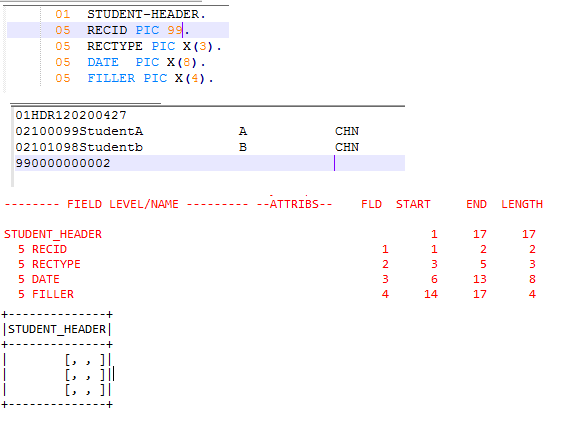
for the below code I am getting the output attached in file, (copybook file, dat file, Console output). Unable to read the data perfectly. Please help me out.
Dataset<Row> dsCob = spark.read().format("cobol").option("copybook", "D:/employee_header.cob") .option("file_start_offset", "1") .option("debug_ignore_file_size", "true") .load("D:/data_file.dat"); dsCob.show();
- Use
.option("schema_retention_policy", "collapse_root")to remove the root level struct and to have more native view of the data. - Use
.option("debug", true)to see what data was actually decoded. - According to the top picture, your data file is more complicated than described in the copybook. It has header segments and value segments distinguished by [possibly]
RECTYPE. The copybook should describe all segments as redefines. - Since your file is multisegment I can expect it might contain RDW headers. If that's so, use
.option("is_record_sequence", "true")and possibly other RDW tuning options described in the documentation.