
stable-diffusion-webui

stable-diffusion-webui copied to clipboard
Published
4 months ago
•
 AUTOMATIC1111
AUTOMATIC1111
[Bug]: Generated Info not showing up
Is there an existing issue for this?
- [X] I have searched the existing issues and checked the recent builds/commits
What happened?
The latest updates bugged out the generated info element on the webui while or after generating, it stays always blank.
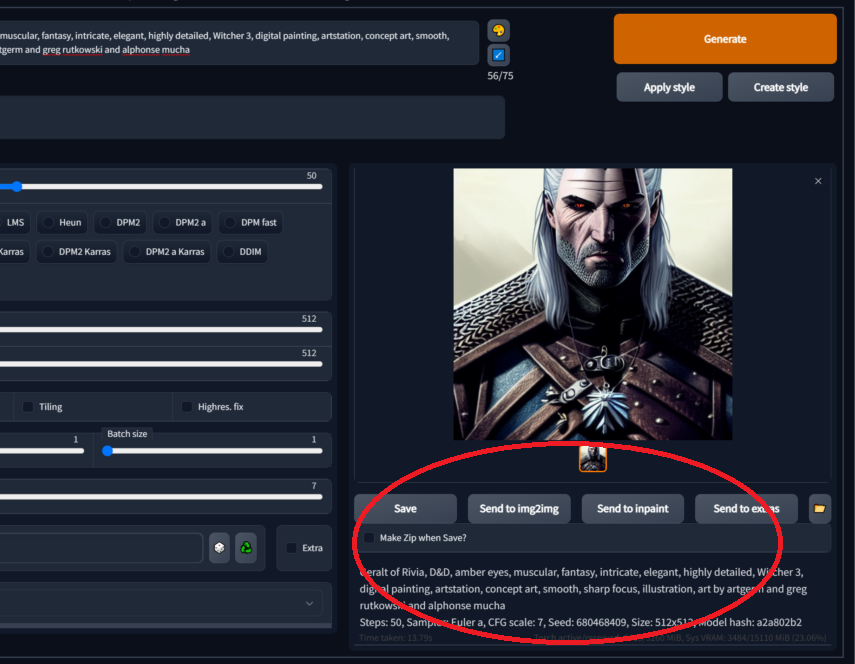 (example screenshot, this information is not showing on my end after the update)
Steps to reproduce the problem
n/a
What should have happened?
Displaying the information as intended.
Commit where the problem happens
latest
What platforms do you use to access the UI ?
Windows
What browsers do you use to access the UI ?
Mozilla Firefox
Command Line Arguments
`--xformers --opt-sub-quad-attention --medvram`
List of extensions
- Remove Background Extension (makes the background transparent)
- Default extensions that came enabled
Console logs
No logs or console logs shows this.
Additional information
No response


Currently I am only aware of problems with iOS. Have you tried all the suggestions here? https://github.com/AlUlkesh/stable-diffusion-webui-images-browser/discussions/107