

 AUTOMATIC1111
[Bug]: Numbers, arrows, and slider bars
Is there an existing issue for this?
- [X] I have searched the existing issues and checked the recent builds/commits
What happened?
This seems like something that other people may describe differently, so if I missed someone else talking about it, I apologize for missing it, but I have given some effort to searching for it.
I use Automatic1111 on a box on my LAN. This allows me to use other computers and tablets in the house to create things when I feel the urge. Unfortunately, not all of these devices have fine mouse controls for scroller bars. Especially on a tablet, changing the resolution to 576x576 before the autofill wipes it out can only be achieved by top-tier e-sports players with 200+ APM. Is there a way to turn that autofill back to OFF?
I know, I know, I know - it is input validation because you can never really trust users. I get it. But ... I am absolutely hating it. A LOT.
Steps to reproduce the problem
To reproduce this error, pull up the A1111 UI on any tablet or phone and try setting the resolution to something specific. (You may need to use the --listen switch.) 576x576 is my usual, but just pick a number and try to hit it with your fingers. You will understand super quickly.
What should have happened?
I should be able to enter the number 576 without having StarCraft II flashbacks.
Commit where the problem happens
Latest version
What platforms do you use to access the UI ?
Windows, Linux, Android
What browsers do you use to access the UI ?
Mozilla Firefox, Google Chrome
Command Line Arguments
n/a
List of extensions
n/a
Console logs
n/a
Additional information
No response

I do believe this was somewhere in the configs, to have the bar move in stages of 64. even auto prefers that and changes it so.. I wonder why no-one has PR'd a change to default yet, lol
I'll try to find where that setting/config is,
also, you can type the number in.

@zaqhack
change these: both Width and height in ui-config.json btw, it is meant to be changed by the user, so don't feel slimed by thinking its some kind of hack.
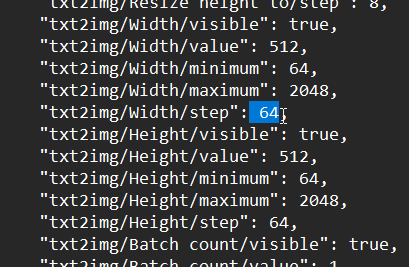
This is helpful, but I honestly just want it turned off as it currently works. Or make the check interval to 10 seconds or something.
This is not really A1111's fault - I get this is part of the web framework. But I'm a big kid: I can take an essay test, and even file taxes. I don't want the UI to just pop the number in there. I used to be able to type in a number from my phone or tablet, and now I can't. I didn't care when it changed, but today ... it was super-frustrating to have the UI overwrite what I'm trying to type. Especially since it is incredibly hard to move the slider 1 tick on a phone screen with your finger. It's REALLY hard to work it without a mouse ... even if I change the defaults or tick sizes or whatever ...
maybe I do not understand you correctly. You are having a poor gradio mobile experience.?
I want to say yes, but I'm not connecting to Gradio outside the house. I'm just connecting via LAN to 192.168.X.X:7890 via tablet browser. (Or phone browser, which is worse.)
I have the exact same setup. I use this constantly from my phone while I am out and about and whatever changed to cause it to automatically fill in the width or height resolution when you try to type it in manually made this incredibly difficult to use. I do find your information about the ui-config.json file helpful though as there were some things that I have always wanted to change regarding some of the default settings. But I have no idea why those fields would need to be set to automatically fill in when someone backspaces the existing value to try and type something. Honestly, the best thing they could do with those fields is not only let people type in whatever size they want, but offer it at a dropdown as well with a list of common values.
