
stable-diffusion-webui
 stable-diffusion-webui copied to clipboard
 AUTOMATIC1111
UX -- Add an option to lock the aspect ratio for all width/height sliders. Autodetect uploaded image width/height.
Is there an existing issue for this?
- [X] I have searched the existing issues and checked the recent builds/commits
What would your feature do ?
I find myself often getting a starter image from somewhere, loading it into SD, and then opening a calculator to figure out the aspect ratio and manually applying that math to downsize the image. This can all be automated.
This workflow would be greatly enhanced if we could either:
-
Enter the aspect ratio into the Width / Height fields and then lock it. Using the slider(s) and/or text field to alter one dimension and have the other dimension maintain the aspect ratio.
-
Auto-detect the aspect ratio and width/height when an image is dragged onto an Image component. Fill out the fields for us. Then let us hit a "lock" button and adjust accordingly.
Possible implementation: I tried playing with adding another button in the button column, but Gradio didn't want to play nice with the padding. I'm not sure if there's a way to alter the vertical spacing, but if not, I would suggest that we remove the "swap" button, since that functionality can't be used that often and can be bypassed by simply remembering one number, and replace it with a "lock" icon, which would be potentially used whenever a non-square aspect ratio is used.
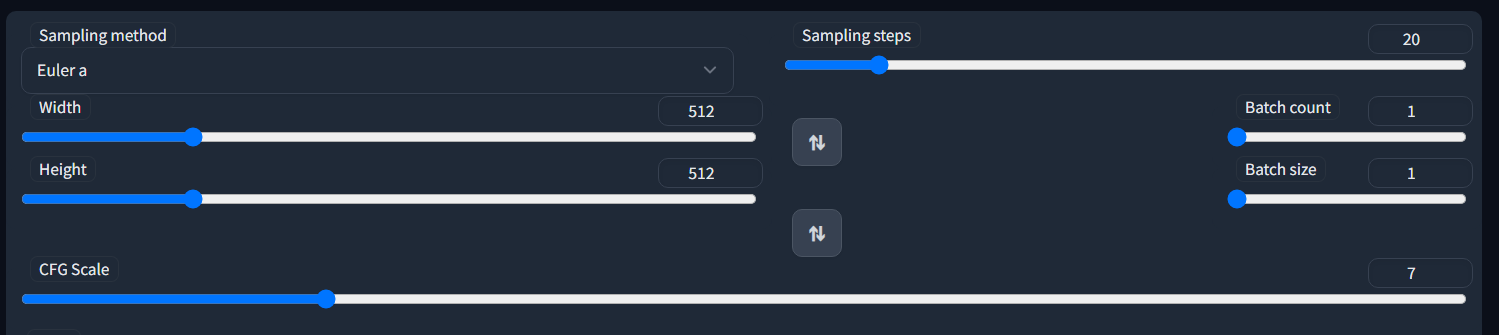
Proposed workflow
- Upload an image
- Autodetect width/height.
- Fill out width/height fields
- Lock the aspect ratio by default
- Allow sliders and/or entering a number to maintain the locked aspect ratio
Additional information
No response

Been hankering for this as well, coincidentally just tried to do something like this today but the layout fights back. I see a couple options, maybe some kind of a custom html/css button (prone to breaking stuff) or settling for horizontal buttons, or as you said, removing the swap button and replacing it with the lock/unlock button. Both buttons side by side isn't that bad, but maybe just my opinion.

Side by side would work, but I can't figure out how to get rid of all the right-padding.
This is probably trivial for someone who knows how Gradio's UI works. Pic and code attached.
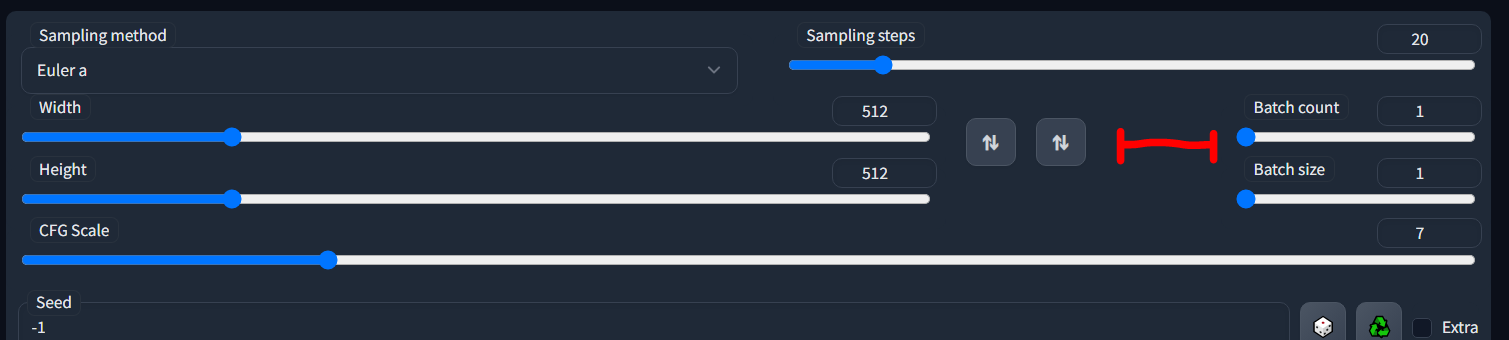
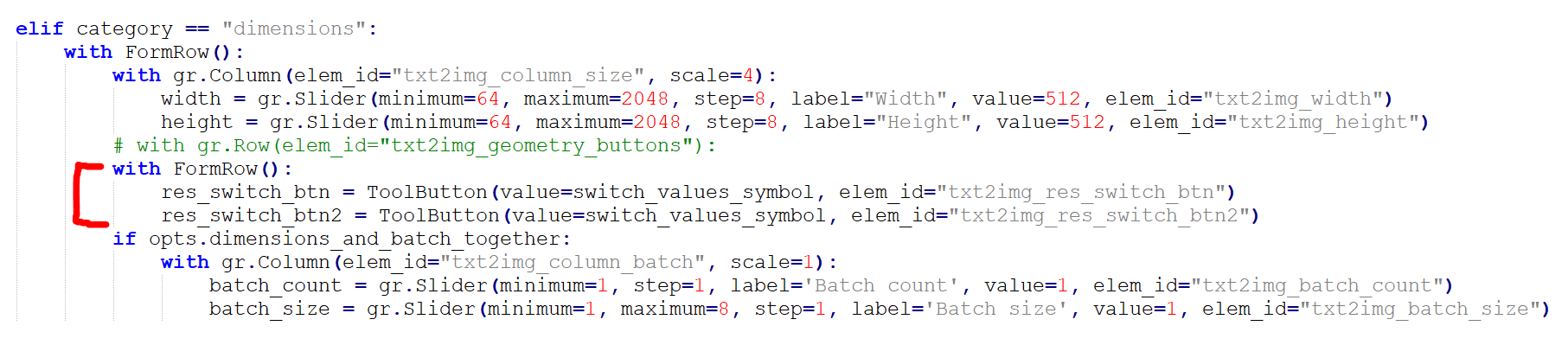
Yeah I don't know if Gradio has the tools to do it, seems like the logical thing would be to put both buttons in a Column and set the scale param to something sensible, but it breaks the row no matter what.
If you put the buttons just floating without a container, they seem to play along the nicest:
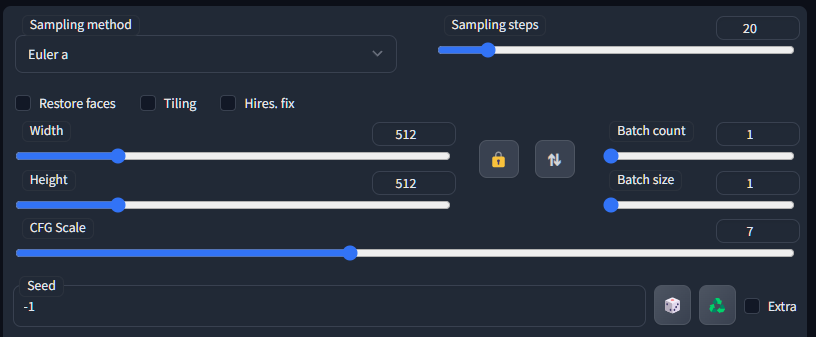
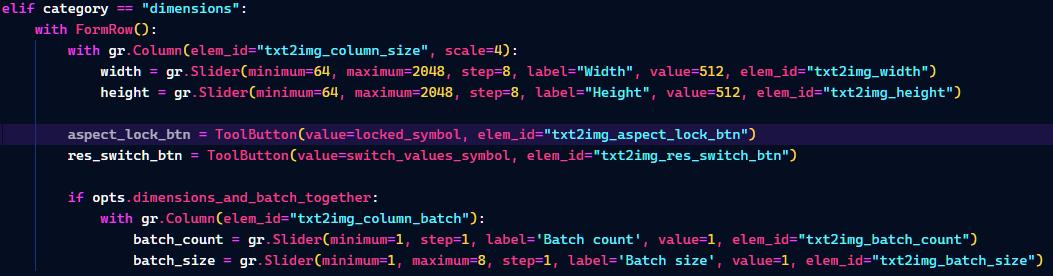
But as you see, the row height affects things in a probably unintended way: compare the lock/switch buttons to the dice/recycle seed buttons below. The seed buttons sit tighter together, and there's nothing different in that code, just the row height. So that makes me think Gradio's layout system isn't that well geared towards laying stuff out in thick rows like this. I can hack together injected CSS and do gr.HTML() to create a custom button just for this situation but I'm pretty sure that's a time bomb waiting to break everyone's UI a couple of patches down the line.
Thanks @argontus I found the same after I posted -- removing the extra "FormRow" allows it to sit as you showed. I think that's good enough for the UI placement.
However, I then realized that Gradio doesn't have a "toggle button", so I imagine this would need to be implemented with some css(?) coloring-trick and by keeping track of the button state? Any thoughts there?
BTW, there's also an active issue over on the ControlNet github to add a button that will determine and inject the ControlNet's image size into A1111s width/height UI fields. This combined with the lock aspect ratio feature would mean that no one will need to inspect images for their size and then manually recalculate an aspect ratio. It'll just be a couple of clicks. Cheers https://github.com/Mikubill/sd-webui-controlnet/issues/378
Yeah I noticed that, too. The button is able to fetch its value from a function, but it's only run when the app loads. I tried to write straight into the button value but it doesn't change once the button's been constructed once. So at this point the only way that I can think of (and keeping this based on Gradio) would be a radio button group of locked and unlocked states. Radio buttons themselves seem to be intended to be used horizontally, tried stacking them vertically but everything breaks.
That controlNet function seems to make sense, haven't really had the time to play around with controlNet that much but now that I think of it, that's kinda the same basic functionality than locking the aspect in img2img. Lots of friction to be removed with these improvements I think.
So a quick update -- with help from the Gradio team there's a 'variant' parameter on their button that colors the button. This would be perfect for the toggle-button behavior that's needed here. Unfortunately, somehow this breaks the A1111 row sizer.

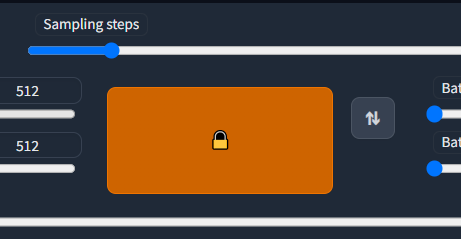
Gradio suspects this may be a bug, but we're unable to duplicate it with stand-alone code. Attempting to duplicate the A1111 layout in stand-alone code results in this:

So the difference is that these buttons are stretching to fill the area, and not occupying their minimum size as seen in A1111.
Does anyone familiar with A1111 and Gradio know the mechanism A1111 uses to shrink all its buttons to their minimum sizes? And more importantly, how to do that in the short example that may show the problem?
Here's the example code I worked on with help from Gradio. Can be run standalone --
import gradio as gr

lock_symbol = '\U0001F512' # 🔒
unlock_symbol = '\U0001F513' # 🔓
switch_values_symbol = '\U000021C5' # ⇅

class FormRow(gr.Row, gr.components.FormComponent):
    """Same as gr.Row but fits inside gradio forms"""

    def get_block_name(self):
        return "row"

class ToolButton(gr.Button, gr.components.FormComponent):
    """Small button with single emoji as text, fits inside gradio forms"""

    def __init__(self, **kwargs):
        super().__init__(variant="tool", **kwargs)

    def get_block_name(self):
        return "button"

def toggle_aspect_ratio(btn):
    if btn == unlock_symbol:
        return gr.update(value = lock_symbol, variant="primary")
    else:
        return gr.update(value = unlock_symbol, variant="secondary")

with gr.Blocks() as demo:
    with gr.Row().style(equal_height=False):
        with gr.Column(variant='compact', elem_id="txt2img_settings"):
            with FormRow():
                with gr.Column(elem_id="txt2img_column_size", scale=4):
                    width = gr.Slider(minimum=64, maximum=2048, step=8, label="Width", value=512, elem_id="txt2img_width")
                    height = gr.Slider(minimum=64, maximum=2048, step=8, label="Height", value=512, elem_id="txt2img_height")

                b = ToolButton(value=unlock_symbol)
                a = ToolButton(value=switch_values_symbol)

                with gr.Column(elem_id="txt2img_column_batch", scale=1):
                    width = gr.Slider(minimum=64, maximum=2048, step=8, label="Width", value=512, elem_id="txt2img_width")
                    height = gr.Slider(minimum=64, maximum=2048, step=8, label="Height", value=512, elem_id="txt2img_height")

    b.click(toggle_aspect_ratio, b, b)

demo.launch()
@Alchete good findings, thanks for digging. I guess I know what's going on now. Your example doesn't work because in A1111 these small buttons use ToolButton class which isn't defined in Gradio, but in A1111 and it sets the variant as "tool" - looking at Gradio codebase left me with the impression that whatever is written into the variant field ends up as a css class like this -> variant="tool" -> .gr-button-tool.
Using ToolButton forces the variant to be "tool" because the class overwrites:
def __init__(self, **kwargs): super().__init__(variant="tool", **kwargs)
but there's no other difference to writing gr.Button(variant="tool"). And we need that because gr-button-tool has been styled in A1111's styles.css so that it doesn't expand, which it would normally do due to other style definitions in the css I guess. After all the button expands like you posted if you remove the gr-button-tool style, which defines widths and flex stuff.
So putting this into use in a completely unintended way, probably, you can write this:
aspect_lock_btn = gr.Button(variant="tool gr-button-primary", value=locked_symbol, elem_id="txt2img_aspect_lock_btn")
and it ends up like this (highlighted text is whatever we type into variant):
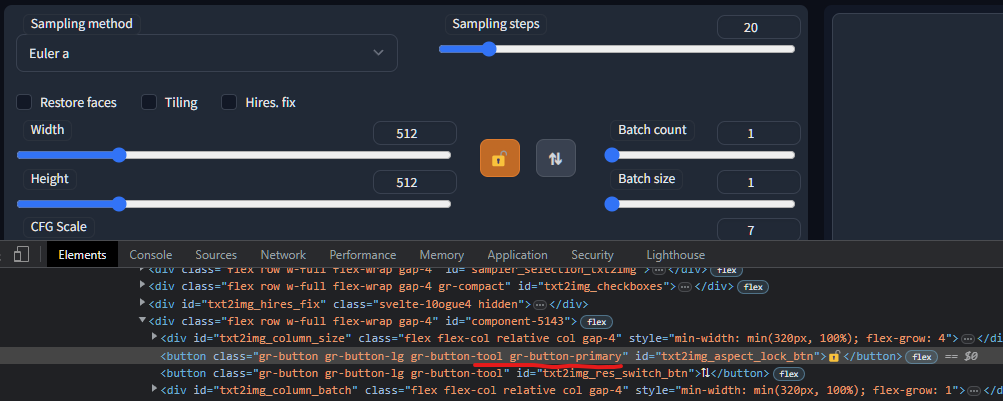
Here's a stand-alone demo showing a possible implementation of the lock feature. Stand-alone this runs fine. However, once inside A1111 it runs extremely slowly as if there's an "UpdateUI" method that runs after every keystroke. 🤷♂️ This needs some love from the Gradio / A111 experts.
import gradio as gr

lock_symbol = '\U0001F512' # 🔒
unlock_symbol = '\U0001F513' # 🔓

def width_changed(btn, width, height, width_slider_changed, aspect_ratio):
    if btn == lock_symbol:
        width_slider_changed = True
        newHeight = int((width/aspect_ratio)+0.5)
        if newHeight == 0:
            newHeight = height
        return [width, newHeight, width_slider_changed]
    else:
        return [width, height, width_slider_changed]

def height_changed(btn, width, height, width_slider_changed, aspect_ratio):
    if btn == lock_symbol:
        if width_slider_changed:
            width_slider_changed = False
            return [width, height, width_slider_changed]
        else:
            return [int((height*aspect_ratio)+0.5), height, width_slider_changed]
    else:
        return [width, height, width_slider_changed]

def toggle_aspect_ratio(btn, width, height, aspect_ratio):
    if btn == unlock_symbol:
        aspect_ratio = width/height
        return [gr.update(value = lock_symbol, variant="primary"), aspect_ratio]
    else:
        return [gr.update(value = unlock_symbol, variant="secondary"), aspect_ratio]

with gr.Blocks() as demo:
    with gr.Row().style(equal_height=False):
        with gr.Column(variant='compact', elem_id="txt2img_settings"):
            with gr.Row():
                with gr.Column(elem_id="txt2img_column_size", scale=4):
                    width = gr.Slider(interactive=True, minimum=64, maximum=2048, step=8, label="Width", value=1024, elem_id="txt2img_width")
                    height = gr.Slider(interactive=True, minimum=64, maximum=2048, step=8, label="Height", value=512, elem_id="txt2img_height")

                b = gr.Button(value=unlock_symbol)
                aspect_ratio = gr.State(value = 1.0)
                width_slider_changed = gr.State(value = False)

    b.click(toggle_aspect_ratio, inputs=[b, width, height, aspect_ratio], outputs=[b, aspect_ratio])

    width.change(width_changed, inputs=[b, width, height, width_slider_changed, aspect_ratio], outputs=[width, height, width_slider_changed], show_progress=False)#, preprocess=True)
    height.change(height_changed, inputs=[b, width, height, width_slider_changed, aspect_ratio], outputs=[width, height, width_slider_changed], show_progress=False)#, preprocess=True)#, preprocess=True)

demo.launch()
Yes please! I hate having to do 1 of 2 things:
- lookup the dimensions image manually, the calculate the aspect ratio
- when using img2img to resize an image (before upscaling), I need to take width/height and multiple each by 2.

I came to see if anyone else had mentioned a button to lock the height/width sliders so moving one moves the other at the same time. It'd be extremely helpful.
Sad to see GRadio isn't playing nicely w/ an implementation.

@Alchete
How about if you add a debounce to the change function? so the other slider won't update immediately and therefore less calls.

There are several extensions that do this now, i.e. https://github.com/thomasasfk/sd-webui-aspect-ratio-helper There is has also been a button to get the width/height from the uploaded image in img2img since 1.3.0. https://github.com/AUTOMATIC1111/stable-diffusion-webui/commit/771ea212de13711b494b082d8e94e79b17ac9d08
Closing.
