

 AUTOMATIC1111
[Bug]: Extra Networks include files with the same name as the folder
Is there an existing issue for this?
- [x] I have searched the existing issues and checked the recent builds/commits
What happened?
When the Extra Networks user interface detects folders in Embedding, Lora, etc., it places them at the top of the user interface as buttons to display only the files in the selected folder. However, if you click on one of them, its name will appear in the search bar without the / character, this will make the UI display files containing the same world as the selected folder name.
Steps to reproduce the problem
*Requirements : Make sure you have a file outside the folder you are going to try. It need to contains the same word as the folder name.
- Go to the webUI
- Press Extra Networks
- Click on one of the folder button (test here)
- You can see "testEmbedding.pt" which is in the test folder. However "testEmbeddingOutsideOfTestFolder" is not.
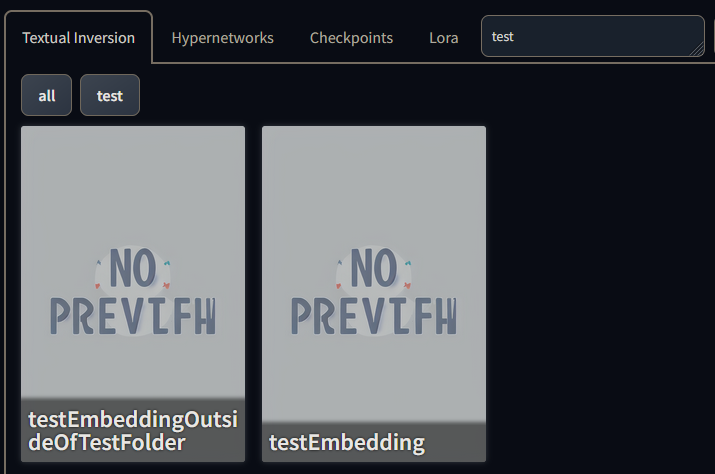
- If we add a / we can now see that only files inside the folder are displayed as it should be.

What should have happened?
Only the embedding file "testEmbedding.pt" should appear because it is the only one in the test file.
Commit where the problem happens
226d840e84c5f306350b0681945989b86760e616
What platforms do you use to access the UI ?
Windows
What browsers do you use to access the UI ?
Mozilla Firefox, Google Chrome
Command Line Arguments
No
List of extensions
No
Console logs
Running on local URL:  http://127.0.0.1:7860

To create a public link, set `share=True` in `launch()`.
Additional information
Made search and came across a pull issue that was mentioning the issue. It seem like the pull was "rejected" or "put on hold" by @AUTOMATIC1111 himself for the following reason. The pull request was however a bit different since it was also talking about changing the search method. What I'm pointing out here is that the buttons are named the same as folder names and it creates the expectation that when you will click on one of them, it will show to you files that are actually in the folder named the same as the button.

What I'm pointing out here is that the buttons are named the same as folder names and it creates the expectation that when you will click on one of them, it will show to you files that are actually in the folder named the same as the button.
That reasoning was also specifically rejected since fixing it will remove the current functionality he mentioned:
Creating empty dirs can be useful to make a button to search for text in model filenames.
Even though I obviously agree with you on how the buttons should work.
