

 AUTOMATIC1111
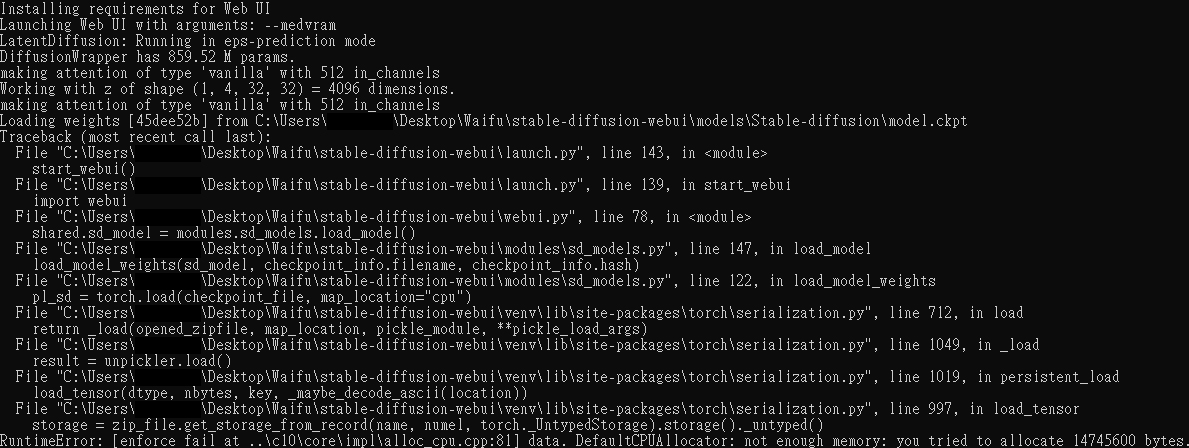
RuntimeError: [enforce fail at ..\c10\core\impl\alloc_cpu.cpp:81] data. DefaultCPUAllocator: not enough memory
Describe the bug
First time I successful open the program and use it, but when I restart my computer, it always run this for me...
RuntimeError: [enforce fail at ..\c10\core\impl\alloc_cpu.cpp:81] data. DefaultCPUAllocator: not enough memory: you tried to allocate 14745600 bytes.
To Reproduce Steps to reproduce the behavior:
- Go to 'stable-diffusion-webui'
- Click on 'webui-user.bat'
- Wait for some time
- See error
Screenshots
Desktop (please complete the following information):
- OS: Windows 11
- GPU: GeForce GTX 1060 6GB
- Browser chrome
- Commit revision 67d011b02eddc20202b654dfea56528de3d5edf7

Try closing all your applications and then do try again. Rebooting may also help. If you're trying to run this while you're gaming or have a GPU-intensive application open, they're likely hogging the VRAM.
If all else fails, try setting up Linux instance with the GPU and see if that helps.

There are GPU memory leaks currently. Webui/SD needs a restart once in a while to keep going. In my case about 500 mid-res images and the 24 gigs of my 3090 are used up totally. maybe related: https://github.com/AUTOMATIC1111/stable-diffusion-webui/issues/1711

Try closing all your applications and then do try again. Rebooting may also help. If you're trying to run this while you're gaming or have a GPU-intensive application open, they're likely hogging the VRAM.
If all else fails, try setting up Linux instance with the GPU and see if that helps.
There are GPU memory leaks currently. Webui/SD needs a restart once in a while to keep going. In my case about 500 mid-res images and the 24 gigs of my 3090 are used up totally. maybe related: #1711
I restart program when my computer just rebooting many times, but it still show this bug.
I understand, I first thought this happens after a while. Now that I see you only have 6 GB of GPU memory, that's the problem
Go to your webui.bat and add that in the beginning: set COMMANDLINE_ARGS=--lowvram
You can also try the "mid" option first set COMMANDLINE_ARGS=--medvram
When using SD keep in mind that higher resolution requires more memory, so keep it at 512x512 for testing first
I understand, I first thought this happens after a while. Now that I see you only have 6 GB of GPU memory, that's the problem
Go to your webui.bat and add that in the beginning: set COMMANDLINE_ARGS=--lowvram
You can also try the "mid" option first set COMMANDLINE_ARGS=--medvram
When using SD keep in mind that higher resolution requires more memory, so keep it at 512x512 for testing first
I tried it, but still same problem...
@Briann123 Try Commit af02ee1297b212e053c0f44bd457e90b7ed49eb9
Specify --lowvram in the COMMANDLINE_ARGS file in the webui-user.bat and see if that works.
Its possible the commit after that version may have a bug.

@Briann123 Try Commit af02ee1
Specify --lowvram in the COMMANDLINE_ARGS file in the webui-user.bat and see if that works.
Its possible the commit after that version may have a bug.
I just try it, but have same problem
I managed to barely get it running on my 8GB Card so if yours is 6GB, you may have to upgrade.
How much system RAM do you have?
I managed to barely get it running on my 8GB Card so if yours is 6GB, you may have to upgrade.
How much system RAM do you have?
I have 16G(8G*2) RAM. I think maybe related to it, because when I run the program, than my Chrome will show "out of memory" page for me.
What worked for me was closing everything that was open, and checking task manager to make sure no other processes such as Chrome were still running (and ending them if they were).
You basically need to free up as much RAM as possible as it seems it initially tries to allocate a little over 10GB of RAM before settling back down.
Then after that it would run, and after that, it would still work after opening the browser. I advise to try it with Microsoft Edge after since it seems to use a little bit less RAM.
I haven't tried yet but if you dual boot Linux (such as Linux Mint) you'll have better luck as it uses very little RAM in general.
Having a similar problem. Visual artist here, I know next to nothing about python or coding, please bear with me.
Attempting to do a local SD 1.5 Install
Alienware R417 Gaming Laptop, 16 GB RAM, dual GPU config:
(Intel HD Graphics 630,
NVDIA GeForce GTX 1070) w/8 GB VRAM, CUDA, Pascal Architecture)
Windows 10
Python 3.10.8 installed (latest 3.11 version didn't work for the install)
Followed this tutorial and (apparently) managed to succesfully install the 1.5 model from Hugging Face & the AUTOMATIC1111 Web UI
https://youtu.be/ycQJDJ-qNI8
Unfortunately. on running the WebUI.bat I get this error:
RuntimeError: [enforce fail at ..\c10\core\impl\alloc_cpu.cpp:81] data. DefaultCPUAllocator: not enough memory: you tried to allocate 12582912 bytes.
I followed some of the tips here but none of them worked. Just can't get past that stage...basically unable to launch the Stable Diffusion ui on my browser.
I watched a couple of videos about a resource called xformers, looks like a possible solution for users with low - VRAM cards like mine. Honestly I'm running blind... I have a very, very vague idea of what I'm doing :-/
Any suggestions?
Thanks!


I have nearly the same hardware ressource as you describe and have the same problem.
webui-user.bat ... RuntimeError ... alloc_cpu.cpp ... DefaultCPUAllocator ... not enough memory: you tried to allocate ...
Does someone have some hints?

Finally I solved this problem with upgrade my ram from 16GB to 48GB
Are the 48GB the minimum requirement?
Try rebooting the computer or closing all applications and just running the WebUI that way. Temporarily disable your security software or add the AI drawing folder to exclusions so your AV doesn't waste RAM trying to scan it while you're loading the model.
You may also need to grab SysInternals RAMMap and do a flush of the changed working set (not 100% sure on that option), but one option basically flushes some of the memory caches that can help "out of memory" errors.
Otherwise, you're kinda boned, you might want to consider setting up a Linux instance on a USB SSD or something and using that for AI drawing. Much better than dealing with Windows if you can endure a little bit more pain.
Finally I solved this problem with upgrade my ram from 16GB to 48GB
Are the 48GB the minimum requirement?
No,I also try the 32GB RAM, and still can run.
I have 32GB system ram and still have the issue... --> my system: RYZEN 5 16GoRAM - GTX 1060 6Go with the "small" .cpkt of the SD 1.5... hello ALL ! YEP ! .. found that my software (magician) for a samsung SSD uses some dram memories as cache memory .. (a rapid mode in the performance option)s.. then i just cut this in standard mode which doesn't use more dram. Also for the try i only open 1 tab in edge navigator (localhost:7860)
- in the webui-user.bat (which is the cfg for user) i put "--opt-split-attention --always-batch-cond-uncond --medvram" on the line : set COMMANDLINE_ARGS= --medvram ...
- i watch about the vram used and it was ... 5.8 Go !!on the little GTX1060 with 6Go Vram. temp 67 to 69°C It seems ok for now i'm now trying to use the --medvram only .. ? OKi !! BUT my CPU goes to 75% used ... now 55% next to try i'm in the 1.5 SD -- generate 16 images 512² in 7min . and hope for the full CKPT file: i put it in line with the 1111 webui option (on left top) but , IT CRASHED. compared to the full model, the light version seems not reflecting what i got with the full one. Last test: with just "set COMMANDLINE_ARGS= --opt-split-attention " but i'm near to think the pb was the SSD using RAM coz when it starts to "compile", the RAM goes for now about 80% then the full .CKPT may be the 2nd crasher. ** you'll see the good with the Loading weights mention in the CMD. Cheers !

To fix the issue on Windows, set the virtual memory size to 'System managed'. I encountered this error when I had 32GB of RAM and set the maximum size of the virtual memory (pagefile.sys file) to 4GB. If you have enough VRAM on your GPU, you can try increasing the size of the virtual memory to see if it resolves the issue.
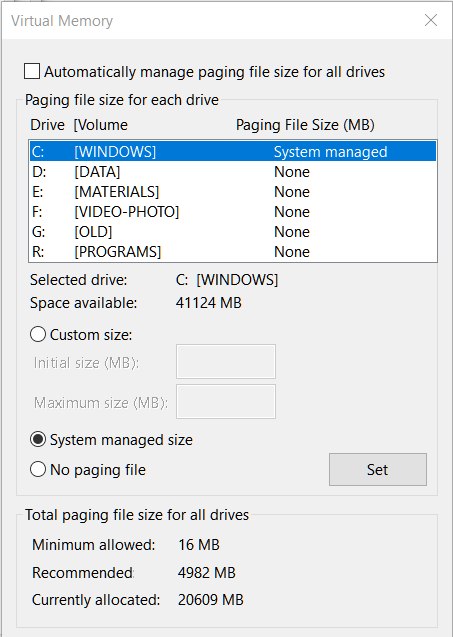

Just to comment, ensuring Virtual Memory is set to "System Managed" also solved the issue for me and I have 16GB System RAM. Maybe this can be listed as a troubleshooting step for Windows users.
To fix the issue on Windows, set the virtual memory size to 'System managed'. I encountered this error when I had 32GB of RAM and set the maximum size of the virtual memory (pagefile.sys file) to 4GB. If you have enough VRAM on your GPU, you can try increasing the size of the virtual memory to see if it resolves the issue. !
- strange as virtual memory is about RAM .. but may be it gets too much ! ? to try ...
- my GFX is now RTX3060 12Go but there are some pb too
- next to get more RAM from 16Go to 32Go to solve .. but an eye on this forgotten memory (as i put out it for the SSD magician software memory manager, i in fact get more RAM .. to try... Thank you for reply i haven't seen sooner ! CHeers 2023 !
To fix the issue on Windows, set the virtual memory size to 'System managed'. I encountered this error when I had 32GB of RAM and set the maximum size of the virtual memory (pagefile.sys file) to 4GB. If you have enough VRAM on your GPU, you can try increasing the size of the virtual memory to see if it resolves the issue.
Thank you, that fixed my issue. I was getting an error trying to load in 30Mbs when I also have 32GB RAM and a 3090

To fix the issue on Windows, set the virtual memory size to 'System managed'. I encountered this error when I had 32GB of RAM and set the maximum size of the virtual memory (pagefile.sys file) to 4GB. If you have enough VRAM on your GPU, you can try increasing the size of the virtual memory to see if it resolves the issue.
seems like someone hardcoded path to windows pagefile
