

 ARMmbed
Forensic Dongle

I changed this PR to target develop rather than main.
There are too many commits, a lot of changes outside of source/hic_hal and extraneous changes (superfluous files, whitespace changes, commented out code, etc).
Some quick notes:
- There are some left-over changes for STM32F373 that should be removed.
- There are too many modules enabled in
stm32wbxx_hal_conf.hresulting in to many HAL files being needed to compile. - All the changes in
source/daplink/interface/main_interface.cshould be moved to HIC-specificsdk_init()andgpio_init(). - The
flash_is_readable()-related changes should be kept in a separate commit with a very good explanation. - Regarding
daplink_addr.h: HIC is called stm32wbxx, but only STM32WB55xG has 1M flash and 256KB RAM. 96 KB of RAM should be more than sufficient and would allow to support STM32WB35. But I am not sure if pin-mapping is compatible. It would be interesting to know if this could support STM32WBx5Cx (the smallest packages possible are typically used for HICs) or if it just works with STM32WB55Rx. 256 KB flash should be enough to support DAPLink bootloader and interface. Also DAPLINK_ROM_CONFIG_ADMIN_* are not used and have been removed. source/hic_hal/stm32/stm32wbxx/gcc/startup_stm32wbxx.sdoes not have the expected DAPLink constants in the vector table (see startup_stm32f103xb.S) and probably should have a.S(uppercase) extension.
I expect many of those commits to be squashed either with git (there are some nice graphical user interfaces that make that sort of things easier) or you can use git diff and patch to manually squash.

It's the advanced version of #797. It supports multiple protocols and is used for forensic analysis.
On Fri, Aug 6, 2021 at 5:26 PM Mathias Brossard @.***> wrote:
Does this PR replace #797 https://github.com/ARMmbed/DAPLink/pull/797?
— You are receiving this because you authored the thread. Reply to this email directly, view it on GitHub https://github.com/ARMmbed/DAPLink/pull/835#issuecomment-894208700, or unsubscribe https://github.com/notifications/unsubscribe-auth/ASREHZV45G64GMEW6ZZVPBTT3PEVFANCNFSM5BPG4FZA . Triage notifications on the go with GitHub Mobile for iOS https://apps.apple.com/app/apple-store/id1477376905?ct=notification-email&mt=8&pt=524675 or Android https://play.google.com/store/apps/details?id=com.github.android&utm_campaign=notification-email .
https://github.com/ARMmbed/DAPLink/issues/894 We are planning to add a new HIC and not a new board. So, should we make the changes mentioned in the above issue? Does it require a Board ID? @mathias-arm @flit
In https://github.com/pyocd/pyOCD/issues/1222 titled "Target Detection Error" you said "Auto detection of the target does not take place.". The combination of HIC and target, we call that a board. If you expect pyocd to automatically select the target, then yes you have to create a board. It does usually come with the expectation that Drag-n-drop flashing works, which normally is a relatively simple process of converting the flash-algorithms to the way DAPLink expects them.

We want to program, debug and extract firmware from a custom target device. The CPU core and memory organization specifics we want to configure via pyocd. What is the best method to achieve this ? Is creating the board files for each target the way to go about this? @mathias-arm @flit
In that case you don't need to create DAPLink boards, but you cannot expect pyocd to guess the target.
I think that we you need is to be creating for each target a pyocd project directory containing:
- A configuration file
- A user-script
- If the CMSSIS Pack for the target do not exist or work, a new target. Look at the part about creating a new target, instead of making it
builtininto pyocd, you can put it your project directory.
I think it would be good if pyocd had an example with that, but approximately:
- create a directory
foo - create a target
foo/target_foo.py:
from pyocd.target import TARGET
from pyocd.core.coresight_target import CoreSightTarget
from pyocd.core.memory_map import *

class FOOTarget(CoreSightTarget):
    VENDOR = "XXX"
    MEMORY_MAP = MemoryMap(
        FlashRegion(start=0x08000000,  length=0x80000, blocksize=0x800, is_boot_memory=True, flm='FOO.flm'),
        RamRegion(start=0x20000000,  length=0x10000)
    )

    def __init__(self, session):
        super(FOOTarget, self).__init__(session, self.MEMORY_MAP)
    [...]

TARGET['foo'] = FOOTarget
- create a user script
foo/pyocd_user.py:
import os
import sys

sys.path.append(os.path.dirname(os.path.abspath(__file__)))

import target_foo
- crate a pyocd configuration
foo/pyocd.yaml:
target_override: foo
Now you should be able to point to this foo project directory with the -j, --project, or --dir flags of the PYOCD_PROJECT_DIR environment variable.
We have done as per the suggestions, but the same issue persists. Any other suggestions? @mathias-arm @flit
We have done as per the suggestions, but the same issue persists.
The suggestions above were limited to the question about how to organize things.
Now you should be able to point to this
fooproject directory with the-j,--project, or--dirflags of thePYOCD_PROJECT_DIRenvironment variable.
How do we point to this project directory, is there any documentation available? Which path should be entered in the environment variable and how can it be accessed on the command line? We checked the documentation provided at https://github.com/pyocd/pyOCD/blob/main/docs/configuration.md but could not find a detailed description. Is there any suggestion about this? @mathias-arm @flit
In my example above, the project directory is the directory in which the different files were put. So as an example I should be able to do:
$ pyocd erase -j foo --chip
From https://github.com/pyocd/pyOCD/blob/main/docs/configuration.md#project-directory:
Project directory
To help pyOCD automatically find configuration files and other resources, it has the concept of the project directory.
When pyOCD looks for files such as the config file or a user script, it first expands '~' references to the home directory. Then it checks whether the filename is absolute, and if so, it uses the filename as-is. Otherwise, it looks for the file in the project directory.
By default, the project directory is simply the working directory where you ran the pyocd tool. You can change the project directory to another location with the -j, --project, or --dir command line arguments. This can be helpful if you are running pyOCD from another tool or application. The project directory can also be set using the PYOCD_PROJECT_DIR environment variable. Command line arguments have precedence over the environment variable.
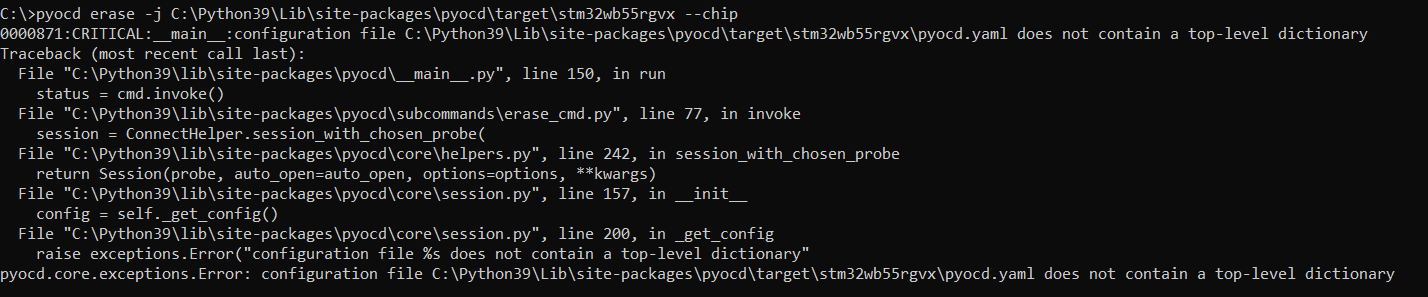 This is how we have given the command. The screenshot of the error obtained is attached.
Kindly look into this and advice us what needs to be done.
@mathias-arm @flit
This is how we have given the command. The screenshot of the error obtained is attached.
Kindly look into this and advice us what needs to be done.
@mathias-arm @flit
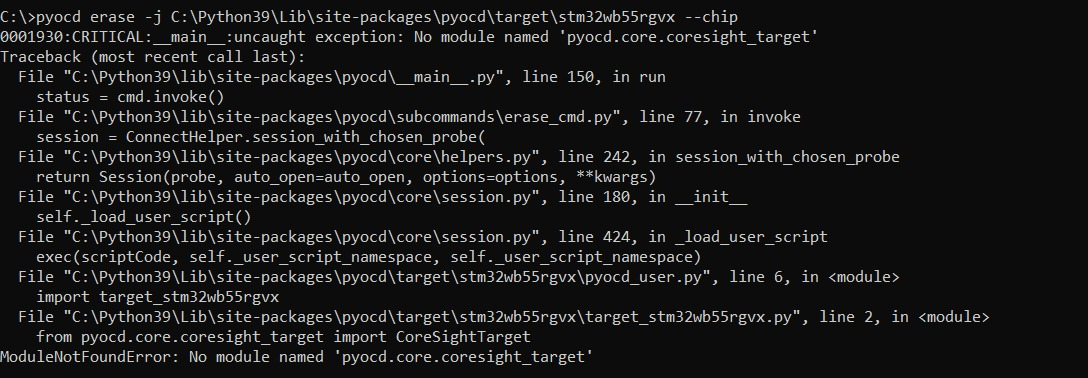 Now we are obtaining new error. Any suggestions?
@mathias-arm @flit
Now we are obtaining new error. Any suggestions?
@mathias-arm @flit
It seems CoreSightTarget has moved from pyocd.core.coresight_target to pyocd.coresight.coresight_target in newer versions of pyOCD.
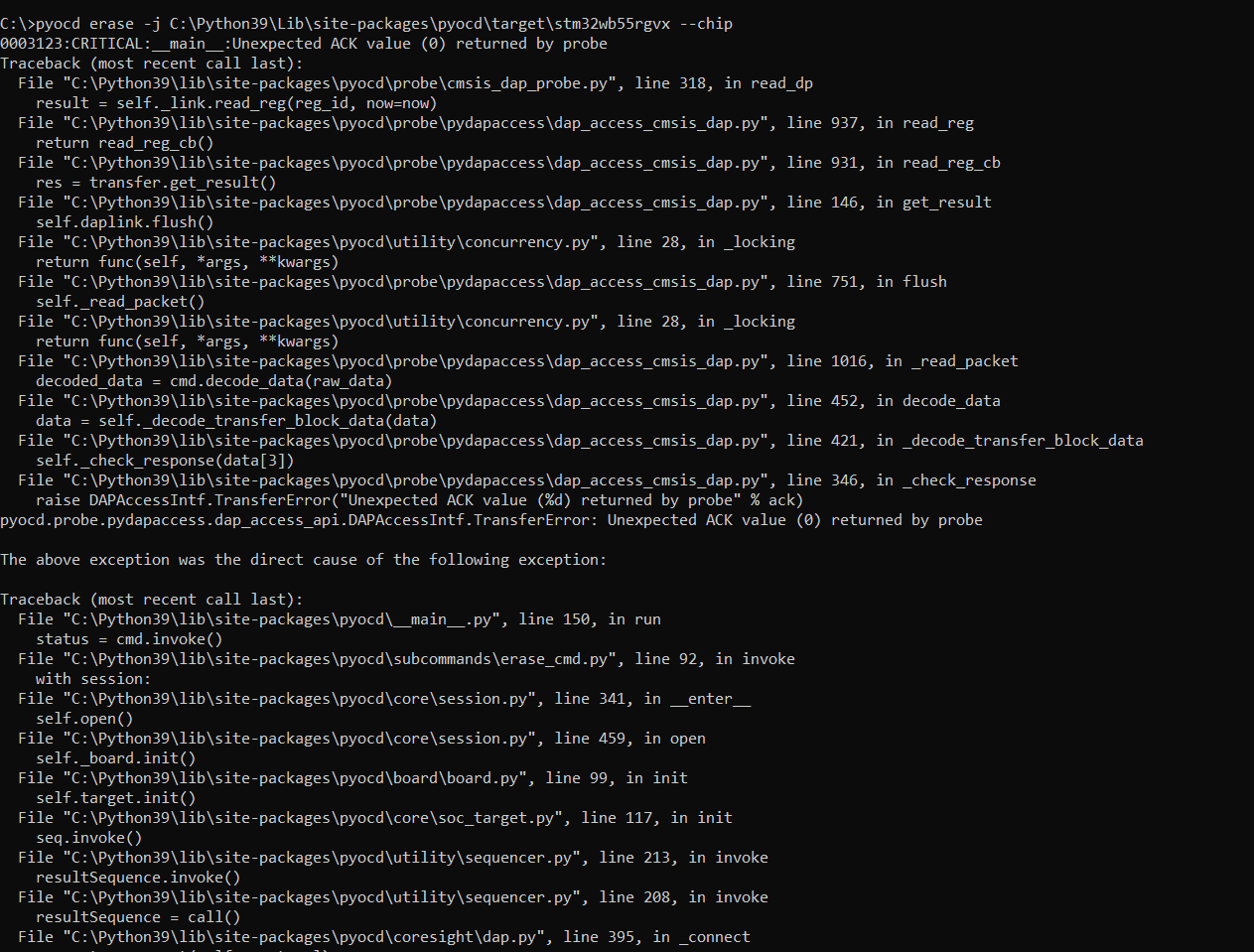 Again, we are obtaining error. Any other suggestions?
@mathias-arm @flit
Again, we are obtaining error. Any other suggestions?
@mathias-arm @flit
No idea. I think you are back to the suggestions on https://github.com/pyocd/pyOCD/issues/1222 and https://github.com/pyocd/pyOCD/issues/811
This is the location we've provided for the target folder. C:\Python39\Lib\site-packages\pyocd\target\stm32wb55rgvx
Files added are described below:
1. pyocd.yaml
target_override: stm32wb55rgvx
2. pyocd_user
import os import sys
sys.path.append(os.path.dirname(os.path.abspath(file)))
import target_stm32wb55rgvx
3. target_stm32wb55rgvx
from pyocd.target import TARGET from pyocd.coresight.coresight_target import CoreSightTarget from pyocd.core.memory_map import *
class STM32WB55RGVxTarget(CoreSightTarget): VENDOR = "STMicroelectronics" MEMORY_MAP = MemoryMap( FlashRegion(start=0x08000000, length=0x000F4000, blocksize=0x800, is_boot_memory=True, flm='STM32WB55RGVx.flm'), RamRegion(start=0x20000000, length=0x0003E800) )
def __init__(self, session):
    super(STM32WB55RGVxTarget, self).__init__(session, self.MEMORY_MAP)
[...]
TARGET['STM32WB55RGVx'] = STM32WB55RGVxTarget
Is there any error? @mathias-arm @flit
This is the location we've provided for the target folder. C:\Python39\Lib\site-packages\pyocd\target\stm32wb55rgvx
Files added are described below:
1. pyocd.yaml
target_override: stm32wb55rgvx
2. pyocd_user
import os import sys
sys.path.append(os.path.dirname(os.path.abspath(file)))
import target_stm32wb55rgvx
3. target_stm32wb55rgvx
from pyocd.target import TARGET from pyocd.coresight.coresight_target import CoreSightTarget from pyocd.core.memory_map import *
class STM32WB55RGVxTarget(CoreSightTarget): VENDOR = "STMicroelectronics" MEMORY_MAP = MemoryMap( FlashRegion(start=0x08000000, length=0x000F4000, blocksize=0x800, is_boot_memory=True, flm='STM32WB55RGVx.flm'), RamRegion(start=0x20000000, length=0x0003E800) )
def __init__(self, session):
    super(STM32WB55RGVxTarget, self).__init__(session, self.MEMORY_MAP)
[...]
TARGET['STM32WB55RGVx'] = STM32WB55RGVxTarget
Is there any error? @mathias-arm @flit
Any suggestions? @mathias-arm @flit
This is a complex problem where only you have this specific combination of elements (probe, target, pyocd configuration). You should try with different combinations to eliminate potential sources of errors: e.g. use pyocd configuration with equivalent Nucleo board, use another probe with you board, use signal analyzer to check the SWD traffic, etc.
Until you can pinpoint in great detail what in DAPLink or pyocd is not working we are not in a position to help you further.
We are connecting to the target device via JTAG. We have checked the clock at TCK pin but it remains constant at 3.26V. Do you have any suggestions or do you require any further information? @mathias-arm @flit

How can we check if communication is taking place between daplink and pyocd? @mathias-arm @flit @jeromecoutant @VeijoPesonen
How can we check if communication is taking place between daplink and pyocd?
@Ashleyvk Sorry, I'm working nowadays for a different company so I don't have a shared interest to study this further.

How can we check if communication is taking place between daplink and pyocd? @mathias-arm @flit @jeromecoutant @VeijoPesonen
Any suggestions? @mathias-arm @flit
Hi @mathias-arm @flit
When we are compiling using gcc, this is what we obtain.

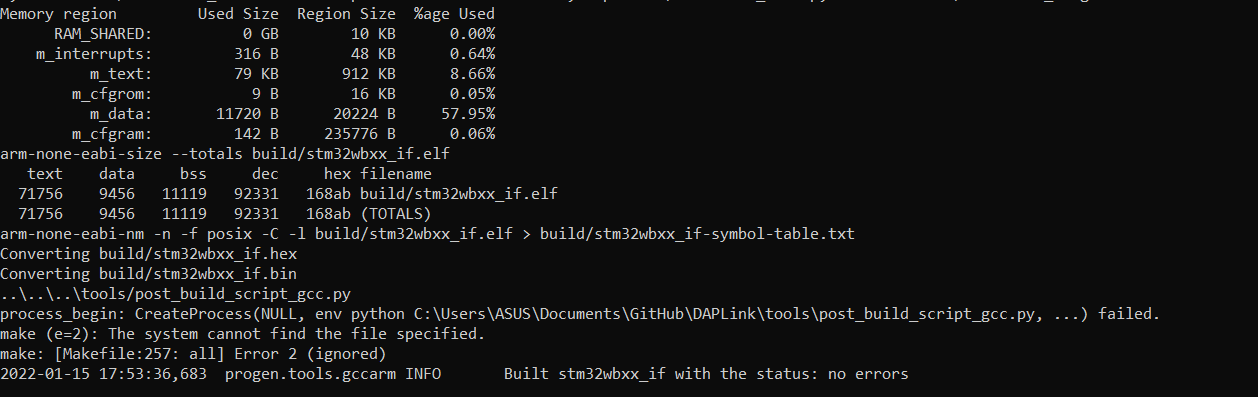
After loading the .bin file to the board, usb is enumerated as:
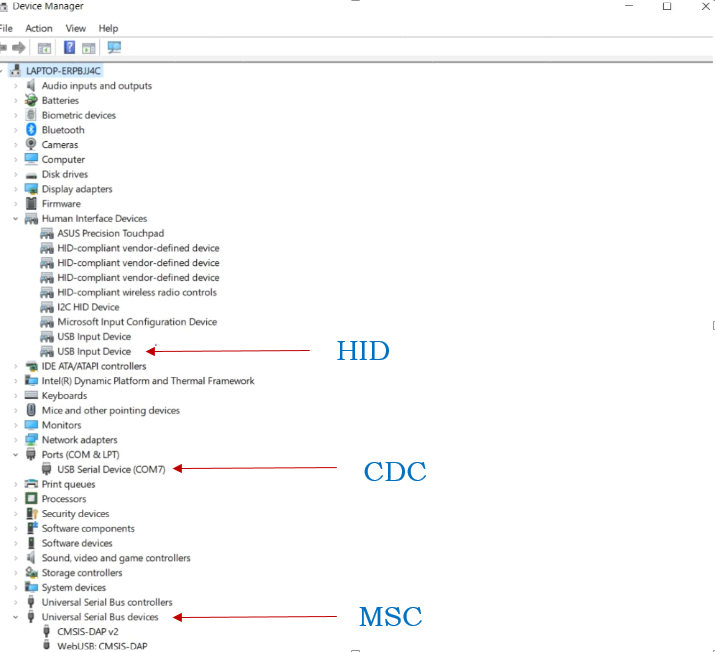
We have compiled the code in debug mode. We believe that it is a communication error between DAPLINK firmware and Pyocd, that's why target is not getting detected. Please share your views on this.
Can you please clarify why libusb is being added when it already gets enumerated while using DAPLink?
@mathias-arm @flit
There are too many commits, a lot of changes outside of
source/hic_haland extraneous changes (superfluous files, whitespace changes, commented out code, etc). [...] That is a lot of commits and a lot of new files. Would it be possible to clean up this PR by squashing some of those commits and review if all changes are relevant?
Closing this PR that is clearly too far from being mergeable. Open a new one when this have been cleaned up.