AObuchow
Allow importing & exporting of user color schemes.
As mentioned in https://github.com/AObuchow/Eclipse-Modern-Dark-Theme/issues/52#issue-639028119 & https://github.com/AObuchow/Eclipse-Modern-Dark-Theme/issues/46#issuecomment-643937552, it'd be nice to be able to save & load user-defined color schemes.
The user could have a list of saved color schemes to switch between in the preference page (depends on #52).
However I'm not sure yet what file type & format should be used when a color scheme is exported. I was thinking perhaps JSON due to its simplicity or CSS. An advantage of using CSS is that if hex codes are used to encode the color scheme's colors, their color preview will be shown in the Generic Editor.

@ingomohr, @PyvesB, @mbooth101: do any of you have an opinion or suggestion on this?
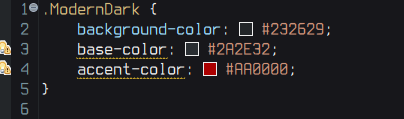
Here's what I had in mind (if CSS is used):
.ModernDark {
	background-color: #232629;
	base-color: #2A2E32;
	accent-color: #AA0000;'
}
In the Generic Editor, this gets rendered as:
I like the CSS-option, too. That way, you could not just export the theme but also review and edit it right away.

do any of you have an opinion or suggestion on this?
Theme is already stored as CSS, why introduce an extra intermediary format? As @ingomohr suggests, this way you can simply have a "Open in CSS Editor" button instead of crafting a complex preferences dialog panel :-)

Agreed, CSS seems to be the best way to store these color schemes :) thanks for the feedback everyone
When this is implemented, a note should be made about using this theme plugin in combination with Wild Web Developer to enable in-editor previews of the CSS colours.
Slight improvement on my original CSS suggestion:
CSS has support for custom properties which are indicated by prefixing a property with --.
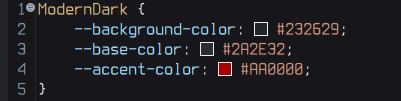
So, a more valid CSS to represent Modern Dark color schemes would be:
ModernDark {
	--background-color: #232629;;
	--base-color: #2A2E32;
	--accent-color: #AA0000;
}
Which will be rendered as the following in the Generic Editor (note the lack of warning markers):