
aws-vault
 aws-vault copied to clipboard
 99designs
The handle is invalid - Git Bash on Windows 10
- [x] I am using the latest release of AWS Vault
- [x] I have provided my
.aws/config(redacted if necessary) - [x] I have provided the debug output using
aws-vault --debug(redacted if necessary)
Just installed from chocolatey on Windows 10, now when I try to to add a new profile using aws-vault add, it fails after I provide the access key. See output below:
$ aws-vault add alisson --debug
2021/04/23 19:31:40 aws-vault v6.3.1
2021/04/23 19:31:40 [keyring] Considering backends: [wincred]
2021/04/23 19:31:40 Loading config file C:\Users\siri\.aws\config
2021/04/23 19:31:40 Parsing config file C:\Users\siri\.aws\config
Enter Access Key ID: [my actual key from my IAM User]
Enter Secret Access Key: aws-vault: error: add: The handle is invalid.
Seems like this is an old bug, there was a merge request, but seems like it's still not fixed: #112 #113

As a sidenote, I was able to add my profile using PowerShell, but then from powershell it's not possible to run aws-vault exec, error below:
PS C:\WINDOWS\system32> aws-vault exec alisson
aws-vault: error: exec: Error execing process: Failed to start command: exec: "": executable file not found in %PATH%
PS C:\WINDOWS\system32>
I added the aws-vault.exe folder path to the $PATH environment variable for system, it still failed with same issue. Then I added to my user $PATH env variable, still no luck.
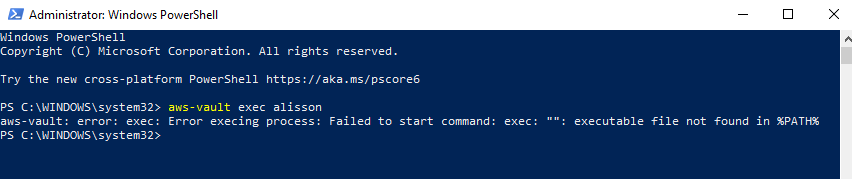
Funny thing is that aws-vault exec works fine in Git Bash. So basically I had to use PowerShell for adding the profile, but Git Bash to actually generate the session using aws-vault exec.
In the output of aws-vault exec --help it says:
usage: aws-vault exec [<flags>] <profile> [<cmd>] [<args>...]

... <snip> ...

Args:
  <profile>  Name of the profile
  [<cmd>]    Command to execute, defaults to $SHELL
  [<args>]   Command arguments
When you run aws-vault exec alisson you're providing the profile but not the command to run, so aws-vault is defaulting to trying to run whatever is stored in $SHELL. I'd guess your PowerShell shell doesn't have that env var defined (or it's defined as an empty value) and so it gets an error when trying to invoke an empty string as a command. It works in Git Bash because $SHELL is defined there.

@irgeek thanks for your reply. So it seems like for it to work in PowerShell we'd need to first declare a $SHELL env var.
What about aws-vault add failing in Git Bash? That one seems even more confusing (the handle is invalid).
So it seems like for it to work in PowerShell we'd need to first declare a $SHELL env var.
You don't need $SHELL defined in your environment, you just need to provide a command. Instead of aws-vault exec alisson you can just do aws-vault exec alisson aws s3 ls and the AWS CLI should run. The dropping into a new shell thing is convenient occasionally, but for the most part I don't use it.
What about aws-vault add failing in Git Bash? That one seems even more confusing (the handle is invalid).
That's a Windows error. I'd guess it has something to do with the way aws-vault is trying to manipulate the TTY it's attached to, possibly to hide the secret key when it's entered. But as I said, that's a guess-I have no clue how to fix it.
I believe winpty aws-vault add alisson may well get you out of trouble in Git Bash.

This issue has been automatically marked as stale because it has not had recent activity. It will be closed if no further activity occurs. Thank you for your contributions.
![stale[bot] avatar](https://avatars.githubusercontent.com/in/1724?v=4 "Published by a pub.dev verified publisher")