

 4ian
4ian
LocalFolderPicker: prop "required"
When required=true, an error is displayed below the input
Closing the PreferencesDialog will not save the value in the preferences storage if the value is empty.
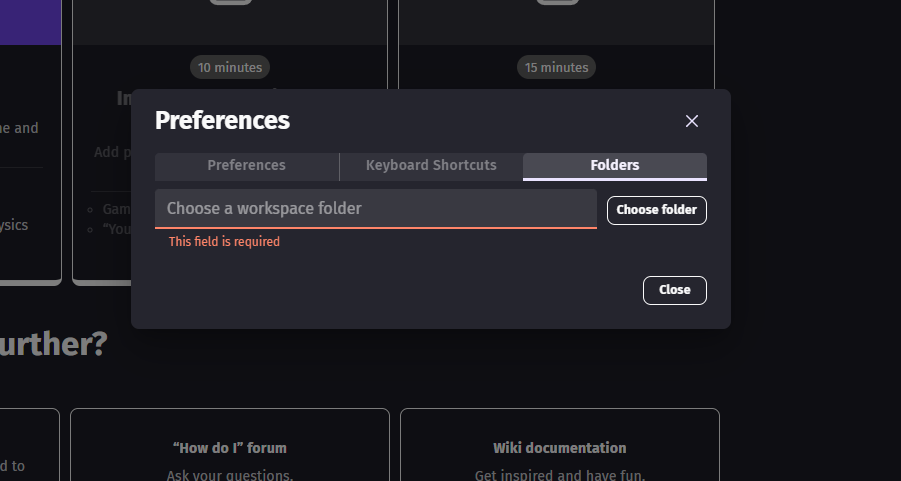

I think this field should not be required though? It's important to let the user enter nothing, so GDevelop will fallback to the default folder it's using?

@4ian
It's important to let the user enter nothing, so GDevelop will fallback to the default folder it's using?
I agree. But if it is saved empty, the default folder path should be filled in and be visible the next time you open the preferences. So there is always the correct path and not for the user invisible, unknown one. And when I click File > Open..., it should open the explorer with that path, not the folder I selected an asset from last time.

Hi!
I made and adjustment from your feedback, but I'm not pretty sure this could work exactly as expected. Could you check it please?
Thanks in advance!
I agree. But if it is saved empty, the default folder path should be filled in and be visible the next time you open the preferences. So there is always the correct path and not for the user invisible, unknown one. And when I click File > Open..., it should open the explorer with that path, not the folder I selected an asset from last time.
Agree with both of these, instead of showing an empty path we should show the default path used by the app - at least as a placeholder value that is greyed.
Hi, I made some changes. I attach a video at the bottom.
- User can freely change the input
- The placeholder is the default folder for new projects
- If user leaves the input empty and closes the Dialog, it will be store the default folder in Preferences, and the next time the user opens the Dialog he will see the path filled.
In this video I show some examples and changes in the folder.
https://user-images.githubusercontent.com/21989259/209571355-63df5567-e9e4-4732-84f9-5c88a35819ba.mp4
Also, I added in LocalFolderPicker a hintText, because the placeholder should have be different from the title text