

 3b1b
3b1b
Hi, How can I configure the tex_template to write Arabic In Manim?
I want to display the text "عشق" in Manim.
This issue is pretty similar to #840
I have tried to do what was suggested for this issue (#840 that is) but I was unable to make it work.
-
Firstly, I changed TEX_USE_CTEX in manimlib/constants.py to True.
-
Then I changed the file ctex_template.tex as follows:
The original ctex_template.tex file was:
    \documentclass[preview]{standalone}

    \usepackage[english]{babel}
    \usepackage{amsmath}
    \usepackage{amssymb}
    \usepackage{dsfont}
    \usepackage{setspace}
    \usepackage{tipa}
    \usepackage{relsize}
    \usepackage{textcomp}
    \usepackage{mathrsfs}
    \usepackage{calligra}
    \usepackage{wasysym}
    \usepackage{ragged2e}
    \usepackage{physics}
    \usepackage{xcolor}
    \usepackage{microtype}
    %\DisableLigatures{encoding = *, family = * }
    \usepackage[UTF8]{ctex}
    \linespread{1}

    \begin{document}

    YourTextHere

    \end{document}
I have change it to:
    \documentclass[preview]{standalone}

    %\usepackage[english]{babel}
    \usepackage{amsmath}
    \usepackage{amssymb}
    \usepackage{dsfont}
    \usepackage{setspace}
    \usepackage{tipa}
    \usepackage{relsize}
    \usepackage{textcomp}
    \usepackage{mathrsfs}
    \usepackage{calligra}
    \usepackage{wasysym}
    \usepackage{ragged2e}
    \usepackage{physics}
    \usepackage{xcolor}
    \usepackage{microtype}
    %\DisableLigatures{encoding = *, family = * }
    \usepackage[UTF8]{ctex}
    %\linespread{1}

    \usepackage{polyglossia}
    \setmainlanguage{arabic}
    \setotherlanguage{english}
    \newfontfamily\englishfont[Scale=MatchLowercase]{Linux Biolinum O}
    \newfontfamily\arabicfont{Droid Arabic Naskh}

    \begin{document}

    YourTextHere

    \end{document}
- After this I tried rendering the following scene:
class Test(Scene):
    def construct(self):
        text = TextMobject("عشق", font="Droid Arabic Naskh")
        self.add(text)
I got the following error:
Traceback (most recent call last):
File "/Users/sameedmac/PycharmProjects/ManimPyCharmTrial/manim/manimlib/extract_scene.py", line 155, in main
  scene = SceneClass(**scene_kwargs)
File "/Users/sameedmac/PycharmProjects/ManimPyCharmTrial/manim/manimlib/scene/scene.py", line 75, in __init__
  self.construct()
File "/Users/sameedmac/Desktop/ManimTemplatePyCharm/main.py", line 15, in construct
  text = TextMobject("عشق", font="Droid Arabic Naskh")
File "/Users/sameedmac/PycharmProjects/ManimPyCharmTrial/manim/manimlib/mobject/svg/tex_mobject.py", line 147, in     __init__
SingleStringTexMobject.__init__(
File "/Users/sameedmac/PycharmProjects/ManimPyCharmTrial/manim/manimlib/mobject/svg/tex_mobject.py", line 42, in __init__
file_name = tex_to_svg_file(
File "/Users/sameedmac/PycharmProjects/ManimPyCharmTrial/manim/manimlib/utils/tex_file_writing.py", line 21, in tex_to_svg_file
dvi_file = tex_to_dvi(tex_file)
File "/Users/sameedmac/PycharmProjects/ManimPyCharmTrial/manim/manimlib/utils/tex_file_writing.py", line 69, in tex_to_dvi
raise Exception(
Exception: Latex error converting to dvi. See log output above or the log file: media/Tex/1fdc1280131ec656.log

Process finished with exit code 0
I am not sure what I am supposed to do now. Any help with this issue would be great. Thank you:)


Try to use
Text, like #1015
Hi, thanks for the response.
I have tried this now. Here is what I have done:
I tried to render the following scene:
class Test(Scene):
    text = Text("عشق", font="Droid Arabic Naskh")
    self.add((text))
I get the output as follows:
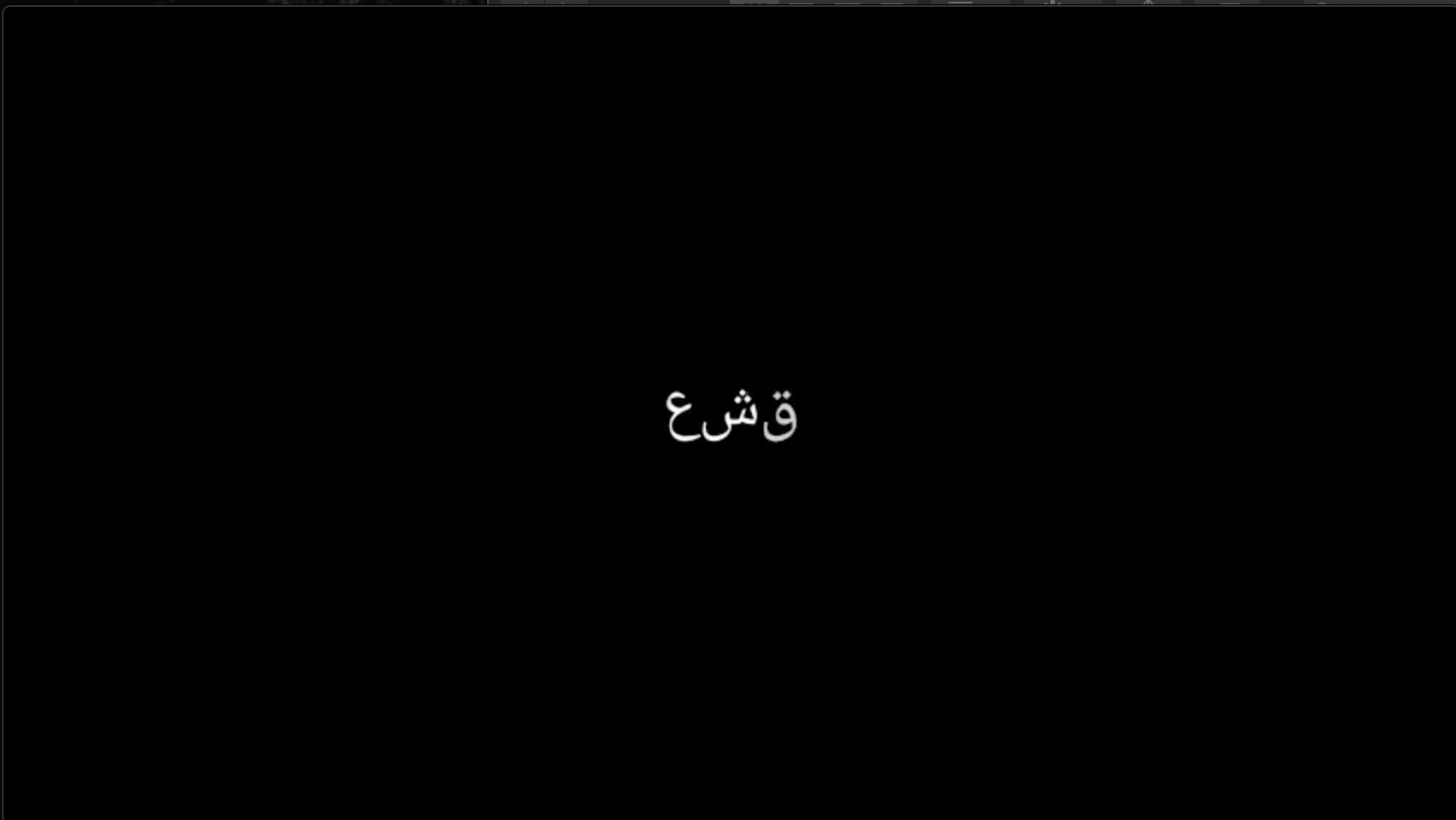
This should not happen. It should instead look like:

So, what it is doing is that it is:
- Not joining the letters properly
- Printing the letters from left to right instead of right to left.
I am guessing I will have to use the original approach of making changes in ctex_template.tex so that I can use proper XeLatex to print arabic text properly.
Is there a way to fix the original issue that I have laid out?
Are there any other ways to do this?
And this: https://github.com/3b1b/manim/issues/1015#issuecomment-621834526_ be used here somehow??
Any help with this issue would be great. Thanks a lot in advance:)

try to use "texmobjext(r"\text{عشق}")"
Hi! Thanks for the response.
I tried doing that and for some reason it is giving me an error...
Is it working for you?
try to use "texmobjext(r"\text{عشق}")"
Hi! Thanks for the response.
I tried doing that and for some reason it is giving me an error...
Is it working for you? i tried it.But,it give me a error"list out of range",i add same number in it ,it work but just have numbers.
try to use "texmobjext(r"\text{عشق}")"
Hi! Thanks for the response. I tried doing that and for some reason it is giving me an error... Is it working for you? i tried it.But,it give me a error"list out of range",i add same number in it ,it work but just have numbers.

I think you might be better off trying https://github.com/ManimCommunity/manim , I've heard that they've added support for Arabic.


just use Text with font set to arabic ex:
arab_text = Text("كل مرة", font="arabic", font_size=100)
