

 32blit
VSCode instructions not working
@Daft-Freak Probably one for you.
I'm following the VSCode.md file and got to change the configuration provider and the list is empty
Seen here
As you can see I do have both plugins installed, the list is empty, but I did eventually have a notification to 'configure the project'.
Any troubleshooting suggestions you might have?

It looks like you need to configure the build before that option is available. There's also a "CMake Tools would like to configure IntelliSense for this folder." notification that usually pops up after configuring, which does the same thing as changing the configuration provider manually.

It's worth noting that these instructions are not easily transferable to Windows since, well, Windows is Windows.
It actually gets as far as preparing the build with my locally installed Windows CMake, but understandably fails on finding SDL2 libraries. I'll investigate passing the required argument to cmake.EXE and see if I can make it work.

Yep. I got a little further. How do I populate the launch.json file? It's complaining (understandably) that the default values are not configured.
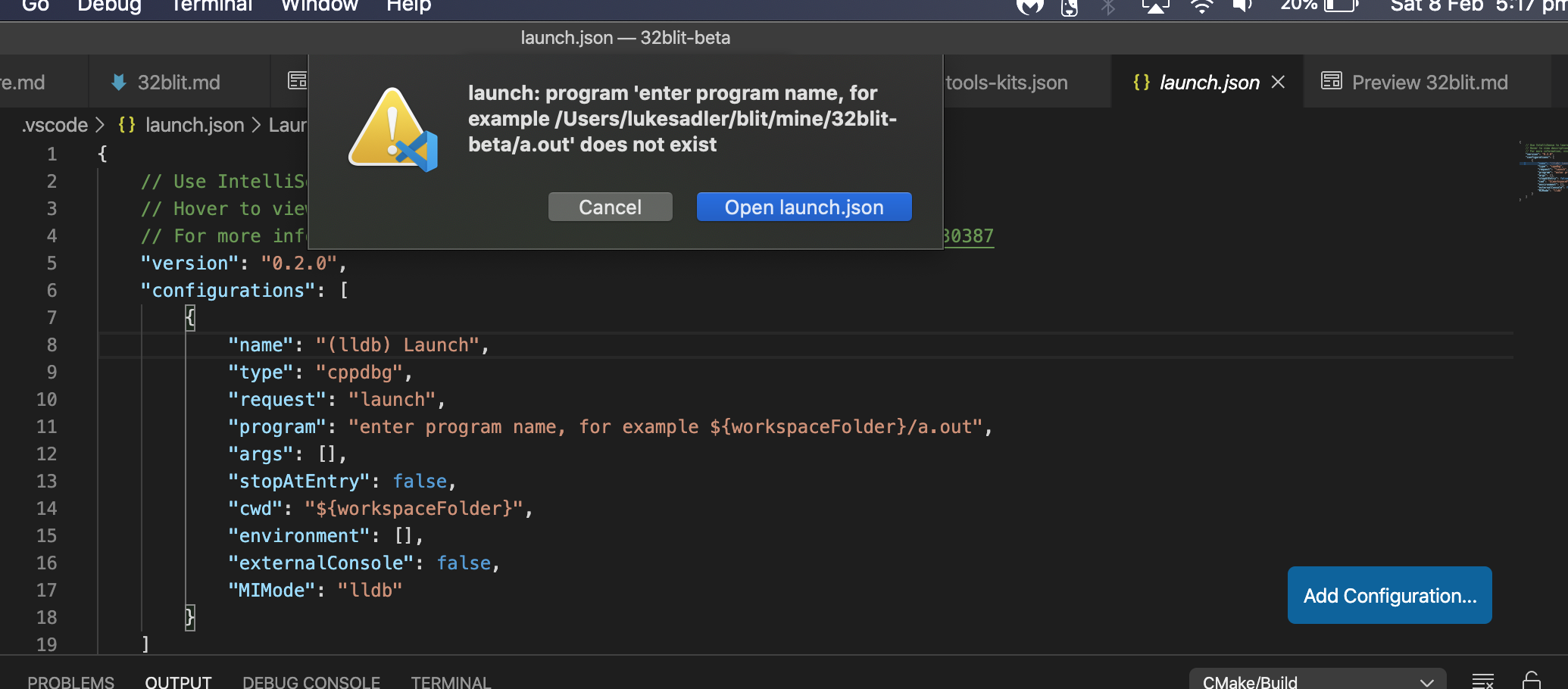
Ok. I got it "working" with hard coded value "${workspaceFolder}/build/examples/raycaster/raycaster",?
Does anyone know if there is an environment variable so i don't need to put in the project name there.
@mylogon341 If you use Ctrl+F5 or the little debug button at the bottom, you don't need a launch.json. Though, according to this you should be able to use ${command:cmake.launchTargetPath}.
@Gadgetoid I knew windows would be a pain, looking at ways to get it to find SDL...
It wouldn't stop referring to the contents of the launch.json file, even if I deleted it. Replacing it with that variable has done the trick, by the looks of it 👍 It might be worth adding that to the docs. I assume its a vsc generated file so can't check it in
The SDL development libraries installed as part of the Visual Studio instructions include an sdl2-config.cmake so it may suffice to use that package and point CMake at it.
The "Kit" I'm using on Windows happens to be "Visual Studio Community 2019" so I'd guess this SDL setup makes sense in that context.
In lieu of VS2019 I don't actually know what kits it might auto-detect- I may have to try installing some toolchains/compilers.
That file was actually me (for travis). With this change adding "SDL2_DIR": "${workspaceRoot}/vs/sdl/" to the configureSettings almost works, unless you have ninja installed which CMake Tools prefers and blows up because the library path has a VS variable in it...
Ha! I was just about to post:
Okay, settings.json is the way to pass additional arguments into the CMake command:
    "cmake.configureSettings": {
        "SDL2_DIR": "../vs/sdl"
    }
And voila, it at least configures. Doesn't build though because ninja breaks everything
This config file should work: https://github.com/Daft-Freak/32blit-beta/blob/less-hacky-sdl/vs/sdl/sdl2-config.cmake (at least, it doesn't break travis and seemed to work for me). Looks like I have some updates to do to the documentation...
I can confirm this works for me and builds an executable.
The missing link now is the copy of SDL2.dll which happens with mingw.toolchain.
I think this could broadly be solved everywhere for Windows users like it is for Linux: "Just install the runtime libraries."
Edit: or not. The runtime library is just a .zip file with SDL2.dll in it 😆
It's a little overkill, but with your modifications and a new vscode-windows.toolchain with the following contents:
if(NOT DEFINED SDL2_DIR)
	set(SDL2_DIR ${CMAKE_CURRENT_LIST_DIR}\\vs\\sdl)
endif()

set(CMAKE_SYSTEM_NAME Windows)

configure_file(${SDL2_DIR}/lib/x64/SDL2.dll ${CMAKE_CURRENT_BINARY_DIR}/SDL2.dll COPYONLY)

install(FILES ${CMAKE_CURRENT_BINARY_DIR}/SDL2.dll DESTINATION bin)
And the following in settings.json
{
    "cmake.configureOnOpen": true,
    "cmake.configureSettings": {
        "CMAKE_TOOLCHAIN_FILE": "../vscode-windows.toolchain"
    }
}
I can build and run from VSCode on Windows x64.
However I cannot use the CMAKE_SIZEOF_VOID_P trick to copy the x86 SDL2.dll in lieu of the x64 one since this variable isn't yet set.
This approach also has the unfortunate consequence that it's overriding the toolchain, so it would probably break any attempt to cross-compile against ARM GCC.
Probably needs a "manually copy SDL2.dll into your build directory" step, since it's not valid to put SDL2 into Windows\System32
Okay, last two commits on the branch(#159, which is doing a bit more than intended now). It sets the DLL path in the config file and checks if that variable is set in 32blit-sdl/CMakeLists.txt. Theoretically the configure_file/install in the mingw toolchain file could now be simplified to set(SDL2_DLL ${SDL2_BINDIR}/SDL2.dll), but I don't have a mingw toolchain set up to test.
EDIT: which of course breaks with the VS generator because of the variable...
EDIT 2: I think all the generators are happy now.
Sorry for the comment spam, but check #160 for the latest attempt to cover everything
Can confirm that configuring, building and running all works smoothly on my laptop using the Visual Studio kits. This applies to both x86 and x64 builds. I haven't tried a cross-compile yet. Nice work! Thank you.
I must also set cwd to "cwd": "${workspaceFolder}/build", in launch.json in order for the selected CMake target to launch, since otherwise it wont find SDL2.dll.
Probably going to tweak the debugging section a bit, as it doesn't seem possible to debug on macOS without a launch.json. (And even then I can't get it to work...)
Collecting some more minor fixes here: https://github.com/Daft-Freak/32blit-beta/commits/vscode-docs-yet-again-help. Is there anything else needed to close this?
Everything's working great for me on an out-of-tree project using the MSVC toolchain and "SDL2_DIR": "${workspaceRoot}/../32blit-beta/vs/sdl/",
It also works in WSL using the MinGW toolchain file and "Unspecified" in the CMake Tools kit selection. For some reason the auto-detected mingw CMake Tools kit doesn't build executables, failing with:
[cmake]     /usr/bin/x86_64-w64-mingw32-gcc      -rdynamic CMakeFiles/cmTC_44df7.dir/testCCompiler.c.o  -o cmTC_44df7
[cmake]     x86_64-w64-mingw32-gcc: error: unrecognized command line option ‘-rdynamic’
This is probably because the mingw toolchain file sets set(CMAKE_SYSTEM_NAME Windows) along with a bunch of other things that the MinGW build requires, and CMake Tools doesn't understand that this is necessary.
Switching to the mingw.toolchain works, compiling against the (probably redundant now) fallback "/usr/local/cross-tools/x86_64-w64-mingw32/lib/cmake/SDL2".
The mingw.toolchain is very strongly minded toward this SDL default, though, so trying to use "SDL2_DIR": "${workspaceRoot}/../32blit-beta/vs/sdl/", causes havoc with an unset ${SDL2_PREFIX} and set(SDL2_BINDIR ${SDL2_PREFIX}/bin) just being plain wrong for the vs/sdl tree.
I guess the question is - does anyone care about cross-compiling with VS Code, MinGW and WSL enough that they're inclined to solve any of these "problems?" All you really get from a MinGW build on Windows is fatter binaries (presumably because it doesn't account for Windows shared libraries) so we should probably (and I'm a main offender for using it so much) discourgage its use in favour of Visual Studio and VS Code with CMake Tools and MSVC.
Actually the line:
configure_file(${SDL2_BINDIR}/SDL2.dll ${CMAKE_CURRENT_BINARY_DIR}/SDL2.dll COPYONLY)
Probably shouldn't be in mingw.toolchain at all thinking about it. And neither should:
install(FILES ${CMAKE_CURRENT_BINARY_DIR}/SDL2.dll DESTINATION bin)
Neither of these things are in any way related to the toolchain level configuration, and I'd wager "Git Blame" will point at me for putting them there.
Ignoring my stupidity above, there's no way the MinGW build is ever going to link against vs/sdl anyway.
Okay, to summarise:
For MinGw cross-compiles using WSL/MinGw and Visual Studio Code
(assuming we care about these at all)
You should add the following to cmake-tools-kits.json:
  {
    "name": "32Blit - MinGw",
    "toolchainFile": "${workspaceRoot}/../32blit-beta/mingw.toolchain"
  },
And use the resulting kit.
This should be used in conjunction with this patch: https://github.com/pimoroni/32blit-beta/pull/198
For MSVC Compile using Windows
launch.json should be configured with:
{
    // Use IntelliSense to learn about possible attributes.
    // Hover to view descriptions of existing attributes.
    // For more information, visit: https://go.microsoft.com/fwlink/?linkid=830387
    "version": "0.2.0",
    "configurations": [

        {
            "name": "(Windows) Launch",
            "type": "cppvsdbg",
            "request": "launch",
            "program": "${command:cmake.launchTargetPath}",
            "args": [],
            "stopAtEntry": false,
            "cwd": "${workspaceFolder}/build",
            "environment": [],
            "externalConsole": false
        }
    ]
}
Most of this is boilerplate, with the important settings being "program" and "cwd". Failing to "cwd" into the "build" directory will cause the executable not to be able to locate SDL2.dll.
Probably a good idea to use the full path for the MinGW toolchain, otherwise you'll end up changing it every time you move project (or from project to the main repo). Not sure if it's important enough to add to the VS Code docs though. Using VS Code with MinGW doesn't seem like a common thing to do. You're either on Windows (WSL) where you could just use the VS compiler or on Linux where you can't debug the output anyway...
I think I covered the debugger in https://github.com/Daft-Freak/32blit-beta/commit/17b7fe3ea513a42760261beb7211575aa220cc7d (no PR yet).
(BTW, I think the reason MinGW binaries are so big is that it static links libstdc++)
Yes, the static linking is intentional so cross-compile builds don't bring along a whole glut of frustratingly obtuse dependencies. That would, indeed, make them larger!
Indeed the only reason the MinGW toolchain exists is for Linux users, or devout WSL-via-the-Terminal users (as I keep being for some reason) to be able to release Windows builds. My using it via VS Code is an experiment in... uh... bonkersness.
Just putting this here so I don't forget about it:
{
    // Use IntelliSense to learn about possible attributes.
    // Hover to view descriptions of existing attributes.
    // For more information, visit: https://go.microsoft.com/fwlink/?linkid=830387
    "version": "0.2.0",
    "configurations": [
        {
            "name": "(arm gdb) Launch",
            "type": "cppdbg",
            "request": "launch",
            "program": "${command:cmake.launchTargetPath}",
            "args": [],
            "stopAtEntry": false,
            "cwd": "${workspaceFolder}",
            "environment": [],
            "externalConsole": false,
            "MIMode": "gdb",
            "miDebuggerPath": "/usr/bin/gdb-multiarch",
            "debugServerPath": "/home/daftfreak/.local/bin/openocd",
            "debugServerArgs": "-f board/32blit.cfg -c init -c \"reset init\"",
            "filterStderr": true,
            "serverStarted": "target halted due to debug-request, current mode: Thread ",
            "setupCommands": [
                { "text": "-target-select remote localhost:3333", "description": "connect to target", "ignoreFailures": false },
                { "text": "-file-exec-and-symbols ${command:cmake.launchTargetPath}", "description": "load file", "ignoreFailures": false},
                { "text": "-interpreter-exec console \"monitor reset\"", "ignoreFailures": false },
                { "text": "-interpreter-exec console \"monitor halt\"", "ignoreFailures": false },
                { "text": "-target-download", "description": "flash target", "ignoreFailures": false }
            ],
            /*"logging": {
                "moduleLoad": true,
                "trace": true,
                "engineLogging": true,
                "programOutput": true,
                "exceptions": true
            }*/
        }
    ]
}
(launch.json for on device debugging, works perfectly for internal flash, needs a manual reset for ext)