

 30350n
Feature Request: transparency support in the SolderMask
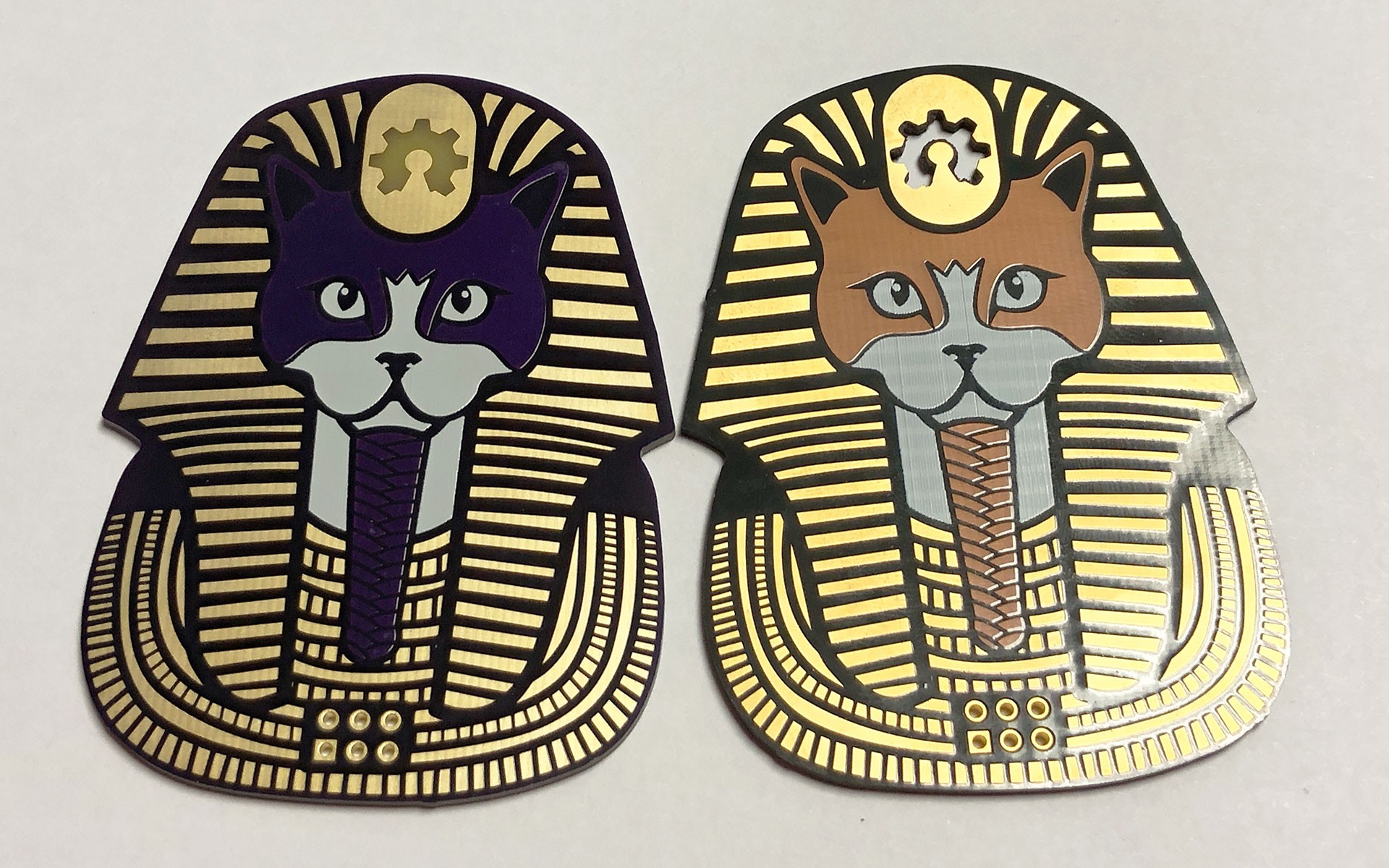
I'm trying to replicate OSH Park's After Dark look. KiCad does a relatively good job (as in, it supports "transparent" soldermaks, but copper is rendered in the same colour independently of it being exposed or not), but when I try to export a board with transparent soldermask with the exporter, and open it it Blender, playing with the transparency seems to have no effect. I don't know how feasible it is because it requires applying "copper" colour to all the unexposed copper and gold/HASL to all the exposed metal.
An example (left, OG purple OSH Park board, right, the alternative After Dark with clear mask)
(EDIT: my first post was a question about an error that no longer applies) ~I have also been using KiBot a lot recently, and when trying to render a board with any value of alpha on the soldermask other than 100%, I get this error, which seems to point to "weird maths when trying to obtain the colour value of something with transparencies":~
DEBUG:Executing: /usr/bin/blender -b --factory-startup -P /usr/local/lib/python3.11/dist-packages/kibot/blender_scripts/blender_export.py -- --format render blender --output /BlenderRender/Render.png /LED_Dimmer-3D_blenderTopSlanted.blend --scene /tmp/tmpt3il67eq.json /LED_Dimmer-blender_export.pcb3d (kibot - kiplot.py:156)
DEBUG:- Output from command: Blender 3.5.1 (hash e1ccd9d4a1d3 built 2023-04-24 23:31:15)
Traceback (most recent call last):
  File "/usr/bin/3.5/scripts/addons/pcb2blender_importer/importer.py", line 205, in execute
    if (pcb := self.import_pcb3d(context, filepath)) == {"CANCELLED"}:
  File "/usr/bin/3.5/scripts/addons/pcb2blender_importer/importer.py", line 375, in import_pcb3d
    setup_pcb_material(board_material.node_tree, images, pcb.stackup)
  File "/usr/bin/3.5/scripts/addons/pcb2blender_importer/materials.py", line 87, in setup_pcb_material
    soldermask_inputs = {"Light Color": [*color, 1.0], "Dark Color":  [*(color * 0.2), 1.0]}
TypeError: can't multiply sequence by non-int of type 'float'
Error: Python: Traceback (most recent call last):
  File "/usr/local/lib/python3.11/dist-packages/kibot/blender_scripts/blender_export.py", line 434, in <module>
    main()
  File "/usr/local/lib/python3.11/dist-packages/kibot/blender_scripts/blender_export.py", line 410, in main
    bpy.ops.pcb2blender.import_pcb3d(**ops)
  File "/usr/bin/3.5/scripts/modules/bpy/ops.py", line 113, in __call__
    ret = _op_call(self.idname_py(), None, kw)
RuntimeError: Error: Python: Traceback (most recent call last):
  File "/usr/bin/3.5/scripts/addons/pcb2blender_importer/importer.py", line 205, in execute
    if (pcb := self.import_pcb3d(context, filepath)) == {"CANCELLED"}:
  File "/usr/bin/3.5/scripts/addons/pcb2blender_importer/importer.py", line 375, in import_pcb3d
    setup_pcb_material(board_material.node_tree, images, pcb.stackup)
  File "/usr/bin/3.5/scripts/addons/pcb2blender_importer/materials.py", line 87, in setup_pcb_material
    soldermask_inputs = {"Light Color": [*color, 1.0], "Dark Color":  [*(color * 0.2), 1.0]}
TypeError: can't multiply sequence by non-int of type 'float'
Location: /usr/bin/3.5/scripts/modules/bpy/ops.py:113
Importing PCB3D file ...
Error: Python: Traceback (most recent call last):
  File "/usr/bin/3.5/scripts/addons/pcb2blender_importer/importer.py", line 205, in execute
    if (pcb := self.import_pcb3d(context, filepath)) == {"CANCELLED"}:
  File "/usr/bin/3.5/scripts/addons/pcb2blender_importer/importer.py", line 375, in import_pcb3d
    setup_pcb_material(board_material.node_tree, images, pcb.stackup)
  File "/usr/bin/3.5/scripts/addons/pcb2blender_importer/materials.py", line 87, in setup_pcb_material
    soldermask_inputs = {"Light Color": [*color, 1.0], "Dark Color":  [*(color * 0.2), 1.0]}
TypeError: can't multiply sequence by non-int of type 'float'
Location: /usr/bin/3.5/scripts/modules/bpy/ops.py:113

Blender quit
~where scene is ~
{
  "auto_camera_z_axis_factor": 0.85,
  "fixed_auto_camera": false,
  "lights": [
    {
      "energy": 10.020009999999997,
      "name": "kibot_light",
      "position": [
        -0.1666665,
        0.1666665,
        0.25025
      ],
      "type": "POINT"
    }
  ],
  "point_of_view": [
    {
      "rotate_x": -30,
      "rotate_y": 0,
      "rotate_z": 20,
      "view": "z"
    }
  ],
  "render": {
    "background1": "#505050",
    "background2": "#FFFFFF",
    "resolution_x": 200,
    "resolution_y": 200,
    "samples": 1,
    "transparent_background": false
  }
~The renders work if opacity is set to 100 (fully opaque).~
~Because the errors point to the pcb2blender scripts, I thought about opening the issue here, but if you think I should move it to the KiBot side, close this and I will do it.~

Hi @mundodisco8 !
I think pcb2blender doesn't support transparency. The stackup file stores RGB, not RGBA (which KiCad can use).
I'm discarding the alpha channel (4th value) like this:
    def parse_kicad_color(self, string):
        if string[0] == "#":
            return KiCadColor.CUSTOM, self.parse_one_color(string, scale=1)[:3]
        else:
            return KiCadColor[string.upper()], (0, 0, 0)
The scene file isn't related to pcb2blender, and doesn't have any correlation with the PCB color.
Now for the error: are you sure you are using a fresh image? The code in /usr/bin/3.5/scripts/addons/pcb2blender_importer/materials.py around line 87 should be:
    if soldermask == "CUSTOM":
        color = Color(srgb2lin(stackup.mask_color_custom))
        soldermask_inputs = {"Light Color": [*color, 1.0], "Dark Color":  [*(color * 0.2), 1.0]}
The Color cast fixes the problem. You can see it here

Man, Salva, you are omniscient!
Mi image was 10 days stale, tried with the latest and now it doesn't error out, so I'm happy with that. I guess now my question is a feature request 😄
Yeah, as @set-soft said, the error atleast should be fixed now on the master branch. Regarding transparency: This is something I'll have to look at once I find time to rework the materials (which could still take quite a while, sorry). That being said, you can always play around with the materials in Blender to achieve the look you want.
