

 2sic
2sic
Query - Dnn User Profiles DataSource Not Returning Roles
**I'm submitting a [x] bug report about [x] admin experience UI and Visual Queries.
Current behavior
See images below. Roles is always empty.
Expected behavior
Roles should return a list of RoleNames (or RoleIDs, I don't remember).
Instructions to Reproduce the Problem Added a Role, "Content Manager", added user, added the new role to the new user.
To verify Custom profile properties are working I added a new profile field named "Colors" (text:80) and for the new user set it to "yellow, green".
In a new 2sxc App, added a Query with only the Datasource, DnnUserProfiles. Set its settings as follows
Title field: DisplayName
Properties: DisplayName,Roles,Colors,Email,FirstName,LastName,Username,City,Website,Role,RoleID,RoleId,RoleNames
Content Type Name: Profile
User IDs was left blank
Note that I added Role,RoleID,RoleId,RoleNames just to see if they might return something, but not expecting them to.
New install of Dnn 9.09.01 with 2sxc 12.01. Browser: all or n/a Language: any/all Windows Server 2019, IIS 10, etc
Anything you would like to add
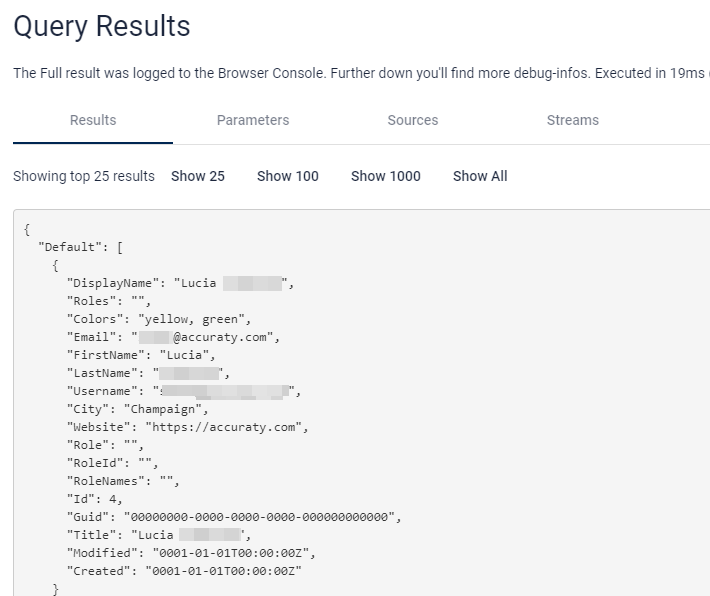
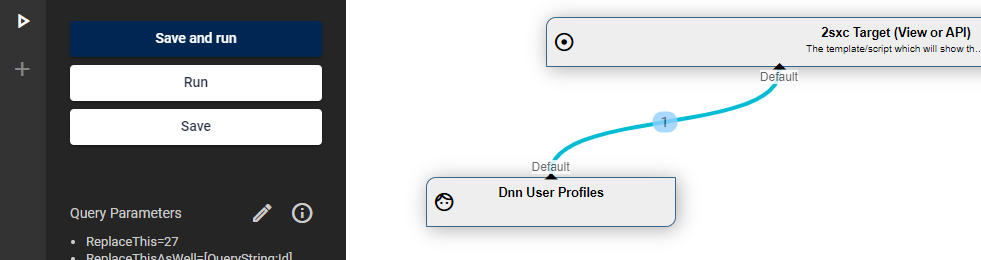
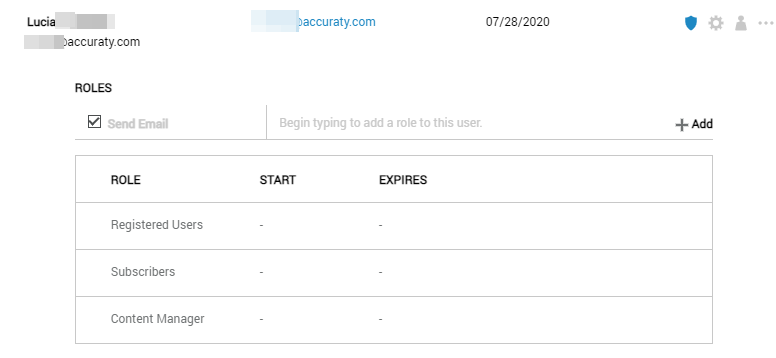

Also, I discovered this on a live website running 2sxc 12.01 on Dnn 9.08.01. All of the above was done on another playground instance just to test/verify.
@jeremy-farrance Just for clarity - did it return this data previously, or is this a wish that it should return this but has never done this before?

Your docs say that it returns the UserInfo properties, one of those is .Roles. If I remember right, UserInfo.Roles returns a 'string[]' and yours used to just return them concat'd with commas as a string ("Subscribers, Content Manager, etc"). And you also nicely implemented the ability to simply name custom properties and return those (which I demo'd above is still working).
I admit I cannot find the project where I've used this previously, And even though its not doing it now, you have to admit, that sounds EXACTLY like the way "iJungleBoy" always implemented this stuff. It just worked like magic. :)
Prolly just this type of thing
Roles = @string.Join(",", Dnn.User.Roles)
Would then output:
Roles = Registered Users,Subscribers
Is it possible its as simple as adding this to the modernized (Aug 2020) code? https://github.com/2sic/2sxc/blob/3ade672ec080e094f864103a2466457e32f970aa/Src/Dnn/ToSic.Sxc.Dnn/Dnn/DataSources/DnnUserProfile.cs#L142
    case "roles":
      value = string.Join(",", user.Roles);
      break;
    default:
@jeremy-farrance ATM I'm not sure if this should be in the UserProfile DataSource - or if this may leak out unexpected information.
The alternative would be to create a new UserRoles DataSource, or make it configurable if roles should be included...
I don't agree that adding Roles would leak unexpected info. Its there on the UserInfo class because it is useful and required. And I would counter that thought with... can you think of a use case where you would use Users/User Profile info - that does not require Roles? A directory of Users would be all users in a Members role. A dropdown from a query of Users in an Authors role.
I did go ahead and try out your recent Query DataSource tutorial in Visual Studio. I was able to add the missing references and get it to compile as is to the DLLs. However, I am not able to get very far converting the tutorial to my own Namespace/Class. Is there additional documentation or a video that would help in learning how to do that?
@jeremy-farrance I'm not sure what your question means. You created a custom data source and would like to put it into your own namespace? that's simple -just do it in visual studio. Or am I missing something?
I am saying I don't know how to do that. I am sure it will seem simple to me at some point in the future. I do hope you reconsider outputting the Roles as that seems like a useful and necessary addition. Thank you for going over this with me. Up to you whether you close it or not, cheers!
So basically just type in a different namespace in VS and then check that it still compiles. if you have any code it needs it may complain because it only auto-adds objects in the same namespace. But VS does a good job suggesting what namespaces are missing so it's probably just a few minutes of changes.
Just make sure the identity of your custom data-source (usually a GUID) is a new guid, so it doesn't get confused with other data sources.