
laravel-saml2
 laravel-saml2 copied to clipboard
 24Slides
logout redirect issue
For the first case, call Saml2Auth::logout(); or redirect the user to the route saml.logout which does just that. Do not close the session immediately as you need to receive a response confirmation from the IdP (redirection). That response will be handled by the library at /saml2/sls and will fire an event for you to complete the operation.
First of all, I have config'd my app based on the instructions found in the README file. Second, I am able to login just fine.
Now, I am having issues w/ the logout process, once I hit the /saml/{UUID}/logout route WITH or WITHOUT the returnTo parameter set, I always end up stuck in MS Azure's logout screen. No redirect is happening at all.
If I do the same, but for the /saml/{UUID}/login route, everything is a-okay. Why is MS Azure not redirecting back to my app after a successful logout? Does the sls route need to be configured in MS Azure?
What am I missing? Please advise.


Yes, I did. It's actually just same/identical to the SAML2_LOGIN_URL = my app's landing/home page. All things being equal, the login process does the redirect correctly. While, the logout process fails. Gets stuck in MS AAD's logout screen.
What gives?
Normally your app should provide a "RelayState" to the IDP, so that the IDP knows where to redirect you back after logging out.
I don't know much about it, but I do think you should inspect your network calls and figure out if it contains one.


Earlier today, we tried filling out the Sign on URL, Relay State, and Logout URL and experienced the same result... still no redirect. The logout process, as described by the README, starts off w/ accessing the /saml2/{UUID}/logout route. This route then goes to https://login.microsoftonline.com/{TENANT_ID}/saml2?SAMLRequest={foobar}&RelayState={foobar}. It is my understanding that the RelayState can be set by setting the returnTo parameter in either the saml2 login/logout routes.
In the login route, it redirects just fine. But, this same redirect won't work in the logout route.
I followed the implementation of this w/ the help of the README. What am I missing?
I have the same problem, and it seems the sls endpoint (I have not understand if it should be a GET or a POST) is not available to be configured in MS Azure.

Same. The SLS is used when the IdP is logged out, right? And then the IdP notifices the SP to logout as well, correct? This is my current understanding. But, it seems like the sls endpoint does nothing. Letting MS Azure know about it seem to do nothing as well.
Yes, I understand that "sls" is for Single Sign-Out, that is to say that "sls" will be called when the user log out from a different SP and MS Azure broadcast the logout to all the different SP (https://learn.microsoft.com/en-us/azure/active-directory/develop/single-sign-out-saml-protocol). But in practice I don't know where to put the "sls" endpoint in azure.
Furthermore, as you explained, during the login the user is redirected correctly to the SP but during the logout the user is not redirected to the "Logout Url (Optional)" endpoint.
Had the same issue and this is the configuration I found out to fix the logout
Azure App
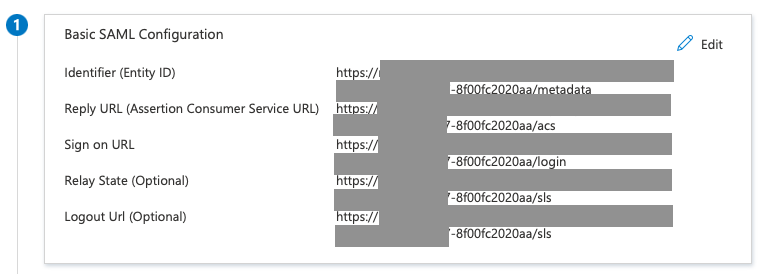
config/saml2.php
...
'logoutRoute' => '/auth/local-logout',
...
routes/web.php
...
Route::group(['prefix' => 'auth', 'middleware' => ['saml']], function () {
    Route::get('login', function () {
        return view('auth.login', [
            'loginUrl' => route('saml.login', ['uuid' => Tenant::where('key', 'XXX')->first()->uuid]),
        ]);
    })->name('login');

    Route::post('logout', function () {
        return redirect()->route('saml.logout', ['uuid' => Tenant::where('key', 'XXX')->first()->uuid]);
    })->name('logout');

    Route::get('local-logout', function () {
        Auth::logout();
        return redirect()->route('home');
    })->name('local-logout');
});
...
Also, I have to set retrieveParametersFromServer to true in config/saml2.php to fix the invalid_logout_response error, not really sure if it's related to my server or not ...

Will have to try this one out... have the Relay State and Logout Url be set to the sls route value.
Here is my least hacky approach to get SAML SSO with Azure AD, with the caveat of it being a sub-domain based multi-tenant application, with the application behind an AWS Load Balancer:
-
composer install 24slides/laravel-saml2 && php artisan vendor:publish --provider="Slides\Saml2\ServiceProvider" && php artisan migrate -
In my .env, put:
# This stopped the logout getting stuck on "You have been logged out" at Microsoft
SESSION_DOMAIN=.mycompany.tech

SAML2_LOGIN_URL=/
# This stopped the endless redirecting on logout
SAML2_LOGOUT_URL=/
SAML2_CONTACT_TECHNICAL_NAME=Technical

[email protected]
SAML2_CONTACT_SUPPORT_NAME=Support
[email protected]
SAML2_ORGANIZATION_NAME="My Company"
SAML2_ORGANIZATION_URL=https://www.mycompany.tech
-
In my
LoginController->login, put:return redirect()->route('saml.login', ['uuid' => $tenant->uuid,]);. I prefer redirect as it reduces duplicate code that already exists inSaml2Controller->login. -
In my
LoginController->logout, put:return redirect()->route('saml.logout', ['uuid' => $tenant->uuid]);I prefer redirect as it reduces duplicate code that already exists inSaml2Controller->logout. -
In my
EventServiceProvider->listenarray (I prefer separate files per listener), put:
        \Slides\Saml2\Events\SignedIn::class => [
            \App\Listeners\SignInFromSAML::class,
        ],
        \Slides\Saml2\Events\SignedOut::class => [
            \App\Listeners\SignOutFromSAML::class,
        ],
class SignInFromSAML
{
    public function handle(\Slides\Saml2\Events\SignedIn $event)
    {
        $messageId = $event->getAuth()->getLastMessageId();

        // your own code preventing reuse of a $messageId to stop replay attacks
        $samlUser = $event->getSaml2User();

        $userData = [
            'id' => $samlUser->getUserId(),
            'attributes' => $samlUser->getAttributes(),
            'assertion' => $samlUser->getRawSamlAssertion()
        ];

        $user = // find user by ID or attribute

        // Login a user.
        \Illuminate\Support\Facades\Auth::login($user);
    }
}
class SignOutFromSAML
{
    public function handle(\Slides\Saml2\Events\SignedOut $event)
    {
        \Illuminate\Support\Facades\Auth::logout();

        // README.md example that doesnt work
        //\Illuminate\Support\Facades\Session::save();

        // Laravel docs solution https://laravel.com/docs/9.x/session#regenerating-the-session-id
        \Illuminate\Support\Facades\Session::invalidate();
    }
}
- In my config/saml2.php, put:
    'routesMiddleware' => ['web'], // My 'web' group includes the 3 mentioned in README.md and is simple enough to use. I may make a 'saml' group if needed in the future.
    'retrieveParametersFromServer' => true, // Fixes an issue where the "Signature validation failed". Perhaps theres a better solution.
    'proxyVars' => true, // My app is running behind a load balancer which treminates SSL
- Create a new application on Azure, set:
- Homepage URL = tenant1.mycompany.tech
- Create a tenant in my database (I wish this command was refactored into a service. Also these are dummy input values. Also copy the certificate exactly from AAD, with the ---BEGIN..., and avoid whitespace issues):
Artisan::call('saml2:create-tenant', [
                '--key' => 'my-tenant-id',
                '--entityId' => 'https://sts.windows.net/d27b20ea-6c60-478b-bc0f-772442c1546a/',
                '--loginUrl' => 'https://login.microsoftonline.com/d27b20ea-6c60-478b-bc0f-772442c1546a/saml2',
                '--logoutUrl' => 'https://login.microsoftonline.com/d27b20ea-6c60-478b-bc0f-772442c1546a/saml2'
                '--relayStateUrl' => null,
                '--nameIdFormat' => 'persistent',
                '--x509cert' => "-----BEGIN CERTIFICATE-----
MIIC0jCCAboCAQAwSjELMAkGA1UEBhMCR1QxIjAgBgNVBAgMGURlcGFydGFtZW50
byBkZSBHdWF0ZW1hbGExFzAVBgNVBAcMDkd1YXRlbWFsYSBDaXR5MIIBIjANBgkq
hkiG9w0BAQEFAAOCAQ8AMIIBCgKCAQEAt2j3rUgFAz9zfhC7ICsT1+ckJ8vTS4NL
EdTMYCGfZYZHIb5u0CSiTkd/oiVq3T2+IizGuGTlQA8J7v60joYR5OHhwewtgwDg
SrlcEGQjUhrHXLLYKD7hCjmWtA//34UHDlrn0hnIZ1z5gCVtdBv/CThCBHfo7FsQ
jWsV9DbR7XtsbX4VNO3iawgnha49ra/5OVU3lCLJN86W8QoMq0WW8CNUJhQp1sFx
5cAYwvrAG70C+ScxieoXs1FbatkU7Gcdq2Wfbc9dARy+KNRJo0NW3hU/s0uvj5jK
WLEAPv+PplFzyYY39ZjHX+AwR/CUoK8wTImpjloSHfBK+WdJXba+dQIDAQABoEMw
QQYJKoZIhvcNAQkOMTQwMjAOBgNVHQ8BAf8EBAMCBaAwIAYDVR0lAQH/BBYwFAYI
KwYBBQUHAwEGCCsGAQUFBwMCMA0GCSqGSIb3DQEBCwUAA4IBAQCWqoioVivcIerX
1X7Ktw6mDBzu41ogywmX20bmiiLgYfEm/6DmiQ+acX6/ir8sktKto/vPa75acE4/
CWSW1g9Ysh/D/XEoU6BwfTI3N49tPA6EW9NJunjIinTTi4c6fqPcxFw2Tii3pKVt
6M7+yYxnbBfK1Hy036+ohFPXtLe+v3O/oRSzyZlDzv7UIBD4duU+Vkyz9XOY6UZ9
txC3lZ0rs1CH0oq/pKqq4p0c5pTq3b/3RUioCG49WdFoz8gm5rkON8Yt2zWonMRR
wZKkY9qX6YPpgCuSS+/+I1l0ORUbNkXG1/uo90dKjx1C3QbRla09QWYybh4ekjD9
zaM0ICF9
-----END CERTIFICATE-----",
            ]);
- Setup Azure app Single Sign-on Basic SAML Configuration:
- Identifier (Entity ID) = https://tenant1.mycompany.tech/saml2/a2467bb3-0bf6-4a2c-9c34-e1077215b14a/metadata
- Reply URL (Assertion Consumer Service URL) = https://tenant1.mycompany.tech/saml2/a2467bb3-0bf6-4a2c-9c34-e1077215b14a/acs
- Sign on URL = https://tenant1.mycompany.tech/saml2/a2467bb3-0bf6-4a2c-9c34-e1077215b14a/login
- Relay State (Optional) = https://tenant1.mycompany.tech
- Logout Url (Optional) = https://tenant1.mycompany.tech/saml2/a2467bb3-0bf6-4a2c-9c34-e1077215b14a/sls. Note this isnt the
saml2.logoutthe package gives you, its thesaml2.sls. This is important.saml2.logoutis meant to be used by your me (the SP),saml2.slsis meant to be used by the Azure (the IdP) after Azure has successfully logged out.
- Success! Visit tenant1.mycompany.tech/login and you should be good to go. When you want to logout, visit tenant1.mycompany.tech/logout and you should get redirected back!

I get redirected back but I get this error:
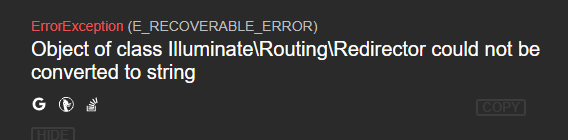
I am not really sure what's going on here.

10. Success! Visit tenant1.mycompany.tech/login and you should be good to go. When you want to logout, visit tenant1.mycompany.tech/logout and you should get redirected back!
@natenatters Is your solution supposed to work if you sign out of Azure? I tried signing out of Azure and it does not logout my user in my Laravel application.

@chris5tu88s yeah our tenants are able to logout fine:
- Visit tenant1.mycompany.tech/logout
- Redirects to the laravel-saml2 logout route
- Redirects to Azure
- Redirects back to our applications login page
- Rediects back to Azure login.
@natenatters Thanks for replying.
EDIT: This issue was caused by the same_site setting in config/session.php You need to set this to 'none'. Using 'lax' or 'strict' will cause the issue below:
I too can get the logout to work like you mentioned, however, what does not work is if the user logs out of Azure directly, ie, within Azure, the user clicks SignOut.
When this happens, Azure will contact my laravel application and the \Slides\Saml2\Events\SignedOut event is fired but within my event listener I cannot logout the user.
Within the event listener:
- auth()->check() is false
- auth()->user() is null
- BUT, if go to the application in the browser, my user is still logged in.
- And calling auth()->logout() and auth()->invalidate() in the listener does nothing (ie, the user is still logged in)
So I'm unsure how to resolve this issue.