
SwiftNEWKit
 SwiftNEWKit copied to clipboard
 1998code
Show "Release Note" on SwiftUI [ AI Assistant available below ]
SwiftNEWKit
Accelerated by Apple SwiftUI
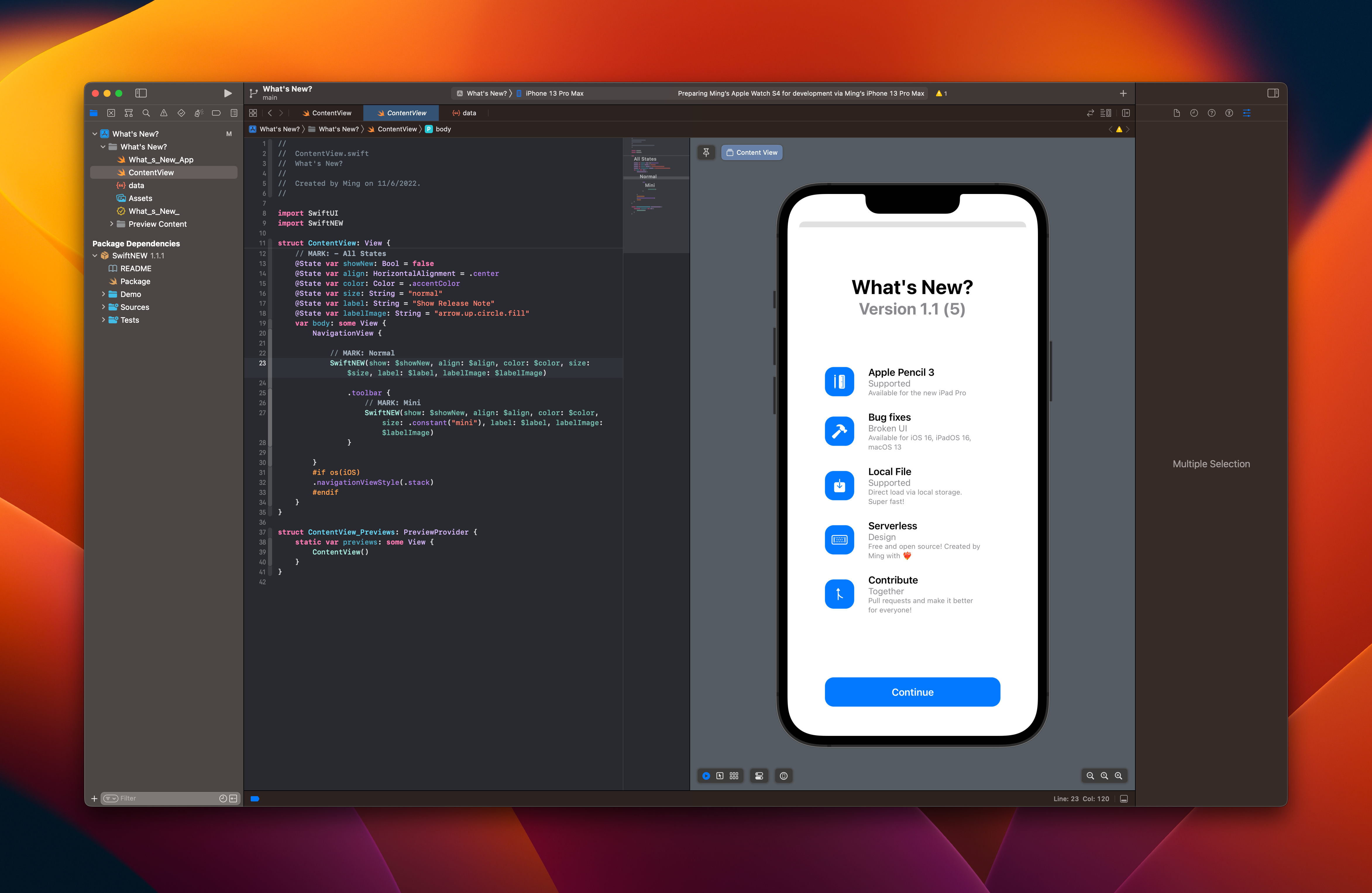
Aims
Provide an easy way for Apple Developers to Show "What's New" to the end users.
Features
- Auto trigger / pop-up the
.sheetfrom Version and/or Build ~~increase~~ changes (starting from 4.0.0) - One-line Coding
- JSON Compatible
- Data Versioning
- View History (2.0.0 or above)
- Fast Loading from local storage
- Simple Binding and pass data
- Simple Model, easy to modify
- Open Source for all developers
- Support Remote JSON File (3.0.0 or above)
- Support Firebase Real Time Database (3.0.0 or above)
- Support Remote Drop Notification (3.5.0 or above)
- Support App Icon (3.9.6 or above)
- Support Version Number in x.y.z and/or x.y (4.0.0 or above)
- Support visionOS & Vision Pro (4.1.0 or above)
Version



Environment
Xcode Local
| Tested on | Latest | Compatible |
|---|---|---|
| iOS | 16 | > 14 |
| iPadOS | 16 | > 14 |
| macOS | 13 | > 11 |
Xcode Cloud
| Tested on | Compatible |
|---|---|
| Xcode | > 13.4 (13F17a) |
| macOS | > 12.3.1 (21E258) |
Guide
English | 中文 | Feel free to add/update new language(s) via pull requests
Get Started
Full Tutorial: https://bit.ly/3NOvJB8
Setup
| Steps | Description | Screenshot |
|---|---|---|
| 1 | Navigate to root project |  |
| 2 | Select Project |  |
| 3 | Select Package Dependencies |  |
| 4 | Click + and paste https://github.com/1998code/SwiftNEWKit to the searchbox |
 |
| 5L | Create a new local file called data.json |
You may copy this JSON sample. |
| 5R | You can use remote json / firebase realtime database too. | Sample: https://testground-a937f-default-rtdb.firebaseio.com/0.json?print=pretty |
Major Usage
- Import first.
import SwiftNEW
- Add States before
bodyor anysome View.
States
| var | Suggested | Options | Type |
|---|---|---|---|
| showNew | false | false, true | Bool |
| align | .center | .leading, .center, .trailing | HorizontalAlignment |
| color | .accentColor | All Colors Supported | Color |
| size | "normal" | "invisible", "mini", "normal" | String |
| labelColor | Color(UIColor.systemBackground) or Color(NSColor.windowBackgroundColor) | All Colors Supported | Color |
| label | "Show Release Note" | All Strings | String |
| labelImage | "arrow.up.circle.fill" | All SF Symbols | String |
| history | true | true, false | Bool |
| data | "data" or "https://.../{}.json" | "{LOCAL_JSON_FILE}" or Remote | String |
| showDrop | false | false, true | Bool |
Samples:
@State var showNew: Bool = false
@State var align: HorizontalAlignment = .center
@State var color: Color = .accentColor
@State var size: String = "normal"
#if os(iOS)
@State var labelColor: Color = Color(UIColor.systemBackground)
#elseif os(macOS)
@State var labelColor: Color = Color(NSColor.windowBackgroundColor)
#endif
@State var label: String = "Show Release Note"
@State var labelImage: String = "arrow.up.circle.fill"
@State var history: Bool = true
@State var data: String = "data"
@State var showDrop: Bool = false
- Then, paste this code inside
bodyor anysome View.
SwiftNEW(show: $showNew, align: $align, color: $color, size: $size, labelColor: $labelColor, label: $label, labelImage: $labelImage, history: $history, data: $data, showDrop: $showDrop)
Instead of using seperate states, inline states works too. *Show Bool cannot be inline.
SwiftNEW(show: $showNew, align: .constant(.center), color: .constant(.accentColor), size: .constant("normal"), labelColor: .constant(Color(UIColor.systemBackground)), label: .constant("Show Release Note"), labelImage: .constant("arrow.up.circle.fill"), history: .constant(true), data: .constant("data"), showDrop: .constant(false))
JSON
Structure / Model
- The below code is just for reference only. You don't need to copy the structure or model.
public struct Vmodel: Codable, Hashable {
    var version: String
    var new: [Model]
}
public struct Model: Codable, Hashable {
    var icon: String
    var title: String
    var subtitle: String
    var body: String
}
Sample
Copy the JSON sample to data.json file (If you don't have it, simply create a new one.)

[
{
"version": "1.2",
"new": [
{
"body": "Available for iOS 16, iPadOS 16, macOS 13",
"icon": "hammer.fill",
"subtitle": "Broken UI",
"title": "Bug fixes"
},
{
"body": "Direct load via remote storage. Easy!",
"icon": "square.and.arrow.down.fill",
"subtitle": "Supported",
"title": "Firebase Remote"
},
{
"body": "Free and open source! Created by Ming with ❤️🔥",
"icon": "macpro.gen3.server",
"subtitle": "Design",
"title": "Serverless"
},
{
"body": "Pull requests and make it better for everyone!",
"icon": "arrow.triangle.pull",
"subtitle": "Together",
"title": "Contribute"
}
]
},
{
"version": "1.1",
"new": [
{
"body": "Available for iOS 16, iPadOS 16, macOS 13",
"icon": "hammer.fill",
"subtitle": "Broken UI",
"title": "Bug fixes"
},
{
"body": "Direct load via local storage. Super fast!",
"icon": "square.and.arrow.down.fill",
"subtitle": "Supported",
"title": "Local File"
},
{
"body": "Free and open source! Created by Ming with ❤️🔥",
"icon": "macpro.gen3.server",
"subtitle": "Design",
"title": "Serverless"
},
{
"body": "Pull requests and make it better for everyone!",
"icon": "arrow.triangle.pull",
"subtitle": "Together",
"title": "Contribute"
}
]
}
]
i18n Sample Available in v3.9.7

Developer Note
- Please report bugs in Issues section.
- If you want to discuss future roadmap or contribution, please find on Discussions.
Preview
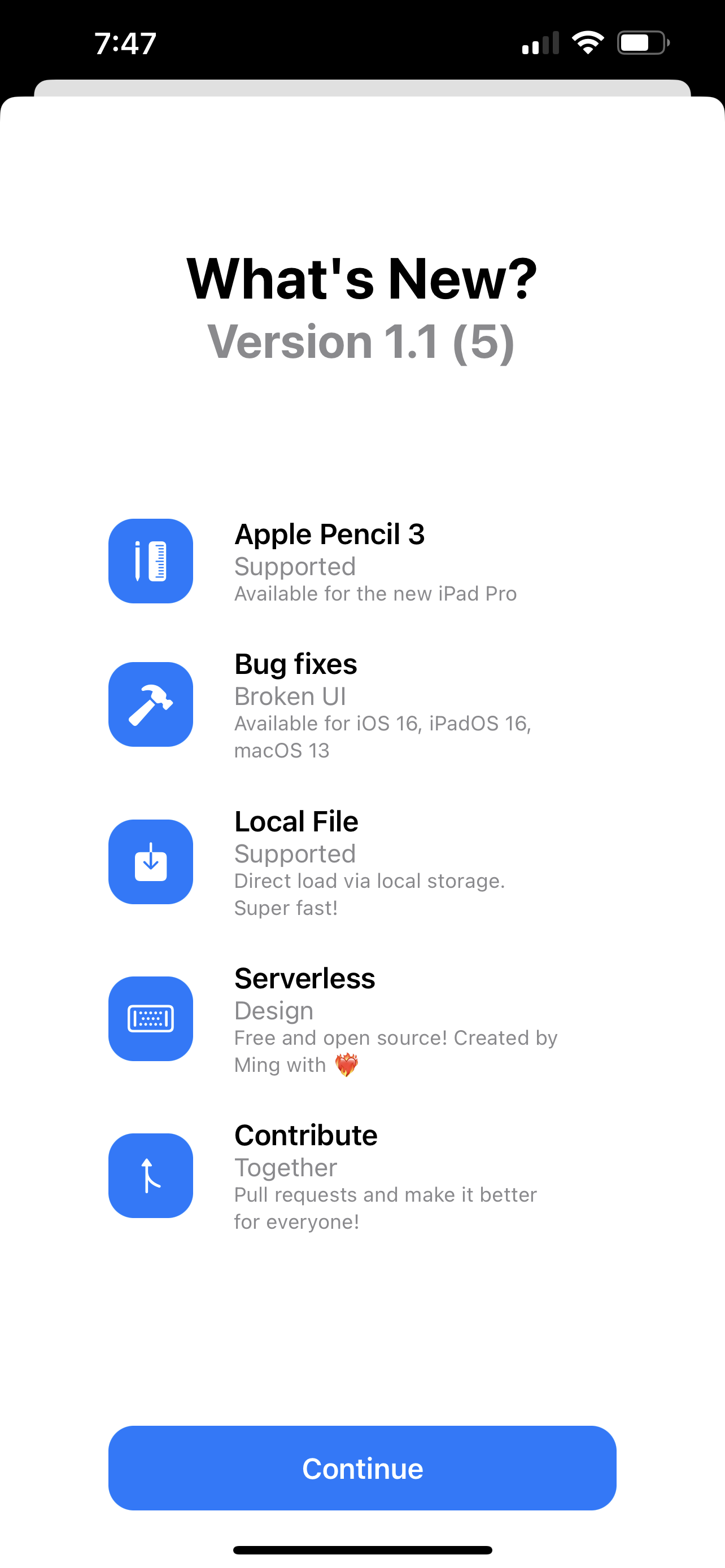 |
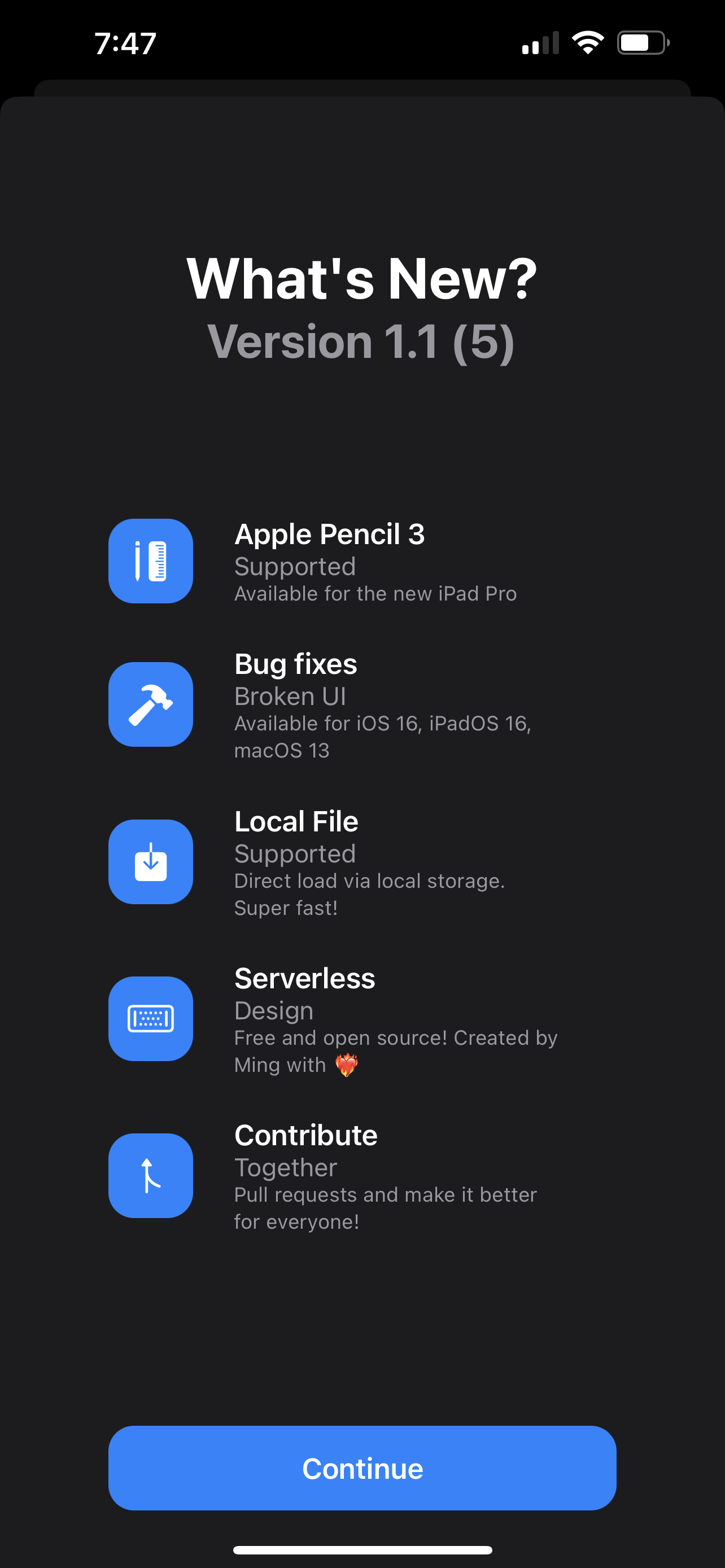 |
|---|---|
| Light Native | Dark Native |
 |
  |
|---|---|
| History View (2.0.0) | App Icon (3.9.6) |
Demo
Path: ./Demo (Xcode Project in SwiftUI)
FAQ
Q1. Why did the sheet not popup/show loading/show blank?
A1. Firstly, be sure the latest version in json is matching your app version. If you are using data.json locally, please check , is missing or any typo that casue the json no longer valid. If you are using remote data (e.g. Firebase), make sure the json structure is the same as the example.
Q2. How can I contribute to the project?
A2. Simply pull a request, and someone will review your code. If everything is okay, your changes will be merged and reflected in the next minor version.
Q3. Can I use it in Educational (includ. Student's Homework, Class's demo) or NGO or Commerical Project?
A3. YES. This project is under license of MIT. Feel free to use it :)
License
MIT
 1998code