

 10up
10up
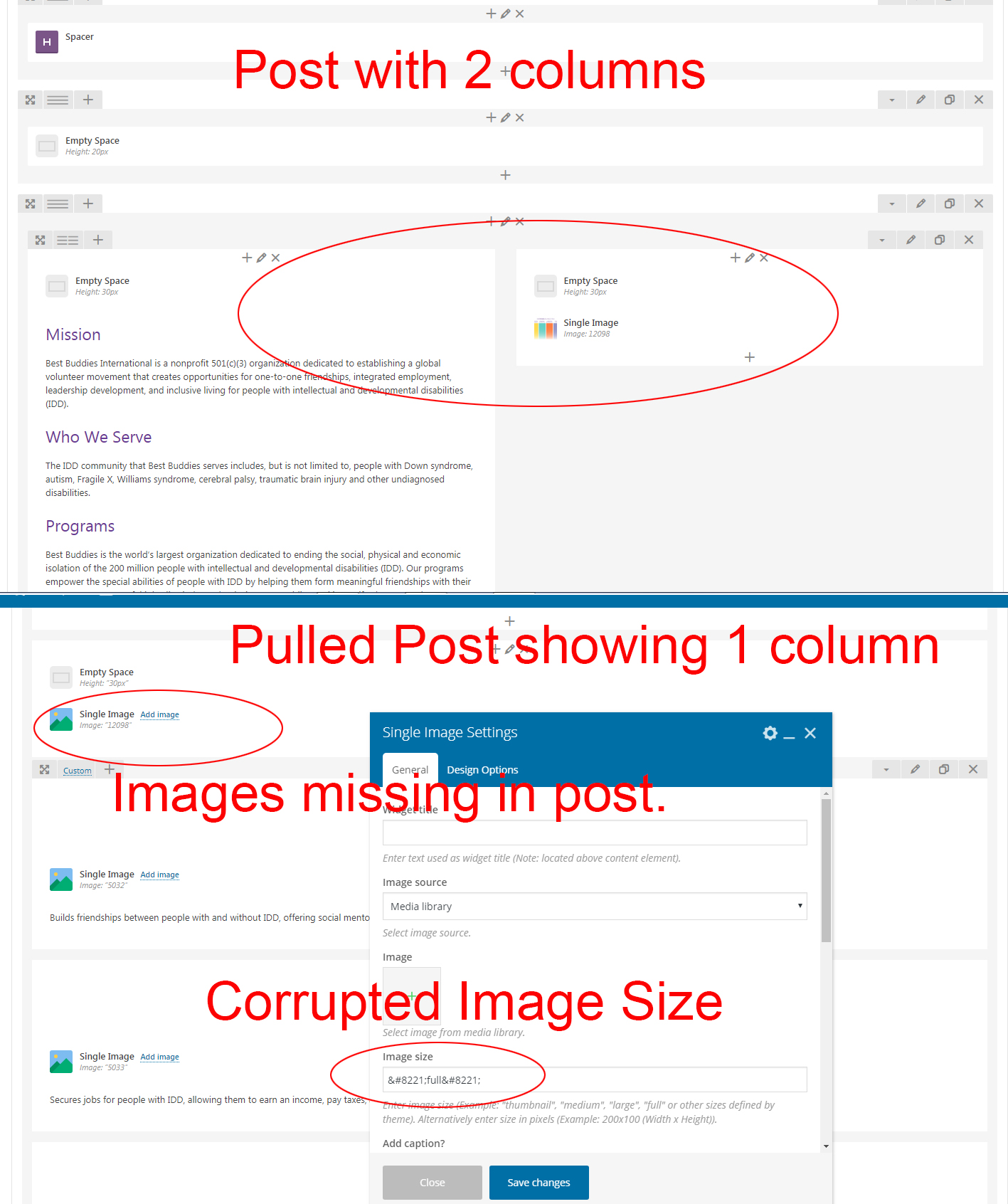
Pulled Content Not formatted - Images and Columns do not appear
After getting a greenlight on the connection, the content created within WPBakery Page Builder does not format the post correctly when pulled. The images are in the media file, but not appearing on or within the pulled post. The columns are also off. After unlinking the page and removing the content, I tried to restore the page and it will not add the content back in. I tested this on another site and if you delete the post or page connection, you will not be able to reconnect the page/post under pull content. The image size on images being pulled also seems corrupted.
I've attached a few screenshots to help troubleshoot. I downloaded this plugin last October of 2018 and by now, I was hoping most issues would be fixed.
Any help is greatly appreciated.

@dcgraphics1 welcome to Distributor and thanks for the feedback! With the number of plugins and themes in the WordPress ecosystem it's hard for us to test Distributor against all of them, so getting specific feedback on inconsistencies is very helpful; in your case with WPBakery Page Builder. As a paying @wpbakery consumer, if you're able to get in contact with them via WPBakery support to see if they'd be open to partnering in troubleshooting this together then I'd be happy to work with them on finding a resolution that will ensure Distributor and WPBakery Page Builder works well together for you. In the meantime, I'll try and find a contact for them here on GitHub who may be able to assist as well.

Hey @mmihey, a bit of research seems to show you may be a good person to start with to find someone on the WPBakery team that may be able to work with us on troubleshooting the issue that @dcgraphics1 raised here. Any chance someone from the WPBakery team would be able to partner with us to see why WPBakery and Distributor don't seem to integrate well and work on a resolution (in either or both codebases) to ensure consumers are able to use both plugins seamlessly?
@jeffpaul - I am experiencing a similar issue with the Divi theme/Divi Builder on the remote sites. If the builder utility is used to create and style the blog post, the images do not transfer to the remote site when pushed.
e.g. (main_site): http://r5z.f0a.myftpupload.com/3-delicious-recipes-to-beat-the-blahs/ (remote_site_1): http://salinewellness.com/2020/03/3-delicious-recipes-to-beat-the-blahs/ (remote_site_2): https://lisavermillionwellness.com/2020/03/3-delicious-recipes-to-beat-the-blahs/
I also noticed that if the post contains a "featured image" it does not transfer when a post is pushed either.
I'm going to try creating the post outside of the builder and test to see if the images transfer, but any help getting the builder-based posts to work would be greatly appreciated as it saves a tremendous amount of time to develop posts and content.

@jeffpaul - After testing, the image issue pertains only to posts created using the builder utility. When creating a standard post, everything transfers properly.
@awespirestudios yes, there's an issue with how various page builders are storing their content and how Distributor syndicates content out to sites. This general plugin compatibility issue is milestoned for our v2.1 release which is tentatively aimed for mid-summer.
@jeffpaul - Thank you for your response. That is fantastic news. And... I absolutely love your plugin!
@nikitahl pinging you, as a bit of research seems to show you may be a good person to start with to find someone on the Visual Composer / WPBakery team that may be able to work with us on troubleshooting the issue that @dcgraphics1 raised here. Any chance someone from your team would be able to partner with us to see why Visual Composer / WPBakery and Distributor don't seem to integrate well and work on a resolution (in either or both codebases) to ensure consumers are able to use both plugins seamlessly?
@jeffpaul I tried out your plugin yesterday the first time - and it seems to be exactly what I was looking for. But - using WPBakery, I have the same issue as mentioned before: Images are transferred to the media folder of the site which is pulling the content from another site but since WPBakery uses the image/media ID for used images inside the content, the images are broken then. I did not find a solution for this but maybe there is an existing extension or code addon which replaces the old image id with the new one?

@pixelpublic we've received no response back in trying to reach out to various page builders. We have started our work on a Distributor v2, but expecting that it will resolve all issues seen across all page builders may not be realistic. Once we get a bit deeper into the large parts being refactored in v2 and can test on some page builders we'll have a better sense. Until then, following this issue and #348 will probably get you pertinent updates when they're available.