

 10up
10up
BUG: The "output" method expects string, gets an array
Hello!
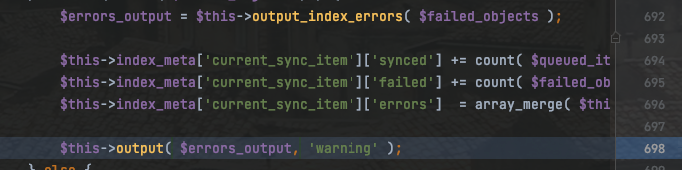
Describe the bug The "output" method in the /includes/classes/IndexHelper.php file on the 698 line expects a string, but the "$errors_output" variable's value is an array, because earlier the "output_index_errors" method returned an array. This causes indexing to crash.
https://github.com/10up/ElasticPress/blob/develop/includes/classes/IndexHelper.php#L698
Expected behavior Make the "$errors_output" string before passing it into the "output" method.
Screenshots
Environment information
- ElasticPress version: 4.1.0
Additional info It is not related to this problem, but maybe it will help with some other issues. I had an interesting case: the Advanced Post Types Order plugin interfered with the request ElasticPress made and changed the order of IDs (it was setting "ORDER BY post_date" instead of order by ID). This was causing some issues with indexation. I set some conditions for the Advanced Post Types Order to work only on required pages. After that ElasticPress works OK.

Hi @madaolex,
The "output" method actually expects either a string or an array. We did have a problem with that but that was supposedly fixed in 4.1.0 via #2688. Is there a reproducible step-by-step scenario you could share with us?
Also, would it be possible for you to share the changes you've made to make things work with Advanced Post Types Order? Thanks!

Hi @felipeelia!
Indeed, it was fixed. Sorry, didn't see that. I didn't check the method itself, so I thought it wasn't fixed. Thank you for the update!
About the Advanced Post Types Order: The plugin has settings for each post type. We use that plugin for the "Products" post type. I just added several conditions in the plugin's settings for "products" to have it working only if the page has "resources" in its URL ("/resources" is a shop page on the website I am working on) or if it is a feed.
