

 1000ch
Illegal value for `line`
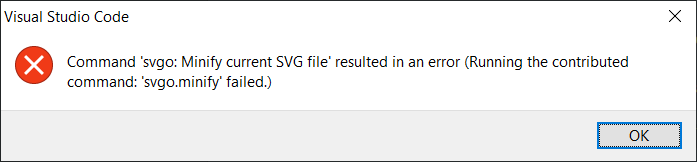
I just installed this extension hoping to make SVG optimisation a bit easier, but whatever option I try to run, it doesn’t seem to work, giving me instead only this extremely, erm, useful error:
Illegal value for line``
I’ve found slews of other issues on GitHub, mostly on the VSCode rep itself, describing this, but the solutions seem quite a bit above my head or just not relevant to my setup at all. At least some of those issues seem to indicate it’s somehow related to linting, though I don’t know if that applies at all here. I haven’t been able to track down any issues anywhere that mention what the error is actually supposed to mean.
Does anyone here have any idea what might be causing this?

From what I can see, this notification is displayed because the file is already minimized


This extension regularly gives me this error too.
Apparently, you just have to add an extra line to the file. It seems to happen when the SVG file is just one line.

@kokoshneta @gyzerok @sebj54 Do you still face the problem? Please share an SVG file that reproduces the same error.

Yes, had it even this morning!
For example this one:
<svg enable-background="new 0 0 511.375 511.375" height="512" viewBox="0 0 511.375 511.375" width="512" xmlns="http://www.w3.org/2000/svg"><g><path d="m511.375 255.687-57.89-64.273 9.064-86.045-84.65-17.921-43.18-75.011-79.031 35.32-79.031-35.32-43.18 75.011-84.65 17.921 9.063 86.045-57.89 64.273 57.889 64.273-9.063 86.045 84.65 17.921 43.18 75.011 79.031-35.321 79.031 35.321 43.18-75.011 84.65-17.921-9.064-86.045zm-255.687 175.071-66.544 29.74-36.35-63.146-71.3-15.095 7.63-72.444-48.749-54.125 48.749-54.125-7.63-72.444 71.3-15.095 36.35-63.146 66.544 29.739 66.543-29.739 36.35 63.146 71.301 15.095-7.63 72.444 48.748 54.124-48.749 54.125 7.63 72.443-71.301 15.095-36.35 63.146z"/><path d="m340.497 179.725-107.203 120.104-66.734-66.734-21.213 21.213 89.186 89.186 128.345-143.792z"/></g></svg>
If you want to reproduce the bug, you have to ensure that the file has only one line. If VS Code automatically adds one empty line at the end of the file when saving the file, you can minify the SVG twice to reproduce the problem.
I don't know if it is part of the problem but I'm on Windows. The error message seems to have changed by the way.
@sebj54 I couldn't reproduce the issue with the provided SVG. and just for clarification, do you use the latest version of this plugin (and vscode itself)?
Thanks @1000ch for trying to reproduce!
Yes I have latest versions for both (plugin: 2.3.2, vscode 1.60.2).
Here is a video where this happens:
- I minify a SVG file correctly (it removes only the last line break)
- Then I try to minify again and a error message appears (the error message is not visible in the video because I captured only VSCode, see below)
https://user-images.githubusercontent.com/5880435/134717678-4d554702-bbc6-4b29-b1cc-927d18cb6198.mp4
The only difference between my two attempts is the ending line break which got removed.
Maybe a simple fix could be to add a line break at the end of the file before running SVGO?
Let me know if I can provide you logs or anything.
@sebj54 Thank you for the detail, It looks like the data is not saved after the first data was optimized once?
@1000ch You're right! I have to save manually (Ctrl+S) after the file has been minified. I do it automatically so I didn't even notice.
I'm not sure the internal state when unsaved, but range data seems to be strange. I added error handling anyway, but this plugin should not touch the state itself including unsaved state, so please use the functionality when the document is saved.
Unfortunately I don't think it's part of the problem. I can show you the same video with a saved SVG with only one line.
And I know some could say "why do you want to run SVGO on a minified SVG?", but minified ≠ optimized.
Same problem here! Is there a solution? Works fine in Sublime Text, but unfortunately with the same SVG not in VS code.

The problem is due to a bug in vscode-set-text:
const lastLine = document.lineAt(document.lineCount - 2);— https://github.com/SamVerschueren/vscode-set-text/blob/master/index.ts#L15
When the document only has 1 line, it tries to get the line at -1, which doesn't exist, so it throws the error. I'll take a peek and open a PR with a solution.
In my local copy of the repo, just changing that 2 to a 1 allows the extension to work as normal. I'm not sure why the original developer used the value of 2 though, I can only assume under the assumption that files would always have a trailing new line.
