

 0x7c13
Update UI design to WinUI 2.6
Is your feature request related to a problem? Please describe. No
Describe the solution you'd like App UI should be updated.
Describe alternatives you've considered A more sophisticated UI can provide more experience.
Additional context Add any other context or screenshots about the feature request here.


I do have a plan but not in a hurry to do so because of the bugs I have seen so far. Also the adoption rate of Windows 11 is not even reaching to 2%. Having rounded corners in Win 10 is also against its design. I expect to update Notepads' visual by EOY.

@JasonStein
-
Why redefine most controls as custom controls?
-
And why are there different xaml formats?
<TextBlock
    x:Name="SessionSnapshotSettingsTitle"
    x:Uid="/Settings/AdvancedPage_SessionSnapshotSettings_Title"
    Margin="0,20,0,0"
    FontWeight="Normal"/>
<TextBlock x:Uid="/Settings/AdvancedPage_SessionSnapshotSettings_Description" Margin="0,8,0,0"/>
<ToggleSwitch x:Uid="/Settings/AdvancedPage_LaunchPreferenceSettings_AlwaysOpenNewWindowToggleSwitch"
              x:Name="AlwaysOpenNewWindowToggleSwitch" />
<NavigationViewItem
                    x:Uid="/Settings/TextAndEditorPage_Title"
                    Tag="TextAndEditor"
                    IsSelected="True">
👆All of these really exist.
- I'm currently working on reformatting xaml source code assets. Does it really make sense?
I am trying to unify with the following formats:
    <muxc:NavigationView
        x:Name="SettingsNavigationView"
        IsPaneOpen="False"
        IsSettingsVisible="False"
        IsBackEnabled="False"
        IsBackButtonVisible="Collapsed"
        PaneDisplayMode="LeftCompact"
        OpenPaneLength="200"
        ItemInvoked="SettingsPanel_OnItemInvoked">
        <muxc:NavigationView.MenuItems>
            <muxc:NavigationViewItem
                x:Uid="/Settings/TextAndEditorPage_Title"
                Tag="TextAndEditor"
                IsSelected="True">
Like this. And if there are less than two elements, put them in one line and insert a space before the ending slash:
<FontIcon FontFamily="Segoe MDL2 Assets" Glyph="" />
- Update the icon font from Segoe MDL2 Assets to Segoe Fluent Icons.
This should be discussed in depth as it has to be selected depending on the version of Windows. Refer Files app source code
@JasonStein
- Why redefine most controls as custom controls?
- And why are there different xaml formats?
<TextBlock
    x:Name="SessionSnapshotSettingsTitle"
    x:Uid="/Settings/AdvancedPage_SessionSnapshotSettings_Title"
    Margin="0,20,0,0"
    FontWeight="Normal"/>
<TextBlock x:Uid="/Settings/AdvancedPage_SessionSnapshotSettings_Description" Margin="0,8,0,0"/><ToggleSwitch x:Uid="/Settings/AdvancedPage_LaunchPreferenceSettings_AlwaysOpenNewWindowToggleSwitch" x:Name="AlwaysOpenNewWindowToggleSwitch" /><NavigationViewItem x:Uid="/Settings/TextAndEditorPage_Title" Tag="TextAndEditor" IsSelected="True">👆All of these really exist.
- I'm currently working on reformatting xaml source code assets. Does it really make sense?
I am trying to unify with the following formats:
    <muxc:NavigationView
        x:Name="SettingsNavigationView"
        IsPaneOpen="False"
        IsSettingsVisible="False"
        IsBackEnabled="False"
        IsBackButtonVisible="Collapsed"
        PaneDisplayMode="LeftCompact"
        OpenPaneLength="200"
        ItemInvoked="SettingsPanel_OnItemInvoked">
        <muxc:NavigationView.MenuItems>
            <muxc:NavigationViewItem
                x:Uid="/Settings/TextAndEditorPage_Title"
                Tag="TextAndEditor"
                IsSelected="True">
Like this. And if there are less than two elements, put them in one line and insert a space before the ending slash:
<FontIcon FontFamily="Segoe MDL2 Assets" Glyph="" />
- Update the icon font from Segoe MDL2 Assets to Segoe Fluent Icons.
This should be discussed in depth as it has to be selected depending on the version of Windows. Refer Files app source code
If you see any custom control or modified version of any existing WinUI/WCT controls in this repo, it must be related to:
- I found some bugs in the original one. (I did contribute to the source but not all of them are back-ported.)
- To achieve "real-time" theme color change in theme setting:
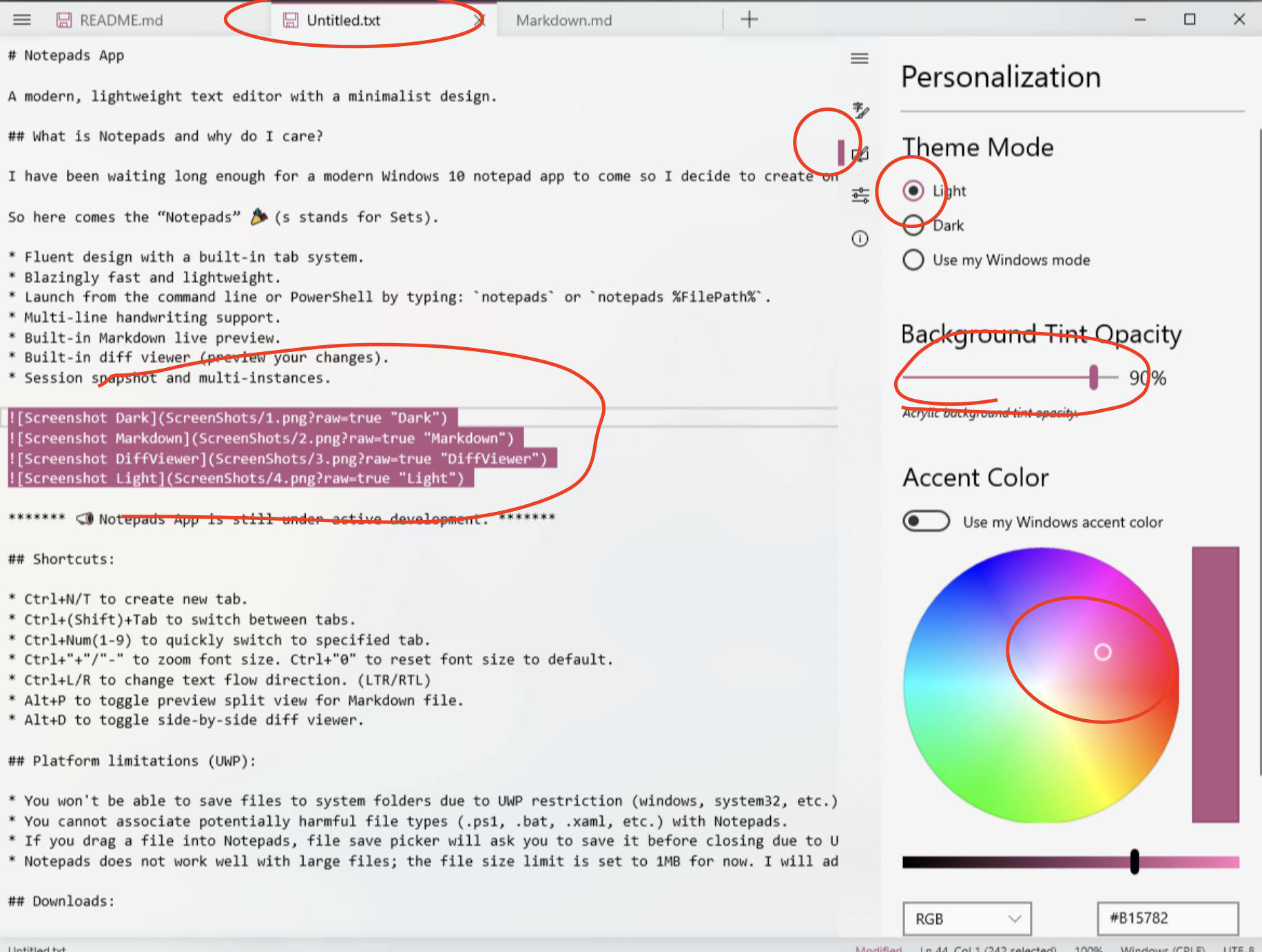
When you change the accent color: https://github.com/JasonStein/Notepads/blob/da3daca3128cf7c09198e9e350c4e084f3f9ed84/src/Notepads/Services/ThemeSettingsService.cs#L332
Some of the controls' accent just won't change in "real-time". You have to re-open before the new color taking into effect. There is no way to "overwrite" this behavior by extension so I have to copy it's source xaml and pin-point the place where accent color is referenced.