
zulip-desktop
 zulip-desktop copied to clipboard
 zulip
zulip
Embedded image broken in desktop app (but works in mobile app)
Describe the bug
A chat message contains embedded image links. The Zulip desktop app cannot open these links, but other Zulip apps /can/ open them.
To Reproduce
I encountered this in a private message: https://rushstack.zulipchat.com/#narrow/pm-with/357793,454895-pm/near/260242681
I'm not sure how this message was authored, but the message source looks like this:
Sorry for disturb,
[image.png](/user_uploads/30359/ZknxcY_Np5iakLVOjw_jboOL/image.png)
after render to markdown #1 will convert to any,
[image.png](/user_uploads/30359/WPD7joOUmMNQUjGWfXt37uSi/image.png)

and
[image.png](/user_uploads/30359/re48L4Zss5aZL4TV8wM2-qjM/image.png)
[image.png](/user_uploads/30359/qK3Htow_xjKdL8ZAexzAjYPo/image.png)
[image.png](/user_uploads/30359/sX5rkHQW8dURhRkKiFf08hkD/image.png)

also has a wrong type output.

any idea for that?
The links appear like image.png. When you click this link on the mobile app, it shows the image. When you click in the web app, it opens the image in a new tab.
However, when you click the link in the desktop app, it plays a loud beep, and nothing happens.
Expected behavior
The desktop app should work consistently with the other apps.
Remarks
The web app opens the linked image in a new browser tab. Since the desktop app does not have browser "tabs," perhaps the beeping is telling us that it doesn't know how to open a <a target="_blank" hyperlink. (?)
Desktop (please complete the following information):
- Operating System: Windows 10 Pro 19043.1288
- Zulip Desktop Version: v5.8.1

Clicking on the image saves it to your Downloads folder. The app should have informed you of this with a notification. Perhaps you are blocking notifications (e.g. with Windows focus assist)? Check if the notification is present in the Windows action center.
This is not a good design, and it will be changed at some point, but that’s how it works currently.

@andersk Thanks for your explanation! I confirmed that the files are indeed being downloaded into the Windows "Downloads" folder.
Part of the confusion is that the loud beep sounds like an error. As far as I can tell it's not one of the default Windows system sounds. For example, if Zulip played the system sound called "Notification", that would sound more like success instead of failure.
The app should have informed you of this with a notification. Perhaps you are blocking notifications
That's right, Windows 10 notifications are entirely disabled in the settings:
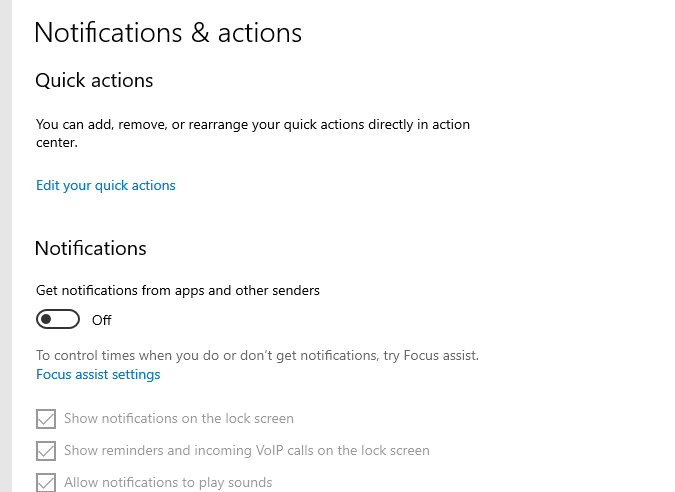
I had to disable them because the design of that feature is really obnoxious. It was popping up big notices that prevented me from seeing my work. Here's how that looks in the Zulip app, for example:
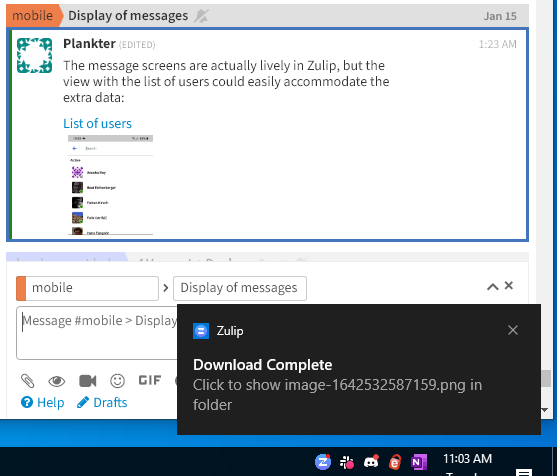
The Windows 10 notification feature seems to be designed for phones or casual users, not people who are doing a job and need to see what they are typing. 😋