
zha-device-handlers
 zha-device-handlers copied to clipboard
 zigpy
zigpy
[Device Support Request] Tuya Neo Outdoor Siren with Solar (TZE200_nlrfgpny)
Problem description
Hello good afternoon! I recently bought this solar siren from aliexpress, very well built product, however I couldn't get it to work within the ZHA, I checked and found a support request for zigbee2mqtt, but I didn't find anything about adding it to the ZHA, not even a device handler that was compatible with her, I attached her diagnosis.
this was the thread I found about this equipment (but zigbee2mqtt) https://github.com/Koenkk/zigbee2mqtt/discussions/17325
This is the product i bought: https://pt.aliexpress.com/item/1005005264809268.html And this is the product on the manufacturer's website https://www.szneo.com/en/products/show.php?id=251 (but mine is zigbee version).
Solution description
The device has a battery, is powered by solar energy, however if I could at least trigger the siren, that would be great for me, would anyone be able to help me?
Screenshots/Video
Screenshots/Video
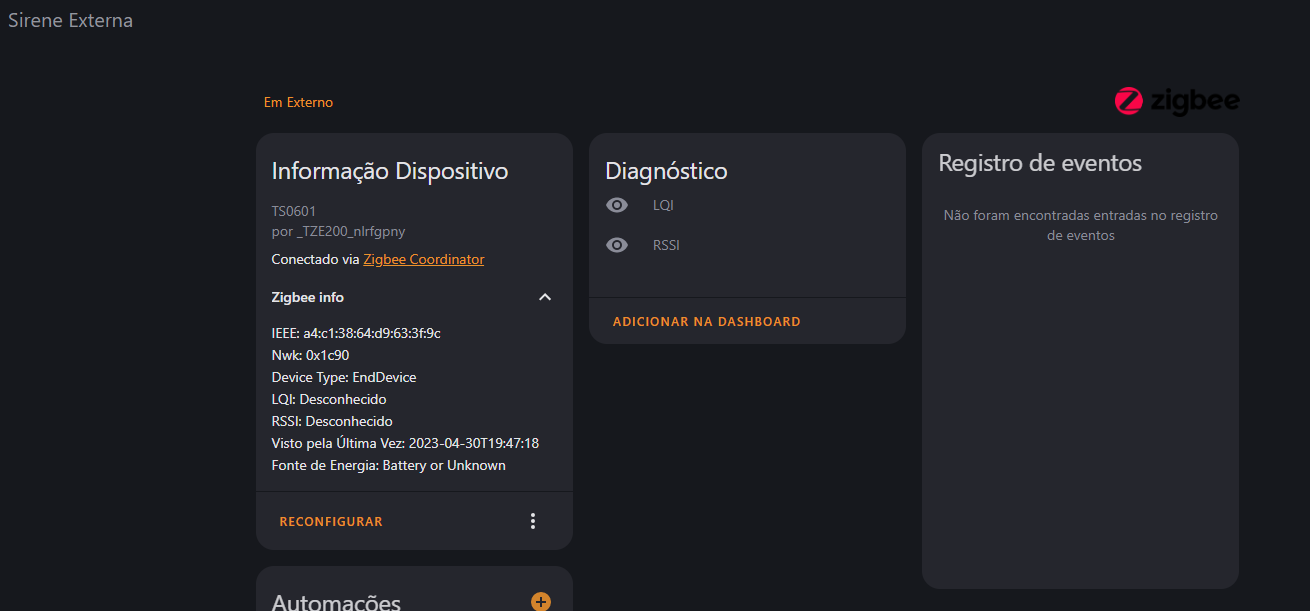
Device signature
Device signature
{
  "node_descriptor": "NodeDescriptor(logical_type=<LogicalType.EndDevice: 2>, complex_descriptor_available=0, user_descriptor_available=0, reserved=0, aps_flags=0, frequency_band=<FrequencyBand.Freq2400MHz: 8>, mac_capability_flags=<MACCapabilityFlags.AllocateAddress: 128>, manufacturer_code=4417, maximum_buffer_size=66, maximum_incoming_transfer_size=66, server_mask=10752, maximum_outgoing_transfer_size=66, descriptor_capability_field=<DescriptorCapability.NONE: 0>, *allocate_address=True, *is_alternate_pan_coordinator=False, *is_coordinator=False, *is_end_device=True, *is_full_function_device=False, *is_mains_powered=False, *is_receiver_on_when_idle=False, *is_router=False, *is_security_capable=False)",
  "endpoints": {
    "1": {
      "profile_id": 260,
      "device_type": "0x0051",
      "in_clusters": [
        "0x0000",
        "0x0004",
        "0x0005",
        "0xef00"
      ],
      "out_clusters": [
        "0x000a",
        "0x0019"
      ]
    }
  },
  "manufacturer": "_TZE200_nlrfgpny",
  "model": "TS0601",
  "class": "zigpy.device.Device"
}
Diagnostic information
Diagnostic information
{
  "home_assistant": {
    "installation_type": "Home Assistant OS",
    "version": "2023.4.6",
    "dev": false,
    "hassio": true,
    "virtualenv": false,
    "python_version": "3.10.10",
    "docker": true,
    "arch": "x86_64",
    "timezone": "America/Cuiaba",
    "os_name": "Linux",
    "os_version": "6.1.25",
    "supervisor": "2023.04.1",
    "host_os": "Home Assistant OS 10.1",
    "docker_version": "23.0.3",
    "chassis": "vm",
    "run_as_root": true
  },
  "custom_components": {
    "ui_lovelace_minimalist": {
      "version": "v1.3.4",
      "requirements": [
        "aiofiles==0.8.0",
        "aiogithubapi>=22.2.4"
      ]
    },
    "smartthinq_sensors": {
      "version": "0.31.6",
      "requirements": [
        "pycountry>=20.7.3",
        "xmltodict>=0.12.0",
        "charset_normalizer>=2.0.0"
      ]
    },
    "scheduler": {
      "version": "v0.0.0",
      "requirements": []
    },
    "alexa_media": {
      "version": "4.6.2",
      "requirements": [
        "alexapy==1.26.5",
        "packaging>=20.3",
        "wrapt>=1.12.1"
      ]
    },
    "hass_agent": {
      "version": "2022.11.9",
      "requirements": []
    },
    "xiaomi_miot_raw": {
      "version": "v1.3.1",
      "requirements": [
        "construct",
        "python-miio>=0.5.3"
      ]
    },
    "samsungtv_smart": {
      "version": "0.11.6",
      "requirements": [
        "websocket-client!=1.4.0,>=0.58.0",
        "wakeonlan>=2.0.0",
        "aiofiles>=0.8.0",
        "casttube>=0.2.1"
      ]
    },
    "hacs": {
      "version": "1.32.1",
      "requirements": [
        "aiogithubapi>=22.10.1"
      ]
    },
    "xiaomi_miot": {
      "version": "0.7.8",
      "requirements": [
        "construct==2.10.56",
        "python-miio>=0.5.6",
        "micloud>=0.3"
      ]
    },
    "localtuya": {
      "version": "5.0.0",
      "requirements": []
    },
    "sonoff": {
      "version": "3.5.1",
      "requirements": [
        "pycryptodome>=3.6.6"
      ]
    },
    "edge_tts": {
      "version": "0.0.1",
      "requirements": [
        "edge-tts==6.1.5"
      ]
    },
    "alarmo": {
      "version": "v1.9.9",
      "requirements": []
    }
  },
  "integration_manifest": {
    "domain": "zha",
    "name": "Zigbee Home Automation",
    "after_dependencies": [
      "onboarding",
      "usb"
    ],
    "codeowners": [
      "@dmulcahey",
      "@adminiuga",
      "@puddly"
    ],
    "config_flow": true,
    "dependencies": [
      "file_upload"
    ],
    "documentation": "https://www.home-assistant.io/integrations/zha",
    "iot_class": "local_polling",
    "loggers": [
      "aiosqlite",
      "bellows",
      "crccheck",
      "pure_pcapy3",
      "zhaquirks",
      "zigpy",
      "zigpy_deconz",
      "zigpy_xbee",
      "zigpy_zigate",
      "zigpy_znp"
    ],
    "requirements": [
      "bellows==0.35.1",
      "pyserial==3.5",
      "pyserial-asyncio==0.6",
      "zha-quirks==0.0.97",
      "zigpy-deconz==0.20.0",
      "zigpy==0.54.1",
      "zigpy-xbee==0.17.0",
      "zigpy-zigate==0.10.3",
      "zigpy-znp==0.10.0"
    ],
    "usb": [
      {
        "vid": "10C4",
        "pid": "EA60",
        "description": "*2652*",
        "known_devices": [
          "slae.sh cc2652rb stick"
        ]
      },
      {
        "vid": "1A86",
        "pid": "55D4",
        "description": "*sonoff*plus*",
        "known_devices": [
          "sonoff zigbee dongle plus v2"
        ]
      },
      {
        "vid": "10C4",
        "pid": "EA60",
        "description": "*sonoff*plus*",
        "known_devices": [
          "sonoff zigbee dongle plus"
        ]
      },
      {
        "vid": "10C4",
        "pid": "EA60",
        "description": "*tubeszb*",
        "known_devices": [
          "TubesZB Coordinator"
        ]
      },
      {
        "vid": "1A86",
        "pid": "7523",
        "description": "*tubeszb*",
        "known_devices": [
          "TubesZB Coordinator"
        ]
      },
      {
        "vid": "1A86",
        "pid": "7523",
        "description": "*zigstar*",
        "known_devices": [
          "ZigStar Coordinators"
        ]
      },
      {
        "vid": "1CF1",
        "pid": "0030",
        "description": "*conbee*",
        "known_devices": [
          "Conbee II"
        ]
      },
      {
        "vid": "10C4",
        "pid": "8A2A",
        "description": "*zigbee*",
        "known_devices": [
          "Nortek HUSBZB-1"
        ]
      },
      {
        "vid": "0403",
        "pid": "6015",
        "description": "*zigate*",
        "known_devices": [
          "ZiGate+"
        ]
      },
      {
        "vid": "10C4",
        "pid": "EA60",
        "description": "*zigate*",
        "known_devices": [
          "ZiGate"
        ]
      },
      {
        "vid": "10C4",
        "pid": "8B34",
        "description": "*bv 2010/10*",
        "known_devices": [
          "Bitron Video AV2010/10"
        ]
      }
    ],
    "zeroconf": [
      {
        "type": "_esphomelib._tcp.local.",
        "name": "tube*"
      },
      {
        "type": "_zigate-zigbee-gateway._tcp.local.",
        "name": "*zigate*"
      },
      {
        "type": "_zigstar_gw._tcp.local.",
        "name": "*zigstar*"
      },
      {
        "type": "_slzb-06._tcp.local.",
        "name": "slzb-06*"
      }
    ],
    "is_built_in": true
  },
  "data": {
    "ieee": "**REDACTED**",
    "nwk": 7312,
    "manufacturer": "_TZE200_nlrfgpny",
    "model": "TS0601",
    "name": "_TZE200_nlrfgpny TS0601",
    "quirk_applied": false,
    "quirk_class": "zigpy.device.Device",
    "manufacturer_code": 4417,
    "power_source": "Battery or Unknown",
    "lqi": null,
    "rssi": null,
    "last_seen": "2023-04-30T19:47:18",
    "available": false,
    "device_type": "EndDevice",
    "signature": {
      "node_descriptor": "NodeDescriptor(logical_type=<LogicalType.EndDevice: 2>, complex_descriptor_available=0, user_descriptor_available=0, reserved=0, aps_flags=0, frequency_band=<FrequencyBand.Freq2400MHz: 8>, mac_capability_flags=<MACCapabilityFlags.AllocateAddress: 128>, manufacturer_code=4417, maximum_buffer_size=66, maximum_incoming_transfer_size=66, server_mask=10752, maximum_outgoing_transfer_size=66, descriptor_capability_field=<DescriptorCapability.NONE: 0>, *allocate_address=True, *is_alternate_pan_coordinator=False, *is_coordinator=False, *is_end_device=True, *is_full_function_device=False, *is_mains_powered=False, *is_receiver_on_when_idle=False, *is_router=False, *is_security_capable=False)",
      "endpoints": {
        "1": {
          "profile_id": 260,
          "device_type": "0x0051",
          "in_clusters": [
            "0x0000",
            "0x0004",
            "0x0005",
            "0xef00"
          ],
          "out_clusters": [
            "0x000a",
            "0x0019"
          ]
        }
      }
    },
    "active_coordinator": false,
    "entities": [],
    "neighbors": [],
    "routes": [],
    "endpoint_names": [
      {
        "name": "SMART_PLUG"
      }
    ],
    "user_given_name": "Sirene Externa",
    "device_reg_id": "0fcba819b87fe06aa34f60fdfadd8a86",
    "area_id": "externo",
    "cluster_details": {
      "1": {
        "device_type": {
          "name": "SMART_PLUG",
          "id": 81
        },
        "profile_id": 260,
        "in_clusters": {
          "0x0004": {
            "endpoint_attribute": "groups",
            "attributes": {},
            "unsupported_attributes": {}
          },
          "0x0005": {
            "endpoint_attribute": "scenes",
            "attributes": {},
            "unsupported_attributes": {}
          },
          "0xef00": {
            "endpoint_attribute": null,
            "attributes": {},
            "unsupported_attributes": {}
          },
          "0x0000": {
            "endpoint_attribute": "basic",
            "attributes": {
              "0x0001": {
                "attribute_name": "app_version",
                "value": 72
              },
              "0x0004": {
                "attribute_name": "manufacturer",
                "value": "_TZE200_nlrfgpny"
              },
              "0x0005": {
                "attribute_name": "model",
                "value": "TS0601"
              }
            },
            "unsupported_attributes": {}
          }
        },
        "out_clusters": {
          "0x0019": {
            "endpoint_attribute": "ota",
            "attributes": {},
            "unsupported_attributes": {}
          },
          "0x000a": {
            "endpoint_attribute": "time",
            "attributes": {},
            "unsupported_attributes": {}
          }
        }
      }
    }
  }
}
Logs
Logs
[Paste the logs here]
Custom quirk
Custom quirk
[Paste your custom quirk here]
Additional information
19/05/2023 I found more information that might be helpful (not for me, as I don't understand the process of creating a custom quirk). https://github.com/dresden-elektronik/deconz-rest-plugin/issues/6941

There is a solution using zigbee2mqtt:[https://github.com/junbing2006/zigbee_siren_TZE200_nlrfgpny/blob/main/zigbee_siren_TZE200_nlrfgpny.js] I have a Tuya Gateway so I am still looking for a solution to get the entities visible by using local tuya in HACS.

There is a solution using zigbee2mqtt:[https://github.com/junbing2006/zigbee_siren_TZE200_nlrfgpny/blob/main/zigbee_siren_TZE200_nlrfgpny.js] I have a Tuya Gateway so I am still looking for a solution to get the entities visible by using local tuya in HACS.
Yes, I had seen this solution, but I only use the ZHA, as it is more integrated with the home assistant. Unfortunately at ZHA there is no discussion about it, probably because it is a newly launched product, I had difficulty finding any information about it even on google. Anyway, thank you for your attention.

Anyone how to add this in Home Assistant using zigbee2mqtt?
This is the external converter file to support zigbee siren _TZE200_nlrfgpny on zigbee2mqtt, there's just nothing in the zha. https://github.com/junbing2006/zigbee_siren_TZE200_nlrfgpny/tree/main
I bought a zigbee2mqtt compatible adapter and migrated to it. It is working without any convert on it.

Is this not planned or completed? Says it is both sequentially. Would be great if this could get a ZHA version.

Picking this up by making a quirk, I have ordered one and i am waiting for it to arrive, but If someone with one already could get the Simple Descriptor as mentioned here that would help a lot in getting the quirk written.
Also if me commenting on this gets any of the people have worked on the Tuya stuff before looking here, i need a bit of help understanding where the hex values came from here so i can make a new/expand the existing cluster class for the outdoor alarm.(im currently making it from scratch so that the quirk can be installed as a custom one for now)

also could this issue get reopened, it was prematurely closed because the reporter was not getting attention, its still a issue as the device isnt supported and should have been left open even if the OP's solution is diffrent software
but If someone with one already could get the Simple Descriptor as mentioned here that would help a lot in getting the quirk written.
I'm new to this but is this what you need? zha-db386a20c9c68f5ceaa30276e1ec743c-_TZE200_nlrfgpny TS0601-34a5825e72845a4d109167aad3342f11.json.txt
nah, it's something that comes up in the logs while pairing, mines arrived now so it can get it there
still not fully sure on how I can use the zigbee2mqtt converter to get the information needed to write the quirk.
I think I'll dedicate sometime to it next weekend to try and get it semi working
@FrnchFrgg sorry for pinging you out of the blue 2 years after your contributions, where did these values come from?
@ioangogo i used your temporary quirk and it gets some functionality out of the product. i am starting to look into how to read attributes on zigbee devices because i want this device to work. Outdoor sirens are apperently rare in the smart home scene. I hope once i get some more info i can help alittle with it.
Are you still working on a quirk for this?

yeah, although I currently don't have much time to fully investigate the other attributes
yeah, although I currently don't have much time to fully investigate the other attributes
Sounds awesome, i wrote an e-mail to szneo in order to get the technical documentation describing which attributes and clusters they use for the product, hopefully i will get a response. I have tried looking through the configuration of the device in Z2M in order to find the right cluster attributes, but without much luck.
They got it to somewhat work in Z2M so in someway there must be some code where we can find the right attributes so we can make it work in ZHA.
I also would be very interested by a custom quirck for this siren! @ioangogo : I see that you submited "Add support for Tuya Neo Outdoor Siren with Solar (TZE200_nlrfgpny)" but it's not currently working. -> do you have a custom quirck we could use for the moment? That would be wonderful, thank you :)

Thank you for opening the thread I would also be very interested in an integration. I bought the sierene a while ago and unfortunately can't get it integrated. Triggering the siren and stopping it would be enough for me. Is there perhaps already a way via HACS? Thank you!

@dominikamann I looked for it last time a couple of weeks ago and couldn't find any :(
It would be wonderful if someone would make it work, I just really don't want to throw it away. Happy to donate.
Same here. @ioangogo seems to have it working. He submitted a code that unfortunately is not yet validated. I'd love to get a custom quirck or anything to make it work. I think I'll end up installing zigbee2mqtt on an other vm just for it :(

Quirk would be great interim solution if possible!
I've been waiting too long to keep hope ! I gave up and installed zigbee2mqtt on a pi zero 2w with a conbee2. One more device to maintain but it work
Quirk would be great interim solution if possible!
I've been waiting too long to keep hope ! I gave up and installed zigbee2mqtt on a pi zero 2w with a conbee2. One more device to maintain but it work
I did exactly the same thing and I didn't regret it. ZHA is great, works well. But Z2M has much more community support overall
But Z2M has much more community support overall Sadly all questions on how to write a quirk are either ignored or answered with "read the README". I've read the thing but it's so short that I really wonder how the devs of ZHA expect anyone outside their group to understand it.

So someone has made a quirk for Z2M in order for it to work there.
What ioangogo is needing is to know which clusters that was used where he defined 0x0000 ini the quirk. i have tried looking through the config in Z2M in order to find the right clusters, unfortunately the TUYA config for Z2M is hugh and cotains a huge amount of lines of code.
I think the best bet to get the info of the clusters needed is to ask the code owner of the Z2M TUYA config.
TUYA_BATTERY_ATTR = 0x020F  # [0, 0, 0, 100] battery percentage
TUYA_ALARM_ATTR = 0x0168  # [0]/[1] Alarm!
TUYA_ALARM_DURATION_ATTR = 0x0267  # [0,0,0,10] alarm duration in seconds: 0-1800
TUYA_MELODY_ATTR = 0x0466  # [5] Melody
TUYA_VOLUME_ATTR = 0x0474  # [0]/[1]/[2] Volume 0-low, 2-high
TUYA_TAMPER_ATTR = 0x0000  < --- Missing Cluster
TUYA_TAMPER_ALARM_ATTR = 0x0000 < --- Missing Cluster
TUYA_ALARM_MODE_ATTR = 0x0000 < --- Missing Cluster
TUYA_CHARGE_STATE_ATTR = 0x0000 < --- Missing Cluster
TUYA_ALARM_STATE_ATTR = 0x0000 < --- Missing Cluster
Interested in thisas well, That would be great to make this work natively with zha.

Please continue working on the zha integration of NAS-AB06B2 _TZE204_nlrfgpny TS0601 https://nl.aliexpress.com/item/1005005827808088.html
