
zha-device-handlers
 zha-device-handlers copied to clipboard
 zigpy
zigpy
[BUG] New yooksmart D10110 inverted with quirk
**Describe the bug**
I purchased a new yooksmart D10110 cover and paired with home assistant. The controls
seemed inverted and I had to move the bar twice in order to get it to move. I read reports
in the past with the suggestion to unpair and pair again, tried multiple times with no luck.
So I disabled the quirk (apologies for the brute force: moved the file to a different directory
and reloaded) and it works now. For completeness:
Before:
- buttons up and down wouldn't work
- available button would be inverted (e.g.: cover was all the way down and the down button was enabled)
- in order to control the cover I'd move the progress bar all the way to 0 or to 100 then the opposite in order to work
After:
- buttons up and down work
- enabled button matches the direction of the cover: if open, it shows down button enabled

**To Reproduce**
Behavior is consistent across multiple pair/unpair cycles and full home assistant instance restarts

**Additional context**
Something that is possible, since the cover is new, is that they corrected the behavior in their firmware
and the quirk isn't needed anymore.
This device has:  Firmware: 0x10013001

I can provide any debugging necessary. I'm using homeassistant official virtual machine image and keeping
it up to date.

Editted: formatting

I'm about to buy these and was wondering: how did you disable the quirk? Can you write the steps for a beginner?
Also, are these the right kind? I'm confused about the naming yooksmart D10110 vs the Yoolax on Amazon. But when following the amazon.com link on the blakadder device database it leads to the Yoolax ones on Amazon. Given the yoo part is the same I assume that's the same motors?

That one should work as well, I picked this one, but it seems the only change is the style. Pick the P440-US motor that can connect directly through zigbee.
As noted on my initial comment, the way I did is ugly and will be reverted by a future upgrade. These are the steps:
1) Get a shell in the system (I use the kvm image, so virsh console <virtual machine name>):
    homeassistant login: root
    Last login: Tue Jan 25 14:50:00 UTC 2022 on ttyS0
    Last login: Mon Feb  7 14:51:33 on ttyS0
    Welcome to Home Assistant OS.

    Use `ha` to access the Home Assistant CLI.
    #
2) Move the file to a backup directory:
    # for i in $(find / -name D10110blinds.py); do dir=$(dirname $i); mkdir $dir/.backup; mv $i $dir/.backup/; done
3) Restart homeassistant
The correct way would be changing the quirk to not load on this firmware version but since I just have this one, I can't confirm the ones that need the quirk have a different firmware version.
Awesome thank you so much for the detailed description! Since you recently bought and I’m about to buy I think I’d get the same firmware version where I have to circumvent this quirk.
I work for yooksmart which is known as the selling brand Yoolax. We have confirmed the issue and will publish new firmware. So you guys need no bother. By the way, the issue is located due to the script of Smartthings which can choose whether or not to invert the direction. we learned the wrong logic obviously.

Cool! How can we update the firmware? Also, since you work for them: they frequently disconnect for me and reconnecting them always takes a long time of trial and error. Is there any trick to it?
I was having the same issue, and solved it in a similar fashion.
@JeremeLau, I presume you mean firmware inside the shade. Is that field upgradable? Is there a way to find out what firmware is in the shade? I'm about to purchase six more shades, but I'm concerned I'll end up with shades that behave differently from each other.
I'm not sure if it's relevant, but the shade I installed has the motor/charging port on the left side.

Cool! How can we update the firmware? Also, since you work for them: they frequently disconnect for me and reconnecting them always takes a long time of trial and error. Is there any trick to it?
Sorry for the inconvenience. We noticed maybe the paring trigger action is too complex and not easy to make it right every time. We're reconsidering a new paring way, wish can reduce the frequency. For the new firmware, since we add more interesting funs, it's still under test.
I was having the same issue, and solved it in a similar fashion.
@JeremeLau, I presume you mean firmware inside the shade. Is that field upgradable? Is there a way to find out what firmware is in the shade? I'm about to purchase six more shades, but I'm concerned I'll end up with shades that behave differently from each other.
I'm not sure if it's relevant, but the shade I installed has the motor/charging port on the left side.
Yes, indeed. The new firmware I mean is the motor firmware itself. Our motor does have the ability to be upgraded over the air or over the USB port. As I mentioned above, it's still under test. If you don't need them urgently, we suggest you can wait until it's ready. Of course, if you would like to test the beta firmware, we'll be appreciated and will guide you to do so.
@JeremeLau I’m interested in testing the beta firmware! I have lots of these shades and am really interested in getting it right!
@JeremeLau I’m interested in testing the beta firmware! I have lots of these shades and am really interested in getting it right!
I'm so sorry, the BOSS rejected the application of spread of beta firmware before fully self-test. Pls, be patient. I'll handle this ASAP.
Just FYI: I purchased eight shades. One as a trial about six weeks ago and then seven more. The seven arrived last week, and I mounted them over the weekend. They all have Firmware: 0x12013001 incl. the first one that came a few weeks ago, and all suffer from the same issue.
@aristeu : Is the removal of the quirk a one-time thing before registering them, or will I have to remove it with every update to HA?
I assume the firmware update would be the best option for me as my Conbee Stick is in the garage, and the blinds are mounted now. Re-registering would mean I have to take them all off again, would it not?
Until the firmware is available, I have created templates in Homeassistant for each shade that correct the problem.
platform: template
covers:
  ingo_office_shades_status:
    device_class: blind
    friendly_name: "Ingo Office Shades Status"
    position_template: >
      {{100 - state_attr('cover.ingo_office_shades','current_position')|int(100)}}
    value_template: >
      {{ (100 - state_attr('cover.ingo_office_shades','current_position') | int(100)) > 95 }}
    set_cover_position:
      service: cover.set_cover_position
      data_template:
        entity_id: cover.ingo_office_shades
        postion: >
          {{ 100 - position }}
    open_cover:
      service: cover.open_cover
      data: {}
      target:
        entity_id: cover.ingo_office_shades
    close_cover:
      service: cover.close_cover
      data: {}
      target:
        entity_id: cover.ingo_office_shades
    stop_cover:
      service: cover.stop_cover
      data: {}
      target:
        entity_id: cover.ingo_office_shades
    icon_template: >
      {% if is_state('cover.ingo_office_shades', 'closed') %}
         mdi:blinds-open
      {% else %}
         mdi:blinds
      {% endif %}

@aristeu : Is the removal of the quirk a one-time thing before registering them, or will I have to remove it with every update to HA?
Unfortunately an update can overwrite it. Unless we can pinpoint firmware version in order to update the quirk to only apply to firmwares that need it, I think the only way would be adding an option to disable the quirk manually. At least it'd live through updates.
I vote for rm -r zhaquirks/yooksmart. I just ordered another set of the Graywind blinds on Amazon and they came with a new motor and a new firmware. They have the same device identifier ("yooksmart", "D10110"). But again the motors report the correct percentage and no quirk is needed. I now think this quirk was added in error in the first place and actually more people need to remove the quirk than need the quirk.
My current workaround is to mount an empty yooksmart directory via my HA docker compose file like so
    volumes:
      - ./deps/zhaquirks/yooksmart:/usr/local/lib/python3.10/site-packages/zhaquirks/yooksmart
which seems like an unnecessary workaround.
I have a set of old Yooksmart Zigbee motors that have firmware 0x11013001 and a set of new Yooksmart Zigbee motors that have firmware 0x11206780.
@JeremeLau are there any instructions how I can upgrade my old firmware motors to the new one?
My current workaround is to mount an empty
yooksmartdirectory via my HA docker compose file like sovolumes: - ./deps/zhaquirks/yooksmart:/usr/local/lib/python3.10/site-packages/zhaquirks/yooksmart
This workaround worked perfectly for me on my Graywind shades on firmware 0x11206780. Thanks!

I'm curious about this kind of issues.
Can you please try to get the attribute values from the WindowCovering cluster:
- 0x0007 'config_status'
- 0x0017 'window_covering_mode'
Thanks in advance.

@JeremeLau I’m interested in testing the beta firmware! I have lots of these shades and am really interested in getting it right!
I'm so sorry, the BOSS rejected the application of spread of beta firmware before fully self-test. Pls, be patient. I'll handle this ASAP.
Hi @JeremeLau, any luck with the new firmware?

Really new to HA and Zigpy, but people above are mis-understanding this issue. The problem comes from having the blinds in front roll or back roll. That is what is "reversing" the values for some and not others. The firmware update @JeremeLau was referring to hopefully fixed this. Until that happens (if it ever does) an option should be available to reverse the values for blinds that are set to back roll (I have both and front roll appears normal). Can we re-open this and add a reverse boolean?

I have both front and back roll (six devices), and they are ALL inverted (Home Assistant incorrectly reports state) unless I completely remove the quirk from ZHA. With the quirk, they all go up when HASS sends cover.close_cover, and vice versa.
Might be helpful if you shared the firmware versions you're running? Perhaps I just have a lucky combination of firmware/configurations.
For myself, the two back rolling devices are using 0x12013001, and the front roll devices are all running 0x12006780

All of mine are on 0x12006780, so could be both firmware and roll direction. Either case, the easy fix seems to be an option to reverse it per blind.
The matter of the fact is that there is no 'reverse reporting' on any of the firmwares (I shared mine above), which is why this quirk should be removed from this repository. That's also why my workaround described above is necessary until that happens. The shades allow programming to reverse the direction of the blinds. The reason that's necessary is because you can mount the motors on the right side of the blinds or on the left side of the blinds. Imagine two windows side by side, one has the motor on the right side and one has the motor on the left side. If the motors would spin in the same direction, one shade would go up and one shade would go down. That's why the shades allow re-programming of the direction of the motor. That way you can change the direction of one of the motors and then both sides would go up or go down at the same time. I scanned the manuals of both firmwares:
- new
0x11206780(see page 35 in the PDF (33 in page numbers)) - old
0x11013001(see page 16 in the PDF (15 in page numbers))
If the motors are correctly programmed so that the 'up' button on the remote means that the shades go up, then Home Assistant reports the right percentages (0% for closed and 100% for opened).
Hence again my plaidoyer to remove this quirk from ZHA.
I'm curious about this kind of issues. Can you please try to get the attribute values from the
WindowCoveringcluster:
- 0x0007 'config_status'
- 0x0017 'window_covering_mode'
Thanks in advance.
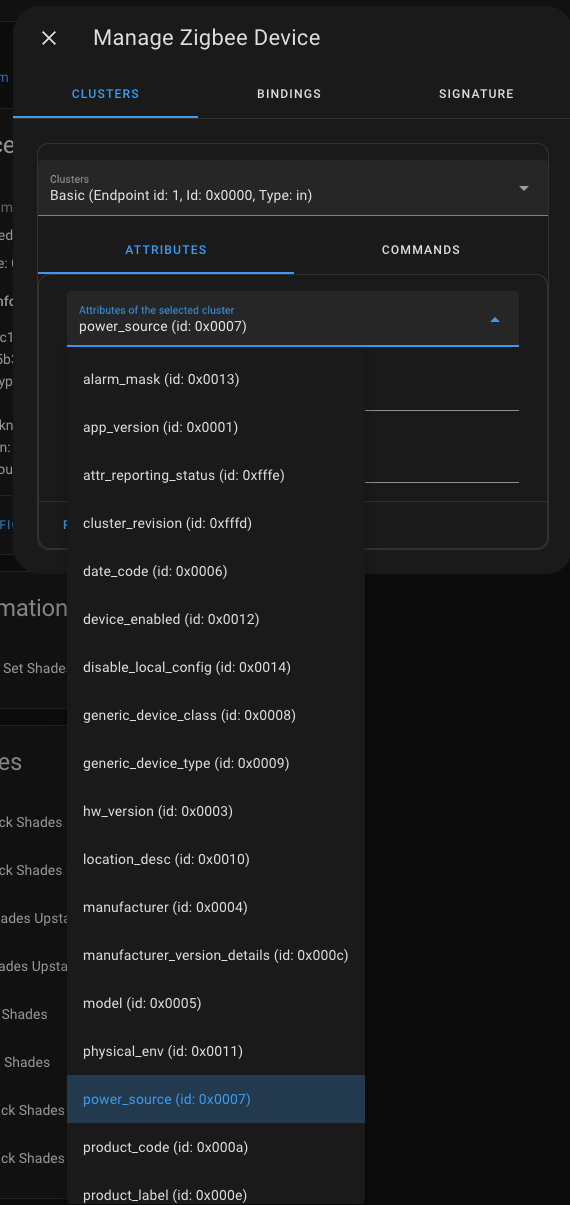
@javicalle 0x0017 doesn't exist and 0x0007 is labeled as power_source.
Here all the clusters:
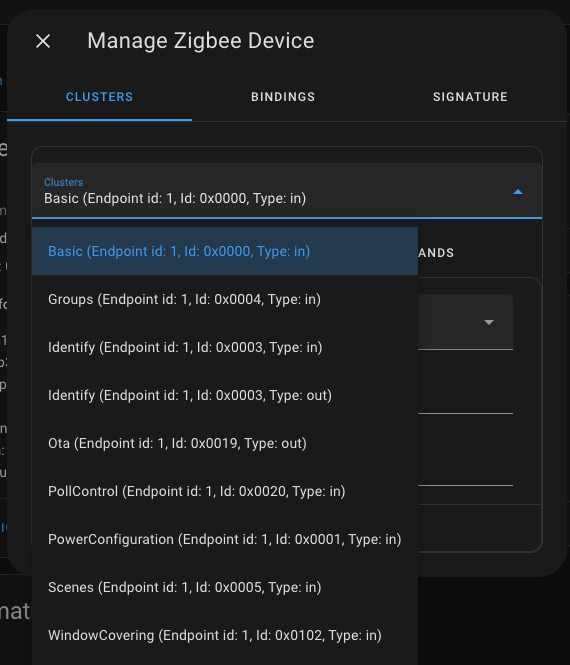
and (most because it didn't fit the screenshot) attributes:
I'm curious about this kind of issues. Can you please try to get the attribute values from the WindowCovering cluster:
You cant finding it on basic luster (from your screen shots) must selecting window covering 0x0102 and then selecting the attribute 0x0007 and 0x017.

My current workaround is to mount an empty
yooksmartdirectory via my HA docker compose file like sovolumes: - ./deps/zhaquirks/yooksmart:/usr/local/lib/python3.10/site-packages/zhaquirks/yooksmart
Hi @jonnylangefeld, I have a question about your WA: I'm running HASS OS, and don't understand where I would make this change. Please forgive my Docker-related ignorance, but I'm coming to the conclusion that in my particular setup I don't have a Docker compose file, is that correct?
For (other people's) reference, I'm currently I'm doing this:
I have this automation:
alias: "Fix: ZHAQuirks/Yooksmart"
description: >-
  Yooksmart ZHAQuirk breaks things with the shades.  Kill it at every opportunity.
trigger:
  - platform: homeassistant
    event: start
  - platform: homeassistant
    event: shutdown
condition: []
action:
  - service: shell_command.rm_yooksmart_quirk
    data: {}
mode: single
and in config.yaml:
shell_command:
  rm_yooksmart_quirk: if [ -d /usr/local/lib/python3.10/site-packages/zhaquirks/yooksmart ]; then rm -rf /usr/local/lib/python3.10/site-packages/zhaquirks/yooksmart; fi
The downside is that this means I need to restart twice every time I do a HASS Core update, once for the update, and again to reload with the quirk removed.
You could also just make a custom quirk (those take priority over existing quirks) that just matches the cover and then does nothing. Seems easier than to delete files from libraries

Here all the clusters:
The last one is the WindowCovering cluster.
But it will be easier if you can share the diagnostic information from your devices.
The last one is the
WindowCoveringcluster.But it will be easier if you can share the diagnostic information from your devices.
Let's see if I can help at all...
Firmwares 0x12013001 (diagnostics here) and 0x12006780 (diagnostics here) both provide the same values:
config_status (id: 0x0007):
     ConfigStatus.Closed_loop_lift_control|Online|Operational
window_covering_mode (id: 0x0017):
     WindowCoveringMode.<bitmap8.0: 0>
Additionally I've attached diagnostics data, this is using a custom quirk that does nothing.
The matter of the fact is that there is no 'reverse reporting' on any of the firmwares (I shared mine above), which is why this quirk should be removed from this repository. That's also why my workaround described above is necessary until that happens. The shades allow programming to reverse the direction of the blinds. The reason that's necessary is because you can mount the motors on the right side of the blinds or on the left side of the blinds. Imagine two windows side by side, one has the motor on the right side and one has the motor on the left side. If the motors would spin in the same direction, one shade would go up and one shade would go down. That's why the shades allow re-programming of the direction of the motor. That way you can change the direction of one of the motors and then both sides would go up or go down at the same time. I scanned the manuals of both firmwares:
- new
0x11206780(see page 35 in the PDF (33 in page numbers))- old
0x11013001(see page 16 in the PDF (15 in page numbers))If the motors are correctly programmed so that the 'up' button on the remote means that the shades go up, then Home Assistant reports the right percentages (0% for closed and 100% for opened).
Hence again my plaidoyer to remove this quirk from ZHA.
Not sure what you are not understanding, but I'll try one more time. I have multiple motors all on the same firmware, front roll shows normal, back roll shows reversed. The current firmware are not reversing the values to the Zigbee controls. My remotes work fine, but Zigbee controls are backwards (would be the same if you had left mounted front roll vs right roll). The quirk needs to be changed to by default do nothing, but with a boolean flag to reverse the controls per blind.
Thanks, Roy
@javicalle Is it possible making one custom attribute (0x0800 ?) on the WindowCovering and making it bol and if its 1 the quirk is using the invert and if its 0 its dont ?
https://github.com/zigpy/zha-device-handlers/blob/22968954cacaff4fc2b00e02ca1bd5622f637393/zhaquirks/yooksmart/D10110blinds.py#L32-L38
If it possible it shall being possible inverting some of the blinds and other not for getting all working in the same direction if being mounted right or left.
Edit: Its also solving the problem with firmware is standard inverted or not so can fixing the blinds with different firmware versions in the same installation.
The matter of the fact is that there is no 'reverse reporting' on any of the firmwares (I shared mine above), which is why this quirk should be removed from this repository. That's also why my workaround described above is necessary until that happens. The shades allow programming to reverse the direction of the blinds. The reason that's necessary is because you can mount the motors on the right side of the blinds or on the left side of the blinds. Imagine two windows side by side, one has the motor on the right side and one has the motor on the left side. If the motors would spin in the same direction, one shade would go up and one shade would go down. That's why the shades allow re-programming of the direction of the motor. That way you can change the direction of one of the motors and then both sides would go up or go down at the same time. I scanned the manuals of both firmwares:
- new
0x11206780(see page 35 in the PDF (33 in page numbers))- old
0x11013001(see page 16 in the PDF (15 in page numbers))If the motors are correctly programmed so that the 'up' button on the remote means that the shades go up, then Home Assistant reports the right percentages (0% for closed and 100% for opened).
Hence again my plaidoyer to remove this quirk from ZHA.
Not sure what you are not understanding, but I'll try one more time. I have multiple motors all on the same firmware, front roll shows normal, back roll shows reversed. The current firmware are not reversing the values to the Zigbee controls. My remotes work fine, but Zigbee controls are backwards (would be the same if you had left mounted front roll vs right roll). The quirk needs to be changed to by default do nothing, but with a boolean flag to reverse the controls per blind.
Thanks, Roy
Personally I'm confused that your experience is so different from my own. I have two old firmware devices, both back roll, one is right and the other is left mounted. With the quirk they are both incorrect in Home Assistant. Then four new firmware devices, all front rolling, one is left mounted, the other three right mounted. All behave incorrectly in Home Assistant with the quirk.
It sounds like my experience is not unique, but yours is under represented in this thread, so I think folks would like to understand why your experience is different . Is it firmware? Device configuration?
I do believe others' assertions that the quirk is sometimes useful, I think the goal is to programmatically determine when it is useful...
Might be worth reviewing and comparing the value of the attributes:
- 0x0007: config_status
- 0x0017: window_covering_mode
Ref: https://github.com/zigpy/zigpy/blob/a2e5910aab25aceca855e6df0847df4487022818/zigpy/zcl/clusters/closures.py#L596