
klipper_config
 klipper_config copied to clipboard
 zellneralex
BElt tension graphs are not plotting
When running the belt test I am getting this: Traceback (most recent call last): // File "/home/pi/klipper/scripts/graph_accelerometer.py", line 259, in // main() // File "/home/pi/klipper/scripts/graph_accelerometer.py", line 218, in main // datas = [parse_log(fn, opts) for fn in args] // File "/home/pi/klipper/scripts/graph_accelerometer.py", line 218, in // datas = [parse_log(fn, opts) for fn in args] // File "/home/pi/klipper/scripts/graph_accelerometer.py", line 22, in parse_log // if not header.startswith('freq,psd_x,psd_y,psd_z,psd_xyz'): // UnboundLocalError: local variable 'header' referenced before assignment 19:19:23 // Command {plot_graph} finished
The 2 files are being generated in home/pi/klipper_config/input_shaper raw_data_belt_a_20220315_191922.csv raw_data_belt_b_20220315_191922.csv
Klipper version: v0.10.0-312-g81283423

What happens if you ssh in your PI and then run
cd klipper_config/input_shaper/
/home/pi/klipper/scripts/graph_accelerometer.py -c raw_data_belt*.csv -o  resonances_belts_test.png
This is the native klipper script call to generate the picture. If that fails than there is a problem in your installation. Have you checked your raw files do they look as expected?

Mine start with:
#time,accel_x,accel_y,accel_z
4155.430577,0.000000,76.491870,8796.565050
4155.430898,611.934960,76.491870,7802.170740
I did run the test last time 26.2.2022 but my klipper is always up to date so that I can not tell the klipper version. But I run the picture creation today at the same klipper version as yours while preparing the instructions above.
The klipper script was last updated 3 month ago and changed from python2 to python3. Have you followed the steps shown at Measuring_Resonances.html#software-installation
That part has changed and need to be executed if your installation is older than 3 month
sudo apt update
sudo apt install python3-numpy python3-matplotlib
when I run: TEST_RESONANCES AXIS=1,1 OUTPUT=raw_data TEST_RESONANCES AXIS=1,-1 OUTPUT=raw_data
Then run: ~/klipper/scripts/graph_accelerometer.py -c /tmp/raw_data_axis*.csv -o /tmp/resonances.png
It works properly.
Only when I run this auto generated graphs it does not produce the graphs and gives: // File "/home/pi/klipper/scripts/graph_accelerometer.py", line 259, in // main() // File "/home/pi/klipper/scripts/graph_accelerometer.py", line 218, in main // datas = [parse_log(fn, opts) for fn in args] // File "/home/pi/klipper/scripts/graph_accelerometer.py", line 218, in // datas = [parse_log(fn, opts) for fn in args] // File "/home/pi/klipper/scripts/graph_accelerometer.py", line 22, in parse_log // if not header.startswith('freq,psd_x,psd_y,psd_z,psd_xyz'): // UnboundLocalError: local variable 'header' referenced before assignment 19:19:23 // Command {plot_graph} finished
I thought I did answer the best I could. I have taken the generated .csv files from the belt_test files and used: ~/klipper/scripts/graph_accelerometer.py -c /tmp/raw*.csv -o /tmp/resonances.png and this generates the graphs.

raw_data_belt_b_20220315_191922.csv
raw_data_belt_a_20220315_191922.csv
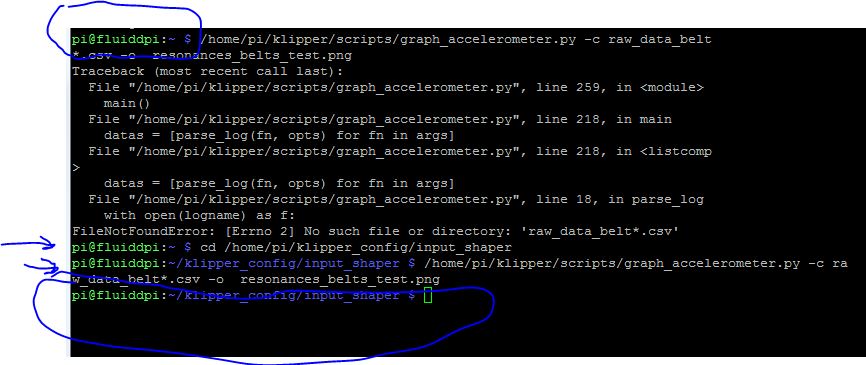 /home/pi/klipper/scripts/graph_accelerometer.py -c raw_data_belt*.csv -o resonances_belts_test.png
This works if I SSH to PI and generates the graph in /home/pi/klipper/. however, if I am not in the folder /home/pi/klipper_config/input_shaper/ It will give the same errors. So it seems it can't get to the folder from the current folder in the script or I have something wrong on my end?

That is what I wanted to know. The klipper scrips are working with the generated files with a and b in the name. Than it must have to do with the collecting the 2 files in the bash script. I will take a look into that.

was this issue ever looked into? i get the same error. manual input through ssh works fine, and so does the resonance test macro

Yes it was I tried a lot to reproduce it but for me it works fine
could you add a Pause before https://github.com/zellneralex/klipper_config/blob/master/input_shaper.cfg#L123 (G4 P2000) to insure that the files are really ready
thanks for following up. unfortunately, the issue remains :(
17:09:41 // Command {plot_graph} finished 17:09:40 // if not header.startswith('freq,psd_x,psd_y,psd_z,psd_xyz'): // UnboundLocalError: local variable 'header' referenced before assignment 17:09:40 // main() // File "/home/pi/klipper/scripts/graph_accelerometer.py", line 218, in main // datas = [parse_log(fn, opts) for fn in args] // File "/home/pi/klipper/scripts/graph_accelerometer.py", line 218, in // datas = [parse_log(fn, opts) for fn in args] // File "/home/pi/klipper/scripts/graph_accelerometer.py", line 22, in parse_log 17:09:40 // Traceback (most recent call last): // File "/home/pi/klipper/scripts/graph_accelerometer.py", line 259, in 17:09:40 // Generate Graph for belts ... 17:09:39 // Running Command {plot_graph}...: 17:09:39 // BELT TEST: Generate graph in backround 17:09:39 // BELT TEST: Resonance Tests done
I will look in that again but since it runs on my machine it is really hard to debug.
But I see you have run the belt test and not the input sharper test. If that’s true than you need the G4 P2000 before https://github.com/zellneralex/klipper_config/blob/master/input_shaper.cfg#L143
I added it to both at the time of testing for consistency :)
although the resonance test always works fine and provides .png images.
Ok the belt files are a lot bigger. I will check if a sleep will work before https://github.com/zellneralex/klipper_config/blob/master/script/plot_graph.sh#L68. I rename the files to get the date in the name. So maybe my SD Card is faster.
Ok I scrolled thru my old notes. A member of the Mainsail crew get it to run with G4 P5000 before https://github.com/zellneralex/klipper_config/blob/master/input_shaper.cfg#L143. So it seams really to be depending on the write speed and compute power of the PI.
Oh I guess I understand now why it works for me. My /tmp is Setup es as a RAM disk. So the time to write the files is nearly 0
Unfortunately that did not resolve it. I don't think it's a delay issue because a second run of the belt test doesn't work even if the are already csv files present from the previous run. It seems to be a file path issue?
You Devine your own path in that line https://github.com/zellneralex/klipper_config/blob/master/script/plot_graph.sh#L11
are your files still at /tmp? And if yes does a manual call of the script generate the picture.
Sorry, I do know to define the directory. That is why resonance test works :)
Manual call to the script with belt variable results in the same error
Files are not in temp. They are all moved to the defined directory
Never seen that. Are you sure the 2 files are in /tmp when calling the script. Until now it works always as long the files where there.
I swapped sd cards for an unrelated reason. The issue is resolved. Possibly a bad SD causing write errors? Either way, thank you for the troubleshooting help!
I will close it.
Bottom line: I can not reproduce the issue. Some helped to add a G4 P5000 before line https://github.com/zellneralex/klipper_config/blob/master/input_shaper.cfg#L143