
zed
 zed copied to clipboard
 zed-industries
Feature: GitHub/GitLab/etc. URL for current file/selection
Check for existing issues
- [X] Completed
Is your feature request related to a problem?
I make regular, heavy use of a VS Code plugin which lets you copy or go to the file you have open, including what you have selected. This is very handy!
Describe the solution you'd like
While the GitHub integration is nice, it would actually be way better if this had a list of well-known mappings (GitHub, GitLab, Bitbucket, enterprise installations, etc.) and could be extended with your own mappings, so that if you run on sr.ht or your own Git server or whatever else instead, you can make it "just work".
If applicable, add mockups / screenshots to help present your vision of the feature
https://user-images.githubusercontent.com/2403023/203352120-c1639154-ecee-4878-af73-d35255502206.mp4

This is pretty neat, I never knew it existed. I'm curious to hear to about how you use this in your daily workflow.

The main way I use this on a day-to-day basis is to quickly snag a link to code I'm working on to share with others in Slack or Discord for work or open source collaboration. That has at least three upsides: it’s async, it’s permanent (as permanent as the service, which is almost certainly more permanent than any individual project, anyway!), and it’s editor-agnostic.
(While some of Zed's collaboration capabilities, including some of those you all have mentioned as planned, should help with the first, it will just never be the case that 100% of my coworkers will be using it—neither at a place like LinkedIn: we have VS Code users, IntelliJ users, Vim users, Emacs users, Sublime users…; nor for open source collaboration, which will also be that varied.)
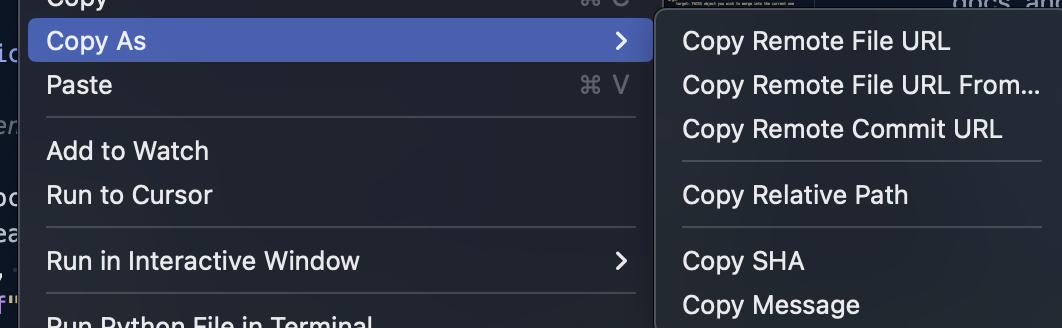

I use this when I want to see a file's blame or commit history in the GitHub interface

I concur: having ability of ZED being able to open the repo/file in the browser right away from a single key shortcut would be a great feature. I use it daily referencing code when working with Sublime: CMD+\ is the combination I use. Of course this will open the file I am currently working on, meaning from the active Git branch.
Needless to say, would be great to have it work fluently with multiple repo sources (Github, BitBucket, GitLab etc.), but I guess this should not be a big problem when working with git references.

And other one, closed/merged, but not functional :( https://github.com/zed-industries/zed/issues/6777
What do you mean with "not functional"? The new editor: copy permalink to file does not open the website but it copies it to the clipboard.
https://github.com/zed-industries/zed/assets/1185253/d3e47b4b-05fb-4773-8c38-9eb2abad3f4c

Yeah, not on my side :( I do exactly as you show, but it will just remember and paste whatever was copied previously, not the permalink.
OK, I seem to have it pinponted. Try to add to your tree another project. Whenever two projects are in the file tree, and possibly some other txt/md file or files on top of the tree, when you try to copy permalink it will not work. It will just paste whatever was the last copied item.
This also applies when multiple windows are opened.
Also the lineage of previously opened project also seems to "remember" and break the permalink copy. When I say "remember", when the projects are removed and I try to act on the "single-out-project" it won't work, so this tells me this must be some kind of project file conf that gets corrupted or misread in terms of repo link.
When I find time I can look more into it, for now this is what I observe.
If it helps anyhow with latest 1.122.1 release, I get the following:
Here is assisting log:
2024-02-07T15:16:04-06:00 [INFO] ========== starting zed ==========
2024-02-07T15:16:04-06:00 [INFO] Opening main db
2024-02-07T15:16:04-06:00 [ERROR] crates/theme/src/settings.rs:326: theme not found: <user> Theme
2024-02-07T15:16:04-06:00 [INFO] Opening main db
2024-02-07T15:16:04-06:00 [INFO] build git repository ".git"
2024-02-07T15:16:04-06:00 [INFO] Opening main db
2024-02-07T15:16:04-06:00 [INFO] Opening main db
2024-02-07T15:16:04-06:00 [INFO] starting language server "pyright", path: "<path_to>", id: 1
2024-02-07T15:16:05-06:00 [INFO] set environment variables from shell:<my_path>
2024-02-07T15:16:05-06:00 [INFO] Node runtime install_if_needed
2024-02-07T15:16:06-06:00 [INFO] reload git repository ".git"
2024-02-07T15:16:06-06:00 [INFO] Node runtime install_if_needed
2024-02-07T15:16:07-06:00 [INFO] reload git repository ".git"
2024-02-07T15:16:07-06:00 [INFO] 1 unhandled notification window/logMessage:
{
  "type": 3,
  "message": "Pyright language server 1.1.306 starting"
}
2024-02-07T15:16:07-06:00 [INFO] 1 unhandled notification window/logMessage:
{
  "type": 3,
  "message": "Server root directory: /Users/<user>/Library/Application Support/Zed/languages/pyright/node_modules/pyright/dist/"
}
2024-02-07T15:16:07-06:00 [INFO] 1 unhandled notification window/logMessage:
{
  "type": 3,
  "message": "Starting service instance \"\""
}
2024-02-07T15:16:07-06:00 [INFO] 1 unhandled notification client/unregisterCapability:
{
  "unregisterations": [
    {
      "id": "70dd8362-9618-47b6-98b8-07806cc365e0",
      "method": "workspace/didChangeWatchedFiles"
    }
  ]
}
2024-02-07T15:16:10-06:00 [INFO] build git repository ".git"
2024-02-07T15:16:10-06:00 [INFO] build git repository ".git"
2024-02-07T15:16:10-06:00 [INFO] build git repository ".git"
2024-02-07T15:16:10-06:00 [INFO] starting language server "pyright", path: "<project_path>", id: 2
2024-02-07T15:16:10-06:00 [INFO] Initializing default prettier with plugins {}
2024-02-07T15:16:10-06:00 [INFO] starting language server "yaml-language-server", path: "<project_path>", id: 3
2024-02-07T15:16:10-06:00 [INFO] Initializing default prettier with plugins {}
2024-02-07T15:16:10-06:00 [INFO] Initializing default prettier with plugins {}
2024-02-07T15:16:10-06:00 [INFO] Initializing default prettier with plugins {}
2024-02-07T15:16:10-06:00 [INFO] Initializing default prettier with plugins {}
2024-02-07T15:16:10-06:00 [INFO] Node runtime install_if_needed
2024-02-07T15:16:10-06:00 [ERROR] crates/workspace/src/persistence/model.rs:257: No path stored for this editor
2024-02-07T15:16:11-06:00 [INFO] 2 unhandled notification window/logMessage:
{
  "type": 3,
  "message": "Pyright language server 1.1.306 starting"
}
2024-02-07T15:16:11-06:00 [INFO] 2 unhandled notification window/logMessage:
{
  "type": 3,
  "message": "Server root directory: /Users/<user>/Library/Application Support/Zed/languages/pyright/node_modules/pyright/dist/"
}
2024-02-07T15:16:11-06:00 [INFO] 2 unhandled notification window/logMessage:
{
  "type": 3,
  "message": "Starting service instance \"\""
}
2024-02-07T15:16:11-06:00 [INFO] 2 unhandled notification client/unregisterCapability:
{
  "unregisterations": [
    {
      "id": "a02b1e57-6286-4cb0-81c0-62704a5b2c60",
      "method": "workspace/didChangeWatchedFiles"
    }
  ]
}
2024-02-07T15:16:11-06:00 [INFO] Node runtime install_if_needed
2024-02-07T15:16:11-06:00 [INFO] reload git repository ".git"
2024-02-07T15:16:11-06:00 [INFO] reload git repository ".git"
2024-02-07T15:16:12-06:00 [INFO] reload git repository ".git"
2024-02-07T15:16:12-06:00 [INFO] reload git repository ".git"
2024-02-07T15:17:28-06:00 [INFO] open paths ["<path_to_file>/<file_name>"]
2024-02-07T15:20:08-06:00 [ERROR] crates/editor/src/editor.rs:8408: failed to parse Git remote URL
And I think I know what might be one of the reasons... I dropped into project pane external Markdown .md file and as such log communicates:
2024-02-07T15:17:28-06:00 [INFO] open paths ["/Users/<user>/<path>/<file>.md"]
2024-02-07T15:20:08-06:00 [ERROR] crates/editor/src/editor.rs:8408: failed to parse Git remote URL
2024-02-07T15:25:13-06:00 [ERROR] unexpected item event after pane was dropped
2024-02-07T15:25:15-06:00 [ERROR] unexpected item event after pane was dropped
2024-02-07T15:25:19-06:00 [ERROR] crates/editor/src/editor.rs:8408: failed to parse Git remote URL
the .md file is from outside the git project, so regardless that I make a call for permalink with focus to in-project file, say .rs or .py, from the log it seems it still tries to nudge the .md path 🤔
Just wondered if there is any expected date for this update? ;)
FYI: With latest preview release 0.124.6 I do not see anything reported in the log, but still get:
@krstp can you give us some exact steps to reproduce the issue? Is the problem that you have a .md file in your project that isn't part of the git repo and you want a permalink to that? Because if so, I don't think that can work, right? Since the file is not stored in git, we can't produce a git link.
Before it used to work with other git folders I work with, now everything is broken. I think the issue might be that I work with BitBucket and permalink in current form is fixated on Github? ¯_(ツ)_/¯ Currently all my request to copy or open yield failed to parse Git remote URL. Regardless what folder/project I open zed in (zed .), the permalink request always yields now:
Notice the message in this post is different than what I show above
no Git repo (which of course was a git repo), just had some singled out Markdown files added to the project.
A separate issue: Before, when drag'n'dropping the file, i.e. Markdown, from other non-git folder, the file would show in the file-tree on the left, now the file does not show up 🤔 All I can do is add another folder to the project, which is somewhat OK, but I would expect if I drag'n'drop single file, the tree would show just a single file.
So on above two notes:
- I think this where the issue comes from: combination of both.
- If anything might help, in previous iterations of Zed Preview, Zed allowed me and I used to move Markdown files to the top of the file-tree, for the ease of finding those files. I cannot repeat this functionality right now. Now, when folder gets added to the file-tree, it stays at its fixed alphabetical position.
In the past, at some point, if I moved the Markdown/Txt file - that is not part of the repo folder - to the top of the tree, the link would break, if not at some point the link worked, however, after one of the updates it broke all-together, I was not able to track what revision it was though.
I hope above notes clarify the issue. In short, now for BitBucket I am not able to yield any of the repo links.
@krstp I added support for Bitbucket.org in this PR here: https://github.com/zed-industries/zed/pull/8601
I think the other issue is separate and we should treat it as such. So once the Bitbucket.org support lands, can you create a separate issue for that?

sr.ht & codeberg.org are also popular.
Can you create separate issues for them? I think these are beginner-friendly issues for someone to pick up :)
Can you create separate issues for them? I think these are beginner-friendly issues for someone to pick up :)
I ended up doing it myself :)
- https://github.com/zed-industries/zed/pull/8616