
node-red-contrib-home-assistant-websocket
 node-red-contrib-home-assistant-websocket copied to clipboard
 zachowj
State node: outputting whole 'config' properties group does not work
Describe the bug
If I try to output config properties of the node in the way shown in the picture (i.e. leaving the input box empty), the node does not give any output anymore.
Neither it shows red border of the box indicating that input is wrong or missing, nor it throws any errors in the debug messages window.
It seems I need to define the specific config.x element I want to output (e.g. config.for) - then the node produces output. But I would like to output the whole config.* group of elements, as I do not know exact name of the property I need.
To Reproduce
Shown in picture.
Expected behavior
By leaving config. input box empty I would like the node to output the whole config.* group of elements.
Screenshots
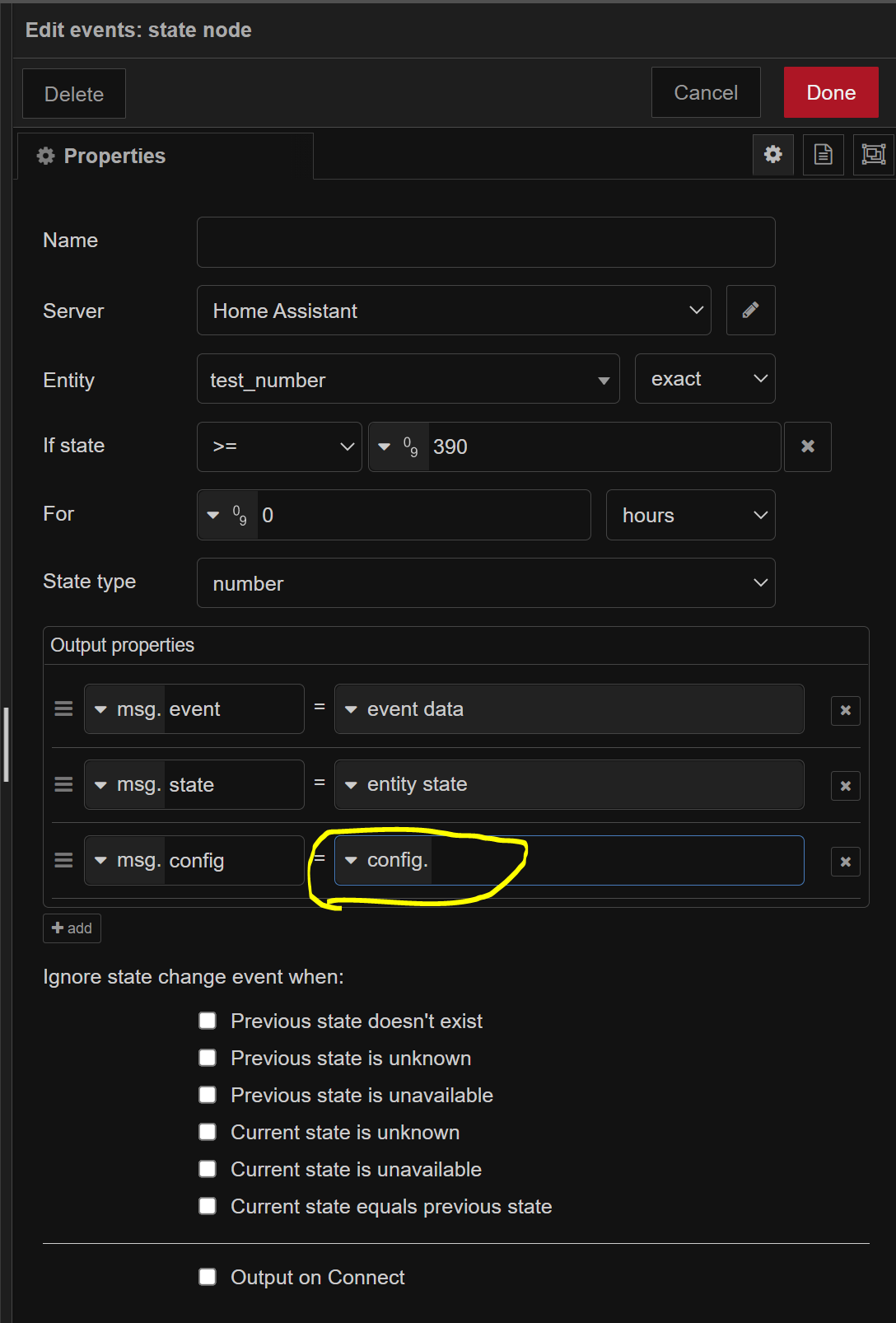
Example Flow
No response
This package's version (not the Home Assistant add-on version)
0.43.1
Is Node-RED running in Docker?
Home Assistant add-on
Node-RED version
11.1.1
Node.js version
--
Additional context
No response

This issue has been automatically marked as abandoned because it has not had recent activity. It will be closed if no further activity occurs. Thank you for your contributions.
![github-actions[bot] avatar](https://avatars.githubusercontent.com/in/15368?v=4 "Published by a pub.dev verified publisher")
This issue has been automatically marked as abandoned because it has not had recent activity. It will be closed if no further activity occurs. Thank you for your contributions.
This currently works for me with the event state and current state node. Is this still an issue?

@zachowj I have just updated the node-red-contrib-home-assistant-websocket package to 0.44.0 and it still doesn't work for me.
Could you please paste the screenshot of how your current state node configuration looks and what output you get in the debug messages window?
[{"id":"d9000d939e9a314f","type":"inject","z":"c89d915bdff0f798","name":"","props":[{"p":"payload"},{"p":"topic","vt":"str"}],"repeat":"","crontab":"","once":false,"onceDelay":0.1,"topic":"","payload":"","payloadType":"date","x":316,"y":1296,"wires":[["44928536fc8cf697"]]},{"id":"0a23369773d8ec4d","type":"debug","z":"c89d915bdff0f798","name":"debug 9","active":true,"tosidebar":true,"console":false,"tostatus":false,"complete":"false","statusVal":"","statusType":"auto","x":724,"y":1296,"wires":[]},{"id":"44928536fc8cf697","type":"api-current-state","z":"c89d915bdff0f798","name":"","server":"","version":3,"outputs":1,"halt_if":"","halt_if_type":"str","halt_if_compare":"is","entity_id":"sun.sun","state_type":"str","blockInputOverrides":false,"outputProperties":[{"property":"payload","propertyType":"msg","value":"","valueType":"config"}],"for":"0","forType":"num","forUnits":"minutes","override_topic":false,"state_location":"payload","override_payload":"msg","entity_location":"data","override_data":"msg","x":516,"y":1296,"wires":[["0a23369773d8ec4d"]]}]
I don't have sun.sun entity, so I changed it to another:
[{"id":"d9000d939e9a314f","type":"inject","z":"a28ab456.c11678","name":"","props":[{"p":"payload"},{"p":"topic","vt":"str"}],"repeat":"","crontab":"","once":false,"onceDelay":0.1,"topic":"","payload":"","payloadType":"date","x":120,"y":2540,"wires":[["44928536fc8cf697"]]},{"id":"0a23369773d8ec4d","type":"debug","z":"a28ab456.c11678","name":"debug 9","active":true,"tosidebar":true,"console":false,"tostatus":false,"complete":"false","statusVal":"","statusType":"auto","x":720,"y":2540,"wires":[]},{"id":"44928536fc8cf697","type":"api-current-state","z":"a28ab456.c11678","name":"","server":"9fe5b232.24e77","version":3,"outputs":1,"halt_if":"","halt_if_type":"str","halt_if_compare":"is","entity_id":"input_text.test_text","state_type":"str","blockInputOverrides":false,"outputProperties":[{"property":"payload","propertyType":"msg","value":"","valueType":"config"}],"for":"0","forType":"num","forUnits":"minutes","override_topic":false,"state_location":"payload","override_payload":"msg","entity_location":"data","override_data":"msg","x":420,"y":2540,"wires":[["0a23369773d8ec4d"]]},{"id":"9fe5b232.24e77","type":"server","name":"Home Assistant","version":4,"addon":true,"rejectUnauthorizedCerts":true,"ha_boolean":"y|yes|true|on|home|open","connectionDelay":true,"cacheJson":true,"heartbeat":false,"heartbeatInterval":30,"areaSelector":"friendlyName","deviceSelector":"friendlyName","entitySelector":"friendlyName","statusSeparator":"at: ","statusYear":"hidden","statusMonth":"short","statusDay":"numeric","statusHourCycle":"h23","statusTimeFormat":"h:m"}]
And I still get no output in the debug messages window:

what could be wrong?
This issue has been automatically marked as abandoned because it has not had recent activity. It will be closed if no further activity occurs. Thank you for your contributions.
@zachowj - can I expect some more help on this one, or should I close it? thanks.
Can you check if you're running the latest version of the HA nodes? Does it output anything if you select an individual property?
I have node-red-contrib-home-assistant-websocket 0.44.0 version.
I get a nice output if I select individual properties:
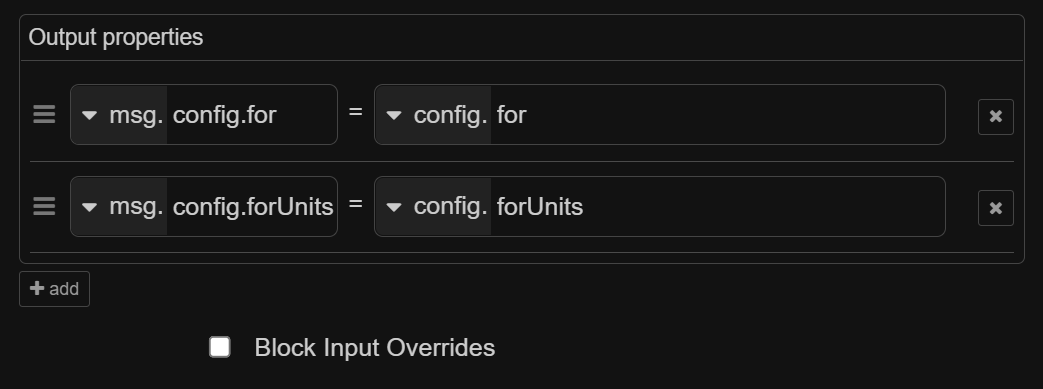
    "config": {
        "for": "0",
        "forUnits": "seconds"
    }
This issue has been automatically marked as abandoned because it has not had recent activity. It will be closed if no further activity occurs. Thank you for your contributions.
I have upgraded to 0.45.9 and config export worked for the first time for me!
I get this:
    "config": {
        "id": "85c5f85ebae56379",
        "type": "api-current-state",
        "z": "a28ab456.c11678",
        "name": "output: config.",
        "server": "9fe5b232.24e77",
        "version": 3,
        "outputs": 1,
        "halt_if": "",
        "halt_if_type": "str",
        "halt_if_compare": "is",
        "entity_id": "input_text.test_text",
        "state_type": "str",
        "blockInputOverrides": false,
        "outputProperties": [{
                "property": "payload",
                "propertyType": "msg",
                "value": "",
                "valueType": "entityState"
            }, {
                "property": "data",
                "propertyType": "msg",
                "value": "",
                "valueType": "entity"
            }, {
                "property": "config",
                "propertyType": "msg",
                "value": "",
                "valueType": "config"
            }
        ],
        "for": "0",
        "forType": "num",
        "forUnits": "seconds",
        "override_topic": false,
        "state_location": "payload",
        "override_payload": "msg",
        "entity_location": "data",
        "override_data": "msg",
        "x": 300,
        "y": 2240,
        "wires": [["f9d165d7102ba684"]]
    }
Thank you.