
vscode-markdown
 vscode-markdown copied to clipboard
 yzhang-gh
Provide support for extension in Rmarkdown
What is the problem?
I cannot use the keybindings for this extension in rmarkdown files (e.g., bold, italics, format table, etc). I can activate the commands via the command palette.
How can I reproduce it?
Open a file with .Rmd extension, and execute commands via keybindings.
Is there any error message in the console?
No.


Hi again, this still does not... I have the following setting:
// markdown-all-in-one.extension file associations
    "markdown-all-in-one.extension": [
        "rmarkdown",
        "Rmd"
    ],
I believe it should be
"files.associations": {
    "*.rmarkdown": "markdown",
    "*.Rmd": "markdown"
}

You'll notice that the language is set to markdown. The language needs to be R Markdown, so that R code chunks can be executed (see the R extension).
Is it possible to get this working in R Markdown language?
Well, then you may need some hacks.
- Open
C:\Users\<username>\.vscode\extensions\yzhang.markdown-all-in-one-2.7.0\package.json - Change
onLanguagebelow (click theR Markdownbutton to see the real language id) https://github.com/yzhang-gh/vscode-markdown/blob/bc3c68beeb31746ad3f56010e117d21ab467da74/package.json#L25-L28 - Change
whenbelow https://github.com/yzhang-gh/vscode-markdown/blob/bc3c68beeb31746ad3f56010e117d21ab467da74/package.json#L74-L79
Note these changes will be overridden when you update this extension.
Currently, I don't have such a plan as R Markdown is a Markdown dialect in a sense.
I will reconsider if many people would like to have it.
I have opened an issues on the on the VSCode-R repo, to see if there is any interest. Should the issues also stay open here as a feature request in order for people to be able to vote / or not vote?
Couldn't the hack above be exposed as a bare metal (at your own risk) configuration option? Basically a comma concatenated string listing editorLangIDs where this exentions enables?

Those configurations are hardcoded in the package.json, which is the configuration file of the extension itself. I don't think it is possible for an extension to change its own configuration at runtime...
I need this feature, too. All we want is the same behavior for R Markdown as the original Markdown (nothing more!) so that the shortcuts, math highlighting, preview, formatting, snippets, and many other features could work.
It is cumbersome to change language ID all the time. And it is not possible to associate R Markdown with Markdown because we need to run code and debug. And I don't think it reasonable for VSCode-R to support so many Markdown features unrelated to R. The ideal solution is to activate this extension in R Markdown. Also, although I have currently hacked it manually in the locally installed package, it would be much better to have this option in the extension itself so that I don't need to do that upon every update.
Please! It is not a matter of dialects. It is just operating the same functions on files with Rmd suffix. Just like LaTeX-Workshop supporting Rtex in addition to tex.

For those who fail to do the hack, check that the editorLangId for .Rmd files is defined as rmd rather than rmarkdown in VSCode-R.
Just like LaTeX-Workshop supporting Rtex in addition to tex.
Interesting. It seems that it defines a rsweave language.
https://github.com/James-Yu/LaTeX-Workshop/blob/0db720dfe38092585415b0d60e6dfca194145b3e/package.json#L141-L155
Although I guess in this issue we only need to support .rmd?
I'll think about this feature later.
Yeah. I think so. As far as I am concerned they defined a new language because the compiling command of rsweave is different from latex. But we don't need this since there is already knit to pdf function in VSCode-R.
Any update on this? I just checked the document of R Markdown. There are actually more features than I thought and much of them out of the scope of this extension (though the basic ones are fully compatible). So would you like to add support for R Markdown? Or is it okay to fork the code here and create a standalone extension devoted to its format? (maybe also support things like Julia Markdown, Pweave and Codebraid)
So would you like to add support for R Markdown?
To me, it is a fair feature request. However, I don't have much time to do it. Technically, it can be as easy as just adding rmd to
https://github.com/yzhang-gh/vscode-markdown/blob/f2f37a0fc204a73069268bb7b2b2eea8f4e5264b/package.json#L125
and
https://github.com/yzhang-gh/vscode-markdown/blob/f2f37a0fc204a73069268bb7b2b2eea8f4e5264b/src/util/generic.ts#L20-L22
But I am not sure whether there will be some side effects.
Or is it okay to fork the code here and create a standalone extension devoted to its format?
Of course.

I believe it should be
"files.associations": {
    "*.rmarkdown": "markdown",
    "*.Rmd": "markdown"
}
This worked for me!

Any update on this? If you associate Rmd files with markdown, then it will not recognize the executable R chunk, which is even worse because the R chunks rather than the markdown paragraphs are the core part of an Rmd file. Note that markdown only recognizes R code blocks with identifier R or r not {r}, but {r} is used in Rmd for the executable chunks. The ideal solution is to activate this extension 'onLanguage:rmd' in addition to 'onLanguage:markdown'. We don't need any other feature at all. If someone thinks it is not proper to use this extension in R Markdown, we could provide an option that controls if it is disabled for R Markdown.
I have been using the workaround mentioned by the author above. The solution is perfect. There is no side effect. But I don't want to perform the trick every time there is an update. Please consider including it in the next version.
Thanks. As you can see, this extension doesn't get updated very often 😂. Will consider adding an option for R Markdown which can be used at your own risk in the next version.
The markdownlint extension has a similar problem (dialects of markdown) and has a setting:
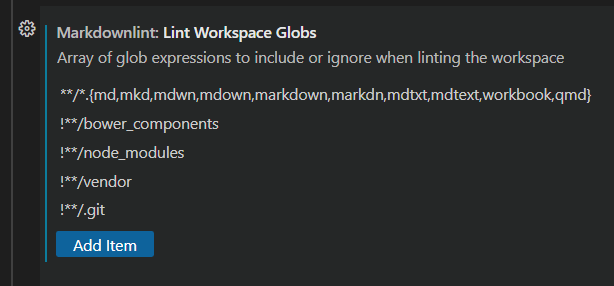
Perhaps all vscode-markdown needs is a setting with an array of languages EDIT: (Markdown, Julia Markdown, Quarto, etc.) so one can customize it. I suspect there will be more "dialects" and such a setting is a good long-term solution, rather than hacks or changes to the code each time a new one comes out.

The markdownlint extension has a similar problem (dialects of markdown) and has a setting:
That's interesting. We can have an option that accepts a list of language ids. Although to deal with key bindings we need to maintain a new when context.
The following keybinding settings enable both Markdown All in One and vscode-R simultaneously and harmoneously
(This is an alternative tentative solution for enabling shortcut keys provided by Markdown All in One until the extention author releases a new version https://github.com/yzhang-gh/vscode-markdown/issues/1182#issuecomment-1273160334)
- Press Ctrl/Cmd + Shift + P to open Command Palette
- Type
Open Keyboard Shortcuts (JSON)in the palette - Add the followings to
keybindings.json. See also Visual Studio Code Key Bindings for learning how to customise keybindings in VSCode.
[
  {
    "key": "ctrl+i",
    "command": "markdown.extension.editing.toggleItalic",
    "when": "editorTextFocus && !editorReadonly && editorLangId == 'markdown' || editorTextFocus && !editorReadonly && editorLangId == 'rmd'"
  },
  {
    "key": "ctrl+b",
    "command": "markdown.extension.editing.toggleBold",
    "when": "editorTextFocus && !editorReadonly && editorLangId == 'markdown' || editorTextFocus && !editorReadonly && editorLangId == 'rmd'"
  },
  {
    "key": "ctrl+m",
    "command": "markdown.extension.editing.toggleMath",
    "when": "editorTextFocus && !editorReadonly && editorLangId == 'markdown' || editorTextFocus && !editorReadonly && editorLangId == 'rmd'"
  },
  {
    "key": "",
    "command": "markdown.extension.editing.toggleList",
    "when": "editorTextFocus && !editorReadonly && editorLangId == 'markdown' || editorTextFocus && !editorReadonly && editorLangId == 'rmd'"
  }
]
Associating .Rmd files with markdown as previously explained in https://github.com/yzhang-gh/vscode-markdown/issues/618#issuecomment-588268938 and in VSCode official document is definitely one way to enable shortcut keys supported by Markdown All in One (e.g. for boldfacing Ctrl/Cmd + B and italicising characters Ctrl/Cmd + I). However, this solution disables R Markdown support provided by vscode-R, e.g. we cannot run chunk nor see syntax highlightings, as shown in a picture below.
Rmd files opened by the language mode of markdown
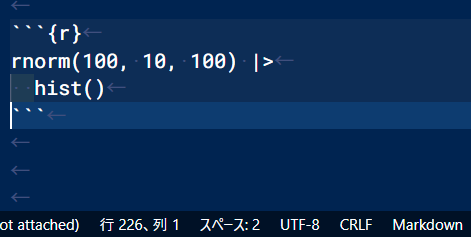
Associating .Rmd files with rmd is required to activate such functionalities of vscode-R, as documented in its Wiki.
Rmd files opened by the language mode of rmd
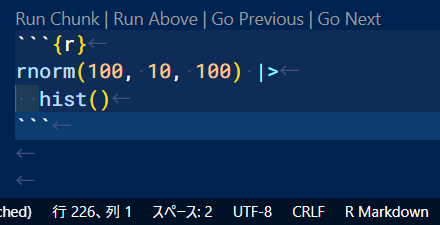

Hi all, I have added initial R Markdown support in the dev build (find it in the Artifacts section).
In short, this extension is now always activated for rmd files (so you no longer have to change the file associations manually). toggleBold and toggleItalic key bindings are also supported by default (for other key bindings you will still need to define them by yourself).
There is a new markdown.extension.supportedLangIds option which accepts an array of language ids (for now only rmd). I haven't tested all the features, but you can try it (e.g. you will see syntax decorations for code spans).
@yzhang-gh Thank you for adding the support for R Markdown! I uninstalled the extention I previouly had and I installed the dev build of the extention via vsix. I confirmed that now Markdown All in One activates once after I open/view .Rmd files and both toggleBold and toggleItalic work inmediately.