
GlobalProtect-openconnect
 GlobalProtect-openconnect copied to clipboard
 yuezk
yuezk
Duo authentication failing 'Unknown error'
First, thanks for this which is the nicest way to connect to GP VPNs
I have been using gpclient happily to connect to VPN, but something changed around 1 week ago (presumably in organisation setup). Clicking connect takes me to the web-based log in page, but after entering credentials the second stage (my organisaion uses Duo for 2FA, so this is normally a frame just notifying that the push has been sent to my phone) instead shows only a red area with 'Unknown error' and there is no push notification to my phone.
I'm on Linux (Fedora 34) and gpclient 1.4.2. I have tried https://github.com/dlenski/gp-saml-gui which is still working (push notification comes to my phone, connects fine by passing over to openconnect). No custom parameters.
Happy to add a log from the terminal - are there things I should redact before posting on here, e.g. the long strings of characters passed in POST etc?


Log and screenshot attached. There is an error in the log, but this appears before the first log-in page comes up (the first log in page comes up fine as normal, it's only the second stage that shows the error - I cannot remember whether this was present before the current issues, I don't think I ran gpclient from the terminal except for the first time after first installing a few weeks ago)
gpclientlog.txt
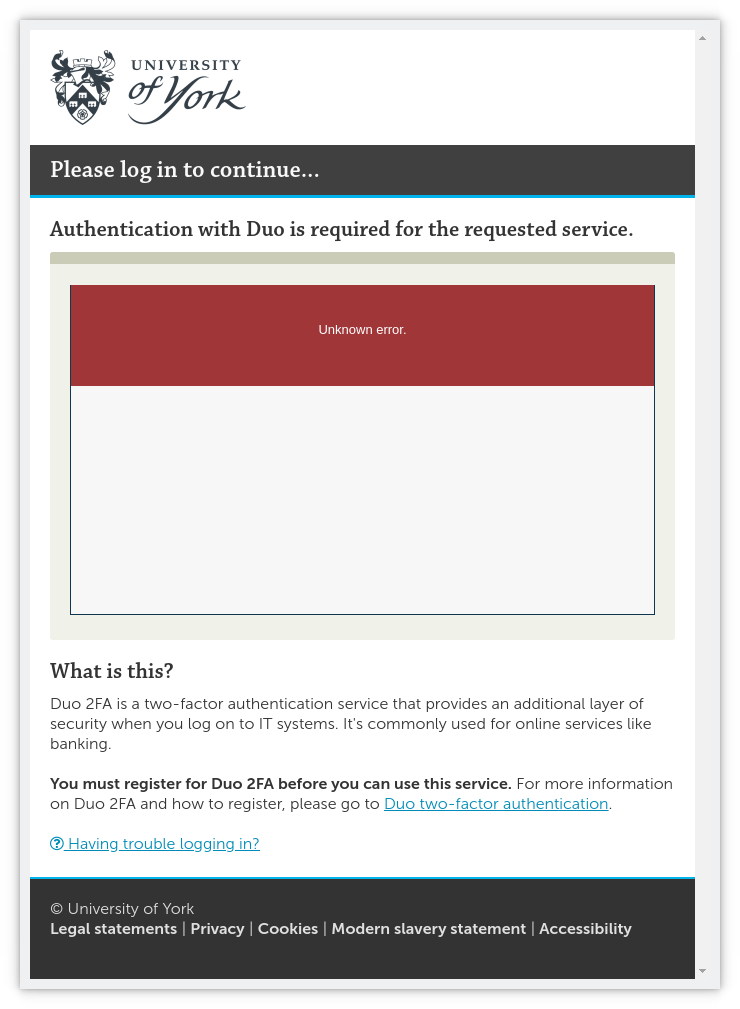 (nothing happens when trying to click on the 'having trouble logging in?' link in the screenshot page - likely some javascript not supported by the html renderer used?)
Thanks. Tried that but same visual error message as in previous screenshot. New log attached (looks similar, but some extra calls to snapchat.com? gpclientlog2.txt )
Do we have any updates on this issue? I have the same problem and I've not been able to fix it. I'm running it on Pop OS 22.04

Still unresolved fo me, same symptoms as described above. Tried clearing ~/.cache/gpclient and also tried a new (computer) user account but same result.
https://github.com/dlenski/gp-saml-gui still works, so I'm using that (but less convenient - no tray indicator of being on VPN or not, for example)
I'm wondering if this could be failing on user-agent?
We have a script that works fine with Okta+Duo, using
User-Agent: Mozilla/5.0 (X11; Ubuntu; Linux 86_64; rv:100.0) Gecko/20100101 Firefox/100.0
Would it be possible to try this agent string and see if it works better?

Could be - or capability of browser, rather than just UA. gp-sml-gui uses a different browser (GTK-based?)
I have other services with my organisation (apart from the GP VPN) that use the same authentication process with Duo 2FA. If there is a way of calling the Qt(?) browser directly I can try whether it fails or works for those (I don't know what command to use to call the browser used by GlobalProtect-openconnect).
Hi guys, I'm trying to resolve this problem.
Have you ever succeeded with this client before? If yes, can you help try to reset the settings through the tray icon -> Reset Settings and start over to see if it could succeed?
Have you ever succeeded with this client before? If yes, can you help try to reset the settings through the tray icon -> Reset Settings and start over to see if it could succeed?
Yes, it worked for some time, but stopped working around the time that this issue was opened. I say around because it actually worked until my previous Okta login timed out. Then when I was presented with a Duo Security dialog, it stopped working.
I work with @herder and use the same script to get on the VPN. The script uses curl to authenticate with Okta. It seems that something with QtWebEngine causes the "Unknown error" with Duo.

Hi guys, I'm trying to resolve this problem. Have you ever succeeded with this client before? If yes, can you help try to reset the settings through the tray icon ->
Reset Settingsand start over to see if it could succeed?
Yep, worked well until maybe a week before I opened issue (had issue, then I was on leave a few days, checked it was still present on return before reporting). Tried 'Reset Settings', cleared ~/.cache/gpclient (same thing?). Even made a different user account on my machine and tried from there for a completely new profile. Same issue.
If there is something in QtWebEngine causing the error, I am on qt5-qtwebengine-5.15.8-2.fc34 (Fedora 34, as indicated on the package name). Just tried dropping that down to qt5-qtwebengine-5.15.2-9.fc34 - seems to be oldest available, but same problem.
Hi guys, I just refined the authentication workflow in 1.4.8. And added support for clearing the login cookies of the webview when clicking the Reset Settings menu, you are recommended to reset it first after upgrading. Please give it a try to see if it works. Thanks.
As of this morning a few of us have updated our client and it seems to be working again! No more "unknown error".
I had the original problem running 1.4.1-ppa1~ubuntu20.04, then it magically started working again late last week. Today I upgraded to 1.4.8-ppa1~ubuntu20.04 and now it tries to connect automatically on startup, but hangs on Connecting....
I tried clearing ~/.cache/gpclient, didn't help, and I run i3 and don't have a tray icon.
this is the only thing related I see in syslog (previous to upgrade there are more detailed logs about login, gateway response, etc):
Jun 13 10:27:07 jr-sp /usr/lib/gdm3/gdm-x-session[105775]: 2022-06-13 10:27:07.965 INFO [105775] [main@24] GlobalProtect started, version: 1.4.8

@jry-anchor Thanks for your feedback.
I run i3 and don't have a tray icon.
I will add the equivalent options of the tray menus to the gpclient command in the future release. For example, it could be gpclient --reset.
Apologies for delay, I have been away.
I was the original reporter. This is now fixed for me in the latest update. Thank you for your efforts.