
game-compatibility
 game-compatibility copied to clipboard
 xenia-project
4D53085B - Halo: Reach
Tested on https://github.com/xenia-project/xenia/commit/fc7695f874f9df1636c06aa0984c7f67a2810a36
Issues:
Bootup okay but stop after intro and cannot reach title screen
Video:
https://www.youtube.com/watch?v=-BwEVsGAZU0
Labels:
state-load

Probably similar to what's happening with Halo 3. The main thread dies early unable to read game data but the intro plays on another thread.

Okay, so an update on Halo games: Looks like they use encryption/whatever to verify if .map files are valid (and signed). Need to implement kernel encryption functions.
I hope one day xenia will accept patches so I can patch those checks out and have some fun like they are having with Halo Online :P

Looks like we're in the menu, fellas! Here's the update as of 11/9/2015 https://www.youtube.com/watch?v=Lns0NAV1MAA and a bonus video- https://www.youtube.com/watch?v=5j8nWDvbZQA


I'm not sure what gets the menu to load, actually. It seems to be random.
As far as starting the campaign goes, I think the game tried to load it after selecting the difficulty. It seems to spit out an error but I can't read it due to the corrupted visuals. This can be seen in the video I posted. If I remember correctly, the game should render player models during the customization screen. I didn't see any ingame rendering in Xenia though. Perhaps the game needs to be "installed" first?
@theoldsport by any chance the error have 2 more options on it if you move up and down. I also believe its because its not logged in?

@no1dead I'll check when I can. I'm wondering if that's the issue as well. If I still had my 360, I could test the actual behavior. I suspect it's either the lack of signing in or not installing the game (or just something else). Both require unimplemented functions I believe. Have the required "kernel encryption functions" described by @DrChat been implemented?
I'll upload a log when I test it again. If I remember correctly, Xenia was definitely trying to sign in to xbox constantly.
Alright I tried to load the campaign again and couldn't select any options on the error prompt. I could only press A/B in response to the error.
I'm actually pretty sure it's because there is 4 people, reach is max for 2.
It is because the campaign can only be run by 2 people, so I guess if you can remove 2 or all 3 and have one person there.
There is only one controller connected though. Wouldn't the game just ignore extra controllers anyway?
No Xenia forces players as a debug thing. I guess. On Nov 17, 2015 8:43 PM, "theoldsport" [email protected] wrote:
There is only one controller connected though. Wouldn't the game just ignore extra controllers anyway?
— Reply to this email directly or view it on GitHub https://github.com/xenia-project/game-compatibility/issues/52#issuecomment-157570293 .
Ah, so would the error occur on a real 360 with four players connected?
Yup game has a max for people for campgin and firefight. On Nov 17, 2015 8:57 PM, "theoldsport" [email protected] wrote:
Ah, so would the error occur on a real 360 with four players connected?
— Reply to this email directly or view it on GitHub https://github.com/xenia-project/game-compatibility/issues/52#issuecomment-157572203 .
Yeah well don't think we can do that yet :P On Nov 17, 2015 9:10 PM, "theoldsport" [email protected] wrote:
Well, there's this- https://www.youtube.com/watch?v=bzOPJO9-HXY
— Reply to this email directly or view it on GitHub https://github.com/xenia-project/game-compatibility/issues/52#issuecomment-157574193 .
So I'm gonna have to compile Xenia without the forced extra players, eh? I don't even know what code to omit :|
Xenia only reports that one player is logged in at the moment. Issue is probably still related to crypto, but we won't know until we can see what the dialog says.
I know that @theoldsport was able to see the main menu before, but in the newest build I can now see the menu but it crashes once there. GTX 750ti i5 4590 Tested with https://github.com/benvanik/xenia/commit/0e1c91681d5edfffd41f0a3badba258464e8784e build. 

I have been doing some research into why these menus are so messed up. Halo Reach is rendering all of the UI for a particular block (blocks being, main menu, player menu, navigation, options etc.) into a renderbuffer and then compositing that down into the final menu.
The problem is that these buffers are never being cleared, is this perhaps some missing functionality like IDirect3DDevice9::Clear not being implemented yet? I haven't found much reference to clearing of buffers except for under 'IssueCopy' for what I assume is the flushing of the EDRAM buffer?
So I have mangled up some code that at least clears the buffer, the issue is that these buffers are also cleared I think when they are bound so anything that was rendered to them is lost, all of the render buffers are just blank textures.
The result looks like this:
 More images here
I have also noticed that this functionality might be the cause of problems in various other games. I've been messing around with Worms 2 Armageddon lately and the very start of the game on the Xbox Live menu suggests that this clearing function is not working either.
Some other things. Halo 3 and Halo Reach make an extremely heavy use of 1D textures, these textures are used as gradients for everything under the sun. I've noticed that the functionality to add 1D textures in the OpenGL4 project is currently not implemented along with 3D textures.

@HaydnTrigg Thank you for the write-up, that's actually really useful!
Are menu clears screwed under Vulkan as well? I've noticed that clears aren't quite working under some circumstances.
Menu music loads, except menu is broken on newest build, in other words. It hangs on an image of the intro (where ever you skip it)

@DrChat Totally missed your message, I'll have a rip through tonight and test out the latest versions of Xenia and provide some feedback
I did some testing looking at which commands are being handled in different switch statements, I believe this clearing is just held up with a specific type of clear command that hasn't been accounted for yet
When I also did my testing, I was using the OpenGL. There wasn't support for 1D or 3D textures I believe because I ran into some issues there. Halo makes use of heaps and heaps of 1D textures that are used against gradient textures 0-1 in the gradient is the X co-ordinate of the 1D texture. (This is also heavily used throughout Halo 3 for all of the weapon effects)

Something I noticed from a build a little while back, not entirely sure which version specifically. But the main menu background texture was loading and I believe the shader was also working for it as well. I was unable to proceed as accepting the dialogue at the main menu causes a freeze, same issue as spectrumm I believe.
@HaydnTrigg As far as I know there should only be two possible clear commands. One is through a drawcall where they render a rectangle into the framebuffer, the other is a clear after copy indicated by some GPU registers.
I'll have to look into implementing 1D textures. I think we're on the verge of them being supported in Vulkan.
Thanks for the info though - it is incredibly useful!
I haven't had the time yet to go through yet, but I had a quick check today looking through recent changes. We may have fixed the clearing bug 👍
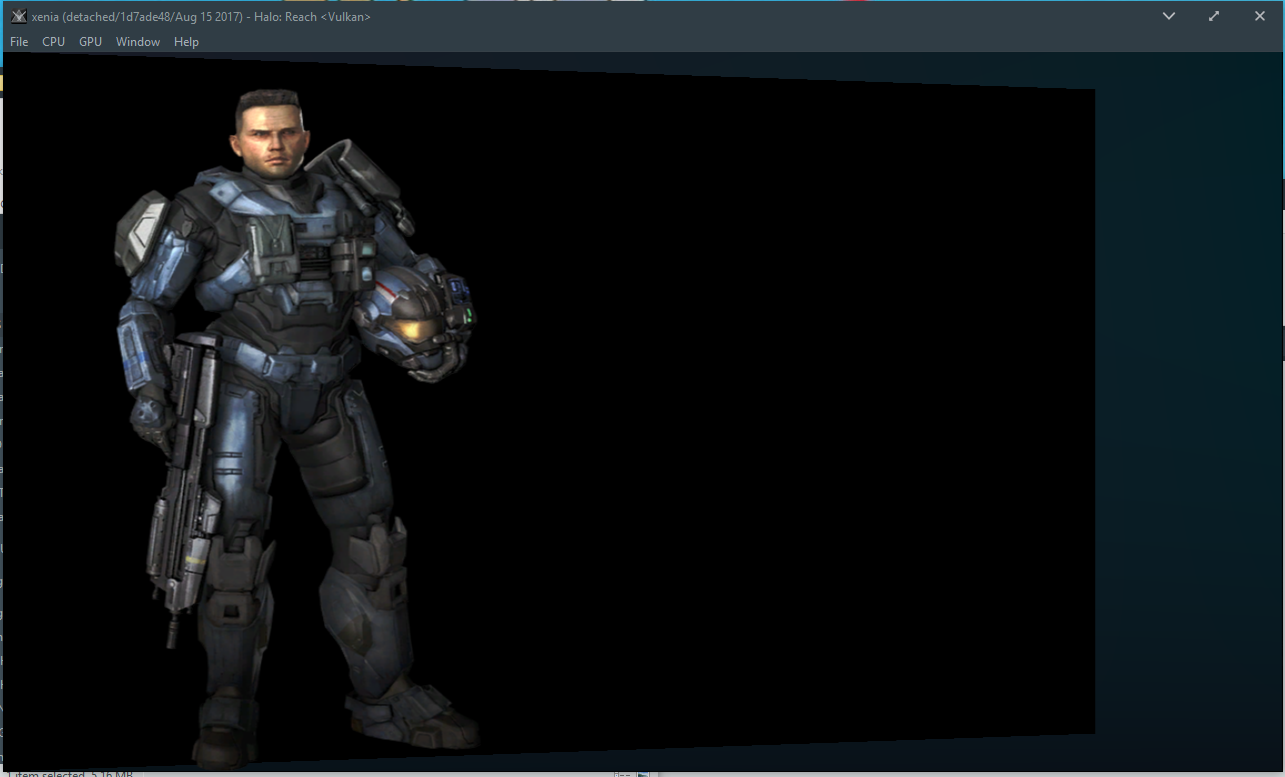
These images are from a special build of Halo Reach. This first image is loading the video.
 Here is the initial screen presented to the user. These black regions used to work and the outsides flicker with white. I believe this could be a simple blending issue. I believe these are transparent, and have a premultiplied alpha? So I am wondering if they're being rendererd as opaque and the alpha value is zero. (Completely just a hunch)
 Here is a picture that took me forever to take. This is what I am talking about with the flicker.

I am able to proceed through into the menu. This version of my game has been extensively modified just for note, however I do not expect this to affect the results that I am presenting as they're unrelated to graphics rendering and are there to unlock all of the features.
This main menu sequence does not have any flickering around the black regions. The background is heavily broken, I believe this is a shader issue because the game used to render out noise and there might be a precision issue?

If I immediately press A again. I am able to enter what I believe is the forge lobby. The player name User is present, but isn't rendering correctly with some yellow background? Could this perhaps be the same blending issue? Players who are the party leader have yellow text iirc.
Staying on this screen for an extended period of time leads to a crash. I can provide logs if you require.

If I try to rush through the game, pressing A as quickly as I can to get to this same screen. I am presented with a slightly different screen, and the waiting for a crash appears to happen sooner.

(I am going to do some more research, but I am having Vulkan cause me BSOD regularly)
Good work so far, it would be very useful for me to know the important features that have been changed around the issue highlighted since my initial investigation into the buffers clearing.
I have a hunch we are now dealing either incorrect buffer formats, blending issues or insanity. But the clearing has made improvements. 👍
Some more research that I have found while debugging.
The game is asking for FetchOpcode::kGetTextureGradients @ SpirvShaderTranslator::ProcessTextureFetchInstruction I am able to get the game running at this point by applying this value to the top of the switch statement.

VulkanCommandProcessor::PopulateVertexBuffers has a lot of fetch type 3's called in it. Currently there is an assert in this function. Could someone illuminate the purpose of this function and what the fetch type 3 means? I think it might be worth replacing this value with an enumeration.
When proceeding through the menus and immediately at the main menu in retail, an error is caused on vkQueueWaitIdle in trampoline.c
@HaydnTrigg Fetch type 3 is a vertex fetch. Type 2 is a texture fetch.
The GetTextureGradients opcode is currently unimplemented because I'm not really sure what it does.
A crash in vkQueueWaitIdle means some graphics commands failed to execute and NVIDIA so graciously terminates Xenia for us :)