

 xdebug
"Can not get property"
PHP version: 7.2.24 Xdebug version: 2.6.0 VS Code extension version: 1.19
Since v1.16 started to get the following error when watching array variables on debugging:
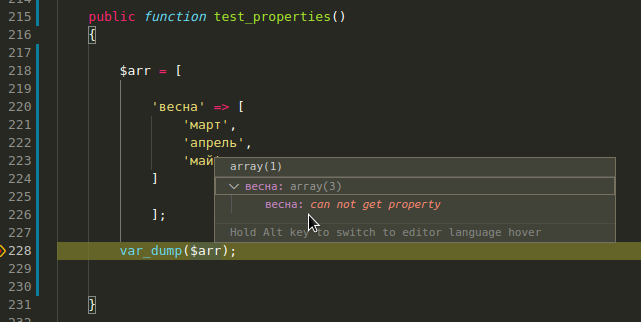
I've seen the statement regarding enabling extended properties since v1.16, could anyone help me?

Hi!
I see you have a very old Xdebug. Since Xdebug 3.0 I turn on extended_properties by default. You can enable them in launch.json like this:
	"configurations": [
		{
			"name": "Listen for Xdebug",
			"type": "php",
			"request": "launch",
...
			"xdebugSettings": {
				"extended_properties": 1
			}
		},
Since I see you are using Russian, what's your file encoding? UTF8 or somethin else?
If possible, please make a debug log by adding "log": true to launch.json configuration and attach here everything that is printed in DEBUG CONSOLE.
Thanks!

I always use UTF-8 encoding in my projects, that should be fine.
I've turned on XDebug logging and here's the startup part of negotiations:
[2648] <- feature_get -i 5 -n extended_properties
[2648] -> <response xmlns="urn:debugger_protocol_v1" xmlns:xdebug="https://xdebug.org/dbgp/xdebug" command="feature_get"
 transaction_id="5" feature_name="extended_properties" supported="1"><![CDATA[0]]></response>

[2648] <- feature_set -i 6 -n extended_properties -v 1
[2648] -> <response xmlns="urn:debugger_protocol_v1" xmlns:xdebug="https://xdebug.org/dbgp/xdebug" command="feature_set"
 transaction_id="6" feature="extended_properties" success="1"></response>

[2648] <- feature_set -i 7 -n extended_properties -v 1
[2648] -> <response xmlns="urn:debugger_protocol_v1" xmlns:xdebug="https://xdebug.org/dbgp/xdebug" command="feature_set"
 transaction_id="7" feature="extended_properties" success="1"></response>
Here's the part of log where I get a property error displayed in the screenshot above:
[2378] <- property_get -i 24 -d 0 -c 0 -n "$arr[\"?????\"]"
[2378] -> <response xmlns="urn:debugger_protocol_v1" xmlns:xdebug="https://xdebug.org/dbgp/xdebug" command="property_get
" transaction_id="24" status="break" reason="ok"><error code="300"><message><![CDATA[can not get property]]></message></
error></response>
Looks like some kind of encoding problem here.
In Debug console I'm getting the following:
-> variablesRequest
{
  command: 'variables',
  arguments: { variablesReference: 4 },
  type: 'request',
  seq: 23
}

<- variablesResponse
Response {
  seq: 0,
  type: 'response',
  request_seq: 23,
  command: 'variables',
  success: true,
  body: {
    variables: [
      {
        name: 'весна',
        value: 'array(3)',
        type: 'array',
        variablesReference: 15,
        presentationHint: {},
        evaluateName: '$arr["весна"]'
      }
    ]
  }
}

xd(2) <- property_get -i 24 -d 0 -c 0 -n "$arr[\"?????\"]"
xd(2) -> <?xml version="1.0" encoding="iso-8859-1"?><response xmlns="urn:debugger_protocol_v1" xmlns:xdebug="https://xdebug.org/dbgp/xdebug" command="property_get" transaction_id="24" status="break" reason="ok"><error code="300"><message><![CDATA[can not get property]]></message></error></response>
<- variablesResponse
Response {
  seq: 0,
  type: 'response',
  request_seq: 24,
  command: 'variables',
  success: false,
  message: 'can not get property',
  body: {
    error: { id: 300, format: 'can not get property', showUser: true }
  }
}
Yeah, I know what it is. When VS Code sends the variablesResponse it is in UTF-8, as expected. However when this extension/Debug Adapter transforms the call to Xdebug it respects its protocol encoding, and that is iso-8859-1, so the Cyrillic is lost...
I already discussed this with Derick, but the problem is, we can't know for sure what sort of encoding PHP uses internally (could be something, not UTF-8). Or better, what the user is typing in their file/database/HTTP.
Then again, in todays world more or less everything is in UTF-8. So I think I'll add an option to launch.json to override it, but switch to UTF-8 default regardless of what is in the XML.
Hello everyone and thank you very much in advance for your help.
I have a similar problem.
OS: Ubuntu 22.04 PHP version: 8.2.6 Xdebug version: 3.2.1 VS Code version: 1.78.2 VS Code extension version: 1.32.1 Yii framework: 2.0.47
I already turned on extended_properties. I also turned on the debug log. I am attaching a file with the debug logs shown in the debug console.

Hello @ieduardoms . From the logs I can see you are not using this extension to debug PHP. I can see it from the text Listening to Xdebug on port 0.0.0.0:9003,0.0.0.0:9000 ... and new connection 18.
This extension reports Listening on XXX and new connection YYY from XXX.
Please see what others extensions you have installed that also offer PHP debugging and try to disable them or write to their respective authors. It's too bad that conflicts like this aren't more obvious.