

 xdebug
Cant ignore some files
PHP version: 7.2.24-0 ubuntu0.18.04.8 Xdebug version: v3.0.4 VS Code extension version: v1.17.0
Your launch.json:
 "version": "0.2.0",
 "configurations": [

     {
         "name": "Listen for Xdebug",
         "type": "php",
         "request": "launch",
         "port": 9003,
         "ignore": [
             "/wp-content/plugins/*.php",
             "/wp-content/themes/brooklyn/",
             "/wp-content/themes/brooklyn/**/*.php",
             "/wp-content/themes/brooklyn/inc/ut-custom-css.php"
         ]
     },
     {
         "name": "Launch currently open script",
         "type": "php",
         "request": "launch",
         "program": "${file}",
         "cwd": "${fileDirname}",
         "port": 0,
         "runtimeArgs": [
             "-dxdebug.start_with_request=yes"
         ],
         "env": {
             "XDEBUG_MODE": "debug,develop",
             "XDEBUG_CONFIG": "client_port=${port}"
         }
     },
     {
         "name": "Launch Built-in web server",
         "type": "php",
         "request": "launch",
         "runtimeArgs": [
             "-dxdebug.mode=debug",
             "-dxdebug.start_with_request=yes",
             "-S",
             "localhost:0"
         ],
         "program": "",
         "cwd": "${workspaceRoot}",
         "port": 9003,
         "serverReadyAction": {
             "pattern": "Development Server \\(http://localhost:([0-9]+)\\) started",
             "uriFormat": "http://localhost:%s",
             "action": "openExternally"
         }
     }
 ]
}
Xdebug php.ini config:
zend_extension = /usr/lib/php/20170718/xdebug.so
xdebug.mode = debug
xdebug.start_with_request = yes
Xdebug logfile (from setting xdebug.log in php.ini):
VS Code extension logfile (from setting "log": true in launch.json):
Hi there I try to ignore some files in WordPress but still see errors in file ut-custom-css.php. Here is my ignore config:
       {
            "name": "Listen for Xdebug",
            "type": "php",
            "request": "launch",
            "port": 9003,
            "ignore": [
                "/wp-content/plugins/*.php",
                "/wp-content/themes/brooklyn/",
                "/wp-content/themes/brooklyn/**/*.php",
                "/wp-content/themes/brooklyn/inc/ut-custom-css.php"
            ]
        },
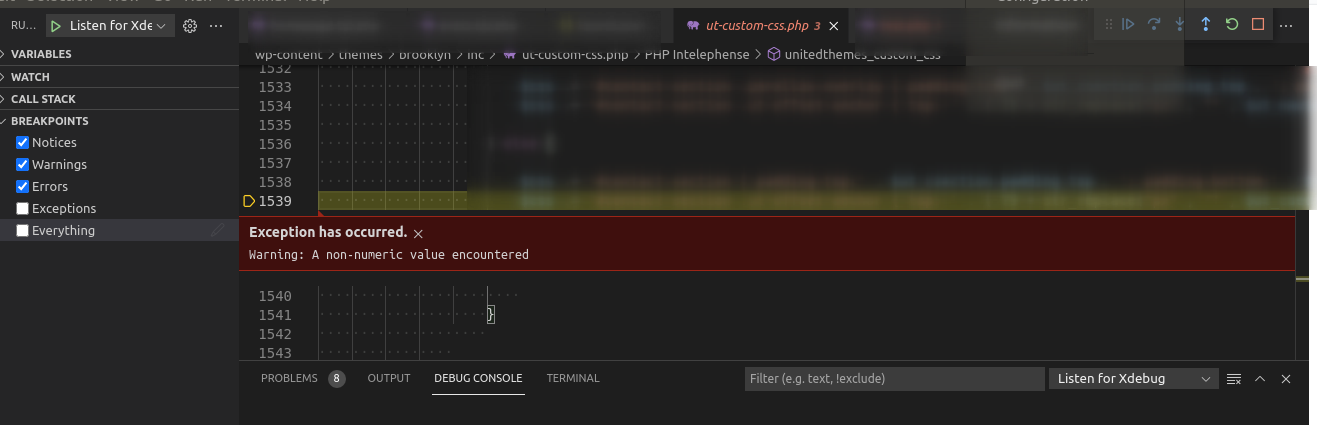
The question is: how can I ignore files and folders in a proper way? Thanks

Hi!
The ignore directive matches against full path so adding **/ as a prefix should help:
       {
            "name": "Listen for Xdebug",
            "type": "php",
            "request": "launch",
            "port": 9003,
            "ignore": [
                "**/wp-content/plugins/*.php",
                "**/wp-content/themes/brooklyn/",
                "**/wp-content/themes/brooklyn/**/*.php",
                "**/wp-content/themes/brooklyn/inc/ut-custom-css.php"
            ]
        },
Let me know if it works!

Hi zobo Thanks a lot, seems it works now One more question: I still get errors from wp-plugin files, seems I do something wrong
The file is wp-content/plugins/responsive-flipbook/massive-panel/extensions.php
Here is ignore configuration:
            "ignore": [
                "**/wp-admin/includes/*.php",
                "**/wp-content/plugins/*.php",
                "**/wp-content/plugins/**/*.php",
                "**/wp-content/plugins/**/**/*.php",
                "**/wp-content/plugins/**/**/**/*.php",
                "**/wp-content/themes/brooklyn/",
                "**/wp-content/themes/brooklyn/**/*.php",
                "**/wp-content/themes/brooklyn/inc/ut-custom-css.php",
                "**/wp-content/plugins/responsive-flipbook/massive-panel/extensions.php",
                "**/wp-content/plugins/responsive-flipbook/massive-panel/**"
            ]
Hm. It should work, but without the log: true I can't know for sure. If you attach it here I can maybe help you further. Could be a upper/lower case issue...
Hm. It should work, but without the
log: trueI can't know for sure. If you attach it here I can maybe help you further. Could be a upper/lower case issue...
Hello
Thanks for your help. I've configured log: true for the debugging, but I can't find any log file
        {
            "log": true,
            "name": "Listen for Xdebug",
            "type": "php",
            "request": "launch",
            "port": 9003,
            "ignore": [
                "**/wp-admin/includes/*.php",
                "**/wp-content/plugins/*.php",
                "**/wp-content/plugins/**/*.php",
                "**/wp-content/plugins/**/**/*.php",
                "**/wp-content/plugins/**/**/**/*.php",
                "**/wp-content/themes/brooklyn/",
                "**/wp-content/themes/brooklyn/**/*.php",
                "**/wp-content/themes/brooklyn/inc/ut-custom-css.php",
                "**/wp-content/plugins/responsive-flipbook/massive-panel/extensions.php",
                "**/wp-content/plugins/responsive-flipbook/massive-panel/**"
            ]
        },
Here is debug console output, not sure if it's useful xdebug-output.log
Hi @karmeljuk . This log is exactly what I needed.
But I do not see a problem. There are lines where the debugger engine stops due to an exception, but it's clear it also immediately continues the execution:
xd(5) -> <?xml version="1.0" encoding="iso-8859-1"?><response xmlns="urn:debugger_protocol_v1" xmlns:xdebug="https://xdebug.org/dbgp/xdebug" command="step_over" transaction_id="13" status="break" reason="ok"><xdebug:message filename="file:///home/xata/Work/Sites/storyterrace.loc/wp-content/plugins/responsive-flipbook/massive-panel/extensions.php" lineno="49" exception="Warning" code="2"><![CDATA[file_get_contents(): php_network_getaddresses: getaddrinfo failed: No address associated with hostname]]></xdebug:message></response>
xd(5) <- run -i 14
However there are places where debugger stops because of a line breakpoint
xd(5) -> <?xml version="1.0" encoding="iso-8859-1"?><response xmlns="urn:debugger_protocol_v1" xmlns:xdebug="https://xdebug.org/dbgp/xdebug" command="run" transaction_id="15" status="break" reason="ok"><xdebug:message filename="file:///home/xata/Work/Sites/storyterrace.loc/wp-content/plugins/responsive-flipbook/massive-panel/extensions.php" lineno="51"></xdebug:message></response>
These are the breakpoints set in this session:
xd(5) <- breakpoint_set -i 4 -t line -f file:///home/xata/Work/Sites/storyterrace.loc/wp-content/plugins/responsive-flipbook/massive-panel/extensions.php -n 49
xd(5) <- breakpoint_set -i 5 -t line -f file:///home/xata/Work/Sites/storyterrace.loc/wp-content/plugins/responsive-flipbook/massive-panel/extensions.php -n 51
xd(5) <- breakpoint_set -i 6 -t line -f file:///home/xata/Work/Sites/storyterrace.loc/wp-content/themes/brooklyn-child/footer.php -n 54
xd(5) <- breakpoint_set -i 7 -t line -f file:///home/xata/Work/Sites/storyterrace.loc/wp-admin/includes/image.php -n 805
xd(5) <- breakpoint_set -i 8 -t exception -x Notice
xd(5) <- breakpoint_set -i 9 -t exception -x Warning
xd(5) <- breakpoint_set -i 10 -t exception -x Error
Try removing line breakpoints that are not relevant and see if you still see the issue, or try to get a more clean log to me. This one has a lot of sessions in it. You can clear the log with the button on the panel:
Let me know so I can close the issue.
Best, Damjan