
Xamarin.Forms
 Xamarin.Forms copied to clipboard
 xamarin
[Bug] [Android] Keyboard.Numeric: It's not possible to enter the decimal separator or the minus sign
Description
I have set the Keyboard to the Numeric Keyboard for some Entry controls.
<Entry Keyboard="Numeric" ...
On Samsung phones and tablets it is not possible to enter the decimal separator or the minus sign. I believe the minus sign does not work at all.
Important for reproduction: Change the language/locale to German/Germany. In Germany the separator sign is ',' (comma) instead of '.' (point).
Responsible code:
The EntryCellRenderer creates it's own DigitsKeyListener for Numeric Keyboard: https://github.com/xamarin/Xamarin.Forms/blob/bd31e1e9fc8b2f9ad94cc99e0c7ab058174821f3/Xamarin.Forms.Platform.Android/Cells/EntryCellRenderer.cs#L72
The LocalizedDigitsKeyListener is only used when the 'decimalSeparator' is not '.'. The bug is only seen when the LocalizedDigitsKeyListener is used.
https://github.com/xamarin/Xamarin.Forms/blob/bd31e1e9fc8b2f9ad94cc99e0c7ab058174821f3/Xamarin.Forms.Platform.Android/Renderers/LocalizedDigitsKeyListener.cs#L56
Seen issues:
- On Samsung devices the numeric keyboard shows always '.' (point) as decimal separator. It does not provide the correct decimal separator ',' (comma) for Germany. Pressing the '.' does not even add the character to the Entry control because it is prevented (filtered) by the
LocalizedDigitsKeyListener. - When the
LocalizedDigitsKeyListeneris used I'm not able to add the minus character.
Workaround
I wrote my own renderer for the entry. I return always the Android version of the DigitsKeyListener. The Xamarin implementation uses the depricated DigitsKeyListener.GetInstance overload without the Locale parameter. I use the one with the Locale parameter and pass Locale.Default. Maybe it would even be better to get the Locale from CultureInfo.CurrentCulture but that is not trivial.
internal class MyEntryRenderer : EntryRenderer
{
    public MyEntryRenderer(Context context) : base(context) { }

    protected override NumberKeyListener GetDigitsKeyListener(InputTypes inputTypes)
    {
        return DigitsKeyListener.GetInstance(Java.Util.Locale.Default,
            inputTypes.HasFlag(InputTypes.NumberFlagSigned),
            inputTypes.HasFlag(InputTypes.NumberFlagDecimal));
    }
}
Context
- Version with issue: Xamarin.Forms 4.0.0.497661
- Platform Target Frameworks:
- Android: 8.1
- Affected Devices:
- Samsung phones and tablets (checked with Android 8.1 and Android 9)

Similar to #6580, this would be a breaking change, so it would need to be implemented as a new option. If you'd like to submit a PR, we'd love to review it! Thanks!

@samhouts
- The issue #6580 sounds similar to this one but I believe that they are different when looking at the details.
- In my opinion there is a bug in the
LocalizedDigitsKeyListenerclass that prevents the usage of the minus key. Please keep in mind that theLocalizedDigitsKeyListenerclass is only used when the decimal separator is not the point '.'. You could change the language to German/Germany to reproduce it because then the decimal separator is the comma ','. - Samsung Android provides always a numeric keyboard with '.' (point) as decimal separator independent of the language setting. On a Samsung device where the language set to German/Germany the
LocalizedDigitsKeyListenerprevents entering the '.' (point) at all. Therefore, it is difficult to develop a workaround (e.g. DoubleValueConverter). - Unfortunately, I do not have the time to develop a PR.
Also run into the same problem. This is a very old issue and very annoying bug. Please fix or improve this soon. Writing Apps for an international customer base gets very disappointing with this bug.

I also have the same problem on a Motorola Moto G (5S) Plus with Android 8.1. Our Customers are in Austria so the locale ist set to de-AT.
The workaround with the custom renderer does not work for me since I use Xamarin.Forms Material Visual! And also if you have a databinding to a double this influences the entry-control in this way that the decimal-separator character is changed from a dot '.' to a comma ','!
I really need a fix very urgently! So when will this issue be fixed?

Same issue here. I implemented a slider instead of an entry and customers go mad because of this :/

I tested on a Samsung J5, Android 6.0 API Version 23. Worked just fine with locale set to PT-BR and EN-US. However, on a Samsung J7 (2018), Android 9.0, locale PT-BR, the bug still happens. The user cannot click on dot neither comma to enter decimal places.

The workaround with the custom renderer does not work for me since I use Xamarin.Forms Material Visual!
@Heinz12 you could do it with the MaterialEntryRenderer instead of EntryRenderer, as specified in the doc https://docs.microsoft.com/fr-fr/xamarin/xamarin-forms/user-interface/visual/material-visual

I found a workaround for this issue. it may not be considered as a clean solution but it does the job.
I ended up using a ValueConverter.
using System.Globalization;

namespace TT2Master.ValueConverter
{
    /// <summary>
    /// Converts double to user friendly number
    /// </summary>
    public class DoubleValueConverter : BaseValueConverter<DoubleValueConverter>
    {
        /// <summary>
        /// Convert anything to double
        /// </summary>
        /// <param name="value">value to convert</param>
        /// <param name="targetType">not supported</param>
        /// <param name="parameter">not supported</param>
        /// <param name="culture">not supported</param>
        /// <returns>double</returns>
        public override object Convert(object value, Type targetType, object parameter, CultureInfo culture)
        {
            if (value == null)
            {
                return 0;
            }
            else
            {
                return TypeConverter.ForceDoubleUniversal(
                    (value.ToString().EndsWith(".") || value.ToString().EndsWith(","))
                    ? value.ToString() + "0"
                    : value.ToString());
            }
        }

        public override object ConvertBack(object value, Type targetType, object parameter, CultureInfo culture) => Convert(value, targetType, parameter, culture);
    }
}
Where BaseValueConverter is
using System.Globalization;
using Xamarin.Forms;

namespace TT2Master.ValueConverter
{
    /// <summary>
    /// base value converter
    /// </summary>
    /// <typeparam name="T">The type of this value converter</typeparam>
    public abstract class BaseValueConverter<T> : IValueConverter
        where T : class, new()
    {
        #region Value Converter Methods
        /// <summary>
        /// The method to convert one type to another
        /// </summary>
        /// <param name="value"></param>
        /// <param name="targetType"></param>
        /// <param name="parameter"></param>
        /// <param name="culture"></param>
        /// <returns></returns>
        public abstract object Convert(object value, Type targetType, object parameter, CultureInfo culture);

        /// <summary>
        /// The method to convert a value back to itself
        /// </summary>
        /// <param name="value"></param>
        /// <param name="targetType"></param>
        /// <param name="parameter"></param>
        /// <param name="culture"></param>
        /// <returns></returns>
        public abstract object ConvertBack(object value, Type targetType, object parameter, CultureInfo culture);

        #endregion
    }
}
Usage example in your page or whatever:
-
add xmlns if needed
xmlns:converter="clr-namespace:TT2Master.ValueConverter" -
Add converter to resource dictionary
    <pages:PopupPage.Resources>
        <ResourceDictionary>
            <converter:DoubleValueConverter x:Key="DoubleConverter" />
        </ResourceDictionary>
    </pages:PopupPage.Resources>
- Use converter
<Entry Grid.Row="8" Grid.Column="2" Text="{Binding MinEfficiency, Converter={StaticResource DoubleConverter}, Mode=TwoWay}" Keyboard="Numeric"/>
Hope this helps :)

@Dids > @nebula2 Where is ForceDoubleUniversal coming from?
Sorry, ForceDoubleUniversal is just this here:
/// <summary>
/// Forces conversion from object to double
/// </summary>
/// <param name="o"></param>
/// <returns></returns>
public static double ForceDoubleUniversal(object o)
{
    if(o == null)
    {
        return 0;
    }
    var culture = o.ToString().Contains(",") ? CultureInfo.CreateSpecificCulture("de-DE") : CultureInfo.CreateSpecificCulture("en-US");

    return !Double.TryParse(o.ToString(), NumberStyles.Any, culture, out double result) ? 0 : result;
}
It's very sad to see that this is still not fixed. This is not the only bug related to locales in Xamarin. Is this a US-only framework?
@omghb, is your workaround still valid in Xamarin Forms 4.8? Because when I use it, the default keyboard is shown instead of the numeric keyboard.
@nebula2, just to confirm, your workaround doesn't work on Samsung devices, right? Since dots aren't even coming to the control.

It's very sad to see that this is still not fixed. This is not the only bug related to locales in Xamarin. Is this a US-only framework?
@nebula2, just to confirm, your workaround doesn't work on Samsung devices, right? Since dots aren't even coming to the control.
I am using a Huawei phone. but I have an old Samsung S5. I will try and see if that works there. If not it would mean a small adjustment. i am using this value converter in prod and had no issues until today
Any progress here? All de-DE xamarin app users with samsung phones are affected. I'm pretty sure they'll appreciate if they can start using decimal separators in Germany...

@samhouts This bug affects a huge amount of locales. Just have a look on this map showing usage of dot vs. comma all over the world. https://en.wikipedia.org/wiki/Decimal_separator

@samhouts This bug affects a huge amount of locales. Just have a look on this map showing usage of dot vs. comma all over the world. https://en.wikipedia.org/wiki/Decimal_separator
I can confirm this issue still exists in Xamarin.Forms 5.0.0. As this only affects the Samsung keyboard, is this not a specific issue with the Samsung keyboard itself? Or is it really Xamarin that has to specify the required input options more clearly to the OS?

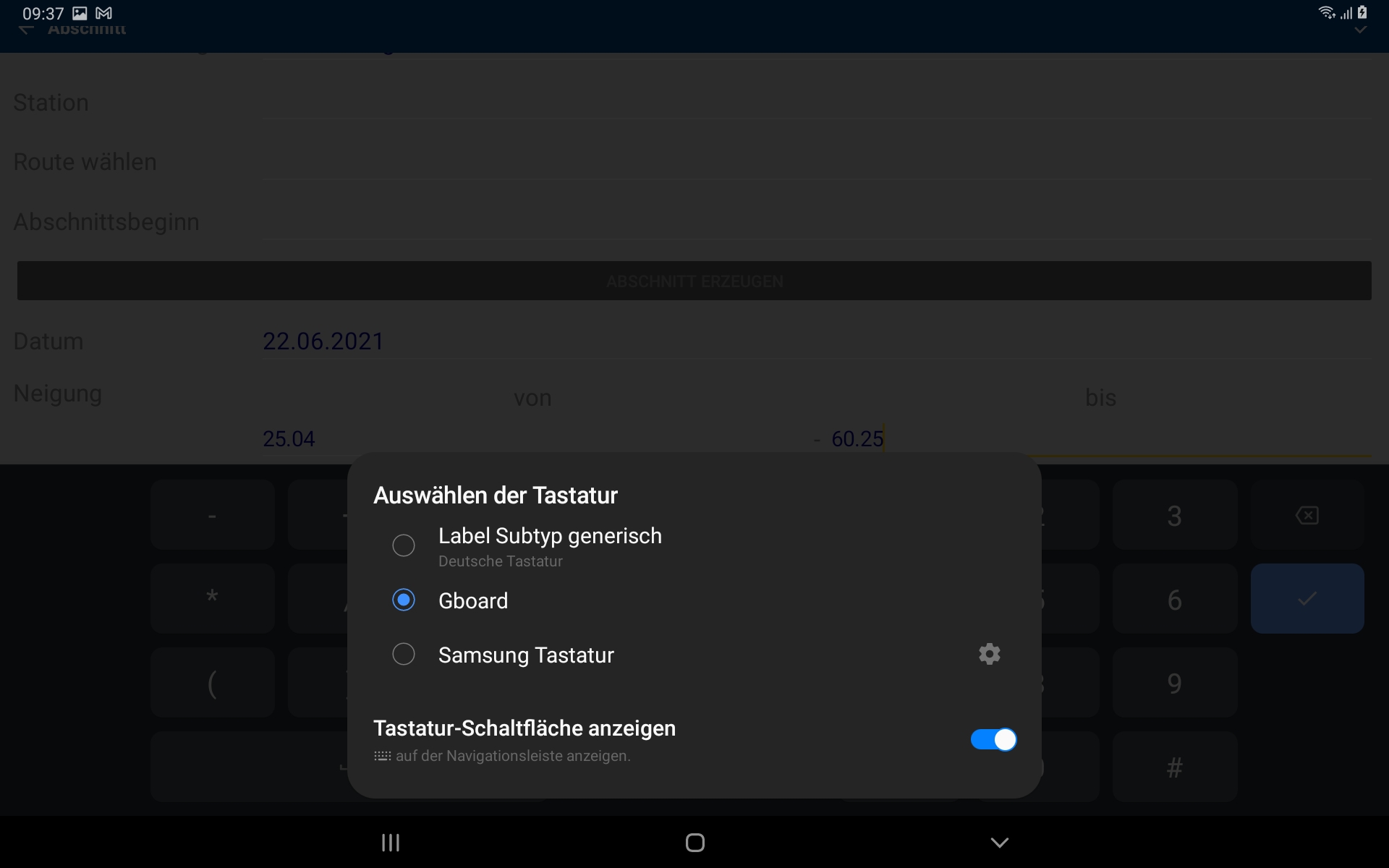

@roman536 this is indeed a valid workaround. However, many mobile users don't even know that there is more than one keyboard available :)
In my opinion it is not a valid workaround to get every user reconfigure the default system keyboard.
Furthermore, I want to repeat that this is a XAMARIN BUG in the LocalizedDigitsKeyListener implementation. Anyway the whole design of the LocalizedDigitsKeyListener looks quite suspicious to me. I also provide a simple workaround. Please have a look at my initial post.
The LocalizedDigitsKeyListener is only used when the 'decimalSeparator' is not '.'. The bug is only seen when the LocalizedDigitsKeyListener is used.
Still existing bug. And if I want to use DisplayPromptAsync with Keyboard.Numeric how can I figure it out then? In my country with Samsung only device minus sign and dot separator are even non clickable.

we also stumbled over the same problem; are there plans to get this fixed?

This is Still an issue with the Samsung Keyboard, maybe its time to abandon Xamarin altogether........ seems like they are not interested in fixing this at all!

This is Still an issue with the Samsung Keyboard, maybe its time to abandon Xamarin altogether........ seems like they are not interested in fixing this at all!
This is between Android <-> OEM. I saw this bug on other phones too, not only Samsung. So more like Android thingy. And don't be fooled that some other framework has it working, e.g.: https://github.com/flutter/flutter/issues/61175
