
Xamarin.Forms
 Xamarin.Forms copied to clipboard
Published
20 hours ago •
 xamarin
xamarin
[Bug] [iOS] CollectionView & VisualStateManager - preselected item state not applied
Description
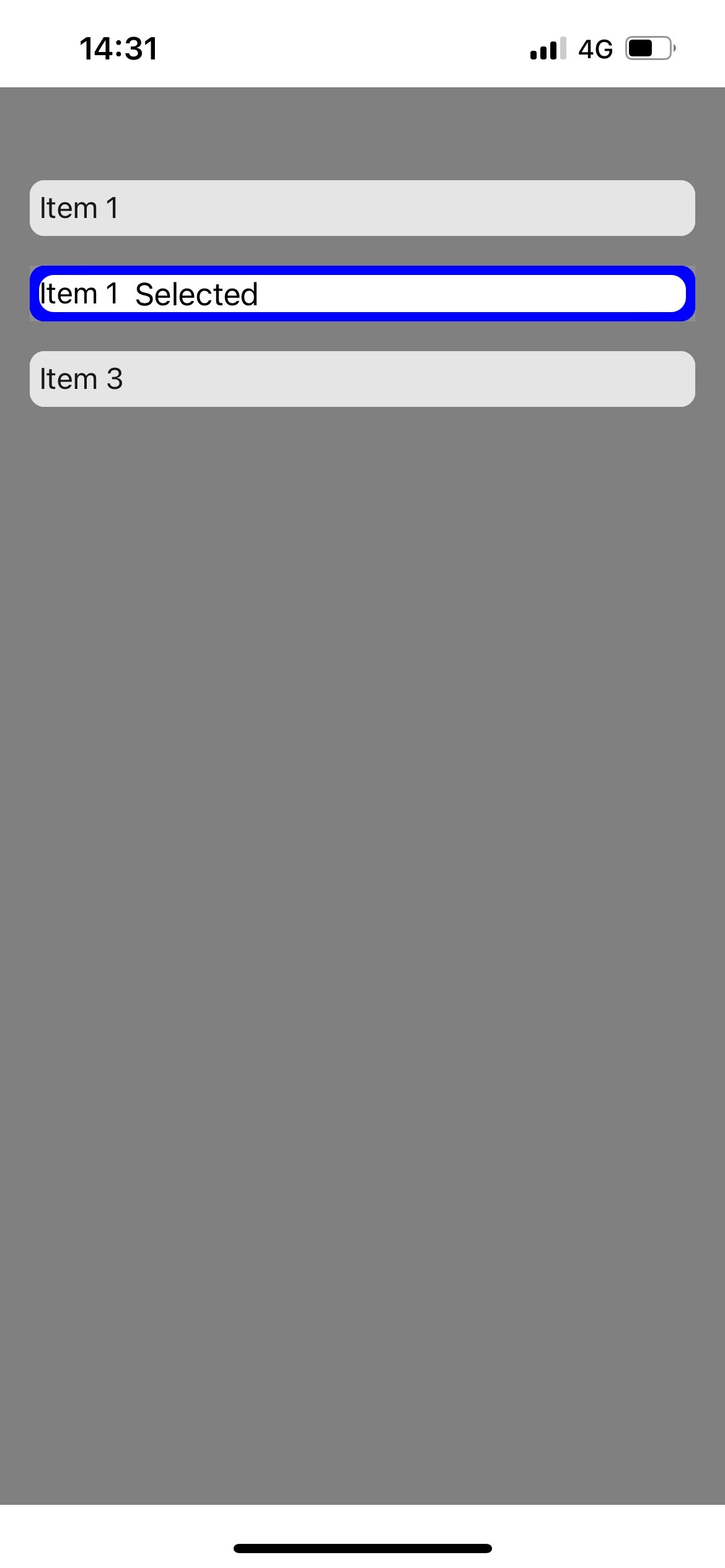
I have a CollectionView with VisualStates configured as in the code below. The "Selected" visual state setter seams to be working only when the user taps on one of the items. It's not working if an item is pre-selected from code.
<?xml version="1.0" encoding="utf-8" ?>
<ContentPage
    x:Class="CollectionViewBug.MainPage"
    xmlns="http://xamarin.com/schemas/2014/forms"
    xmlns:x="http://schemas.microsoft.com/winfx/2009/xaml"
    xmlns:collectionviewbug="clr-namespace:CollectionViewBug"
    xmlns:ios="clr-namespace:Xamarin.Forms.PlatformConfiguration.iOSSpecific;assembly=Xamarin.Forms.Core"
    ios:Page.UseSafeArea="true"
    x:DataType="collectionviewbug:MainViewModel">

    <StackLayout BackgroundColor="Gray" VerticalOptions="FillAndExpand">
        <CollectionView
            Margin="16,50,16,0"
            HorizontalOptions="FillAndExpand"
            ItemSizingStrategy="MeasureAllItems"
            ItemsSource="{Binding Items}"
            SelectedItem="{Binding SelectedItem}"
            SelectionMode="Single"
            VerticalOptions="CenterAndExpand">
            <CollectionView.ItemsLayout>
                <LinearItemsLayout ItemSpacing="16" Orientation="Vertical" />
            </CollectionView.ItemsLayout>
            <CollectionView.ItemTemplate>
                <DataTemplate x:DataType="collectionviewbug:ItemModel">
                    <Frame
                        Padding="5"
                        BackgroundColor="White"
                        BorderColor="White"
                        CornerRadius="8"
                        HasShadow="False"
                        HeightRequest="20"
                        Opacity="0.8"
                        WidthRequest="168">
                        <Frame
                            Padding="0"
                            BackgroundColor="White"
                            CornerRadius="8"
                            HasShadow="False">
                            <StackLayout Orientation="Horizontal" Spacing="8">
                                <Label
                                    FontSize="16"
                                    HorizontalOptions="Start"
                                    Text="{Binding Name}"
                                    TextColor="Black"
                                    VerticalOptions="StartAndExpand"
                                    VerticalTextAlignment="Start" />
                                <Label
                                    HorizontalOptions="Start"
                                    IsVisible="{Binding IsSelected}"
                                    Text="Selected"
                                    TextColor="Black" />
                            </StackLayout>
                        </Frame>
                        <VisualStateManager.VisualStateGroups>
                            <VisualStateGroup x:Name="CommonStates">
                                <VisualState x:Name="Normal" />
                                <VisualState x:Name="Selected">
                                    <VisualState.Setters>
                                        <Setter Property="Opacity" Value="1.0" />
                                        <Setter Property="BackgroundColor" Value="Blue" />
                                        <Setter Property="BorderColor" Value="Blue" />
                                    </VisualState.Setters>
                                </VisualState>
                            </VisualStateGroup>
                        </VisualStateManager.VisualStateGroups>
                    </Frame>
                </DataTemplate>
            </CollectionView.ItemTemplate>
        </CollectionView>
    </StackLayout>
</ContentPage>
and view model:
public class ItemModel : INotifyPropertyChanged
    {
        public string Name { get; set; }

        private bool isSelected = false;
        public bool IsSelected
        {
            get => isSelected; set
            {
                isSelected = value;
                PropertyChanged?.Invoke(this, new PropertyChangedEventArgs(nameof(IsSelected)));
            }
        }

        public event PropertyChangedEventHandler PropertyChanged;
    }

    public class MainViewModel : INotifyPropertyChanged
    {
        public event PropertyChangedEventHandler PropertyChanged;

        public MainViewModel()
        {
            Items = new ObservableCollection<ItemModel>()
            {
            new ItemModel() { Name = "Item 1"},
            new ItemModel() { Name = "Item 1"},
            new ItemModel() { Name = "Item 3"}
            };

            SelectedItem = Items[0];
        }

        public ObservableCollection<ItemModel> Items { get; }

        private ItemModel selectedItem;
        public ItemModel SelectedItem
        {
            get => selectedItem;
            set
            {
                foreach (var it in Items)
                    it.IsSelected = false;

                selectedItem = value;
                selectedItem.IsSelected = true;
                PropertyChanged?.Invoke(this, new PropertyChangedEventArgs(nameof(SelectedItem)));
            }
        }
    }
Steps to Reproduce
Create a Xamarin Forms app with the code above and run it.
Expected Behavior
The selected item should be highlighted when starting the app (see 'Working State' screenshot)
Actual Behavior
The pre-selected item is not highlighted when starting the app (see 'Initial State' screenshot).
Basic Information
- Version with issue: Xamarin.Forms 5.0.0.2515
- Last known good version: -
- Platform Target Frameworks:
- iOS:
Screenshots
Initial state:

Working state:

workaround on: https://github.com/xamarin/Xamarin.Forms/issues/9511#issuecomment-757142935
