
Xamarin.Forms
 Xamarin.Forms copied to clipboard
 xamarin
[Bug] [iOS] Image cache not getting released from memory
Description
I have created a simple custom control with image. In iOS platform renderer, I have get the UIImage for the ImageSource using LoadImageAsync method and set the UIImage to iOS native UIImageView's Image. I have done the proper dispose code for this implementation too. But even though the app's memory gets increasing continuously while navigating back and forth between custom control page. On further analysis, it seems the image cache is increasing for each and every page navigation.
Steps to Reproduce
- Deploy the sample on iOS platform.
- Check the allocations using instrumentals by navigating front and back through button clicks.
Expected Behavior
The memory should be disposed properly while navigating back from control page.
Actual Behavior
The app size getting increased continuously for each and every page navigation.
Basic Information
- Version with issue:
- Last known good version:
- Platform Target Frameworks:
- iOS: iOS 15.5
- Android: Not ensured.
- UWP: Not ensured.
- Android Support Library / AndroidX Version:
- NuGet Packages: Xamarin.Forms 5.0.0.2196 Xamarin.Essentials 1.7.0
- Affected Devices: iPhone 12 Pro Max - iOS 15.5 (Simulator)
Environment
Show/Hide Visual Studio info
Visual Studio Community 2022 for Mac Preview
Version 17.3 Preview (17.3 build 2012)
Installation UUID: 47d771b3-3b3f-4351-a378-3a1ad90da403

Runtime
.NET 6.0.5 (64-bit)
Architecture: X64

Roslyn (Language Service)
4.3.0-3.22312.2+52adfb8b2dc71ed4278debcf13960f2116868608

NuGet
Version: 6.2.1.2

.NET SDK (x64)
SDK: /usr/local/share/dotnet/sdk/6.0.400/Sdks
SDK Versions:
	6.0.400
	3.1.421
MSBuild SDKs: /Applications/Visual Studio (Preview).app/Contents/MonoBundle/MSBuild/Current/bin/Sdks

.NET Runtime (x64)
Runtime: /usr/local/share/dotnet/dotnet
Runtime Versions:
	6.0.7
	3.1.27

Xamarin.Profiler
Version: 1.8.0.19
Location: /Applications/Xamarin Profiler.app/Contents/MacOS/Xamarin Profiler

Updater
Version: 11

Apple Developer Tools
Xcode 13.4.1 (20504)
Build 13F100

Xamarin.Mac
Version: 8.10.0.5 (Visual Studio Community)
Hash: 96b3edb6d
Branch: d17-2
Build date: 2022-05-18 07:32:06-0400

Xamarin.iOS
Version: 15.10.0.5 (Visual Studio Community)
Hash: 96b3edb6d
Branch: d17-2
Build date: 2022-05-18 07:32:07-0400

Xamarin Designer
Version: 17.3.0.204
Hash: f5da0100a
Branch: remotes/origin/d17-3
Build date: 2022-07-14 20:16:33 UTC

Xamarin.Android
Version: 13.0.0.0 (Visual Studio Community)
Commit: xamarin-android/d17-3/030cd63
Android SDK: /Users/syncfusion/Library/Developer/Xamarin/android-sdk-macosx
	Supported Android versions:
		8.0    (API level 26)
		6.0    (API level 23)
		12.0   (API level 31)
		4.4    (API level 19)
		8.1    (API level 27)
		5.1    (API level 22)
		5.0    (API level 21)
		11.0   (API level 30)
		10.0   (API level 29)
		7.1    (API level 25)
		4.4.87 (API level 20)
		9.0    (API level 28)
		7.0    (API level 24)

SDK Command-line Tools Version: 7.0
SDK Platform Tools Version: 33.0.2
SDK Build Tools Version: 33.0.0

Build Information:
Mono: dffa5ab
Java.Interop: xamarin/java.interop/d17-3@7716ae53
SQLite: xamarin/sqlite/3.38.5@df4deab
Xamarin.Android Tools: xamarin/xamarin-android-tools/main@14076a6

Microsoft Build of OpenJDK
Java SDK: /Library/Java/JavaVirtualMachines/microsoft-11.jdk
11.0.12
Android Designer EPL code available here:
https://github.com/xamarin/AndroidDesigner.EPL

Eclipse Temurin JDK
Java SDK: /Library/Java/JavaVirtualMachines/temurin-8.jdk
1.8.0.302
Android Designer EPL code available here:
https://github.com/xamarin/AndroidDesigner.EPL

Android SDK Manager
Version: 17.3.0.21
Hash: 91e34a0
Branch: remotes/origin/d17-3
Build date: 2022-07-14 20:16:38 UTC

Android Device Manager
Version: 0.0.0.1168
Hash: 4b9aaa3
Branch: 4b9aaa3
Build date: 2022-07-14 20:16:38 UTC

Build Information
Release ID: 1703002012
Git revision: f6bf6fa9b2a092abfd87672666c59e4ac2317b6c
Build date: 2022-07-14 20:14:12+00
Build branch: release-17.3
Build lane: release-17.3

Operating System
Mac OS X 12.0.1
Darwin 21.1.0 Darwin Kernel Version 21.1.0
    Wed Oct 13 17:33:23 PDT 2021
    root:xnu-8019.41.5~1/RELEASE_X86_64 x86_64
Build Logs
Not applicable:
Screenshots
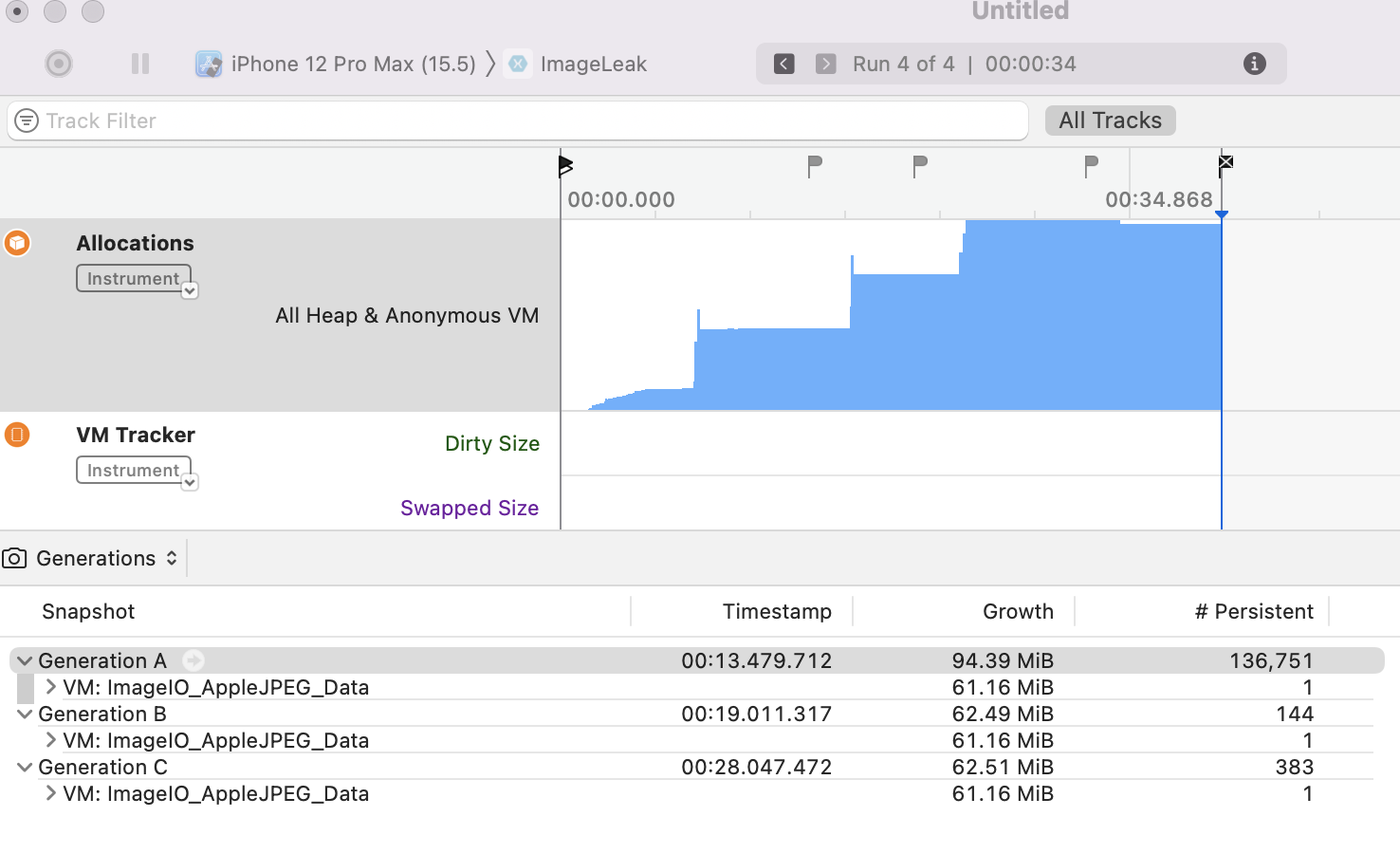
Reproduction Link
Workaround
Not found yet.

I have the same problem. Can anyone take a look at it or are Forms dead already?
