

 writefreely
ios app unable to retrieve existing posts on server
Describe the bug
Self-hosted writefreely, single user instance, installed behind nginx reverse proxy as per instructions. Logging in to the blog via the web user interface works fine, all posts and functions fully accessible. Logging in via the ios app (same user name and password) also works, and I am able to post new articles to the write freely instance. However, when I log in via the app, I am not not able to see (and therefore also not able to edit) any of the existing posts on the server, only those created with the app.
Steps to reproduce (if necessary)
Steps to reproduce the behavior:
- Use ios app to log in on server that has existing blog posts.
- Go to 'All Posts', 'Drafts' or 'your-blog-name' under 'Your Blogs'
- Already existing posts or posts subsequently created not using the writefreely app are not visible in the app! Even after refreshing all pages, logging out and in again, etc.
Expected behavior
What should've happened: I should be able to see and edit and manipulate existing posts on the server when I log on using the app.
Application configuration
- Single user mode
- Database: sqlite
- Open registration: no
- Federation enabled: no
Version or last commit: writefreely v0.13.1, current ios app version as 27/01/2022, v1.0.8 (build 646)

Thanks for reporting this bug! From the description, it sounds like this is an issue with the iOS app more than the backend server, so I'm going to move the report there.

Hey @McColdewey, thanks for reaching out and sorry for the trouble!
As I understand it, there are posts that you've created via the web app that are not showing up when you log in to your WriteFreely instance from the iOS app. I've a couple of clarifying questions for you:
- If you log in to your WriteFreely instance from another computer, are you still able to see these same posts?
- Are you able to see these posts on your published WriteFreely blog when you're not logged in?
- Could you give me ballpark estimate of how many blogs and how many total posts you have on that WriteFreely instance?

Hi Angelo
The blog is currently only at its inception. It’s a single user single blog. There are as of right now 10 posts, of which 4 are pinned (for privacy policy, terms of service, contacts, etc). Two are test posts created and posted with the ios app. These are the only posts I can see and manipulate (move, edit, etc) with the app. Using a browser, I can see all posts, from multiple clients, including iphone and ipad, mac, linux and windows clients. The host resides on a cloud-based linux host (ubuntu 20.04 LTS). All posted (non-draft) posts are visible to visitors not logged in to the blog.
Kind regards, Jon
On Sun, 30 Jan 2022, at 15:31, Angelo Stavrow wrote:
Hey @McColdewey https://github.com/McColdewey, thanks for reaching out and sorry for the trouble!
As I understand it, there are posts that you've created via the web app that are not showing up when you log in to your WriteFreely instance from the iOS app. I've a couple of clarifying questions for you:
- If you log in to your WriteFreely instance from another computer, are you still able to see these same posts?
- Are you able to see these posts on your published WriteFreely blog when you're not logged in?
- Could you give me ballpark estimate of how many blogs and how many total posts you have on that WriteFreely instance?
— Reply to this email directly, view it on GitHub https://github.com/writefreely/writefreely-swiftui-multiplatform/issues/200#issuecomment-1025155770, or unsubscribe https://github.com/notifications/unsubscribe-auth/AD2CZ7EU43MVXYMGXBO2UFDUYVDUJANCNFSM5M6F2QPA. Triage notifications on the go with GitHub Mobile for iOS https://apps.apple.com/app/apple-store/id1477376905?ct=notification-email&mt=8&pt=524675 or Android https://play.google.com/store/apps/details?id=com.github.android&referrer=utm_campaign%3Dnotification-email%26utm_medium%3Demail%26utm_source%3Dgithub. You are receiving this because you were mentioned.Message ID: @.***>
Thanks for the follow-up, Jon! What I was looking to confirm was that the posts that aren't showing up in the iOS app were nonetheless published posts—and since you can see them on other clients, they clearly are.
When you successfully log in, the app fetches all of the user's blogs (internally referred to as "collections" of posts) and all published posts, whether they are associated with a blog or not (the latter being "anonymous"-type posts). Tapping the reload button at the bottom-right of the post list triggers the same action. Once the data is fetched, it's stored in the device's local database, and the app updates the list of blogs and posts shown in the UI. It sounds like something in this process is failing.
What's curious is that you're nonetheless able to connect to (and interact with) the WriteFreely instance, by virtue of your having successfully published posts from the iOS app. When the app publishes a post to the instance, it gets back a response with things like the published post's ID, which is updated in the device's local database entry for that post.
If you log out on the app and then log back in, do you still see those posts that were published from the iOS app?
Another thought: have you changed the name of the blog since creating it, or otherwise tweaked any configuration on the WriteFreely instance?
We don't do any logging in the iOS app, but I'm wondering if exposing some stats on what's in the device's local database would be helpful.
Just to make sure the aberrant behaviour isn't do to a relict of previous installs or configuration changes, I have just now nuked the installation and set it up clean, from scratch, and subsequently not altered any configuration details. I also deleted and then reinstalled the ios app. The behaviour is exactly the same: I can log in via the ios app and create new posts, but I cannot see any posts already present on the writefreely instance.
We don't do any logging in the iOS app, but I'm wondering if exposing some stats on what's in the device's local database would be helpful.
Any suggestion how to go about obtaining the ios device's local database?
Jon
On Sun, 30 Jan 2022, at 17:03, Angelo Stavrow wrote:
Thanks for the follow-up, Jon! What I was looking to confirm was that the posts that aren't showing up in the iOS app were nonetheless published posts—and since you can see them on other clients, they clearly are.
When you successfully log in, the app fetches all of the user's blogs (internally referred to as "collections" of posts) and all published posts, whether they are associated with a blog or not (the latter being "anonymous"-type posts). Tapping the reload button at the bottom-right of the post list triggers the same action. Once the data is fetched, it's stored in the device's local database, and the app updates the list of blogs and posts shown in the UI. It sounds like something in this process is failing.
What's curious is that you're nonetheless able to connect to (and interact with) the WriteFreely instance, by virtue of your having successfully published posts from the iOS app. When the app publishes a post to the instance, it gets back a response with things like the published post's ID, which is updated in the device's local database entry for that post.
If you log out on the app and then log back in, do you still see those posts that were published from the iOS app?
Another thought: have you changed the name of the blog since creating it, or otherwise tweaked any configuration on the WriteFreely instance?
We don't do any logging in the iOS app, but I'm wondering if exposing some stats on what's in the device's local database would be helpful.
— Reply to this email directly, view it on GitHub https://github.com/writefreely/writefreely-swiftui-multiplatform/issues/200#issuecomment-1025174368, or unsubscribe https://github.com/notifications/unsubscribe-auth/AD2CZ7G37EJRXSRRNS537BTUYVONHANCNFSM5M6F2QPA. Triage notifications on the go with GitHub Mobile for iOS https://apps.apple.com/app/apple-store/id1477376905?ct=notification-email&mt=8&pt=524675 or Android https://play.google.com/store/apps/details?id=com.github.android&referrer=utm_campaign%3Dnotification-email%26utm_medium%3Demail%26utm_source%3Dgithub. You are receiving this because you were mentioned.Message ID: @.***>
PS: Yes, the posts created on the ios device remain visible, but only posts created on the very same ios device: i have an ipad and an iphone. The iphone can't see posts created by the ipad and vice versa. All posts created anywhere else (web interface or on another ios device) are invisible.
J.
Just to make sure the aberrant behaviour isn't do to a relict of previous installs or configuration changes, I have just now nuked the installation and set it up clean, from scratch, and subsequently not altered any configuration details. I also deleted and then reinstalled the ios app. The behaviour is exactly the same: I can log in via the ios app and create new posts, but I cannot see any posts already present on the writefreely instance.
That's very strange. I will dig into why this is failing silently in the iOS app, but frankly this is really unexpected — on login, your device should fetch all available blogs and posts. Could you provide me with some details on what devices you're using the iOS app with?
Any suggestion how to go about obtaining the ios device's local database?
I'm not too sure about this, but maybe a way to export this data (as, e.g., JSON files) would be a useful addition to the app.
One device is an ipad pro 9.7 inch software version 15.2.1, the other is an iphone SE software version 15.0.2
I could try to set up another instance of writefreely on a different server. If it showed the same issues, i could then give you access to it, in order to determine if it’s my clients or my servers that are somehow „special“. However, this would involve a bit of work with setting up dns and certificates, etc.
Jon
On Wed, 2 Feb 2022, at 14:18, Angelo Stavrow wrote:
Just to make sure the aberrant behaviour isn't do to a relict of previous installs or configuration changes, I have just now nuked the installation and set it up clean, from scratch, and subsequently not altered any configuration details. I also deleted and then reinstalled the ios app. The behaviour is exactly the same: I can log in via the ios app and create new posts, but I cannot see any posts already present on the writefreely instance.
That's very strange. I will dig into why this is failing silently in the iOS app, but frankly this is really unexpected — on login, your device should fetch all available blogs and posts. Could you provide me with some details on what devices you're using the iOS app with?
Any suggestion how to go about obtaining the ios device's local database?
I'm not too sure about this, but maybe a way to export this data (as, e.g., JSON files) would be a useful addition to the app.
— Reply to this email directly, view it on GitHub https://github.com/writefreely/writefreely-swiftui-multiplatform/issues/200#issuecomment-1027931917, or unsubscribe https://github.com/notifications/unsubscribe-auth/AD2CZ7GEZ24S5U4UNEMKH3TUZEVJNANCNFSM5M6F2QPA. Triage notifications on the go with GitHub Mobile for iOS https://apps.apple.com/app/apple-store/id1477376905?ct=notification-email&mt=8&pt=524675 or Android https://play.google.com/store/apps/details?id=com.github.android&referrer=utm_campaign%3Dnotification-email%26utm_medium%3Demail%26utm_source%3Dgithub. You are receiving this because you were mentioned.Message ID: @.***>
Let me see what I can determine might be happening before you go to the trouble of setting up a new instance. I'm investigating a couple of possibilities, which might at least give us a little more information on what's happening for you.
Once I have something ready, I'll be in touch!
Hey @McColdewey, can you check to see if the latest release (v1.0.10) presents any kind of useful error?
(It was just released to the App Store, so it might be a minute before you see it show up.)
I have no idea if this is a separate issue, but since installing the new ios app version 1.0.10, I can no longer log into the writefreely server instance (which was also updated to the latest version, v0.13.1).
The error message I get when attempting to connect to the server is: "Error ... The data couldn't be read because it ... isn't in the correct format." Access to the server with a browser works fine.
That's... unexpected.
Someone reported a similar issue on the forums, so I wonder if this is related somehow.
Hey @McColdewey — in the forum link I posted above, the user was able to resolve the incorrect-format error message by reinstalling their WriteFreely instance.
I don't know if that's the same issue here, and I know it's not a trivial thing to do, but maybe it'd be worth investigating by spinning up another instance on another server as you'd previously suggested and see if you run into the same issues.
I have managed to get past the incorrect-format error, it basically now just appears as a notice, but the WriteFreely app then connects with the blog.
Unfortunately I then find myself in the same situation as before the latest app release to v1.0.10: I can create articles with the app, those articles are published to the blog, and can be edited via a web browser, but any changes made via the web browser are not reflected in the app, and the app cannot see any articles created outside of the app.
@McColdewey Any chance that when editing on the web, you're moving the post from drafts to a blog (or vice-versa, or between blogs)? Or does the post you create in the app stay in the same blog (or drafts) the whole time?
Hi Folks,
I wanted to throw my towel into the ring too!
So I cloned the repo, and got it running & reproducing the error consistently. I've also narrowed down the issue to the decoding of the posts (on line 257 in the attached screenshot). I haven't written any swift, so I wanted to post here before diving in myself (maybe I'm missing something obvious).
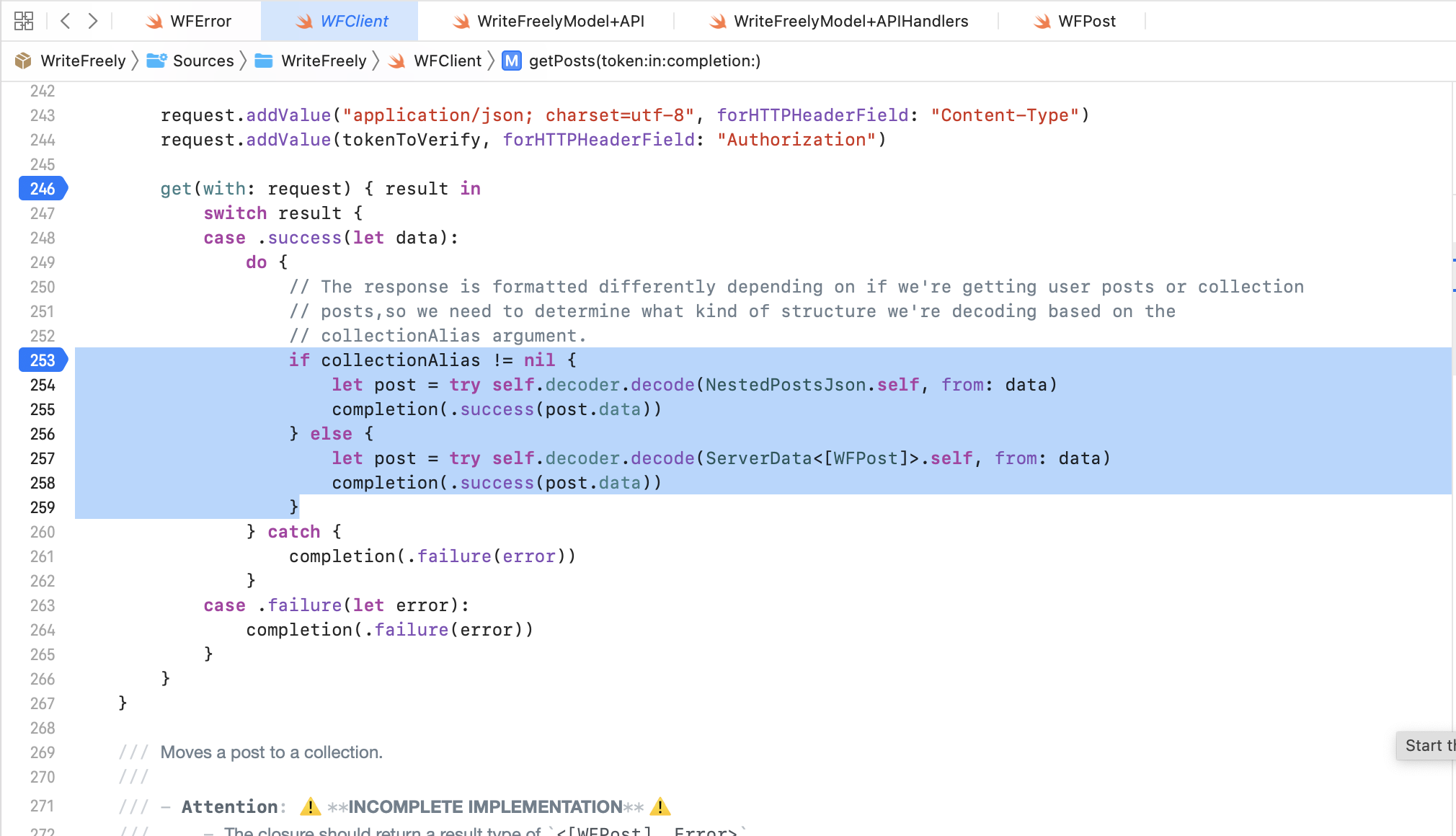
I've created a demo which resets every 30 minutes, and displays the above behaviour (details in the below b64-encoded string).
In the demo I have created 2 live posts (available via the reader) and one draft post. None of which show up.
dXJsOiBodHRwczovLzAxOTdlMjQ4LTNmMjItMTFlZC04NmI1LTQ3YmMxZWM2YjhjYy5hb2V1Lm1lLyB1c2VyOmpvaG4gcGFzczpwYXNzd29yZDEyMwo=

@McColdewey Any chance that when editing on the web, you're moving the post from drafts to a blog (or vice-versa, or between blogs)? Or does the post you create in the app stay in the same blog (or drafts) the whole time?
No. I only have one blog, so nothing gets moved to another blog. The articles I work on in the app can be "published" to Drafts, or to the blog proper. In either case, they are then visible in both the app and when visiting the blog via the web interface. If I edit any of the articles via the web interface (Draft or blog proper), the changes are not reflected in the app. If I move an app-created article from Drafts to blog proper via the Web interface, this change is also not visible in the app. However, clicking the refresh button on the app does consistently give me an Error message: "Error .. The data couldn't be read because it isn't in the correct format."
@moredhel Thanks for sharing your findings!
When I try logging into your instance and step through that portion of the getPosts method, here's what happens when I print out the output of the JSON decoding step:
(lldb) po self.decoder.decode(ServerData<[WFPost]>.self, from: data)
▿ DecodingError
  ▿ dataCorrupted : Context
    ▿ codingPath : 3 elements
      - 0 : CodingKeys(stringValue: "data", intValue: nil)
      ▿ 1 : _JSONKey(stringValue: "Index 0", intValue: 0)
        - stringValue : "Index 0"
        ▿ intValue : Optional<Int>
          - some : 0
      - 2 : CodingKeys(stringValue: "created", intValue: nil)
    - debugDescription : "Expected date string to be ISO8601-formatted."
    - underlyingError : nil
This is the error that gets thrown in the catch block.
From the JSON that's returned by your WriteFreely instance, here are the date-related values:
// First post
"created":"2022-09-28T11:55:39.886581893Z"
"updated":"2022-09-28T11:55:39Z",

// Second post
"created":"2022-09-28T11:56:17.317439464Z"
"updated":"2022-09-28T11:57:20Z"

// Draft post
"created":"2022-09-28T11:56:40.684942248Z"
"updated":"2022-09-28T11:56:40Z"
For comparison, here are date-related values from the same call result from another WriteFreely blog I have access to:
"created":"2021-04-26T12:12:23Z"
"updated":"2021-04-26T12:12:23Z"
@moredhel, @McColdewey — Is there something set on your servers or WF instances that would produce such precise created date timestamps? This comment in the Vapor repo suggests that fractional seconds aren't supported by Swift's ISO8601 date decoding strategy.
I've opened writefreely/writefreely-swift#34 to track this in the WriteFreely Swift client.
@AngeloStavrow, Thank you so much for your investigative work!
I put together a quick fix which works for me. Here's the PR: https://github.com/writefreely/writefreely/pull/585
It's a pretty short fix, but we should definitely include the fix in the swift client too.
I've just submitted v1.0.12 for review on the App Store, which should resolve the date issue.
Thanks, I'll give it a spin and feed back this weekend, if it percolates to my updatable apps by then. Jon
@McColdewey Thanks! The release has been approved and should be hitting the App Store shortly. Do let me know if it resolved the issue!
Many Thanks @moredhel and @AngeloStavrow I can confirm the upgrade to v1.0.12 fixes the issue. I can now see, edit and otherwise manipulate all posts on my writefreely instance using the ios apps. Jon
Excellent! Thanks for raising the issue, I'm glad we were able to resolve it. 🙂