
react-native-calendars
 react-native-calendars copied to clipboard
 wix
wix
WeekCalendar component align problem
Hi!
I'm trying to use the WeekCalendar Component, but for some reason the dates and headers doesn't align.
<CalendarProvider date={new Date().toISOString()}> <WeekCalendar onDayPress={(day) => console.log(day)} firstDay={1} pagingEnabled={false}/> </CalendarProvider>

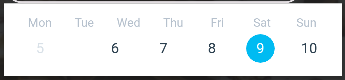

I'm having the same issue and my calendar is showing 8 days on the same row

I'm also having this issue
If anybody managed to solve this problem please share with us the solution


I solved this but am working on the scrolling aspect (like why is there a blank space period). You need to set the calendarWidth={calendarWidth} within the weekcalendar. The issue is that the day names (monday etc.) take the sizing of the view its in or the page it is in. The dates take the screensize if calendarwidth is not specified.
This is how I calculated mine if anyone is curious on an easy snippet of code:
const screenWidth = Dimensions.get('window').width; const padding = 0.052 * screenWidth; // 6% of the screen width const calendarWidth = screenWidth * 0.96 - 2 * padding; // subtract padding from both sides

I had the same issue with the Calendar component. I was able to resolve by using the alignContent property of the Calendar's style.
<View style={globalStyles.calendarContainer}>
      <Calendar
        style={{
          alignContent: "center",
        }}
        markingType={'multi-dot'}
        markedDates={{
          '2023-08-23': { selected: true, selectedColor: seaBlueColor },
          '2023-08-26': { dots: [massage, workout] }
        }}
        onDayPress={day => { setSelectedDate(day.dateString) }}
      />
</View>

Any updates on this? Couldn't get it to work with the previously mentioned fixes.

Managed to fix this issue by forcing the calendar width
const MyCalendar = () => {
  const [width, setWidth] = useState<number>();

  return (
    <View onLayout={(e) => setWidth(e.nativeEvent.layout.width)}>
      <CalendarProvider date="2024-08-08">
        <ExpandableCalendar
          key={width} // Force rerendering the calendar on width change
          calendarWidth={width}
        />
      </CalendarProvider>
    </View>
  );
};

This issue has been automatically marked as stale because it has not had recent activity. It will be closed if no further activity occurs. Thank you for your contributions.
![stale[bot] avatar](https://avatars.githubusercontent.com/in/1724?v=4 "Published by a pub.dev verified publisher")
I was facing the same issue in version 1.1312.0, and the solution provided by @tran-simon worked perfectly. Just a heads up: make sure to apply the onLayout handler to the View that directly wraps your calendar component, not any outer or parent view — that made the difference for me.
Thanks for the helpful solution! 🙌

key={width} // Force rerendering the calendar on width change calendarWidth={width}
work for me
`import dayjs from "dayjs"; import React, {useState} from "react"; import {CalendarProvider, WeekCalendar} from "react-native-calendars";
import {useTheme} from "@hooks/useTheme"; import {View} from "react-native";
export interface ICalendarStripProps { markedDates?: string[]; selectedDate?: string; onDateChanged?: (date: string) => void; }
export function CalendarStrip({
markedDates,
selectedDate,
onDateChanged,
}: ICalendarStripProps): JSX.Element {
const {theme} = useTheme();
const [width, setWidth] = useState
