

 withastro
Cascade layer issues/feedbacks
This issue is more of an umbrella for the various issues and feedback gathered regarding the style changes from Starlight 0.34.0 and the switch to cascade layers.
Technical issues
1. Missing styles
Not technically related to the changes in 0.34.0, but seems to be more easily reproducible due to some refactoring in this release. If an integration or Starlight plugin injecting dynamic routes that also render the <StarlightPage> component, due to an head propagation issue, some styles can end up missing in development mode.
- Tracked in https://github.com/withastro/astro/issues/13724
- Initially, I opened a workaround PR before investigating the issue
- After having investigated the issue, I implemented a better and documented workaround with an E2E test that we can decided to ship if the Astro issue is not something that can be easily fixed
2. Custom pages layer order
For custom pages rendered using the <StarlightPage> component, due to how import order for stylesheets works in Astro, importing <AnchorHeading> or any Starlight component before <StarlightPage> breaks the expected layer order as we cannot control the order in this case like we do for Starlight pages.
- Opened a tentative PR to fix this issue but ended up fixing the issue in dev but breaking in production
- Need to investigate further if we can somehow reliably enforce the order in such cases
- If not, we would need to document this behavior and suggest to import
<StarlightPage>before any other Starlight component
Documentation feedback
3. Do I have to use cascade layers?
It looks like some users could be confused by the fact that we are using cascade layers in Starlight and that they may also need to use them in their own stylesheets. The "any custom unlayered CSS will override the default styles" may not be clear enough.
- We should figure out how to emphasize that cascade layers are not mandatory for user stylesheets. Starlight use them internally, users can use them if they want to, but they are not required
4. I was expecting Starlight to override my styles, but it's no longer the case
This case is a bit more tricky as I think having authored CSS that is expected to be overridden by Starlight is a bit confusing. Altho, I guess this can happen e.g. for someone migrating to Starlight, importing all their existing custom CSS and only tweaking them enough to make them work with Starlight.
Now, with the cascade layers, any unlayered CSS will override Starlight styles, so any authored CSS will win and can lead to unexpected results.
- Not quite sure yet how to document/provide guidance for this case
5. Tailwind customCss ordering
A few users have already run in this issue where their ./src/styles/global.css was not being the first element in the customCss array which can definitely cause unexpected behavior.
- Maybe a mention about the ordering could be made in step 4 of https://starlight.astro.build/guides/css-and-tailwind/#add-tailwind-to-an-existing-project
Participation
- [x] I am willing to submit a pull request for this issue.

One thing I am noticing is that it seems like the Starlight layers are out of order. We are documenting a Design System using Astro/Starlight.
We are noticing issues when trying to use our layered CSS, but we are working through that. This is how it looks for me with the default configuration and not adding any additional layers.
Is this the intentional order? It seems weird to me that "reset" is in the middle, taking precedence over "components". I noticed this because with something like the LinkButton, the margin from the * selector is taking priority over the actual component CSS, as seen here. The margin-block is getting overruled and the LinkButton has 0 margin.
These issues all went away when I tried
@layer starlight.reset, starlight;
Really our biggest pain point right now is the competing CSS, we are trying to document components that have CSS applied to them from our Design System, and one of two issues happen.
@layer designsystem, starlight: This causes problems because the starlight reset is wiping out some of our CSS, specifically things like font properties on the button elements.
@layer starlight, designsystem: This causes the same type of problems except reversed, our resets are changing the CSS of the out of the box Starlight styles.
My gut reaction to this is that for our Design System, I would split our main CSS into multiple CSS files, like theme.css, reset.css and core.css. That way I could inject things in a more appropriate order.
@layer theme, reset, starlight, core;

@import "@design-system/tokens.css" layer(theme);
@import "@design-system/reset.css" layer(reset);
@import "@design-system/core.css" layer(core);
This solves most of the problems, aside from the Starlight layers seemingly being out of order. Another suggestion that I have is to come up with a way to export the different layers as their own CSS files, and give us a way to "eject", essentially allowing us to inject our CSS somewhere in the middle of the Starlight CSS layers. This is similar to Tailwinds, which allows you to do this.
@layer theme, base, components, utilities;

@import "tailwindcss/theme.css" layer(theme);
@import "tailwindcss/preflight.css" layer(base);
@import "@design-system/index.css" layer(components);
@import "tailwindcss/utilities.css" layer(utilities);

Thanks for the feedback, super appreciated :raised_hands:
I guess there are multiple points to address here:
Layer order
Is this the intentional order?
Definitely not. The expected default order can be found here and as you noticed with layers like the reset one, it's not properly applied in your case.
I'm assuming this is the issue I described in the point 2 of the issue and we are still in the process of investigating it and how best to handle these cases.
Design system layers
I would split our main CSS into multiple CSS files […] That way I could inject things in a more appropriate order.
That would be my expectation as well. For most users, Starlight using layers internally would be invisible and writing any custom unlayered CSS will override the default styles which would match the expected behavior. Some users would potentially also group some of their overrides in a new layer, but that would be a more advanced use case. Although, in the case of a design system interfacing with another tool using layers too, I think having multiple layers to precisely control the order of the CSS would be, in my opinion, the easiest and flexible way to go.
Starlight layers
essentially allowing us to inject our CSS somewhere in the middle of the Starlight CSS layers
This is something we discussed in the initial implementation of layers. To allow such behavior, we would need top-level layers that would prevent a user from doing @layer my-reset, starlight, my-overrides; but would require them to @layer my-reset, starlight-base, starlight-reset, starlight-core, starlight-content, starlight-components, starlight-utils, my-overrides;. On the other hand, using nested layers prevents the use case you described where a user would want to use a layer in the middle of the Starlight layers.
Definitely a tricky choice to make, but definitely something to keep in mind and think about, monitor if more users are running into this, see what are the use cases and potentially revisit the initial decision.
Yeah one thing I have noticed with the Starlight layers, which I guess is related to your point above is that the layer orders seem to be random, so they are constantly changing. So maybe our temporary workaround it just to apply the layers in the correct order that you linked, that way we are getting the intended results while things are worked out.
Overall I love the addition of layers, I think once finalized it will help us integrate the our Design System without having to worry about things getting overwritten, primarily by the two separate resets.
Running into the same issues with the tailwind v4/css layers change. None of the approaches above resulted in it working for me (splitting up starlight.reset, or changing the order of imports for StarlightPage component as noted in #3199). I also think that the recommendation proposed within #3199 is extremely fragile. Easy for users to forget, hard to troubleshoot when it's not done correctly, and easy to break for those using formatters and might have import sorting (if it were to even work, which I cannot get it to work).

It definitely is, but at the moment, just like it's documented in Astro Docs, it looks like we will have to do the same until we have a better solution.
which I cannot get it to work
Feel free to share a link to a reproduction, I can take a look at it and see if it's another issue or something else.
It definitely is, but at the moment, just like it's documented in Astro Docs, it looks like we will have to do the same until we have a better solution.
which I cannot get it to work
Feel free to share a link to a reproduction, I can take a look at it and see if it's another issue or something else.
I've been attempting to reproduce with a minimal example, but I haven't had success. So I'm trying to track down with my internal codebase what could be causing the issue, however, I'm struggling to track it down. This is in a codebase which has a lot of core component overrides, a handful of plugins, src/ is ./, some other custom CSS, but I've tried disabling all of those things and it doesn't seem to make a difference.
Not super familiar with CSS layers -- what is the easiest way to troubleshoot this to figure out why the StarlightPage component being first has no impact on ordering? This is my current order:
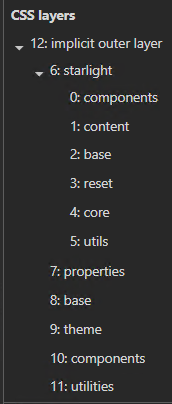
At a minimum, I don't think it's the plugins or component overrides, as completely disabling them inside of the astro config seems to make no difference.
Nevermind, was able to track down the issue. We have a route middleware which does a lot of logic, sort of similar to your topic plugin, that isolates sections of the site into dedicated sidebars/navigation/etc. And we have optional hooks on custom pages, where if a specific function is defined, it will run it to inject dynamic content into the sidebar. It looks like importing of that function causes the import order to somehow be different, and it pushes starlight.components as the first layer. We're definitely doing some unique things in that middleware (that I honestly think should be native, but whatever). so I will have to refactor that so it no longer breaks layer ordering.
Again, feels very fragile. Feel like somehow starlight should be forcing the order with a astro layout or something. Not an expert with CSS layers tho so probably not an easy solution.
I think it's finally time to close this umbrella issue.
All issues gathered so far regarding cascade layers have been either fixed or tentatively addressed some way or another. We are also still exploring some further improvements for a few of the issues, but I think new issues regarding cascade layers should now be opened in dedicated issues so we can more easily track them and prioritize them.