
windicss-intellisense
 windicss-intellisense copied to clipboard
 windicss
is not valid windi css class
Hi,
Thanks for making and maintaining Windi CSS.
I got the following error when hovering my bg-neutral-lighter class:
bg-neutral-lighter is not valid windi css class (windi_invalid-class)
In my configuration file, I put
export default defineConfig({
  theme: {
    colors: {
      neutral: {
        dark: 'var(--ms-gray-800)',
        DEFAULT: 'var(--ms-gray-500)',
        light: 'var(--ms-gray-100)',
        lighter: 'var(--ms-gray-50)'
      },
    },
  },
})
Do you see any reason that leads my class not to be taken into account? Is it because I use CSS variables? If so, any workaround I could use?

I think the config is not picked up correctly somehow. I will try to look at it next week


I've just checked the config loader. It does not show any issue so far. Can anyone share an repo for me to test, where this issue happens?
I've just checked the config loader. It does not show any issue so far. Can anyone share an repo for me to test, where this issue happens?
It happens when the config is change. But when I restart the VS Code it not show error.
I'm also facing a similar issue, so when I'm adding a new color to the config, it's not detected but after restarting the vscode it works fine. It's kinda annoying 😅

I'm also facing a similar issue, so when I'm adding a new color to the config, it's not detected but after restarting the vscode it works fine. It's kinda annoying 😅
Same

I am having the same issue but at all times. It does not get fixed by restarting VS Code. I have to add that windiCSS works just fine and my colors are displayed correctly. Any update is welcome, thanks.

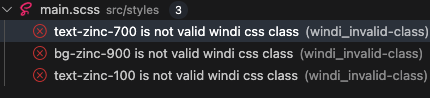


I think the simplest thing to do would be to add a setting for the project to define the configuration file path manually.

I don't think this issue is reproducible because it is environment and incident dependent.
Anyway, apparently Windicss extension on VSCode switches language that renders .css files,
for me it switched to PostCSS so i just changed it Windi and it worked.

