
merge-confidence
 merge-confidence copied to clipboard
 whitesource
The home of Mend's Merge Confidence feature, for Renovate and Mend Remediate
Repository Deprecation Notice
Deprecation Notice: Although still supported, the method specified in the rest of this README.md file for enabling Merge Confidence badges is no longer the preferred approach.
For up-to-date instructions, we highly recommend referring to the official documentation.
Merge Confidence
Look at the Merge Confidence badges before merging to:
- Prevent updates which break in production
- See at a glance if you should update
Merge Confidence finds and flags undeclared breaking releases. It analyzes test and release adoption data across Mend Renovate’s early-adopting user base.
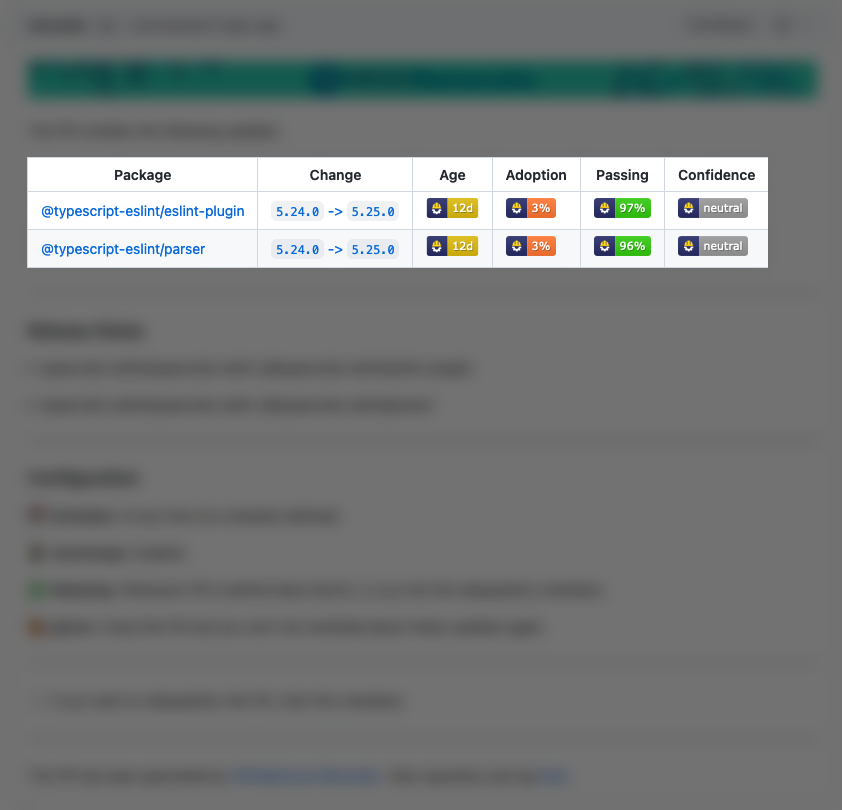
Pull request badges
Merge Confidence adds the following badges to your pull requests:
- Age: The age of the package
- Adoption: The percentage of this package's users (within Renovate) which are using this release
- Passing: The percentage of updates which have passing tests for this package
- Confidence: The confidence level for this update
Supported platforms
Merge Confidence badges for pull requests are available in beta on any supported Renovate platform, including Mend Remediate.
Supported languages
Data is available for packages from:
- npm
- Maven
- PyPI
We plan to support more languages soon.
Enabling and disabling
If you use the Mend Renovate App (formerly WhiteSource Renovate App) then the badges are enabled automatically.
If you don't use the app, you can enable the badges by adding this to your Renovate config:
"extends": ["github>whitesource/merge-confidence:beta"]
If you want to disable the badges in the app, add this to your config:
"ignorePresets": ["github>whitesource/merge-confidence:beta"]
Confidence levels and their meaning
Merge Confidence uses the following confidence levels:
-
Low: We think the update contains breaking changes. Often this is expected because it's a Major version update, but updates can have unknown breaking changes.
-
Neutral: We don't have enough data about the update, or we can't decide if the update should be Low or High confidence.
-
High: We rank updates as High confidence when the combination of
Age,AdoptionandPassingtests means there's a very low chance of breaking changes. -
Very High: We only use this for updates which are months old and have either high
Adoptionor have very high testPassingscores.
How it works
Mend's hosted Renovate App has created millions of pull requests on github.com to help developers update their dependencies since 2017.
We bundle and analyze metrics such as package Age, package Adoption, and Passing tests.
This way we can find packages that have undeclared breaking changes.
Algorithm
The algorithm that decides on the values is private and is not something we plan to share. Similar to a search engine's algorithm, we plan to adjust and improve it over time, for example by using historical data to set a baseline confidence level for packages.
Data
We plan to expose much more of the data via a companion website, such as number of users of a package and popular repositories which already updated to the version in question.
Explanations
npm package ranking
npm packages less than three days old can be unpublished, which can result in a service impact if you have updated to a package that gets unpublished. This is why npm packages can only get the High Confidence badge when they are at least three days old.
Percentage values weighting
The percentages for Adoption and Passing are weighted towards Organizations, private repositories, and projects with high test reliability.
This means those values aren't raw percentages.
Roadmap
High-level information on planned improvements is available in the Merge Confidence Roadmap Project on GitHub.
Questions and feedback
You are invited to create an Issue if you have anything you'd like to discuss.
Metadata
Owner
 whitesource
Metadata
The home of Mend's Merge Confidence feature, for Renovate and Mend Remediate