

 web-pal
Support Tempo plugin
Also, I'm using the Tempo plugin. When I log time from Chronos, the remaining time & logged time in the Tempo sidebar of the issue do not match. They only match after I log work from the temp UI. How can I use Chronos together with Tempo?
Client.
We need to have setting checkbox [x] Tempo support. At this moment i don't know which custom fields tempo use, need to figure out and implement. Actually i'm not sure whether it is necessary in general to do anything fo tempo support, maybe it should be supported by default without custom fields or additional api requests.
P.S Help wanted! If someone wants to handle this issue, let us know please.

The main difference when using Tempo is, that you can add custom fields to the log work dialog. Most importantly, you can log work of an issue/story/etc to an account.
This would be useful to be available with Chronos.
Here is how the log work dialog from cloud Jira looks like when using Tempo for time tracking:
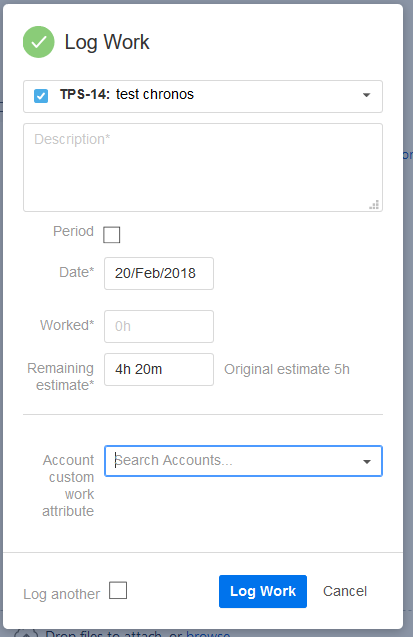
The default Jira fields are the same with Tempo as far as I know, i.e. original estimate, remaining time, logged time, so no changes required here.

Hello, I'm a new contributor and would like to work on this issue. Where should I start?

I think this is now really needed, because as of Monday (3/18) the time logged via Chronos is not visible for tempo. I can't figure out what is the cause, but my guess is the recent release of Tempo (no 14th)
Remaining time is properly lowered, logged time is visible in Activity tab, but not in the Worklog.

this is a bug on tempo's side. I've contacted them and they are working on a fix for it. no further action needed from your side then.