

 weaveworks
Clean up the containerd namespace after image removal
Currently when an image is removed, the cleanup takes care of the exported ext4 image file and metadata in /var/lib/firecracker, but doesn't remove the OCI source image from the firecracker namespace in containerd. This eventually causes a buildup of OCI images in that namespace.
We could remove OCI images from containerd when no exported images depend on them anymore.
- Benefit: prevents the buildup of OCI images in containerd.
- Drawback: importing the same image into Ignite (exporting it to
ext4) would need to redownload the image (this might be a wanted feature if the OCI image has been updated, so we don't need to "cache manage" the containerd images).

This issue is slightly related to #734 This would not be a consideration if we were able to use a native containerd snapshotter that met our devicemapper needs.
when no exported images depend on them anymore. Is there a sensible answer to this question? ^ Ignite ext4 snapshots don't have any idea of dependencies or shared OCI image "layers"
We could provide a helper to manage the source OCI images that back ignite ones. We could also provide a helper to clear the firecracker namespace.
The main concern here is keeping related images around for user image pull cache hits.
Talking through it, maybe we can naively delete images.
As long as base-layers like weaaveworks/ignite-ubuntu:20.04 have been pulled explicitly, containerd should keep those layers in the namespace as long as we're only deleting dependent images and not the base.

I assume this is what I'm experiencing here?
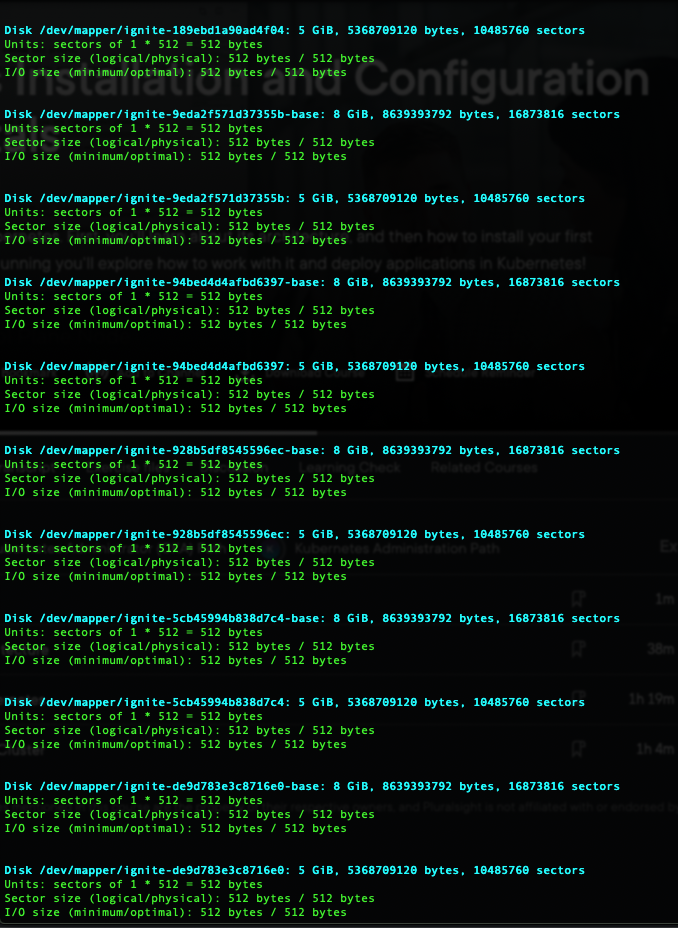
All with their corresponding /dev/loops
I currently have zero ignite images on my machine, I just noticed that these weren't getting cleaned up when removing the ignite instances.
Is there a recommended way to clear these out without having to go through and deleting all of them individually?

@MikePadge Your issue of leftover disks is unrelated to @twelho's observation of OCI images in the firecracker containerd namespace. These end up here because we use the container runtime to import images to the ext4 disks, but they are not actually needed for runtime, just caching. To list ignite's containerd images, do:
sudo ctr -n firecracker image list
WRT leftover disks: Have you been using ignite for several versions? Leftover ignite devicemapper disks should be less of a problem now.
Those disks should normally get cleaned up when you do an ignite vm rm, but we've had bugs in the past where that does not happen.
No, I just started introducing myself to ignite recently, so I doubt I'm mixing versions. I did recently bump the latest 8 to 9 though.
It could also have something to do with me handjamming this (below) for cleaning. I'll add the vm rm command in there (or just use the cleanup script in the quickstart repo) to see if that alleviates
isweep(){
	ignite kill $(ignite ps -q)
	wait
	ignite rm $(ignite ps -qa)
}

iclean(){
	ignite kill $(ignite ps -q)
	wait
	ignite rm -f $(ignite ps -qa)
	wait
	ignite rmi -f $(ignite images -q)
}
Either that, or I've been having a lot of trouble with the quickstart setup script, so me tweaking that could have caused this. I'll gather my notes and dump what I can over there.
That ctr image listing is definitely where those disks were hiding though, I was missing the namespace flag looking for them, thank you.
Oh no, removing those images did not clear the system disk listings
Rebooting... woot... they're gone.
Thanks again.
No, I just started introducing myself to ignite recently, so I doubt I'm mixing versions. I did recently bump the latest 8 to 9 though.
It could also have something to do with me handjamming this (below) for cleaning. I'll add the vm rm command in there (or just use the cleanup script in the quickstart repo) to see if that alleviates
isweep(){
	ignite kill $(ignite ps -q)
	wait
	ignite rm $(ignite ps -qa)
}

iclean(){
	ignite kill $(ignite ps -q)
	wait
	ignite rm -f $(ignite ps -qa)
	wait
	ignite rmi -f $(ignite images -q)
}
Either that, or I've been having a lot of trouble with the quickstart setup script, so me tweaking that could have caused this. I'll gather my notes and dump what I can over there.
That ctr image listing is definitely where those disks were hiding though, I was missing the namespace flag looking for them, thank you.
Oh no, removing those images did not clear the system disk listings
Rebooting... woot... they're gone.
Thanks again.